Quick Answer: To automate Facebook ads for the first time, connect your ad account to an automation platform such as FabFunnel, then set one simple rule, such as pausing an ad set once cost per result crosses a number you define. Let that single rule run for a few days before adding anything else. Skip scaling and budget rules until you have watched the basics work correctly.
What It Means to Automate Facebook Ads at the Start
Automation on Meta does not think, predict, or make judgment calls. It checks a condition against your account data on a schedule and takes the action you told it to take when the condition is met. Expecting it to spot creative fatigue or forecast next week’s cost per acquisition will lead to disappointment. What it does well is monitoring: checking spend, cost per result, frequency, or ROAS on an interval, then pausing an ad set, adjusting a budget, or sending an alert once a threshold is crossed.
A rule has a condition and an action, nothing else, whether you are setting up automated ads facebook rules for the first time or refining existing ones. Write conditions narrow enough that the action is correct every time it fires. Reallocating budget across five campaigns based on a hunch about trends is not something to build in week one.
FabFunnel’s rules engine works on this logic: you define the condition (a CPA floor, a ROAS threshold, a frequency cap), the rule runs 24/7, and every action gets logged with the triggering condition and a timestamp, the kind of infrastructure that turns manual monitoring into automatic Facebook ads management.
Step 1: Connect Your Ad Account
Before any rule can run, the automation tool needs read and write access to your Meta ad account, granted through Meta’s own authorization screen rather than by handing over a login anywhere else, the same access any facebook ads automation software needs before it can take action on your behalf. Once connected, the platform can see your campaigns and ads and pull performance numbers on a schedule instead of you refreshing Ads Manager manually.
If you manage more than one account, connect the one you’re least worried about first, since mistakes are cheaper to recover from on a smaller account. FabFunnel’s Meta Ads Automation lets you apply rules per account or across every connected account at once, so nothing forces a rule out everywhere the moment it exists.
Step 2: Learn Your Baseline Before You Set a Threshold
Before writing a rule, gather your account’s baseline numbers: average cost per result over the last two to four weeks, typical daily spend, and normal frequency range. A threshold set without a baseline is a guess.
Automation can reliably watch a number continuously and take a predictable action when a threshold is crossed. It cannot judge creative quality or tell whether an ad set is genuinely failing versus still in its learning phase. A sensible first rule waits until an ad set has enough delivery to be past that learning phase before evaluating it against a CPA condition.
Step 3: Set a Basic CPA Pause Rule
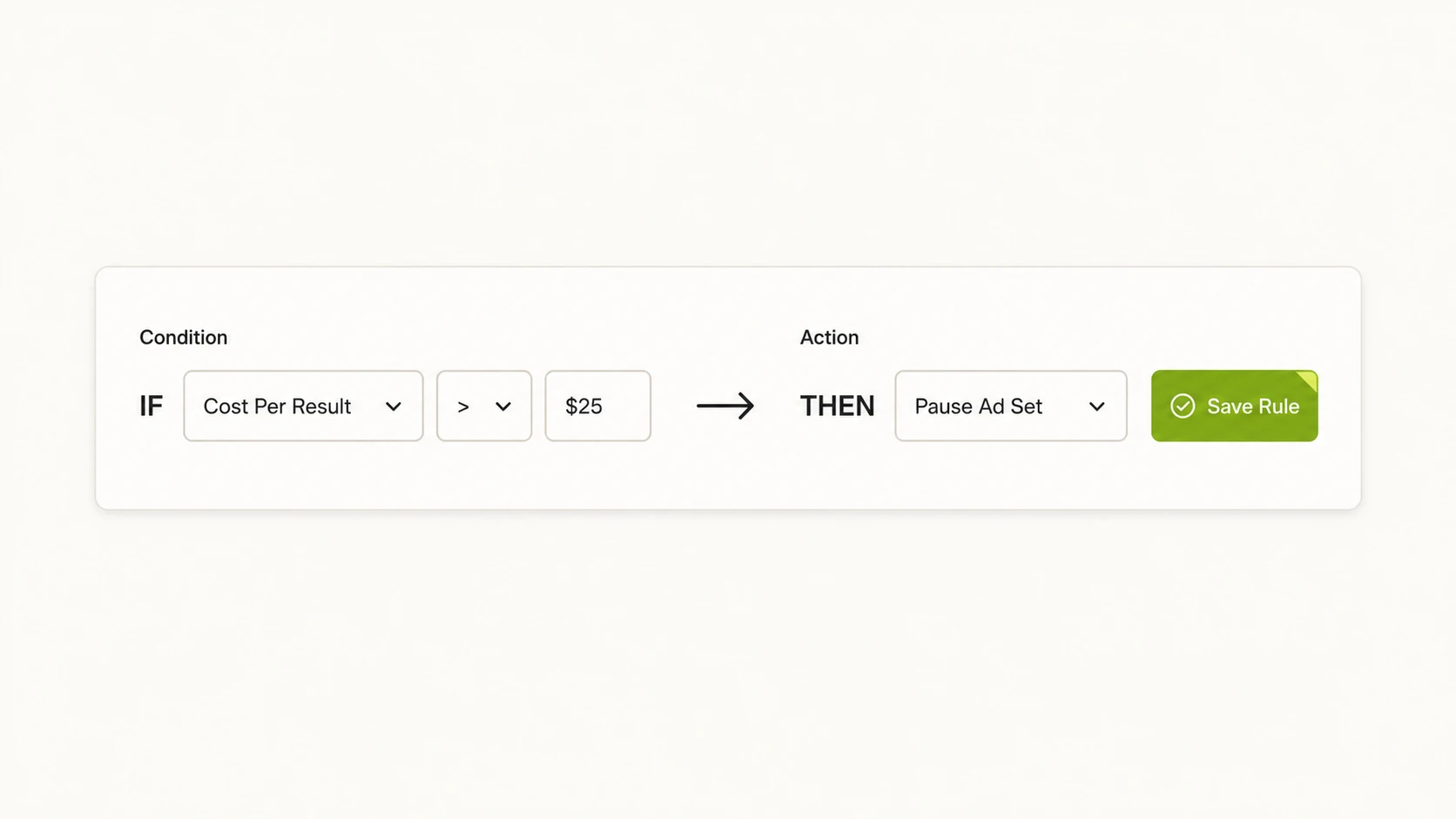
Your first rule should do one thing and be easy to explain in a single sentence. A CPA pause rule fits: if cost per result for an ad set exceeds a number you set, pause that ad set. Nothing about budget, nothing about bidding, nothing about creative rotation.
To set the threshold, take your baseline average CPA from Step 2 and add a margin, often 30 to 50 percent above average, so the rule only fires on ad sets that are meaningfully underperforming. Apply it to a single ad account first, and give it a delivery minimum so it isn’t judging an ad set on three data points. Once live, the rule checks continuously, and you stop manually checking cost per result throughout the day.
FabFunnel’s logging matters most here: every time the rule fires, you get a timestamped record of the condition that triggered it, so you can see exactly which ad sets were paused and why.
Step 4: Test the Rule Before You Trust It
Do not let a brand-new rule run unsupervised the moment you save it. Apply it to a single ad account first, and check in manually every day for three to five days. Confirm the cost per result at each pause matched what you expected, and check whether anything paused that you would have kept running.
If the rule behaves as expected across that first week, trust it on a second account. If it pauses something you disagree with, adjust the threshold rather than abandoning the rule; most early problems come from a threshold set too tight for normal variance. Every action is logged with a timestamp and condition, so this review means reading the log, not memory.
Why You Should Not Start With Aggressive Scaling Rules
Scaling rules, the kind that raise budgets automatically once ROAS clears a threshold, promise growth without manual work, a temptation for anyone new to running automated ads on Facebook. They are the wrong place to start, because a budget increase compounds a mistake in a way a pause does not. A pause rule that fires incorrectly costs a day of missed delivery on one ad set. A scaling rule that fires incorrectly, doubling a budget on an ad set riding a short-term spike, can burn real money before you notice.
Scaling rules only make sense once you trust your pause and floor rules, since their job is pushing budget toward ad sets those rules already confirmed are performing. Get the defensive rules right first, then add growth rules once you have clean logs behind you. For a closer look at getting budget-scaling logic right once you’re ready for it, see Facebook advertising budget optimization.
Safe First Rule vs. Rule to Avoid on Day One
The difference between a safe starting rule and a risky one isn’t complexity, it’s what happens when the rule is wrong.
| Rule Type | Example | Why It’s Safe or Risky on Day One |
|---|---|---|
| CPA pause (safe) | Pause ad set if cost per result exceeds a set threshold | Worst case is a paused ad set you can reactivate; the downside is bounded and reversible |
| Frequency cap alert (safe) | Alert when frequency exceeds a set number | Only notifies you, takes no spend action, good for building trust in the data |
| Budget scaling (avoid) | Increase daily budget when ROAS clears a threshold | A wrong trigger increases spend immediately; downside is uncapped until you catch it |
| Cross-account bulk rule (avoid) | Apply one untested threshold across every connected account at once | A miscalibrated threshold affects everything at once instead of one account |
A Realistic First 30 Days Checklist
The first month is about building trust in a small number of rules, not covering every scenario. Week one: connect your ad account, gather baseline CPA and spend numbers, and set a single CPA pause rule on one account with a delivery minimum attached. Week two: check the rule daily and review the timestamped log of anything it paused, adjusting the threshold if it fired on ad sets you’d have kept running.
By week three, if the pause rule has run cleanly, add a second narrow rule, such as a frequency cap alert, and consider applying the original rule to a second account. Week four: review the month’s logs, the kind of habit that helps you automate Facebook ads reports instead of manually compiling them, and note which rules earned your trust, and decide whether you’re ready to apply rules across every connected account. Resist adding a scaling rule this month unless every existing rule has run cleanly for two full weeks.
By day 30, a beginner who follows this pace usually has one or two rules they trust completely and a log history to reference next time.
FAQs
1. Do I need a minimum ad spend before setting up automation?
There’s no fixed requirement, but automation works better once an account has enough daily delivery for a CPA number to be meaningful rather than noisy. If your account spends very little per day, gather a longer baseline window before setting a threshold.
2. What happens if my automation rule pauses a good ad set by mistake?
You reactivate it manually, which is why the first rule should have a bounded, reversible downside like a pause rather than a budget change. Review the timestamped log to see the cost per result at the moment it triggered, then widen the threshold.
3. Can I automate Facebook ads without connecting my full ad account?
No. A rules engine needs read and write access to take the action it’s configured to take. You can still limit which specific ad sets or campaigns a rule applies to once connected.
4. How is a dedicated automation platform different from Meta’s own automated rules inside Ads Manager?
Meta’s native rules check on a longer interval and live only inside one ad account. FabFunnel runs its rules engine continuously, logs every triggered action with a timestamp and condition, and applies the same rule across every connected Meta, TikTok, or NewsBreak account at once.
5. How long should I let a new rule run before I trust it fully?
A full week of daily review is a reasonable minimum, long enough to see the rule react to normal variance rather than one unusual day. Extend that to two weeks if spend is irregular.
6. Can automation replace a media buyer entirely for a beginner?
No, and treating it that way is how first-time setups go wrong. Automation executes conditions you define continuously, but choosing which conditions matter and reading creative performance still require a person reviewing the account.
7. What’s the safest first rule for someone who wants to automate Facebook ads for the first time?
A CPA pause rule with a delivery minimum, applied to one ad account, is the standard starting point: a single condition, a reversible action, and a threshold calibrated from your own baseline.
This kind of guided rule setup is part of what FabFunnel’s ad management platform covers. Ready to put this into practice? Start at FabFunnel, or see how the rules engine and Genie work together.