Quick Answer
Automated Facebook ads reporting works as a three-step workflow: sync core metrics (spend, ROAS, CPR, CPC, CTR) on a fixed interval instead of manual exports, consolidate that data if you’re running other platforms alongside Meta, and build in a scheduled manual read to catch what automated reporting won’t — the “why” behind a number, not just the number itself. Skipping that third step is the most common way ad reporting tools get treated as a replacement for judgment instead of an input to it.
Manually exporting Facebook Ads Manager data, cleaning it up, and building a report is a recurring task that scales badly — the more accounts or campaigns, the more manual work, with no reduction in how often it needs doing. Automated ad reporting exists specifically to remove the recurring manual labor, not the analysis itself.
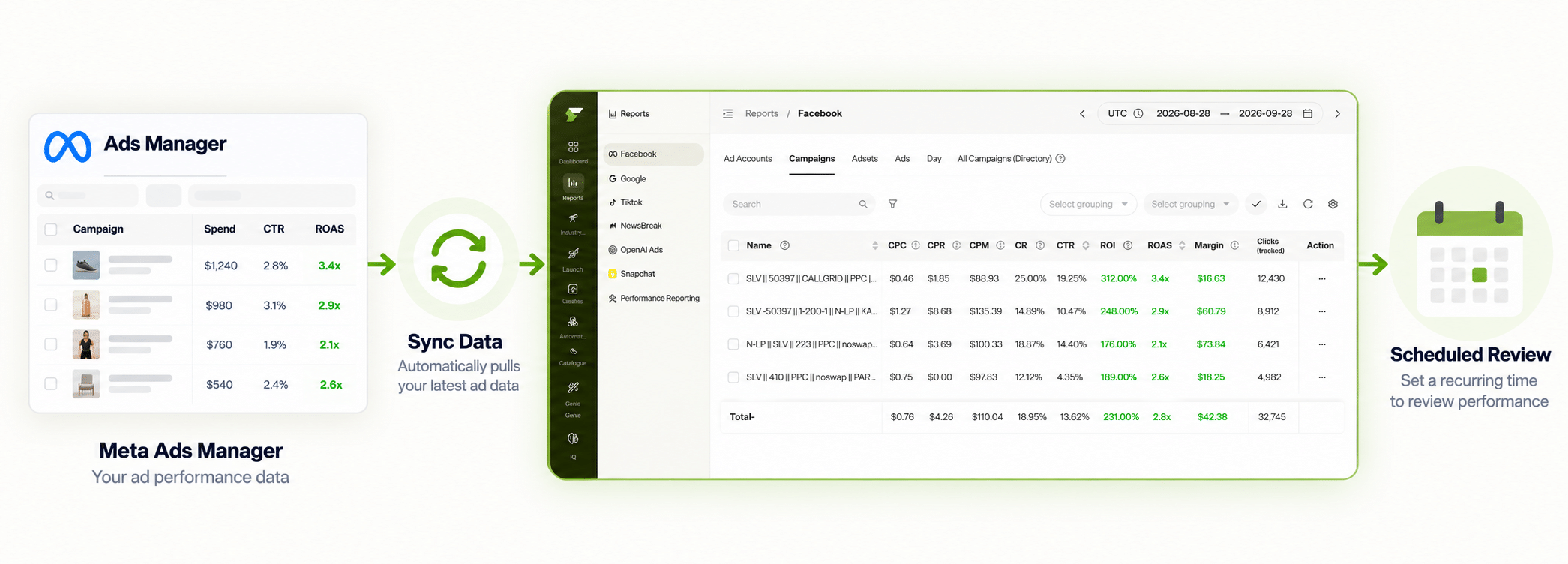
Step 1: Sync Core Metrics on a Fixed Interval
The foundation of automated Facebook ads reporting is a sync that runs continuously rather than a manual export you remember to do. FabFunnel’s Multi Ad Account Reporting keeps spend, ROAS, CPR, CPC, and CTR synced roughly every 15 minutes, with per-account timezone settings. This is the piece that turns “pull a report when someone asks” into “the report is always current.”
Step 2: Consolidate if You’re Running More Than Just Facebook
A facebook ads reporting tool that only covers Meta leaves a gap the moment a brand also runs TikTok or NewsBreak campaigns. Multi Ad Account Reporting syncs across all three, which matters for a workflow step specifically: consolidating means one dashboard to scan instead of reconciling exports from separate platforms by hand.
Step 3: Build In a Scheduled Manual Read
This is the step automated ad reporting tools don’t do for you, and skipping it is the actual risk. A synced number tells you what happened; it doesn’t tell you why. A CPA spike could reflect genuine underperformance, a tracking issue, or a competitor’s promotion — the same synced data looks identical in all three cases. Co-Pilot, a recommendation layer trained on live reporting data, flags what’s worth a closer look without executing changes automatically, which is useful precisely because it points at where the manual read should focus rather than replacing it.
Does This Work the Same Way for Meta Ads Reporting Specifically?
Yes — meta ads reporting is the same sync, just described by platform name rather than by the broader “facebook ads” label. The metrics, sync interval, and consolidation across accounts work identically whether you call it Facebook ads reporting or Meta ads reporting.
What Does a Facebook Advertising Reporting Tool Actually Need to Cover?
At minimum: the metrics that map to profitability (not just CTR or reach), a sync interval fast enough to catch problems before they burn significant spend, and cross-platform consolidation if the account runs on more than Meta. A facebook advertising reporting software that only covers vanity metrics or requires manual pulls fails on one or more of these.
Manual Reporting vs. Automated Facebook Ads Reporting
| Step | Manual Process | Automated Workflow |
|---|---|---|
| Pulling core metrics | Export from Ads Manager manually | Synced roughly every 15 minutes |
| Checking multiple platforms | Export from each platform separately | Consolidated across Meta, TikTok, NewsBreak |
| Spotting underperformance | Scan every campaign’s numbers by hand | Co-Pilot flags patterns from live reporting data |
| Interpreting why a metric moved | Fully manual | Still manual — automation surfaces the signal, not the explanation |
Does Automated Ad Reporting Replace the Need to Read Reports Manually?
No, and this is the point most likely to get missed. Automation removes the recurring, mechanical work of pulling and consolidating data. It doesn’t replace the judgment call of deciding whether a flagged number reflects a real problem. A workflow that treats automated reporting as the final answer rather than an input to a scheduled review is missing the third step of the process.
How Often Should the Manual Review Step Happen?
There’s no universal answer, but a weekly or biweekly scheduled review is a reasonable starting cadence for most accounts, with a faster check-in during a launch or a known volatile period. The synced data supports checking daily if needed; the manual analysis doesn’t need to happen that often to stay useful.
What Should a Weekly Facebook Ads Report Actually Contain?
An automated report is only as useful as what it puts in front of the reader. For most teams, the core view is short:
- Spend against budget, so overspend or underdelivery shows up early.
- ROAS and cost per result, the two numbers that map to profitability.
- CPC and CTR, as diagnostic signals rather than goals.
- Movement versus the prior period, because a number without a trend says little.
- Flags worth a closer look, from Co-Pilot or your own rules.
Keep the layout the same every week. Consistent ad reporting lets anyone on the team spot what changed without relearning the format.
What Are the Common Mistakes in Automated Ad Reporting?
- Trusting the dashboard without checking the source. Compare synced numbers against Ads Manager once, early on, so you know they line up.
- Reporting on too many metrics. More columns hide the signal. Pick the five that drive decisions.
- Ignoring attribution differences. Platform-reported conversions and your own tracking will rarely match exactly. Decide which source is your reference and say so in the report.
- No owner for the review. A report nobody is responsible for reading is just a dashboard.
How Do You Set Up Ad Reporting So a Client or Boss Will Actually Read It?
The best ad reporting answers three questions in the first screen: what did we spend, what did it return, and what are we doing next. Everything else is supporting detail.
Choose the metrics before you build the report. For most paid social accounts that means spend, ROAS, cost per result, CPC, and CTR, shown against the previous period and your target. More metrics than that usually hide the story.
Match the format to the reader. An executive wants a short summary and one chart. A media buyer wants the full breakdown by campaign and creative. Build one underlying data set and present two views, instead of maintaining two separate reports by hand.
Add a short written note to every report, even an automated one. Two or three sentences on what changed and why turn numbers into a decision. Good ad reporting automates the collection and leaves the interpretation to a person, which is exactly where the value sits.
FAQs
What’s the difference between an ad reporting tool and an ad reporting tool with automation?
A basic tool might still require a manual export or refresh. An automated one syncs on a fixed schedule without a person triggering it, which is the difference that actually saves time at volume.
Does automated Facebook ads reporting work across multiple ad accounts, not just one?
Yes — Multi Ad Account Reporting is built to consolidate across accounts and platforms, which is the more common use case for anyone managing more than a single Facebook ad account.
How current is the data in an automated ad reporting workflow?
Spend, ROAS, CPR, CPC, and CTR sync roughly every 15 minutes, which is near-real-time rather than instantaneous — close enough for most monitoring needs without requiring a live feed.
Can automated facebook advertising reporting tools tell me why a campaign underperformed?
Not on their own. Co-Pilot surfaces flagged patterns worth a closer look, but interpreting the actual cause — creative fatigue, audience saturation, external factors — still requires a person reviewing the specifics.
Is a facebook ads reporting tool useful for a single small account, or only at scale?
The time savings are more noticeable at scale, but even a single account benefits from not manually exporting data on a recurring basis. The value scales with account count and campaign volume.
What should a scheduled manual review actually look for, if the reporting is already automated?
Flagged anomalies from Co-Pilot, trends that don’t match expectations, and anything the synced dashboard shows moving in an unexpected direction — the review is about interpretation, not re-pulling data that’s already current.
Where to Start
If manually exporting and consolidating Facebook ads reports is eating recurring hours, that’s the specific step automated ad reporting removes — while the judgment call still belongs to a scheduled manual review. FabFunnel’s Multi Ad Account Reporting and Co-Pilot are built around that split — start at FabFunnel or explore the full toolset at Fab AI.