Multi Ad Account Reporting
Multi-account ad reporting.
Included in every Growth plan
Meta, TikTok, NewsBreak, Google, Snapchat, OpenAI Ads, and BIGO
Logging into Meta Ads Manager, TikTok Ads and NewsBreak separately to work out how your budget is doing is not a reporting process, it is a time tax. FabFunnel's ad reporting pulls every connected account into one view with a 15-minute sync, reads each platform in its own native fields rather than flattening everything into a generic table, and surfaces third-party tracker data alongside the platform numbers.
7-day free trial on Growth Starter and Pro. Card required.
The problem it solves
What manual ad reporting costs
- The time tax
Three logins every morning
Meta Ads Manager, TikTok Ads, NewsBreak. Separate tabs, separate dashboards, separate field names for the same idea. Assembling the picture costs you time every single day.
Client reporting is a Monday time sink
Client ad reporting pulled from several platforms into a deck every week is hours of work producing a document that is stale before the call starts.
Generic ad reporting flattens what matters
Most cross-platform tools map everything onto one common table, which means the fields your team optimizes on get lost in translation.
How it works
All accounts, one view, synced every 15 minutes
- 01
Connect your accounts
Link your ad accounts and FabFunnel reads the same accounts and profiles the launch side uses. Multiple accounts per platform, one setup. If a profile disconnects, ad reporting flags it rather than quietly showing you a smaller number.
- 02
See every account in one report
Campaigns, ad sets and ads across every connected account, with metrics aggregated across accounts and platforms. Group by up to three nested dimensions, set a date range, and compare it against a custom previous period.
- 03
Export for clients or stakeholders
Export across all connected accounts and platforms. Spreadsheet assembly becomes one action, current to the last sync.
Platforms
Ad reporting in each platform's own language.
Every platform reports in its native fields, not a lowest-common-denominator table. Launch platforms and reporting-only platforms sit side by side in Reports, each with its own view.
Meta
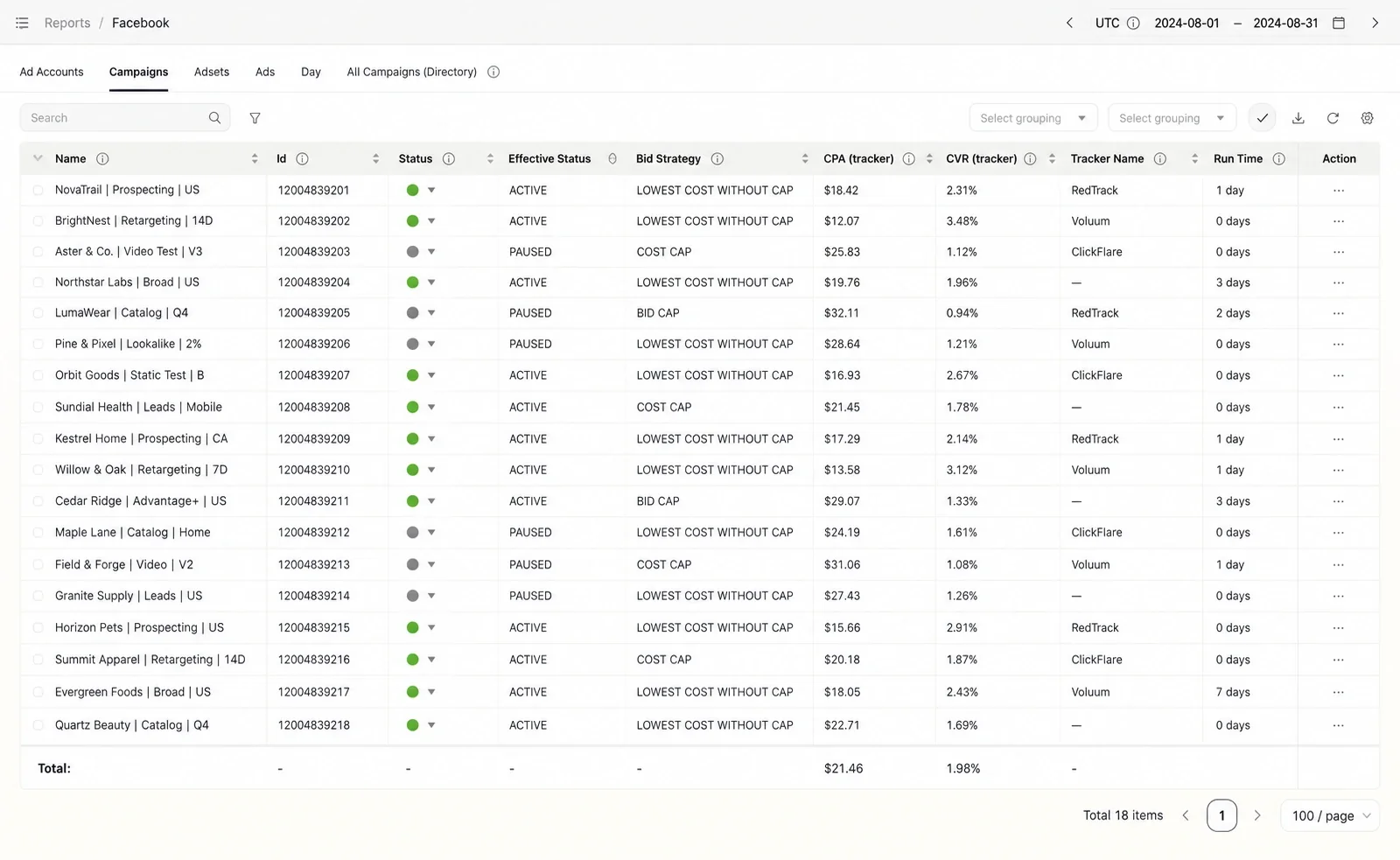
Ad accounts, campaigns, ad sets, ads, day, and an all-campaigns directory, plus tracker CPA, CVR, and tracker name.
TikTok
TikTok ad accounts report next to Meta in their own columns, alongside the campaigns you launch and automate there.
NewsBreak
NewsBreak results report in their own view, next to the campaigns your rules manage.
Google
Google Ads fields such as bidding strategy type, budget delivery method, and target CPA, at account, campaign, ad group, ad, and day level, with a campaign directory.
Snapchat
Snap fields at ad account, campaign, ad squad, ad, and day level, with a campaign directory.
OpenAI Ads
OpenAI Ads at ad account, campaign, ad set, ad, and day level, with an all-campaigns directory and standard platform metrics.
BIGO
BIGO ad accounts report in the same Reporting workspace as the platforms you launch on.
Capability breakdown
What the monitoring layer covers
- Sync
15-minute sync across every account
Spend, impressions, clicks, CPM, CTR, CR and conversions pull from every connected account every 15 minutes. Fresh numbers rather than yesterday's export.
Fresh numbers, no manual refresh
- Native fields
Each platform in its own language
This is the part generic ad reporting tools get wrong. Meta reports in Facebook native fields. Meta ads reporting keeps Bid Strategy, Effective Status and Run Time as their own columns. Google reports in Google Ads concepts: bidding strategy type, budget delivery method, target CPA. Snapchat reports in Snap concepts. Nobody has to translate a mapped column back into what they optimize on.
Native columns, not a lowest common denominator
- Tracker data
Third-party attribution next to platform numbers
Tracker columns on Meta carry CPA (tracker), CVR (tracker) and Tracker Name, with named integrations for Voluum, ClickFlare, RedTrack and Everflow. Your attribution sits in the same row as platform-reported performance, so the gap between them is visible instead of being a reconciliation job.
Platform truth and tracker truth, side by side
- Reporting reach
Ad reporting on seven platforms, launching on three
You launch on Meta, TikTok, and NewsBreak. You can also connect Google, Snapchat, OpenAI Ads, and BIGO as reporting-only surfaces, so the spend you run there appears in the same workflow even though the launcher does not touch them.
One view over everything you buy
- Multi-client
Every client account, separated
Connect multiple ad accounts per platform and keep each client in its own workspace. Client A's campaigns, creatives and performance are only visible inside Client A's workspace, so nothing bleeds between accounts when you onboard the next one. Group up to three levels deep inside a workspace, and compare any date range against a custom previous period.
Separate workspaces, no data mixing
- Co-Pilot
Ask the data a question
The same connected accounts feed Co-Pilot (beta). Ask for a chart, a table or a budget recommendation in plain language instead of building the view by hand.
The dashboard, answered conversationally
Before / after
What changes when ad reporting is unified
| Without FabFunnel | With FabFunnel |
|---|---|
| Log into three platforms separately every morning | Every account, synced every 15 minutes |
| Pull each platform into a client spreadsheet by hand | Export, current data, all accounts |
| Reconcile tracker numbers against platform numbers manually | Tracker CPA and CVR sit in the row next to the platform figures |
| A generic table that renames every platform's fields | Native columns per platform, in the language your team uses |
| A disconnected profile quietly shrinks your numbers | The sync issue is surfaced instead of showing an incomplete total |
| Manage each client through a separate platform login | Every client in their own workspace |
Works best with
Where Reporting fits in the workflow
Co-Pilot
Reporting data is what Co-Pilot reads. Ask it for charts and recommendations.
Explore Co-PilotAutomation
Reporting shows you what your rules have been acting on.
Explore AutomationBulk Launcher
Clone a winning ad set straight from the reporting view.
Explore Bulk Launcher
Social proof
What teams say about Multi Ad Account Reporting
We have all the tools in one dashboard. We don't have to juggle between four or five different tools anymore.
- 15 minsync across every connected account
- 7platforms reported
- 4tracker integrations on Meta
Where it sits
Build it. Launch it. Manage it.
Bulk Launcher puts campaigns live and Automation watches them. Reporting and Co-Pilot (beta) tell you what to do next.
Build it
Launch it
Manage it
- ReportingYou are here
- Co-Pilot (beta) Recommendations from your reporting data
What it doesn't do: each platform has its own view; there is no single table across every platform. Tracker columns are on Meta only. Google, Snapchat, OpenAI Ads and BIGO are reporting only, with no launching or automation. Co-Pilot (beta) covers Meta, TikTok, and NewsBreak and never launches, pauses, or edits campaigns.
FAQ
Common questions about multi ad account reporting
How Multi Ad Account Reporting pulls every ad account into one view. Can’t find what you need? Book a demo
How often does data sync?
Every 15 minutes across all connected accounts and platforms.
Which platforms does FabFunnel report on?
Meta, TikTok, and NewsBreak, which are also the launch platforms, plus Google, Snapchat, OpenAI Ads, and BIGO as reporting-only surfaces. You can see their spend in the same workflow, but you do not launch to them from FabFunnel. As a Facebook ads reporting tool it reads Meta in native fields rather than mapped ones.
What metrics are available?
Spend, impressions, clicks, CPM, CTR, CR and conversions, at campaign, ad set and ad level. Each platform also reports in its own native fields rather than a flattened common table.
Does it include third-party tracker data?
Yes, on Meta. Tracker columns carry CPA (tracker), CVR (tracker) and Tracker Name, with integrations for Voluum, ClickFlare, RedTrack and Everflow.
Can I manage multiple client accounts from one login?
Yes. Connect multiple accounts per platform and keep each client in its own workspace. Performance, creatives and campaigns stay scoped to that client, so there is no mixing between accounts.
Can I group and compare?
Yes. Nested grouping up to three levels, plus a date range with a custom comparison period.
Can I export reports for clients?
Yes. Export across all connected accounts and platforms.
Is this automated ad reporting or do I still build the reports?
Automated. Data pulls itself every 15 minutes across every connected account, and export is one action. You are not assembling anything by hand.
What happens if an ad account disconnects?
Reporting flags the sync issue in the dashboard rather than showing you an incomplete figure without explanation.