Automation
Ad automation rules that scale and pause.
Included in every Growth plan
Every hour nobody is checking, budget is either draining on a loser or sitting untouched on a winner. Ad automation in FabFunnel is a rule engine: you set a condition on a campaign, ad set, or ad, pick what happens when it is met, and the rule runs on the schedule you set, on Meta, TikTok, or NewsBreak.
The film
See Automation in action.
Build an if-then rule, pick the action, cap the budget change, and choose how often it checks your campaigns.
The problem it solves
What happens without ad automation
- The unwatched tax
Budget bleeds unnoticed
A campaign stops converting and keeps spending until someone notices. Without a rule, the default is that you pay for the miss.
Winners lose momentum while you're busy
A proven ad set only grows when a person is free to raise its budget. In a manual workflow, scaling waits on somebody's calendar rather than on the data.
Manual rules are not ad automation
Each platform has its own rules interface. Keeping three sets of rules maintained by hand is a second job, not ad automation.
How it works
Ad automation you set once
- 01
Define your conditions
Build a condition from the fields buyers use: ROAS, CPA, CTR, spend, daily and lifetime budget, status and bid strategy, each evaluated over a reporting window you choose. Stack conditions with AND inside a group, or add an OR group for an alternate path.
- 02
Set the action
On Meta and TikTok, pick one of nine actions: turn on, turn off, notify on Slack, or increase, decrease, or set either a daily or a lifetime budget. Budget increases and decreases take a percentage or a dollar figure, plus an optional "until" limit in dollars, so a percentage increase stops where you set it. NewsBreak rules turn on, turn off, or notify on Slack.
- 03
Choose how often it runs
Every 30 minutes is the default. Pick from eight schedule presets, from every 30 minutes to Mon, Wed, and Fri at 8:00, or build a custom schedule, with its own working timezone and optional start and end dates.
Where rules run
Campaign automation for Meta, TikTok, and NewsBreak.
Rules act on the three platforms you launch on, so the campaigns Bulk Launcher builds are the campaigns your rules watch. Each rule runs on one platform. Build a rule once, then duplicate it instead of starting over.
Meta
Rules at campaign, ad set, and ad level, with all nine actions: turn on, turn off, notify on Slack, and increase, decrease, or set daily or lifetime budget.
TikTok
Pick TikTok as the traffic source and build rules for your TikTok campaigns in the same builder, on the same schedules.
NewsBreak
NewsBreak campaigns get rules from the same builder too, so budget moves and pauses follow the logic you already run elsewhere.
How it works
How ad automation works in FabFunnel.
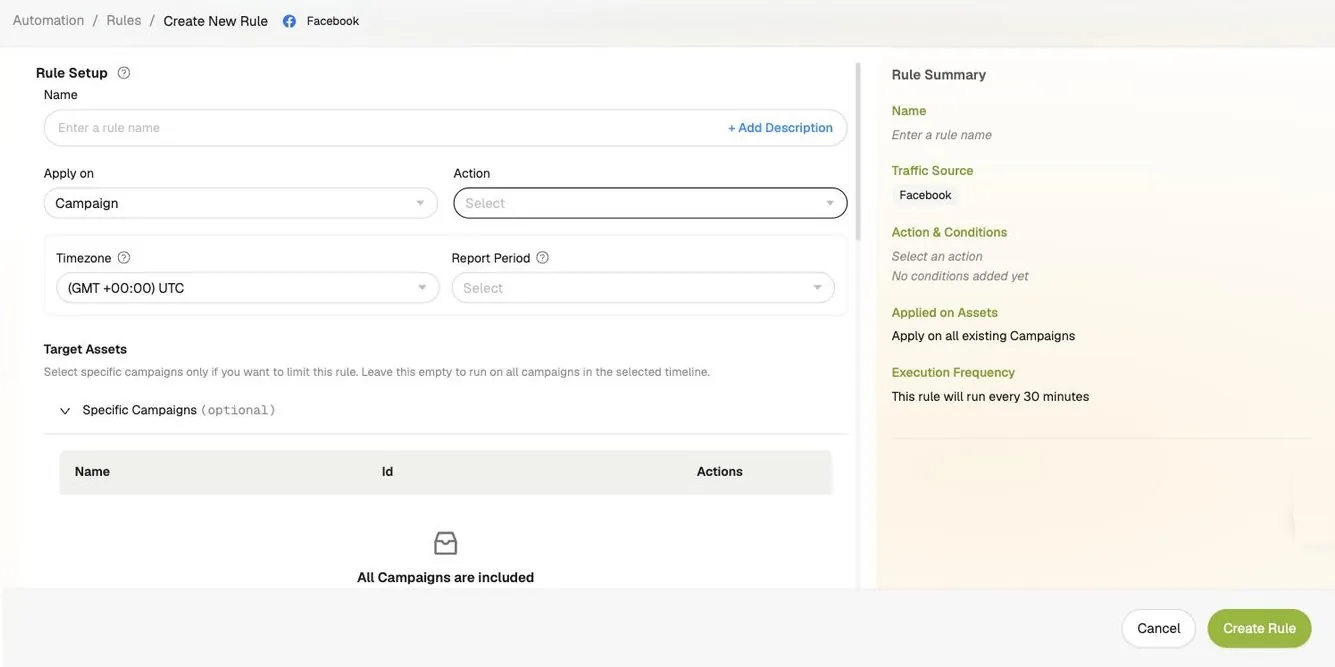
Every rule is three choices: what to do, when it applies, and how often to check. The screenshots below are the real rule builder.
Action
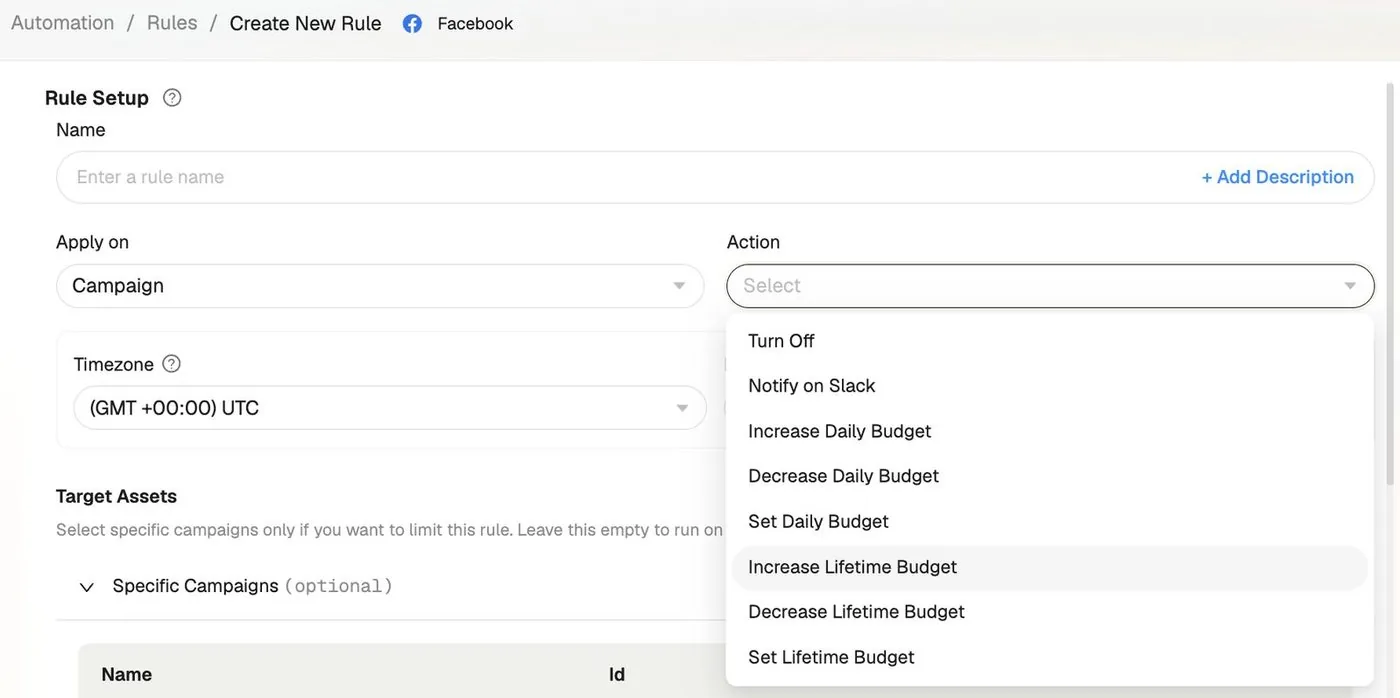
Choose what the rule does.
Pick the level the rule applies on, campaign, ad set, or ad, then one of nine actions. Budget actions take a value in percent or dollars, plus an Until ceiling, so a scaling rule stops raising budget once it reaches the cap you set.
- Turn on or turn off
- Increase, decrease, or set daily budget
- Increase, decrease, or set lifetime budget
- Notify on Slack
Conditions
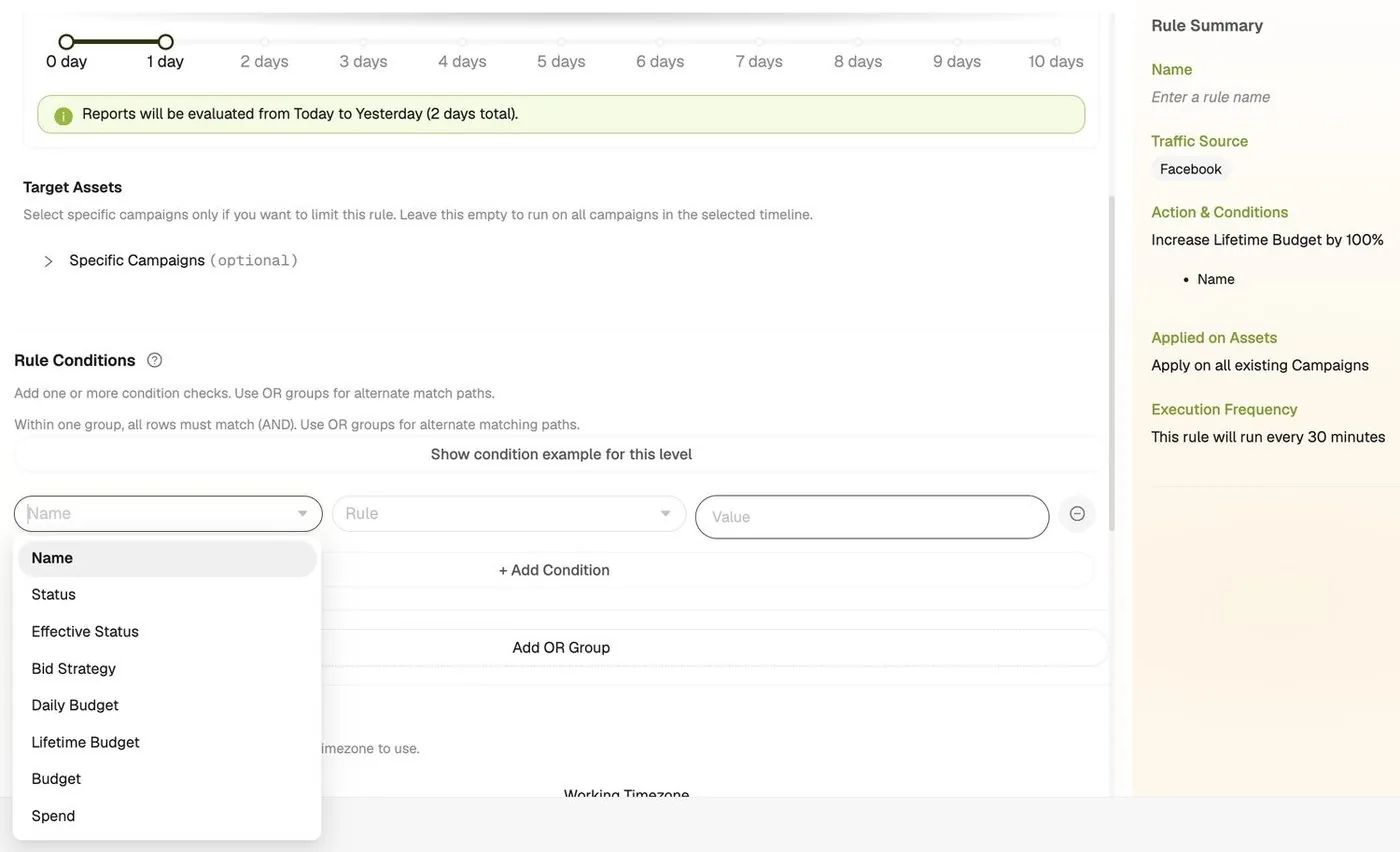
Write the condition, in plain rows.
Each row is a field, a rule, and a value. Rows inside a group must all match, and OR groups add alternate paths, so one rule can cover more than one situation. The report period sets the window the rule reads, from today back across the days you choose.
- ROAS, CPA, CTR, spend, budget, status, and more
- AND rows inside a group, OR groups between them
- Condition examples for each level, inline
Schedule
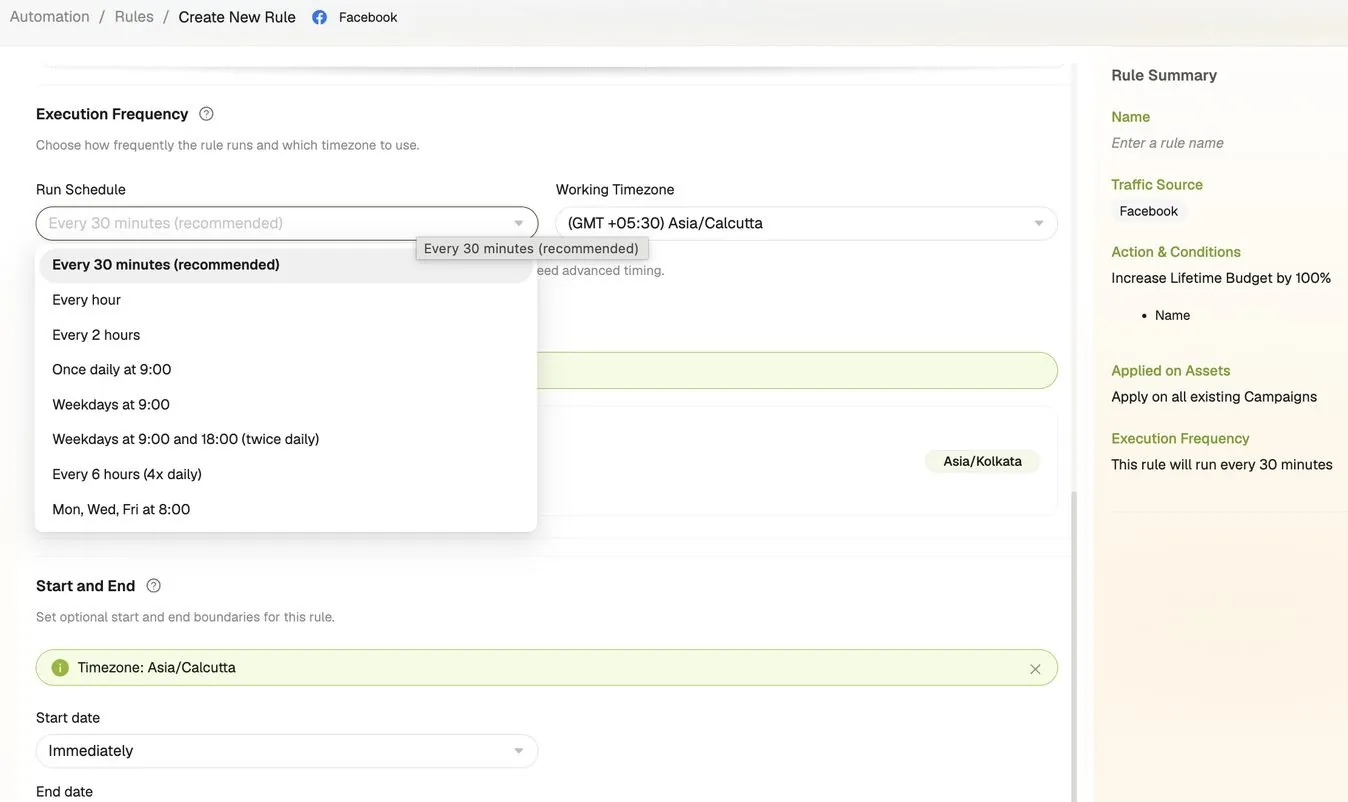
Decide how often it checks.
Pick hourly, every 2 or 6 hours, daily, weekdays, or set days. Choose the working timezone and optional start and end dates. Force run checks a rule right away when you do not want to wait.
- Eight schedule presets
- Working timezone per rule
- Start immediately or on a date
Before / after
What changes when ad automation runs on your rules
| Without FabFunnel | With FabFunnel |
|---|---|
| A campaign misses CPA and you catch it hours later | The rule evaluates on your schedule and turns it off on your rule |
| A winning campaign sits at the same budget for days | Budget rises on target hit, up to the dollar limit you set |
| Rebuild the same rules in three platform dashboards | Build in one rule builder, duplicate a rule instead of starting over |
| Check dashboards manually to find what needs attention | Slack alerts bring you the ones that need judgment |
| One blunt rule for the whole account | Rules at campaign, ad set and ad level running at the same time |
Rule examples
What automation rules look like in practice
- Protect budget
IF CPA above $60 today
THEN pause the ad set
- Scale winners
IF ROAS above 3 yesterday
THEN increase daily budget by 20%
- Watch spend
IF spend above $500 with no conversions today
THEN pause the campaign
- Kill slow starters
IF CTR below 0.5% over the last 4 hours
THEN pause the ad
- Alert instead of act
IF spend crosses your threshold
THEN notify on Slack
- Sleep Tight template
AT 9:30 PM UTC
THEN turn off all active ad sets
Rule types breakdown
What ad automation covers
- Protection
Auto-pause underperformers
Set a CPA cap, a ROAS floor or a CTR threshold. When a campaign crosses the line the rule turns it off on its next evaluation, before it drains the rest of the day. Works on Meta, TikTok, and NewsBreak.
- Growth
Auto-scale winners
When a campaign hits its ROAS target, raise its budget by a percentage or a fixed amount. Set an "until" ceiling in dollars and the rule stops raising once it gets there, so a 20% increase cannot compound past what you are willing to spend.
- Three levels
Campaign, ad set and ad
Apply a rule at any of the three levels, and run several at the same time. A broad campaign-level rule protects total spend while a narrow ad-level rule kills the single creative that is dragging your CTR down.
- Signal
Slack alerts
Not every rule should take an action. Notify on Slack fires when a condition is met and leaves the decision to you, which is the right shape for anything you want a human to look at before it moves.
- Timing
Schedule-based rules
Run a rule every 30 minutes, hourly, every two or six hours, once daily, on weekdays, twice daily, or on set weekdays only, or build a custom schedule. The Sleep Tight template turns off all active ad sets at 9:30 PM UTC.
- Platforms
Three platforms, one interface
Each rule runs on one platform. Build it once, then duplicate the rule rather than rebuilding your ad automation from scratch in three dashboards. Force run executes a rule immediately when you do not want to wait for the next evaluation. Two templates, Sleep Tight and Ramp Up, give you a starting point.
Works best with
Where Automation fits in the workflow
Bulk Launcher
Launch in bulk, then let rules protect and grow what you launched.
Explore Bulk LauncherMulti Ad Account Reporting
Reporting shows you what the rules have been acting on.
Explore Multi Ad Account ReportingCo-Pilot
Co-Pilot reads the numbers and tells you which rule to build next.
Explore Co-Pilot
- 9actions on Meta and TikTok
- 3levels: campaign, ad set, ad
- 8schedule presets, plus custom
Where it sits
Build it. Launch it. Manage it.
Bulk Launcher puts the test live. Automation watches it. Reporting and Co-Pilot (beta) show you what happened.
Build it
Launch it
- Bulk Launcher Launch campaigns in bulk across accounts
- AutomationYou are here
Manage it
What it doesn't do: rules act on Meta, TikTok, and NewsBreak campaigns only; Google, Snapchat, OpenAI Ads and BIGO are reporting only. Rules don't duplicate ads, and alerts go to Slack, not email or webhooks. A rule applies from the moment you save it and never acts on past performance.
FAQ
Common questions about ad automation
How Automation watches your campaigns and acts on them on rules you set. Can’t find what you need? Book a demo
Which platforms do automation rules run on?
Meta (Facebook), TikTok, and NewsBreak, the same three platforms FabFunnel launches on. Each rule runs on one platform.
How often do rules check and execute?
You choose. Every 30 minutes is the default, with eight presets and a custom schedule, each in its own working timezone. Force run executes a rule immediately when you do not want to wait.
What can a rule do?
On Meta and TikTok, nine actions: turn on, turn off, notify on Slack, and increase, decrease, or set a daily or lifetime budget. Increases and decreases take a percentage or a dollar value plus an optional “until” limit. NewsBreak rules turn on, turn off, or notify on Slack.
Can I run more than one rule at a time?
Yes, at different levels at the same time. A campaign-level rule can protect total spend while an ad-level rule pauses a single underperforming creative. That is where advertising automation beats a single blunt account rule.
Can I set rules based on time of day?
Yes, through the schedule. Pick a preset or a custom schedule in your working timezone, or start from the Sleep Tight template, which turns off all active ad sets at 9:30 PM UTC. Campaign automation on a clock, not on someone remembering.
Where do notifications go?
Slack. The Notify on Slack action posts there when a condition fires. There is no email notification.
Will a rule affect campaigns that are already running?
A rule acts on its next scheduled run after you save it. You can pause or delete any ad campaign automation rule at any time without touching campaigns that are already live.