You’ve got a campaign brief approved. Budget signed off. Creative assets ready. Now comes the part nobody talks about: the actual work of getting it live on Facebook.
For most teams, this means opening Ads Manager. They click through several fields, copy and paste targeting details from a spreadsheet, and upload creatives one at a time. Then, they double‑check budgets and hope no one makes a typo. Do that for five campaigns, and you’ve burned half a day. Do it across twenty client accounts, and you’ve built yourself a second full‑time job.
This is exactly where Facebook advertising automation starts to make a measurable difference.
Here’s the uncomfortable truth: most teams don’t have a scaling problem. They have a workflow problem.
The question isn’t whether Facebook campaign automation is worth exploring. It’s whether your current workflow is costing you more than you think – and what a better one could look like.
What is a Facebook Campaign Launch Workflow?
A campaign launch workflow is the complete set of steps. It starts when a campaign gets approved and ends when it goes live and begins spending.
The standard steps include: campaign structure configuration, ad set creation, creative asset upload and assignment, budget and schedule configuration, internal quality assurance review, and final publication. While the sequential order of these steps is consistent across most teams, the specific tools, personnel roles, and handoff mechanisms between steps vary considerably. These variations are material drivers of differences in launch efficiency and throughput.
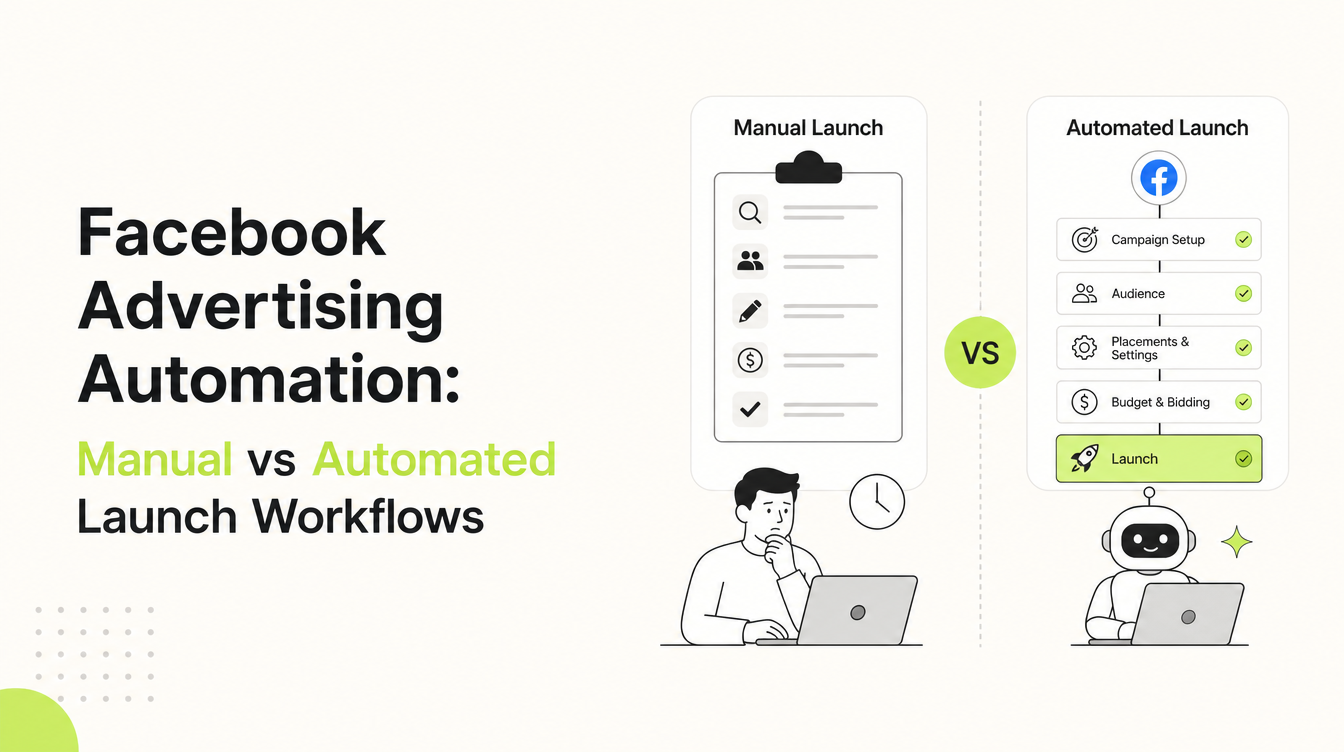
The Manual Launch Workflow
Launching manually means you’re stuck building every single campaign, ad set, and ad from scratch inside Meta Ads Manager – every single time. Without Facebook ads automation tools, every campaign becomes a repetitive, error-prone process that depends entirely on manual input.
A media buyer gets a brief, opens Ads Manager, and creates the campaign. They configure each ad set manually, upload creative assets, paste in copy, set budgets and dates, then submit for review. If changes are flagged, the buyer must re‑enter the platform to make edits before the campaign finally goes live.
Where manual works well: For small accounts running a handful of campaigns, manual is fine. If you’re a solo operator or running fewer than five campaigns a month, the overhead of automation probably isn’t worth it yet.
The Hidden Costs:
A single campaign with three ad sets and four creatives per ad set can take 60–90 minutes to build from scratch. Multiply that by 10 campaigns each month, and you are facing 10–15 hours of manual execution. This work needs no strategic thinking, only careful clicking.
Human error is where it gets expensive. One agency owner shared that her team discovered a $5,000 daily budget had been mistakenly entered as $50,000. This copy‑paste error went unnoticed until $18,000 was spent overnight. Not an edge case – it’s a clear result of asking people to perform the same high‑stakes data-entry task 50 times in a row.
“We’ve seen brands waste 40% of their holiday budget targeting last year’s buyers – simply because the wrong ad set was duplicated. It’s one of the most common and costly manual errors in high-volume campaign management.”
And then there’s the ceiling: if campaigns can only be built by one or two people who know Ads Manager well, your capacity is their calendar.
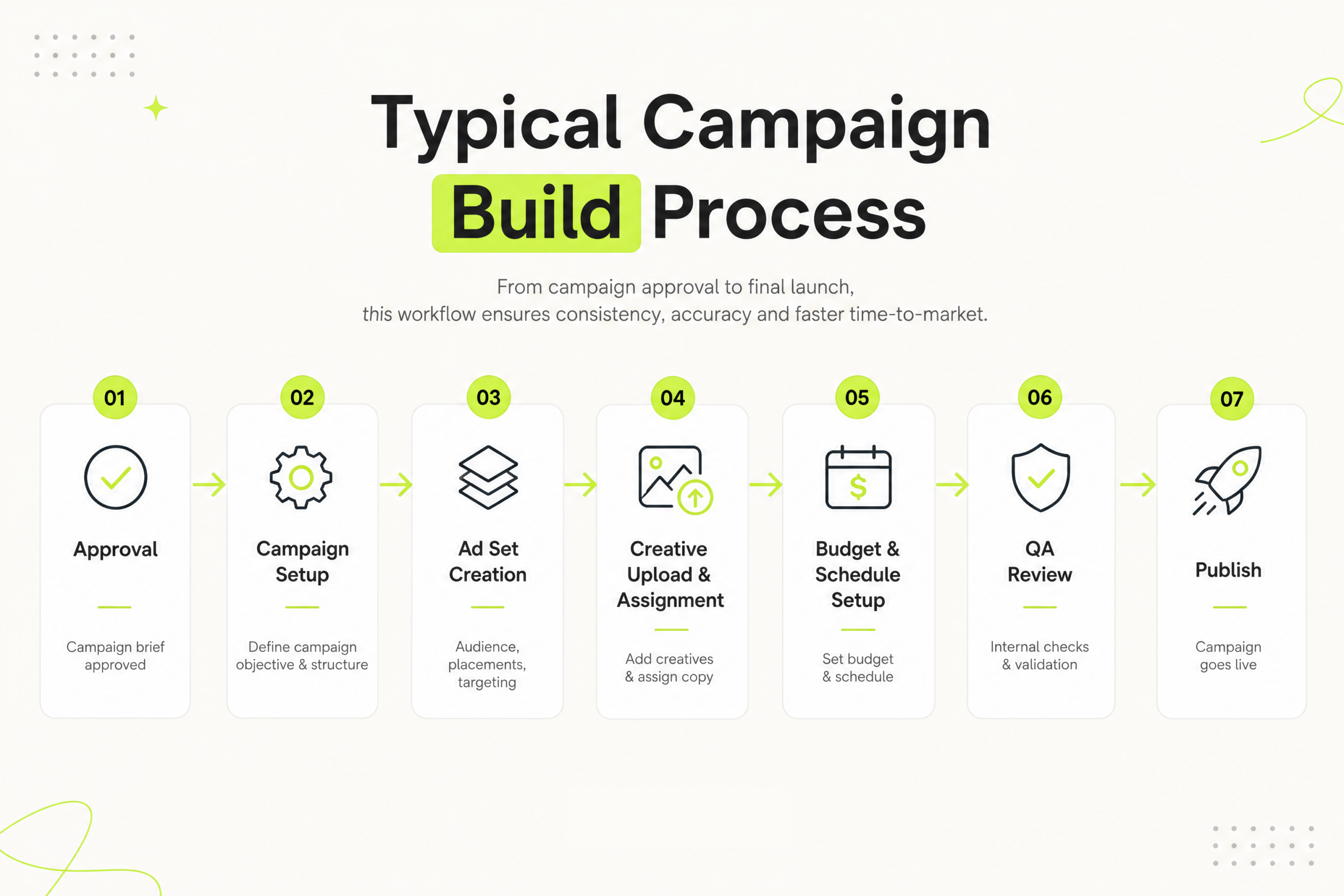
The Automated Launch Workflow
An automated launch workflow doesn’t mean flipping a switch and walking away. It means systematizing the repeatable parts so the team’s time goes toward judgment calls – not data entry. This is where Facebook ads automation software like FabFunnel comes in.
In FabFunnel, the core building blocks are:
Campaign Templates: Create them once, reuse them forever. Templates aren’t just nice to have, they’re the backbone of Facebook advertising automation. They lock in consistency across every single launch. And best of all? They free you from the soul-crushing cycle of starting over.
Bulk Launch: Need to launch 20 ad sets across 5 campaigns? Bulk Launch builds all of them simultaneously from your templates. This is one of the biggest advantages of modern Facebook ads automation tools, especially when scaling across multiple accounts.
After building, save everything as a draft for internal review before launching – no need to keep Ads Manager tabs open.
Post-Launch Rules are what turn simple workflows into full Facebook campaign automation, where performance actions happen without manual intervention.
- Pause ads that underperform after 48 hours.
- Increase budgets for ad sets that beat your ROAS target.
- Notify the team if pacing is off.
The same scenario, automated:
To run a retargeting campaign with three ad sets and four creatives each:
- In FabFunnel, choose your Retargeting Launch Template.
- Pick three audience segments from your saved Audience Library.
- Select 12 creatives already tagged in the Library.
- Set your budget and launch date.
- Save as draft for review – then publish when ready.
Same campaign. A fraction of the time. Zero manual data entry.
Manual vs Automated: Head-to-Head
When comparing manual workflows vs Facebook ads automation software, the differences become obvious across speed, accuracy, and scalability.
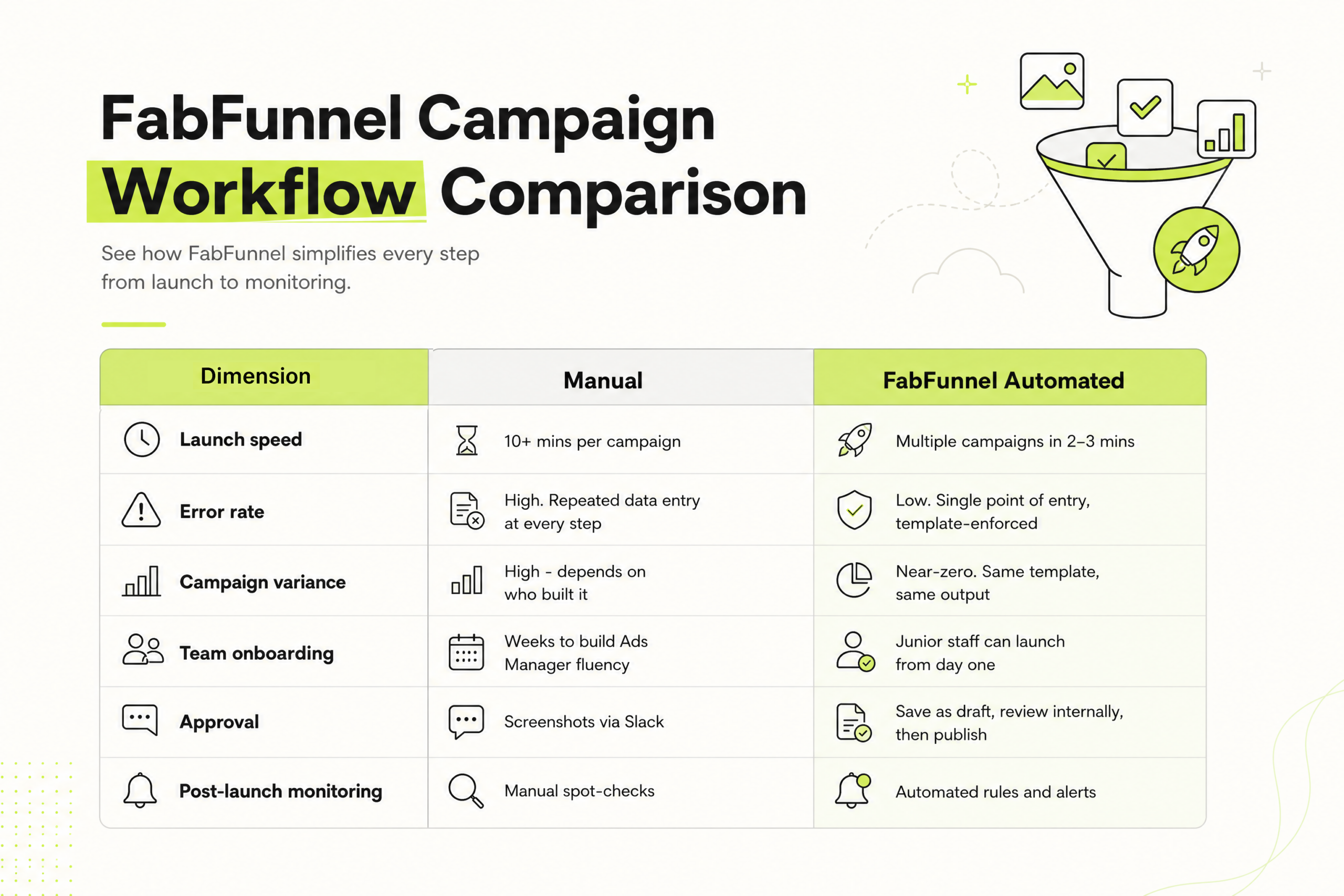
Campaign variance is the one most teams underestimate. When five different people build campaigns manually across twenty accounts, you don’t get five versions of your best work – you get five versions of whoever was most tired that day. Templates remove that variable entirely.
Launch speed: Running 20 campaigns a month and saving 60 minutes each returns 20 hours – half a workweek – to the team every month. At agency billing rates, that’s not an operational nicety. It’s a margin line.
When to Use Manual and When Not To
Manual works when:
- You’re building a highly custom, one-off campaign that genuinely doesn’t fit any template.
- You’re testing a new funnel structure for the first time (run it manually once, then templatize it).
- You manage fewer than five campaigns a month across one or two accounts.
Manual becomes a liability when:
- The same campaign types are being rebuilt from scratch every month.
- Launch errors have cost you money, time, or a client relationship.
- New team members can’t build campaigns independently without significant oversight.
- As your client base grows, you’ll face a choice: hire someone just to handle execution, or automate.
Because without Facebook advertising automation, increasing campaign volume quickly creates a bottleneck – slowing both your ad performance and your team’s efficiency.
The clearest sign you’ve outgrown manual: onboarding a new account means adding hours to your week instead of adding it to a workflow.
Building your automated launch workflow in FabFunnel
Step 1: Templatize your top campaign types
Identify the three to five structures you build most often – prospecting, retargeting, seasonals. Build a Launch Template for each. These become your reusable foundations.
Pro Tip: Clone your best-performing live campaign as the starting point for each template. You’re building from proven structure, not best guesses.
Step 2: Organize the Creative Library
Arrange every creative asset by campaign or industry. From here on, every new creative goes into the Library before it goes anywhere near Ads Manager.
Step 3: Configure Post-launch rules
Define performance rules before you hit publish – not after something goes wrong. Decide which campaigns get stricter alerts, which auto‑pause, and which simply notify the team.
Step 4: Save as draft for review
After building from templates, save the campaign as a draft. Your team (or client, via your internal process) reviews the draft inside FabFunnel. Once approved, publish directly to Ads Manager.
From there, the workflow runs itself.
Common Mistakes When Switching to Automation
Automating a broken process: Templates amplify what already works. So audit first – then templatize your winners, not your average campaigns.
For high-budget campaigns, always keep a human approval step. Automation is worth it for the time saved on building. Skipping the final check is not worth it.
Treating post-launch rules as optional: They’re not extras – they’re the second half of the automation. A campaign that publishes without performance rules is only half-automated.
The Verdict
The best Facebook advertising teams don’t choose between manual and automated. They use both intentionally.
FabFunnel automates repeatable work. Your team focuses on strategy. Simple as that.
Automation isn’t about removing control. It’s about applying Facebook ads automation tools where they matter most and eliminating manual effort everywhere else.
If your team is spending more time building campaigns than improving them, that’s the gap FabFunnel is designed to close.
Your most complex campaign, automated in 20 minutes.
Book a demo to see how Facebook ads automation software can transform your workflow.
FAQs:
1. Can my team launch campaigns without Ads Manager expertise?
Yes. No expertise needed. Templates guide setup step-by-step—so anyone can launch fast, without errors.
2. Will I lose control if I automate campaign launches?
No. You still review everything in draft before publishing – automation just removes the busywork.
3. How much time can Automation actually save?
Hours every week. What used to take 60–90 minutes per campaign can be done in minutes.
4. How does Automation prevent costly mistakes?
It standardizes everything. No missed settings, no wrong budgets – just consistent, error-free launches every time.
5. Do I still need to monitor campaigns manually?
Less than ever. Set rules to automatically pause, scale, or flag performance – so nothing slips through.