Quick Answer
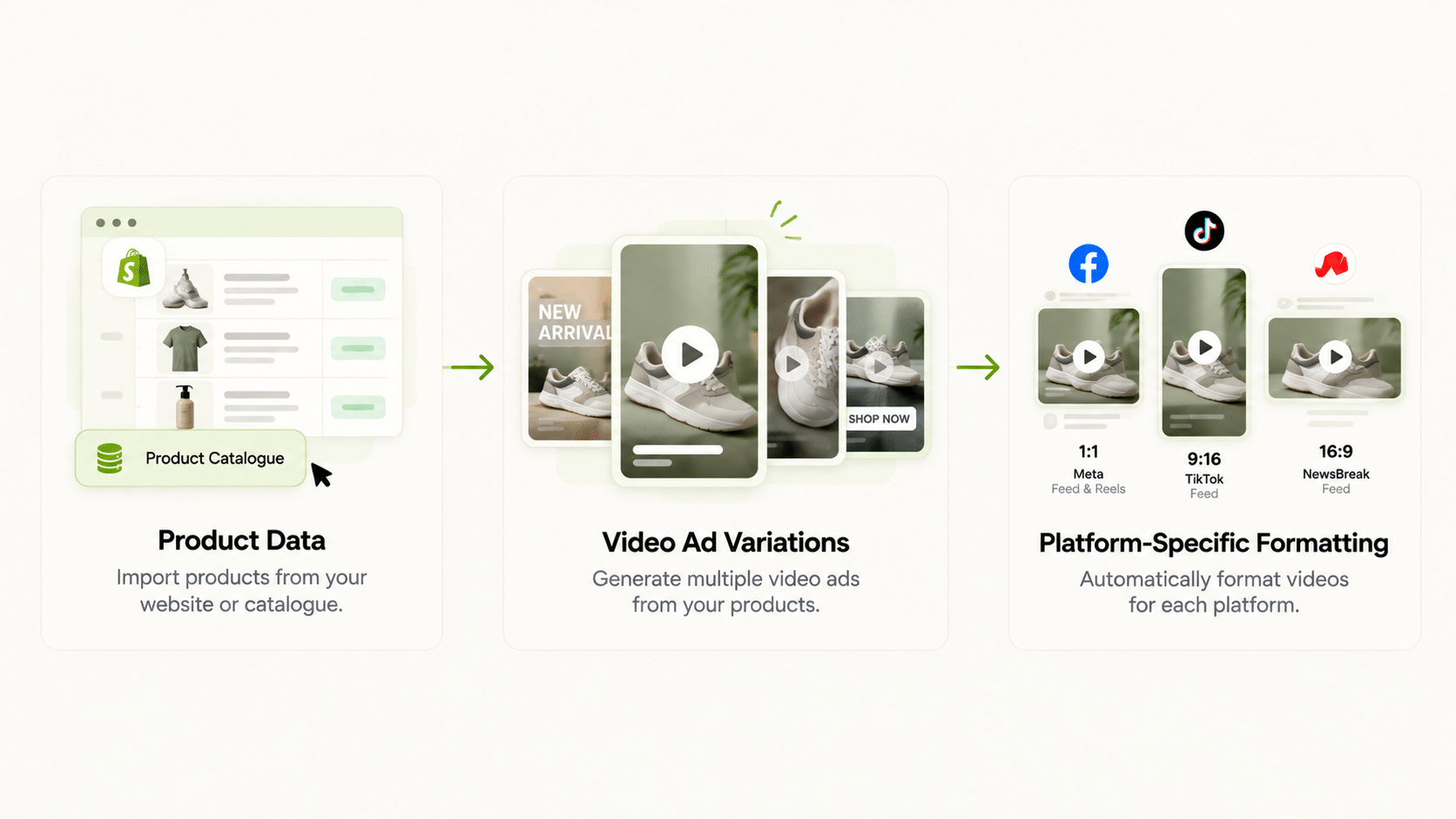
A video ads maker built for paid campaigns needs three things: connection to your actual product data (not a generic template), output formatted correctly for the platform you’re running (feed, story, and reels each have different specs), and fast iteration so you can test multiple video variations without re-editing from scratch each time. An ai video ads maker that produces one polished video but can’t quickly generate variations limits how much creative testing you can do.
Video ad creator tools range widely in what they automate. Some assist with editing an existing video; others generate a video from scratch using product images and text. This piece covers what to check regardless of which category a tool falls into.
What Should a Video Ad Generator Actually Automate?
At minimum, turning static product assets (images, copy, pricing) into a moving video format without manual video editing software. Beyond that, the more valuable capability is generating many variations quickly, since video ad testing benefits from volume the same way static ad testing does.
Think of the work in three layers: concept (what the video says and shows), production (turning that into a rendered file), and adaptation (versions for different products, hooks, and placements). Most of the time cost sits in production and adaptation. A video ad generator earns its place by compressing those two layers, not by replacing the concept work, which still needs a person who understands the offer and the audience.
What’s the Difference Between Facebook Video Ad Creator Tools and General Video Ad Makers?
A facebook video ad creator built for Meta accounts for feed, story, and reels dimensions and typical viewing behavior (often sound-off, captions-on). A facebook ad video creator that ignores platform-specific viewing habits produces a video that’s technically correct but not optimized for how people watch ads on that placement.
Practical differences to check:
- Aspect ratio. Vertical for story and reels, square or vertical for feed. One ratio rarely fits all.
- Opening seconds. The hook has to land before someone scrolls past, so the first frame matters more than the last.
- On-screen text. If the message depends on audio, sound-off viewers miss it.
Video Ads Maker: What to Check Before Choosing One
| Requirement | Why It Matters |
|---|---|
| Catalogue/product data connection | Avoids generic templates disconnected from actual products |
| Platform-specific formatting (feed, story, reels) | Each placement has different dimensions and viewing behavior |
| Fast iteration for multiple variations | Video ad testing benefits from volume, same as static creative |
| Captions/sound-off optimization | Most social video is watched without sound initially |
| Choice of quality vs. speed | Lets you draft cheaply and finalize winners at higher quality |
| Link to campaign launch | Avoids download-and-upload steps between creative and campaign |
Does FabFunnel’s Genie Generate Video Ads?
Yes. Genie generates both image and video ads. It works in four steps: pick an ad mode (Product Ad, Brand Ad, Product Shoot, or Performance Ad), pick a format, pick an approach, then configure and generate.
For video, you choose from four models: Seedance 2 Fast, Seedance 2, Veo 3.1 Fast, and Veo 3.1 Quality. FabFunnel’s documentation describes the Seedance models as faster and suitable for most use cases, Veo 3.1 Quality as the highest quality but slowest to render, and Veo 3.1 Fast as a balance of speed and quality. Aspect ratio and resolution are selectable, and brand guidelines are pulled automatically from your Catalogue (Brand → Categories → Products).
Two related tools sit around it. Create Variations applies one approved concept across multiple products. Video Sage analyses competitor video ads for hook, CTA, and retention patterns, and is reachable from Industry Insights through “Analyse Video,” so you can study what works before you brief your own video.
Not confirmed: specific video length limits, caption-generation features, and whether output meets any particular platform’s technical specs automatically. Check these in a trial if they are requirements. FabFunnel supports Meta, TikTok, and NewsBreak; Google Ads is not supported.
Should a Facebook Video Ad Maker Be Different From a TikTok Video Ad Maker?
Yes, meaningfully. TikTok’s native format leans toward a more casual, in-feed style, while Meta placements span a wider range from polished feed ads to more native-feeling reels content. A video ads maker that applies one style template across both platforms typically underperforms compared to one that adjusts for each platform’s actual viewing norms.
In practice, that means briefing differently: a facebook video ad maker workflow might start from a product benefit and a clear CTA, while a TikTok version might open on a problem or a demonstration. The tool can produce both, but the creative direction is yours.
How Do You Test a Video Ad Creator Before Committing?
Use one real product and run a small test. Generate the same concept at a fast tier and a high-quality tier, then watch both on a phone with the sound off. Check whether the product looks right, whether the first two seconds hold attention, and whether any on-screen text is readable.
Then time the whole loop from brief to a file ready for upload. Any facebook ad video creator can look impressive in a demo; the loop time tells you whether you can afford to test ten variations a week. Among video ad creators, the useful ones are those where a revision takes minutes of your attention, not an afternoon.
What Makes the First Three Seconds of a Video Ad Work?
On social platforms, people decide almost immediately whether to keep watching. Treat the opening as its own piece of creative. Show the product or the problem straight away, not a logo animation. Put the key message in text on screen, since many viewers watch without sound. Keep the first scene visually distinct from the usual feed, with movement or a clear subject, so it stops the scroll.
Then structure the rest simply: show the benefit, show proof or the product in use, and end with one clear call to action. Short videos that do one thing well usually beat longer ones that try to cover everything.
How Should You Plan a Batch of Video Variations?
Decide what you are testing before you generate. A common approach is to hold the product and offer constant and vary the hook: a problem statement, a result, a question, or a demonstration. Generate several versions of each hook, review them on a phone, and launch the strongest few.
Keep notes on which hooks win for which product types. Over time that record becomes a brief you can reuse, and it makes each new batch faster and better aimed than the last.
How Do You Pick a Video Ads Maker Based on Your Production Volume?
Match the tool to how much video you actually need, because the right video ads maker for one team is overkill for another. A team publishing two videos a month has different needs from one testing twenty variations a week.
For low volume, a video ads maker with a simple workflow and good defaults is enough. The main question is whether it produces a result you are proud to run without heavy editing. For high volume, look for features that cut repeat work: applying one concept across many products, saving brand settings, and choosing a faster, cheaper tier for drafts.
Whatever your volume, test the full loop. Time how long it takes to go from brief to a file ready for upload, including revisions. A video ads maker that generates quickly but needs several rounds of fixes may be slower overall than one with a steadier first draft.
Think about budget too. Higher-quality tiers cost more and take longer to render, so use them for finalists. Draft cheaply, pick winners, and spend your quality budget on the few videos that earn it. That habit makes any video ads maker cheaper to run, and it keeps your video ads maker budget focused on winners.
FAQs
What’s the difference between a video ads maker and a video ad generator?
No functional difference. Both terms describe tools that turn product or brand assets into video ad creative. What matters is catalogue connection and platform-specific formatting.
Are video ad creators the same across Facebook, Instagram, and TikTok?
Not functionally. Each platform has different dimensions, typical viewing behavior, and native content styles, so a tool optimized for one doesn’t automatically produce equally effective output for another.
Does an ai video ads maker eliminate the need for a video editor entirely?
It reduces repetitive editing work for straightforward variations, but a brand’s flagship video content or a new creative direction still often benefits from dedicated editing and review.
Does FabFunnel’s Genie generate video ads specifically?
Yes. Genie generates video ads using Seedance 2 Fast, Seedance 2, Veo 3.1 Fast, or Veo 3.1 Quality, with selectable aspect ratio and resolution.
Why does sound-off, captions-on design matter for a facebook video ad creator?
Because a large share of social video is watched with sound off initially, and a video ad that relies on audio to convey its message loses effectiveness without captions or clear visual storytelling.
What’s the biggest mistake in choosing a video ad creator for a multi-platform campaign?
Assuming one style or format works equally well across Meta, TikTok, and other platforms. Each has distinct viewing norms that a single template usually doesn’t account for.
Where to Start
Pick one product and test your shortlisted video ads maker by generating the same concept at two quality levels, then compare cost, speed, and output. FabFunnel’s Genie generates image and video ads from your product Catalogue across Meta, TikTok, and NewsBreak. Start at FabFunnel or explore the full toolset at Fab AI.