One video. A full creative matrix. Live across platforms before the day ends.
That’s not a pitch. That’s what AI video ads actually look like in practice in 2026, once you understand what “100+” really means. You’re not generating 100 original productions from scratch. You’re taking one solid source asset and multiplying it across variables: different hooks, different formats, different captions, different CTAs. Each one a real ad variation worth putting in the market.
For performance marketers and ecom brands running paid social, creative volume is what scales campaigns. You stop guessing which angle works and start finding out fast.
Here’s how to do it.
What “100+ AI Video Ads” Actually Means
Quick reality check before the steps, because the number deserves honest framing.
AI doesn’t write 100 original scripts and shoot 100 different videos. What it does is take one source video and multiply it across variables:
- Format variations – 9:16 for Reels/TikTok, 1:1 for feed, 16:9 for YouTube pre-roll
- Hook variations – different opening 3 seconds with different text overlays or spoken lines
- Caption and copy variations – different headline overlays, CTAs, and caption styles
- Cut variations – different clip selections from a longer source video
- Language or audience variations – same video, different copy for different segments
Run those variables against each other and 100+ legitimate AI video ads from one source clip is not just possible. It’s a systematic process. Every variation is a real, deployable ad. That’s the point.
What You Need Before You Start
One strong source video. This is the asset everything else multiplies from. It doesn’t need to be polished. A solid UGC clip, a product demo, a talking-head piece – all work. What it needs: clear audio, decent lighting, a message that lands. AI video ad tools amplify good source material. They can’t rescue bad footage.
A clear offer and CTA. Decide what you want the ad to do before generating variations. Buy now, sign up, learn more – pick one per campaign. Testing the offer alongside creative variables at the same time muddies what you’re learning.
Platform targets identified. Meta, TikTok, NewsBreak, YouTube – know where these AI video ads are going before you build the matrix. Format requirements differ by platform and that shapes the whole variation strategy.
Step-By-Step: How To Generate 100+ AI Video Ad Variations
Step 1: Create or Source Your Base Video
Your base video should run 30–90 seconds. Long enough to pull multiple clips from, tight enough to stay focused.
Options for creating it:
- UGC-style footage – film yourself or a creator using the product. Works particularly well for TikTok and Meta Reels because it looks native.
- Screen recording + voiceover – the go-to for SaaS and app products.
- AI-generated video – AI video tools have improved – but don’t let that oversell them. Runway, Pika, and HeyGen work well for simple concepts and fast turnarounds.
For anything high-stakes in 2026, real footage still pulls more weight. Use AI where the budget or timeline doesn’t justify a shoot. Don’t use it where results actually matter.
Step 2: Generate Hook Variations
The hook is the first 3 seconds. It decides whether someone stops scrolling or keeps going. This is where variation matters most, and where AI video ad creation tools pay for themselves fast.
Take your base video and write 5–10 different opening hooks using an AI writing tool:
- Pain-point hook: “Still manually building campaigns one by one?”
- Result hook: “This brand cut ad setup time by 90%.”
- Question hook: “What if you could launch 200 ads before lunch?”
- Curiosity hook: “Most marketers don’t know this exists yet.”
- Social proof hook: “10,000 performance marketers switched to this.”
Each hook becomes a separate AI video ad variant. Pair each one with your base video using a tool like CapCut, Creatopy, or AdCreative.ai to swap the opening text overlay or drop in a voiceover intro. That’s already 5–10 variations before you’ve touched anything else.
Step 3: Resize for Every Platform Format
One video, three formats minimum:
- 9:16 vertical – TikTok, Instagram Reels, Facebook Stories
- 1:1 square – Facebook and Instagram feed
- 16:9 horizontal – YouTube pre-roll, display
CapCut Pro, Creatopy, and Adobe Express all handle this automatically. Their auto-resize features reframe the subject of your video for each aspect ratio. No manual cropping per format.
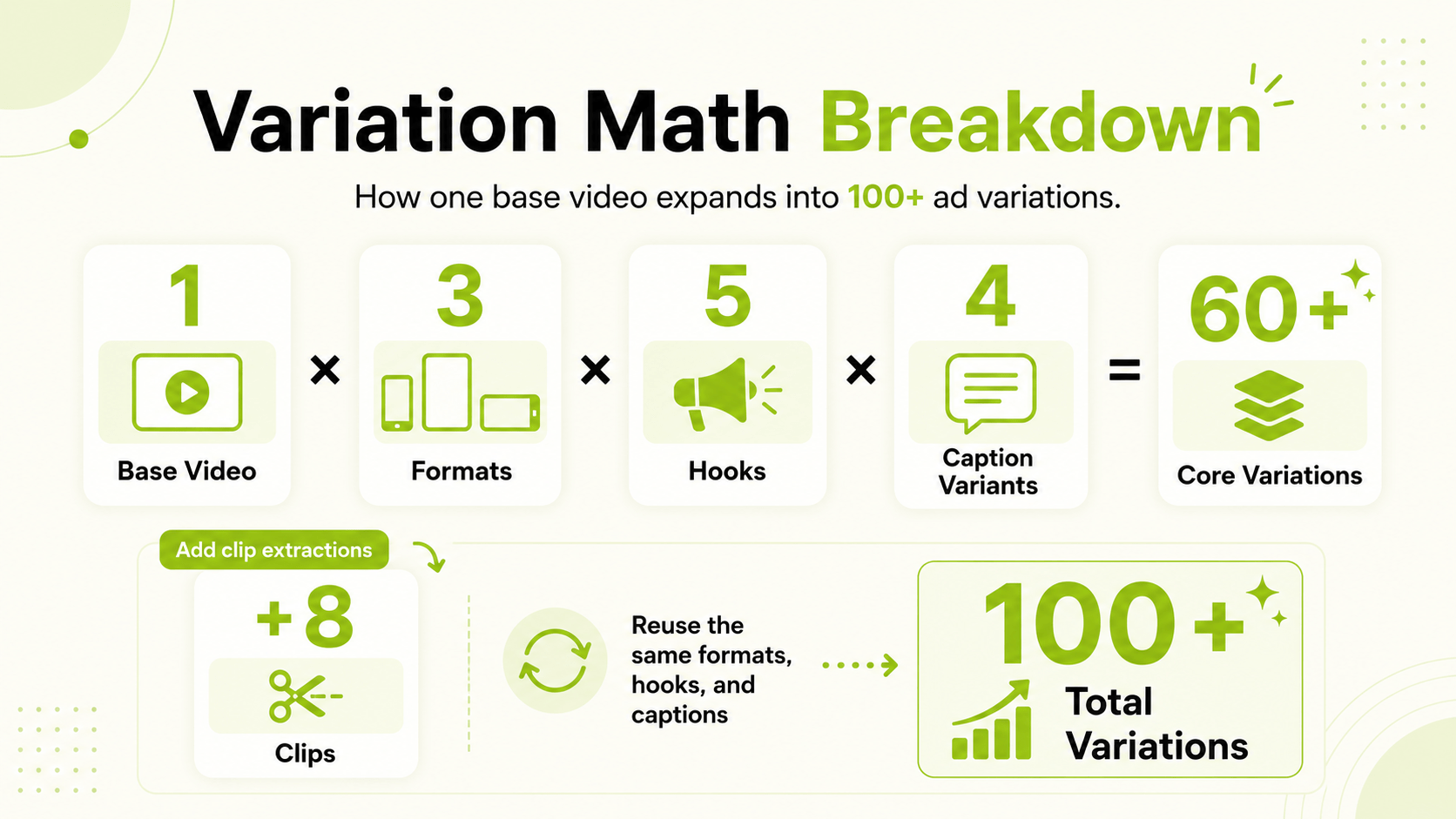
5 hook variations × 3 formats = 15 AI video ad variations from one base clip. Not at 100 yet, but you’re already in useful territory.
Step 4: Generate Caption and Overlay Variations
Add text overlay and caption variations to each format:
- Different headline copy (5 variants)
- Different CTA text (3 variants: “Shop Now,” “Get Started,” “See How It Works”)
- With captions vs. without (some audiences watch without sound, some don’t)
Opus Clip and Munch auto-generate captions straight from your video’s audio. AdCreative.ai and Creatopy let you apply different text overlay templates in bulk across your AI video ads.
15 base variations × caption and CTA permutations = well past 50. Add format combinations on top and you’re approaching 100+ without any extra filming.
Step 5: Cut Multiple Clips From the Source Video
A 60–90 second source video has multiple standalone ads inside it. AI clip extraction tools find them.
Opus Clip analyzes your video, scores each segment for engagement potential, and pulls the top clips with captions already applied. From one 90-second video, you can reasonably get 8–12 distinct clips that each work as a short-form AI video ad.
Reformat each clip, pair with hook and CTA variations, and your variation count climbs again.
Step 6: Launch and Let Performance Data Do the Work
You now have a full creative matrix of AI video ads ready to go. The last step is bulk launching it and letting automated campaign tools handle performance from there.
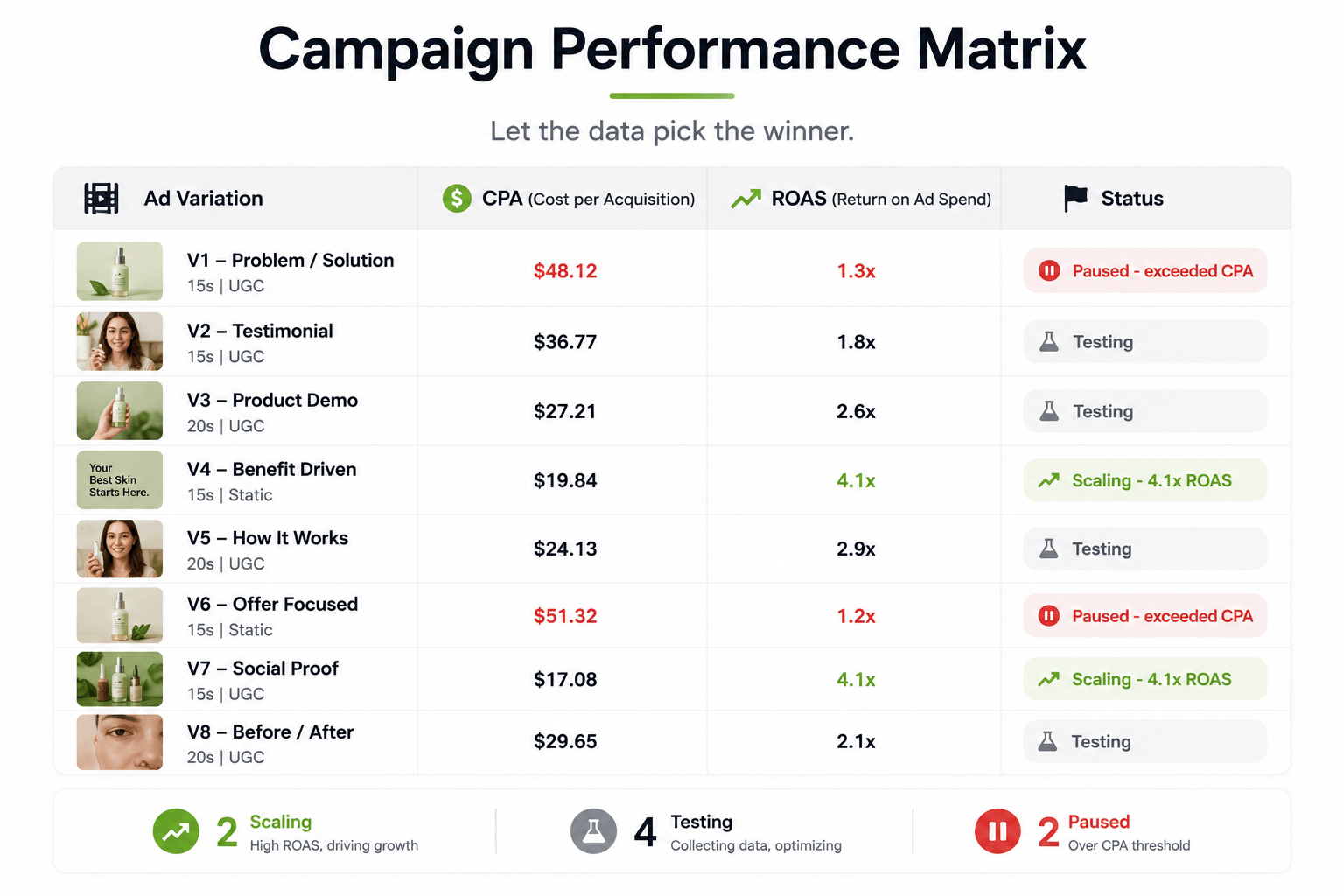
This is where FabFunnel closes the loop. Push your full variation set live across Meta, TikTok, and NewsBreak in a single workflow. Automated rules pause the AI video ads that aren’t hitting your CPA or ROAS targets and scale the ones that are – around the clock, without daily manual check-ins.
You’re not trying to run 100+ AI video ads forever. You’re trying to find your 3–5 winners fast and concentrate budget there.
Set your thresholds before launch: a CPA ceiling, a ROAS floor, a frequency cap. Then let the rules run. Every variation that gets cut is budget moving to the ones working. That’s the whole point of the volume strategy.
Tools Referenced in This Guide
| Task | Tools |
| AI video generation | Runway, Pika, HeyGen |
| Clip extraction + captions | Opus Clip, Munch, Vidyo.ai |
| Resize + format variations | CapCut Pro, Creatopy, Adobe Express |
| Hook + copy generation | ChatGPT, Claude, AdCreative.ai |
| Bulk launch + optimization | FabFunnel |
The Takeaway: Volume Is a Testing Strategy, Not a Vanity Metric
Generating 100+ AI video ads isn’t about flooding platforms with content. It’s about having enough creative surface area that the data tells you something real – which angle resonates, which format converts, which hook stops the scroll.
The teams finding winning creatives fastest in 2026 aren’t the ones with the sharpest instincts. They’re the ones running more AI video ad variations than their competitors, letting performance data make the call, and moving faster on what works.
The volume is achievable for a lean team. The strategy still has to be yours.
Frequently Asked Questions
Can AI really generate 100+ video ads?
Yes – as variations of a source asset, not as 100 original productions. Format resizes, hook swaps, caption variants, and clip extractions from one base video get you to 100+ real, deployable AI video ads. Each one is worth testing.
What’s the best AI video ad creator in 2026?
Depends on the task. For clip extraction and captions: Opus Clip. For format resizing: CapCut Pro or Creatopy. For building AI video ads from a script: Runway or HeyGen. For bulk launch and optimization after production: FabFunnel. Most workflows use 2–3 tools in sequence rather than one tool for everything.
Do AI-generated video ads perform as well as human-produced ones?
For testing and iteration at scale, they perform well – especially UGC-style formats where high production value isn’t expected. For brand campaigns or high-spend hero creatives, human-produced assets still tend to come out ahead. Use AI video ads for volume and testing. Put production budget into the proven winners.
How long does it actually take to generate 100+ video ad variations?
With a prepared source video and a clear brief, the generation and formatting process takes 2–4 hours end to end for a first run. “Minutes” applies specifically to the bulk rendering and formatting steps. The prep work – filming, writing hooks, defining CTAs – takes longer. Subsequent runs with an established workflow get faster.
What platforms work best for AI video ads?
TikTok and Instagram Reels show the strongest performance for short-form formats. Meta feed placements work well for 1:1 square AI video ads. YouTube pre-roll suits longer product demos. What works varies by audience, offer, and creative style – test across platforms before committing budget.
Do I need a big budget to test 100+ video ad variations?
No. $10–20 per variation gives enough directional signal on which hooks and formats are landing. The point is identifying winners quickly, not spending heavily on everything at once.