Quick Answer: Sales automation is software that handles repetitive, rules based sales tasks such as logging calls, scoring leads, sending follow up emails, and updating deal stages, work a rep would otherwise do by hand. It typically runs through a CRM and connected tools rather than replacing the CRM itself. The result is less manual admin and more time reps can spend actually talking to buyers.
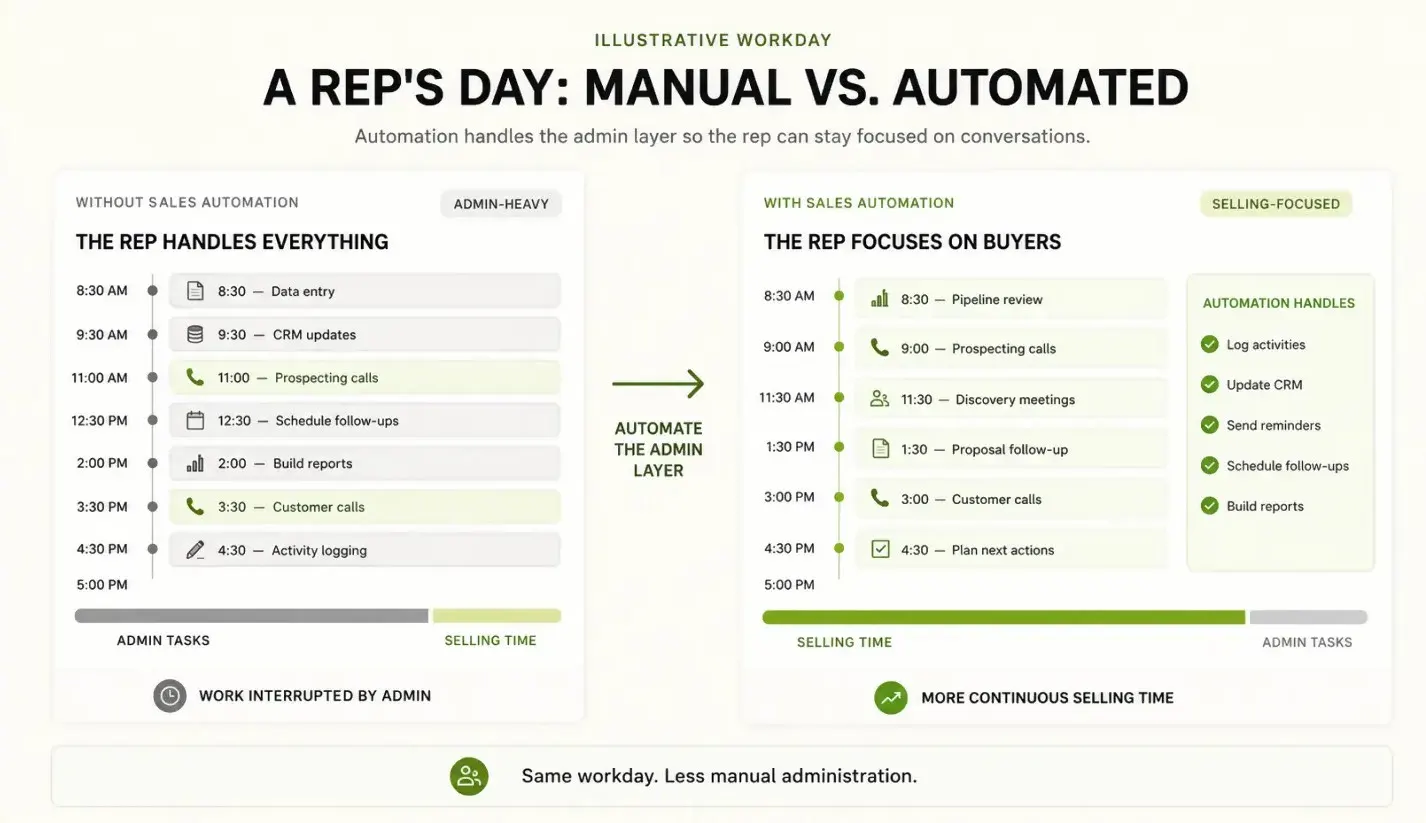
Every sales rep spends a chunk of the day on work that has nothing to do with selling: logging a call in the CRM, writing a third follow-up email, updating a deal stage, or going back and forth to find a meeting time. None of that moves a deal forward on its own, but skip it and the pipeline falls apart. Sales automation exists to take that administrative load off a rep’s plate so they can spend more time actually talking to buyers. This guide walks through what it is, the categories of tools built for it, how it’s different from marketing automation, and how a business can figure out where to start.
What Is Sales Automation?
If you’re asking “what is sales automation” for the first time, the short answer is this: it’s the use of software to handle repetitive, rules-based sales tasks that used to require a person doing them manually, one at a time.
That covers things like:
- Scoring and ranking leads based on fit and behavior, instead of a rep guessing which ones are worth calling first
- Sending scheduled follow-up emails after a demo, a form fill, or a period of silence
- Logging calls, emails, and notes into the CRM automatically instead of a rep typing them in after the fact
- Moving a deal to the next pipeline stage when a trigger event happens, like a contract being signed
- Letting a prospect book a meeting directly on a rep’s calendar without an email back-and-forth
- Generating a proposal or contract from a template and routing it for e-signature
None of this replaces the parts of selling that require judgment, like reading a buyer’s hesitation on a call or deciding when to push versus wait. It’s aimed squarely at the repetitive, rules-based part of the job, which is exactly the kind of work that eats hours without needing much human judgment.
The reason it matters is straightforward. A rep who isn’t manually updating records or chasing scheduling logistics has more hours for calls, demos, and negotiation. Fewer leads get missed because a follow-up didn’t go out on time, and fewer deals stall because nobody updated the pipeline stage after a call.
The Main Categories of Sales Automation
It isn’t one tool, it’s a set of overlapping categories, each solving a different piece of the sales process. Most sales teams end up running two or three of these at once, connected through a CRM.
| Category | What It Handles |
|---|---|
| CRM automation | Logging activity (calls, emails, meetings), updating deal stages on triggers, assigning leads to reps, and flagging deals that have gone quiet. |
| Email and outreach sequencing | Multi-step, multi-channel cadences (email, calls, LinkedIn touches) that go out on a schedule and branch based on whether a prospect replies or opens a message. |
| Lead scoring and routing | Look at where each new lead works and how they act, score them on how good and how ready they are, then send the best ones to the right salesperson. |
| Proposal and contract automation | Build quotes, proposals, and contracts from templates and deal data, then send them straight to approval and e-signature. |
| Conversational AI and chatbots for qualification | Bots on a website or chat widget that ask qualifying questions, capture intent, and book a meeting or hand a qualified lead to a rep. |
| Meeting scheduling | Letting prospects pick a time directly off a rep’s real calendar, removing the “does Tuesday at 2pm work” email thread. |
How Sales Automation Differs From Marketing Automation
These two get lumped together a lot, and there’s real overlap, but they solve different problems for different audiences.
| Marketing Automation | Sales Automation | |
|---|---|---|
| Audience | Many people at once, before they’ve raised their hand | One specific account or lead, already in an active conversation |
| Owner | Marketing team | Sales team |
| Unit of work | A segment or list | A deal |
| Typical tools | Email drips, content offers, retargeting | CRM automation, sequencing, lead scoring, meeting scheduling |
Marketing automation is built for reaching many people at once, before they’ve raised their hand. It nurtures cold and warm leads with email drips, content offers, and retargeting, usually owned by the marketing team. The unit of work is a segment or a list.
Sales automation kicks in once a lead is close to or already in an active conversation with a rep. It’s one-to-one by nature: a specific rep working a specific account through a specific pipeline. It’s owned by sales, and the unit of work is a deal.
In practice, the two connect through the CRM: marketing automation feeds qualified leads in, and this stage takes over from there, with lead scoring often the handoff point between them. Neither replaces the other. A team relying only on marketing automation will generate leads that pile up because no one’s following up with them systematically. A team relying only on it without any nurturing further upstream will burn through outbound lists faster than marketing can refill them.
Real Examples of Sales Automation Tools by Category
Here’s how these categories show up as real, named tools, described neutrally based on their publicly stated positioning as of 2026. This isn’t exhaustive, and feature sets change often, so check current vendor documentation before deciding.
CRM automation:
- Salesforce – Enterprise CRM. Flow automates workflows. Einstein AI handles scoring, forecasting, and activity capture.
- HubSpot Sales Hub – CRM. Built-in sequences, deal automation, lead scoring. For SMBs. Part of HubSpot platform.
- Pipedrive – pipeline-first CRM. For smaller sales teams. Automation rules move deals and trigger follow-ups.
Email and outreach sequencing:
- Outreach – Sales engagement platform for building multi-step, multi-channel outreach cadences and tracking rep activity against them.
- Salesloft – Similar category to Outreach: sequencing, call tracking, and pipeline visibility built around a rep’s daily outreach workflow.
- Apollo – Combines a prospect database with outreach sequencing and lead scoring, marketed as a full-cycle prospecting-to-close tool.
Lead scoring and routing:
- HubSpot and Salesforce both offer native lead scoring (rules-based and predictive) as part of their CRM suites rather than as standalone products.
- Dedicated intent and scoring platforms, a category that includes tools like 6sense, layer firmographic and buying-intent signals on top of CRM data to rank and route leads.
Proposal and contract automation:
- PandaDoc – Document generation, e-signature, and proposal automation that pulls data from a connected CRM.
- DocuSign – Widely used for e-signature and contract workflow automation, often paired with a separate CRM or CPQ tool for the document generation step.
Conversational AI and chatbots for qualification:
- Drift and Intercom – Website chat tools with bot-driven qualification flows that can route a qualified visitor to a rep or book a meeting directly.
Meeting scheduling:
Chili Piper and Calendly – scheduling tools that drop prospects straight onto a rep’s calendar, often triggered as the next step after a chatbot or form qualifies a lead.
If you’re looking for tools to automate sales workflow end to end rather than one slice of it, the CRM and outreach sequencing platforms (Salesforce, HubSpot, Apollo) bundle the widest range of automation types into one system, while the others are usually adopted as add-ons connected through integrations.
AI Sales Automation: What’s Actually New
A lot of what gets marketed under that label in 2026 is an extension of scoring and sequencing that’s existed for years, now running on machine learning models instead of fixed rules. The genuinely newer pieces worth understanding are:
- Predictive lead scoring that learns from historical win/loss data instead of relying on a fixed point system a sales ops person built manually.
- AI-generated outreach copy, where a tool drafts a personalized first line or full email based on a prospect’s company, role, or recent activity, which a rep then reviews before sending.
- Conversation intelligence, which analyzes call recordings and transcripts to surface deal risk, competitor mentions, or coaching opportunities without a rep filling out notes.
- Autonomous or semi-autonomous outbound agents, an emerging, less proven category where a system runs parts of prospecting or follow-up with minimal human input, though a human still typically approves before anything external actually sends.
The important distinction for a beginner: AI here is mostly improving the accuracy and personalization of automation that already existed, not replacing the rep’s judgment on when and how to close a deal.
How a Business Should Decide Where to Start
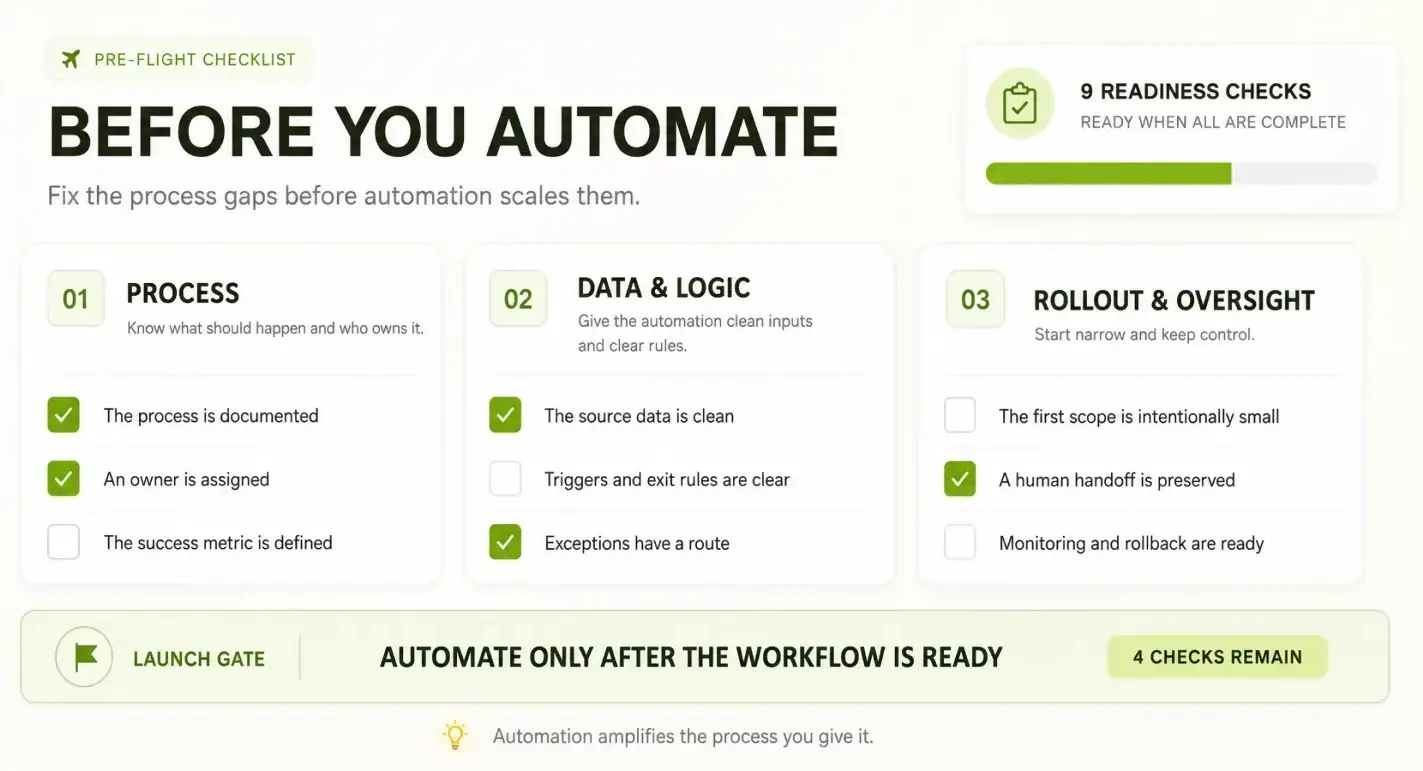
Trying to automate everything at once is how most rollouts stall. A more workable approach is to start with the task that’s costing the most rep time or losing the most deals, and prove out automation there before expanding.
A few practical ways to identify that starting point:
- Audit where reps’ time actually goes. Hours a week lost to manual data entry points straight to CRM automation as the highest-leverage starting point.
- Look at response time to inbound leads. Leads sitting for hours before anyone reaches out means lead scoring, routing, and instant meeting scheduling will move the needle faster than anything else here.
- Check how consistent follow-up actually is. Reps forgetting a second or third touch is what an outreach sequencing tool fixes, without a bigger platform change.
- Confirm CRM data is clean first. Automation built on messy or duplicate data amplifies the mess instead of fixing it. Data hygiene work upfront pays for itself.
- Pick one category, not five. Rolling out CRM automation, an outreach tool, a chatbot, and contract automation in the same quarter overwhelms reps, and none of it sticks. Prove value in one area, then expand.
Budget and team size matter too. A five-person team doesn’t need the same tooling complexity as a 200-person enterprise org, and buying in too early often means paying for capability nobody uses.
Common Mistakes When Adopting Sales Automation
- Automating a broken process. An inconsistent sales process just gets executed faster and at greater scale, mistakes included.
- Over-sequencing prospects. Too many automated touches too fast reads as spam and damages the relationship before a rep ever talks to the person.
- Ignoring CRM data quality. Duplicate records, missing fields, and inconsistent naming quietly break scoring models and routing rules.
- Treating it as “set and forget.” Sequences, scoring models, and routing rules need regular review as pricing or ideal customer profiles change.
- Skipping rep buy-in. Reps who don’t trust a new tool will work around it, log activity manually anyway, or ignore what it recommends.
- Removing the human touch entirely. Automating every prospect touchpoint, including the ones that should come from a person, tends to lower reply and conversion rates rather than raise them.
FAQs
1. Is sales automation only for large sales teams?
No. Small teams often see the fastest relative time savings, since a one- or two-person team has no headcount to absorb manual admin work. Many sales automation tools have entry-level tiers built for exactly this.
2. Do I need a CRM before I can use sales automation software?
In almost all cases, yes. CRM automation, lead scoring, and outreach sequencing all depend on having a central record of contacts, companies, and deals to trigger off of. Trying to automate without one usually means rebuilding the same work in spreadsheets.
3. How is AI sales automation different from regular automation?
Regular automation runs on fixed rules a person configured (if X happens, do Y). AI-driven models learn from past data and actually make calls, like figuring out who’s most likely to buy or writing a personal message. No static rulebook.
4. What’s the difference between sales automation and sales enablement?
Sales enablement equips reps with content, training, and messaging to help them sell. Sales automation removes manual tasks like activity logging and follow-ups. They often share a stack or platform, but enablement shapes what reps say and know; automation removes what they do by hand.
5. How much does sales automation software typically cost?
Pricing varies widely by tool and team size. Small teams can often start free or cheap with entry-level CRM and outreach tools. But the moment you want advanced automation, AI scoring, or custom workflows, you’re looking at annual contracts and per-seat fees. So don’t try to price the whole stack in one sitting. Budget category by category, and you’ll quickly see what you truly need.
6. Can sales automation replace a sales team?
No. Sales automation removes the repetitive administrative work around a deal, not the judgment calls a rep makes while talking to a buyer. Tasks like reading hesitation on a call, negotiating terms, or deciding when to push back still need a person. Tools marketed as fully automating the close are usually automating the steps that lead up to a conversation, not the conversation itself.
7. What’s the best sales automation tool for a small business?
There’s no universally best tool; the right choice usually depends on your team size and budget. For smaller teams, a pipeline-first CRM like Pipedrive or an all-in-one platform like HubSpot Sales Hub tends to work best, since both bundle CRM automation, sequencing, and lead scoring into one system rather than forcing you to stitch together multiple tools. Standalone platforms like Outreach or Salesloft become worthwhile only when your outbound volume grows beyond what your CRM’s built-in sequencing can support.
8. How long does it take to see results from sales automation?
Simple automations, like follow-up sequences or meeting scheduling, tend to show a difference within a few weeks since they fix an immediate gap in response time. Lead scoring and predictive models take longer, often a full sales cycle or more, since they need historical data to calibrate against. The slowest returns come from rolling out too many categories at once, which is part of why starting with one high-leverage area works better than a full-stack rollout.
Sales automation, at its core, is about removing the manual work that sits between a lead showing up and a deal closing, so the humans on a sales team can spend time on the parts of selling that actually require a human. The right starting point depends on where a business is losing the most time or the most leads today, not which tool has the longest feature list. Getting the process and data right before layering automation on top tends to matter more than which platform gets chosen.