Quick Answer
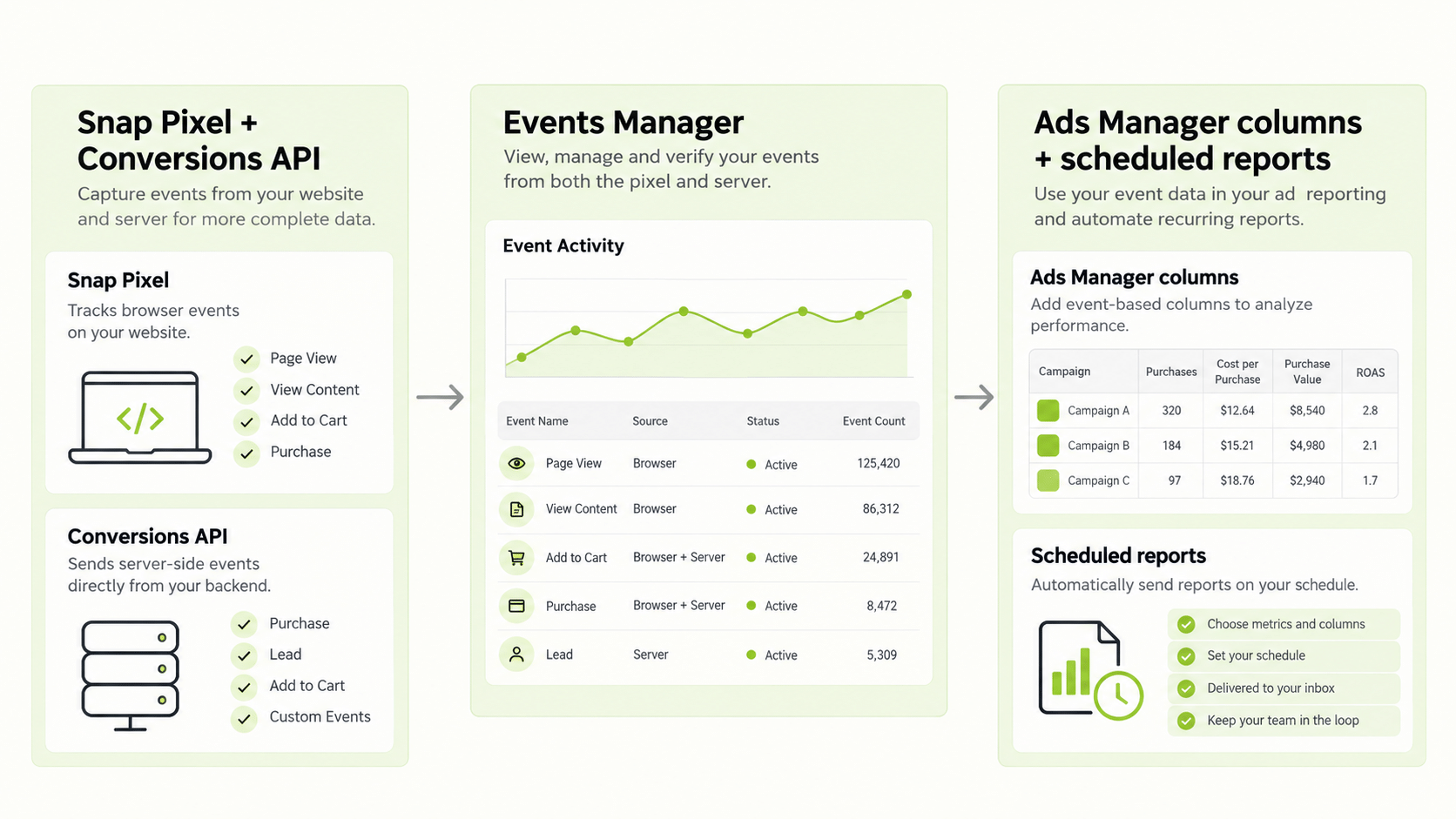
The Snapchat advertising platform is Snapchat Ads Manager plus the measurement tools around it: the Snap Pixel for websites, the Conversions API for server-side events, and mobile measurement partners for apps. You manage campaigns in a three-level structure (campaign, ad set, ad) and measure them through Ads Manager columns, breakdowns, and scheduled reports. Two points trip people up. Snapchat describes its conversion figures as estimates that can lag, and its default attribution window is 28 days after a click and 1 day after a view. Set up tracking before you spend, and decide which number is your source of truth.
What Is the Snapchat Advertising Platform?
The Snapchat advertising platform is the set of tools advertisers use to buy and measure ads on Snapchat. Its centre is Snapchat Ads Manager, where you create campaigns, set budgets and bids, upload creative, and read results. Around it sit Events Manager, where you connect tracking sources, and Audience tools for building custom and lookalike audiences.
If you have used other paid social tools, the structure will feel familiar. A campaign holds the objective. An ad set holds the audience, placement, schedule, budget, and bid. An ad holds the creative and the call to action. Snapchat also offers a Marketing API for teams that want to build their own integrations, so some third-party tools connect to the same data.
Because Snapchat updates menus and options often, treat this guide as a map and confirm each setting in your own account. The Snapchat advertising platform rewards advertisers who set up tracking first and optimise second.
How Do You Manage Campaigns on the Snapchat Advertising Platform?
Good management on the Snapchat advertising platform is mostly routine. A simple operating rhythm looks like this.
- Name things consistently. Put the objective, audience, and date in each campaign name so reports sort cleanly.
- Change one thing at a time. Edits to budget, audience, and creative together make results impossible to read.
- Respect the learning phase. Snapchat describes an exploration period after launch, typically four days or more depending on the objective. Avoid large edits during it.
- Review daily for delivery, weekly for creative. Daily checks catch spend problems. Weekly reviews decide which creative to keep.
- Refresh creative on a schedule. Frequency climbs fast on small audiences.
Budget and bid settings deserve a regular look too. Snapchat notes that a max bid set too low can stop a campaign from spending its budget, so if delivery stalls, check the bid before you change the creative.
How Do You Set Up Measurement on the Snapchat Advertising Platform Before You Launch?
Tracking is the part most often skipped, and it limits everything else. Per Snapchat’s help pages, web conversions in Ads Manager depend on the Snap Pixel, and app conversions depend on a mobile measurement partner or the Conversions API.
| Source | What it measures | Notes |
|---|---|---|
| Snap Pixel | Website events such as purchases, sign-ups, add to cart | Installed on your site |
| Conversions API | Server-side web, app, and offline events | Set up through Events Manager |
| Mobile measurement partner | App installs and in-app events | Required for app conversions |
In Events Manager you can create a new web event source using the Conversions API, and the Pixel ID or Snap App ID decides which parameters you must send. Many advertisers run the Pixel and the Conversions API together so that a browser that blocks the Pixel does not erase the event. Send a test event and confirm it appears before you put real budget behind the campaign.
Which Metrics Matter Most on the Snapchat Advertising Platform?
Start with the metrics that match your objective, and keep the front page of your report short.
| Goal | Core metrics |
|---|---|
| Awareness | Impressions, reach, frequency, CPM |
| Traffic | Clicks, CTR, cost per click, landing page views |
| App installs | Installs, cost per install |
| Sales | Purchases, purchase value, cost per purchase, ROAS |
Snapchat’s own metrics guide lists standard event metrics such as Purchases, Purchases Value, Sign Ups, Add to Cart, and Checkouts Started. Use the Columns menu to pick presets or build a custom set, and save the set so that every report uses the same definitions.
Note that value and ROAS reporting for custom conversions depends on how you send the data. Snapchat’s help page states that it needs the latest version of the Conversions API with a Purchase event and a contents array, and that older Pixel or legacy API setups can pass value data but do not support value or ROAS reporting. If purchase value looks empty, check the implementation first.
Why Do Snapchat Numbers Differ From Other Tools?
Snapchat’s conversion glossary says figures on the Snapchat advertising platform are estimates that can lag and should not be treated as official for billing. Three things explain most gaps.
- Attribution windows. Snapchat’s Pixel defaults to 28 days after a click and 1 day after a view. If your analytics tool counts only last-click, or uses a shorter window, the totals will differ.
- Estimated conversions. Snapchat uses statistical modelling to fill in delayed conversions, and these figures appear in standard columns. Recent days can therefore change after the fact.
- Time zones and counting rules. Differences from tools such as Google Analytics often come from mismatched windows or time zones.
The fix is a written reconciliation rule: name the source of truth, state the attribution window, and note the expected lag. Then when two numbers disagree, you can explain it in one sentence.
How Do Reports and Breakdowns Work?
The Snapchat advertising platform lets you slice results by dimensions such as time and, where available, demographics or placement. You can also schedule reports so that the numbers arrive without anyone logging in. Confirm the available breakdowns and scheduling options in your account, because they vary.
Use breakdowns to check assumptions. If a campaign aimed at one age band earns most of its conversions from another, your audience setting was off. Avoid reacting to small samples: wait until a segment has enough conversions before you exclude it.
How Should You Structure a Weekly Review?
A weekly review keeps management honest. Start with delivery: did every ad set spend its budget, and if not, is the bid or the audience the constraint? Then look at cost per result against your target, not against last week alone. Next, rank creatives by cost per result and pause the weakest one only if it has had enough volume to judge.
Finish with one decision and one test. The decision might be moving budget from a weak ad set to a strong one. The test might be a new hook against the current best. Write both down with the date, so that a month later you can see which changes helped. Teams that skip this step tend to repeat the same experiments without noticing.
For client work, add a short note on what changed and why. Stakeholders accept a flat week when the reason is clear and a plan follows.
How Do You Report Across Platforms?
Once you advertise beyond Snapchat, the Snapchat advertising platform becomes one dashboard among several, and comparing it with others is slow. Each platform names and counts things differently.
FabFunnel’s Multi Ad Account Reporting shows Snapchat alongside Meta, TikTok, and NewsBreak so that spend and performance sit side by side. Snapchat is connected for reporting only: FabFunnel launches campaigns on Meta, TikTok, and NewsBreak, and reports on Snapchat and Google. You still build and manage Snapchat campaigns inside Snapchat Ads Manager. The columns shown follow each platform’s own metrics, so check them before you use the dashboard for client reporting.
What Measurement Mistakes Hurt Results?
Frequent errors include launching without a Pixel or Conversions API, which leaves you optimising for clicks, and judging a test on day one, before the exploration period has ended. Others include changing attribution windows halfway through a test, comparing platform-reported figures with backend sales without a rule, and exporting reports with different column sets each week.
Write down your measurement plan before launch: the events, the attribution window, the source of truth, and the review dates. A one-page plan prevents most arguments later.
FAQs
What is the Snapchat advertising platform?
It is Snapchat Ads Manager and its supporting tools, including Events Manager, the Snap Pixel, the Conversions API, and audience tools.
How do I measure conversions on the Snapchat advertising platform?
Install the Snap Pixel for web events, use the Conversions API for server-side events, and use a mobile measurement partner for app events.
What is the default attribution window?
Snapchat’s Pixel defaults to a 28-day click window and a 1-day view window. Confirm the setting in your account.
Why are my Snapchat conversion numbers different from Google Analytics?
Usually because of mismatched attribution windows, time zones, or counting rules, plus Snapchat’s estimated conversions.
Is there a Snapchat ad platform for managing several accounts?
Snapchat offers a Marketing API, and some third-party tools connect to it. Check Snapchat’s documentation for current account-management options.
Can I launch Snapchat campaigns from FabFunnel?
No. FabFunnel launches on Meta, TikTok, and NewsBreak and reports on Snapchat. Build and manage campaigns in Snapchat Ads Manager.
Where to Start
Set up the Pixel and send a test event, write a one-page measurement plan, and launch one campaign with one objective. When your Snapchat advertising platform data is flowing, you can follow it next to Meta, TikTok, and NewsBreak at FabFunnel or explore the full toolset at Fab AI. A snap ad platform is easier to manage when the team writes down its Snapchat ad strategy before building campaigns or reports.