Quick Answer
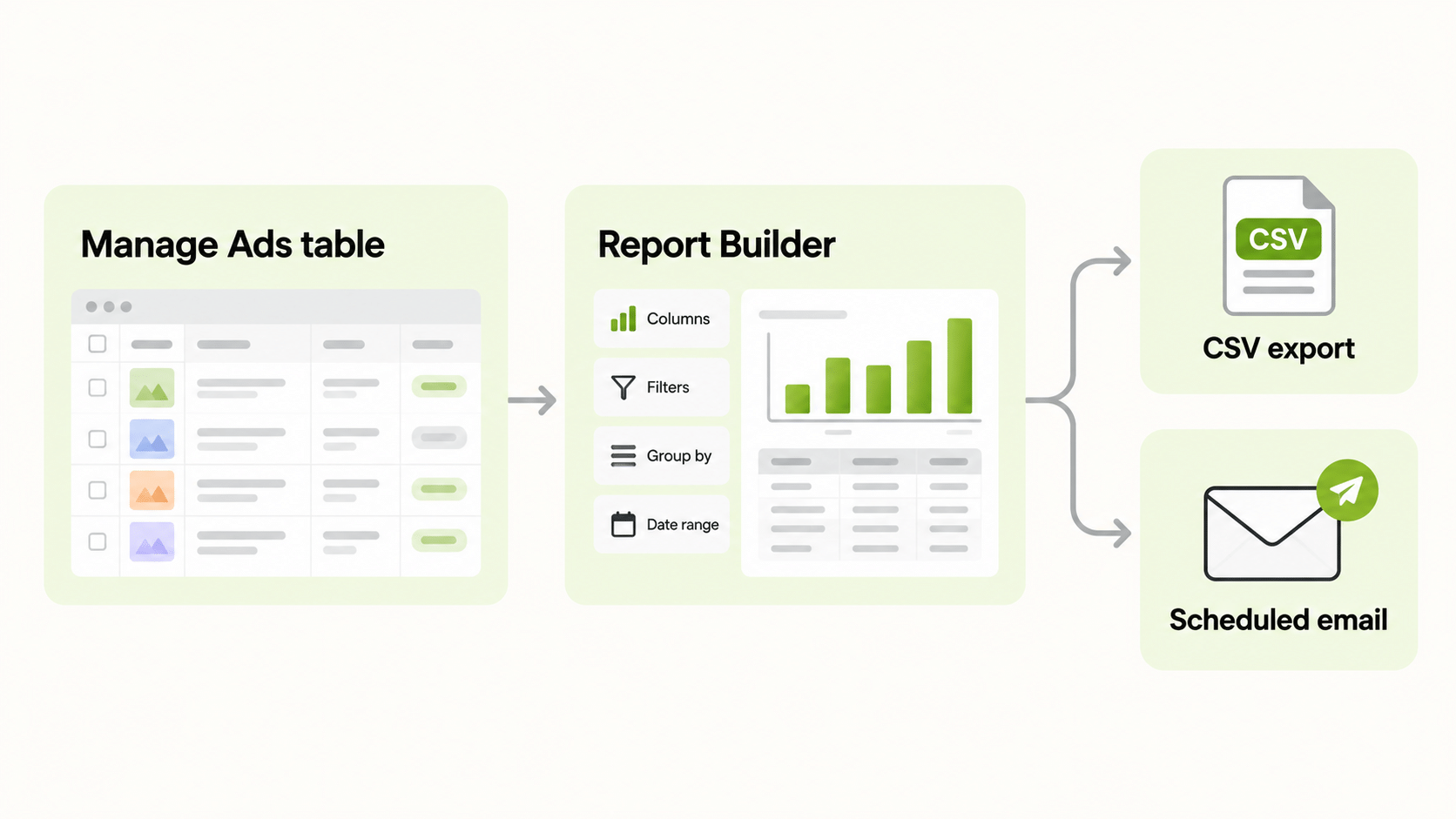
Snapchat ads reporting runs through Snapchat Ads Manager. The Manage Ads table gives you live columns, filters, and breakdowns. The Report Builder under the Reports menu creates custom reports with chosen dimensions and metrics, optionally scheduled to an email address. You can also export a CSV from Manage Ads. Two cautions apply. Snapchat describes its conversion figures as estimates that can lag, and its Pixel defaults to a 28-day click and 1-day view attribution window, so totals will rarely match your analytics tool. Set up tracking first, choose a short metric list, and decide which number is your source of truth.
What Is Snapchat Ads Reporting?
Snapchat ads reporting is the process of reading, exporting, and presenting performance data from your Snapchat campaigns. It does three jobs. Monitoring checks spend and delivery. Analysis looks for the audiences, formats, and creatives that work. Communication packages results for people outside the account, such as clients, managers, and finance.
Each job needs a different view. A monitoring view is small and fast. An analysis view is wide and filterable. A communication view is short and tied to goals. Trying to make one view serve all three is the main reason reports go unread.
Where Do You Find Snapchat Ads Reporting in Ads Manager?
Snapchat’s business help pages describe several places.
| Tool | Best for | Notes |
|---|---|---|
| Manage Ads table | Daily monitoring and quick analysis | Columns, filters, and a Breakdown button |
| Report Builder | Custom and scheduled reports | Choose type, file format, schedule, recipient, filters, dimensions, and metrics |
| Download from Manage Ads | One-off exports | Exports the current columns and date range as a CSV |
| Delivery Insights | Audience and delivery detail | Breakdowns such as age, gender, country, and OS, with some limited to certain users |
Menu labels change, so check the current names in your account before you write instructions for a colleague.
Which Metrics Should Snapchat Ads Reporting Track?
Choose metrics by goal and keep the first view short.
| Goal | Core metrics |
|---|---|
| Awareness | Impressions, reach, frequency, CPM |
| Traffic | Clicks, CTR, cost per click, landing page views |
| App installs | Installs, cost per install |
| Sales | Purchases, purchase value, cost per purchase, ROAS |
Snapchat’s own metrics guide lists standard event metrics such as Purchases, Purchases Value, Sign Ups, Add to Cart, and Checkouts Started. Use the Columns menu to save a custom set so that every report uses the same definitions. Value and ROAS reporting for custom conversions depends on how events are sent: Snapchat’s help page says it needs the latest Conversions API with a Purchase event and a contents array.
How Do Breakdowns and Exports Work?
In the Manage Ads table, a Breakdown button splits metrics by day, week, month, or quarter. Snapchat notes that it appears when you select up to ten campaigns, ad sets, or ads and use a date range under a year. Hourly data is available through an interval option in the download configuration.
For exports, the path in the help pages runs through Manage Ads, then Columns, then Download. The export reflects your current columns, dates, and times. One detail trips people up: toggling a secondary date range for comparison does not change the table or the download, which always use the primary date range and metrics.
How Do You Schedule Snapchat Ads Reporting?
In the Report Builder, you pick a report type, name it, choose a file type and language, add an optional schedule and recipient email, then set filters, dimensions, and metrics. Manage Ads also has a schedule toggle when you click download, which prompts for the cadence.
Treat the schedule as part of the reporting design. Decide who needs the report, how often, and what they should do with it. A weekly emailed CSV that nobody opens is not reporting. Review the list of scheduled reports every quarter and retire the ones that no longer have a reader.
Why Do Snapchat Numbers Differ From Other Tools?
Snapchat’s conversion glossary says that Ads Manager figures are estimates that can lag and should not be treated as official for billing. Three things explain most gaps.
- Attribution windows. The Pixel defaults to 28 days after a click and 1 day after a view. If your analytics tool counts only last-click, totals will differ.
- Estimated conversions. Snapchat uses statistical modelling to fill in delayed conversions, so recent days can change after the fact.
- Time zones and counting rules. Differences from tools such as Google Analytics often come from mismatched windows or time zones.
Write a reconciliation rule: name the source of truth, state the attribution window, and note the expected lag. Then explain any gap in one sentence.
What Does a Good Snapchat Ads Dashboard Look Like?
A Snapchat ads dashboard that people use follows a few rules.
- One audience. Executives want outcomes and cost per result. Operators want pacing, frequency, and creative detail.
- Five or six headline metrics with a comparison to the previous period.
- One chart per question, such as spend against results over time.
- A short note on what changed and what happens next.
- A fixed layout every week.
If a number needs a paragraph of explanation, it does not belong on the front page.
When Do You Need a Snapchat Ads Reporting Tool?
Native Snapchat ads reporting is enough for a single account and one reader. A Snapchat ads reporting tool becomes useful when you manage several accounts, advertise on more than one platform and want one set of numbers, need a branded dashboard for clients, or need delivery that native scheduling does not provide. When you compare tools, check which metrics they read, how fresh the data is, who owns the connection, and what they cost as accounts grow. Ask to see your own account data.
How Do You Report Snapchat Next to Other Channels?
Few advertisers use Snapchat alone, and comparing platforms in separate dashboards is slow. FabFunnel’s Multi Ad Account Reporting shows Snapchat alongside Meta, TikTok, and NewsBreak, with Google also connected, so spend and performance sit side by side. Snapchat is connected for reporting only: FabFunnel launches campaigns on Meta, TikTok, and NewsBreak, so you build and manage Snapchat campaigns in Snapchat Ads Manager. The columns follow each platform’s own metrics, so check them before you use the dashboard for client reporting.
How Should You Review Snapchat Ads Reporting Each Week?
A weekly routine keeps reporting useful. Start with delivery: did each ad set spend its budget, and if not, is the bid or the audience the constraint? Then compare cost per result with your target, not only with last week. Rank creatives by cost per result and pause the weakest only when it has had enough volume to judge.
Finish with one decision and one test. The decision might be moving budget from a weak ad set to a strong one. The test might be a new hook against the current best. Write both down with the date so that you can see later which changes helped.
Because Snapchat describes a learning period after launch, avoid large changes in the first days of a campaign. Snapchat’s own guidance suggests an exploration phase of around four days or more depending on the objective, and conclusions drawn inside it are mostly noise. For client work, add a short note on what changed and why. Stakeholders accept a flat week when the reason is clear and a plan follows.
What Snapchat Ads Reporting Mistakes Should You Avoid?
Common errors include launching without a Pixel or Conversions API, judging a test before the exploration period ends, changing attribution windows mid-test, mixing column sets between reports, and comparing platform figures with backend sales without a rule. Another is forgetting that the secondary date range does not change exports.
FAQs
What is Snapchat ads reporting?
It is the set of tables, reports, and exports used to monitor, analyse, and communicate Snapchat campaign performance.
How do I schedule a Snapchat report?
Use the Report Builder to add a schedule and recipient email, or use the schedule toggle when you download from Manage Ads.
Can I export Snapchat ads data?
Yes. Manage Ads exports your current columns and date range as a CSV.
Why do Snapchat conversion numbers differ from Google Analytics?
Attribution windows, time zones, counting rules, and estimated conversions differ between tools.
Do I need a Snapchat ads reporting tool?
Not for one account and one reader. It helps with several accounts, platforms, or branded dashboards.
Can FabFunnel launch Snapchat campaigns?
No. FabFunnel reports on Snapchat but launches only on Meta, TikTok, and NewsBreak.
Where to Start
Install the Pixel, choose five metrics, and save one report in the Report Builder. Run it for a month before adding a tool. To follow Snapchat next to Meta, TikTok, and NewsBreak, try the reporting at FabFunnel or explore the full toolset at Fab AI.