Quick Answer
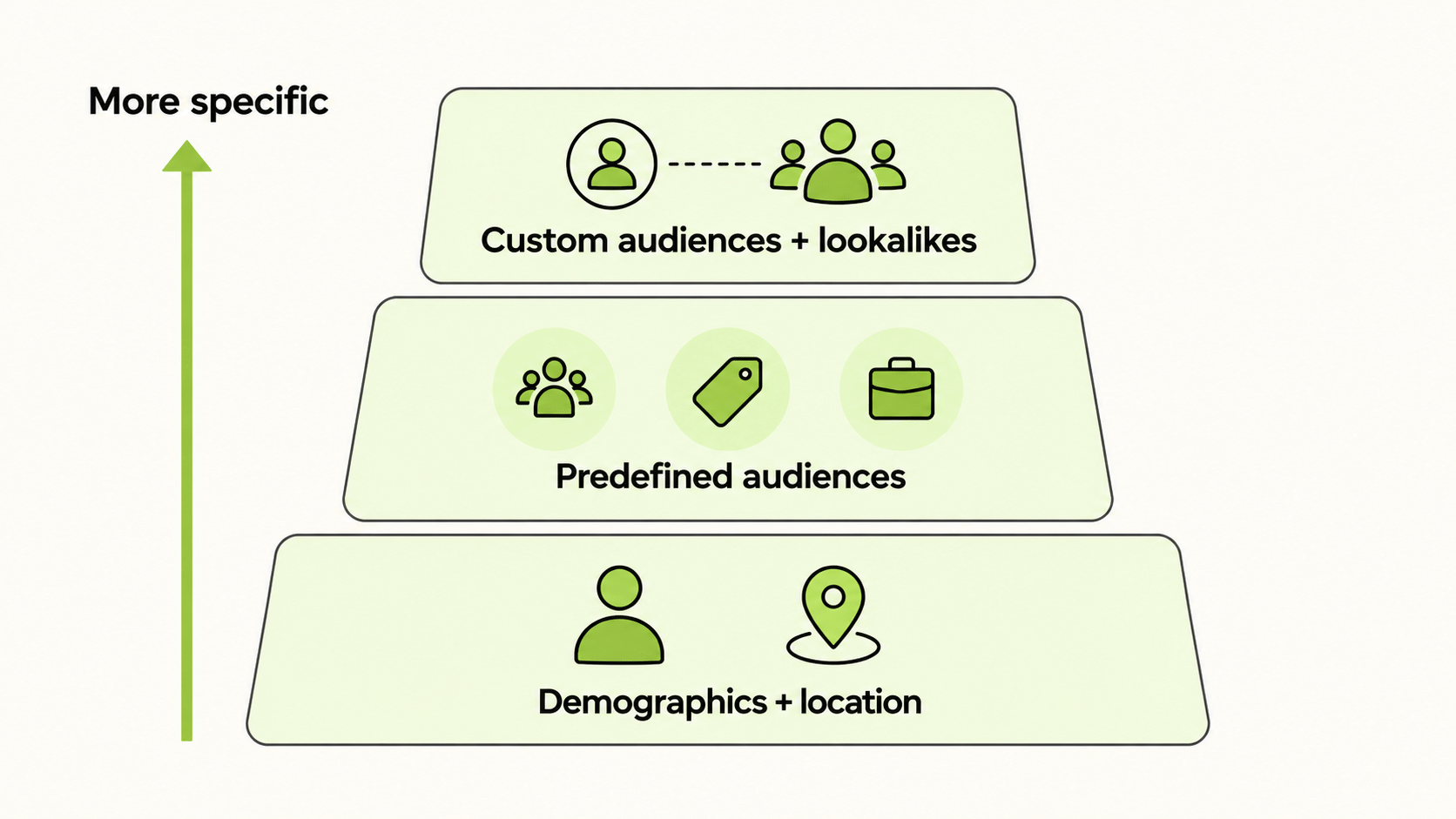
Open a fresh Snapchat ad set and you will see the broad controls first: age, location, language, and device. Interest groups sit on top of those. Once your account has customer lists, Pixel traffic, or app events, you can add custom audiences and build lookalikes. Keep the first test simple. Snapchat ads targeting gets hard to diagnose when several filters change at once. Audience Insights is useful here because it shows whether the Snapchat target audience you reached resembles the buyers in your own data.
What Is Snapchat Ads Targeting and How Does It Work?
Snapchat ads targeting is the set of controls in Snapchat Ads Manager that decide who can see your ads. You set it at the ad set level, alongside budget, schedule, and bid. The auction then looks for people inside your defined audience who are likely to take the action you optimise for.
Tighter targeting can look sensible on paper and still make a campaign worse. A small audience often costs more to reach and leaves the system little room to learn. Creative does some of the filtering too. A clear opening shown to a workable audience will usually beat a finely tuned audience paired with an ad people skip.
Because Snapchat updates its interface and options, treat any list of targeting settings as a map, and confirm the live options in Ads Manager before you plan a campaign around one.
What Are the Main Snapchat Ad Targeting Options?
| Layer | Examples | Best use |
|---|---|---|
| Demographics | Age, gender, language | Setting basic fit for the product |
| Location | Country, region, city, postal area | Local offers, regional rollouts |
| Device | iOS, Android | App campaigns, creative compatibility |
| Predefined audiences | Interest and behaviour groups, such as gamers, beauty fans, or crafters | Prospecting without data |
| Custom audiences | Customer lists, Snap Pixel visitors, app activity | Retargeting and suppression |
| Lookalike audiences | Users similar to a seed audience | Scaling from proven customers |
According to Snapchat’s business help pages, Snap Audience Match lets you build an audience from customer lists using email addresses, phone numbers, or mobile device IDs, and shows how many matched Snapchat users you reached. Lookalikes require a seed: a customer list, a Pixel audience, or a third-party audience must already exist before you can create one.
Who Is the Target Audience of Snapchat?
Snapchat is a camera-first messaging and content app, and its audience is commonly described as younger than that of older social platforms. That description is a starting point, not a plan. The target audience of Snapchat inside your category may look very different from the platform average, and your best customers may sit in a narrower slice than any general profile suggests.
Use Audience Insights, which Snapchat provides under the Analyze tab, to see device use, demographics, location, and interest categories for the audiences you are reaching. Compare that to your customer data. If your buyers are mainly in one age band and one region, start there. If the data is thin, begin with broad demographic settings and let results show you where to narrow.
How Do Predefined and Custom Audiences Differ?
Snapchat supplies its own interest and behaviour groups, so a new advertiser can test an audience without uploading a list. These groups are convenient, but they are broad. Your competitors can select exactly the same ones.
Custom audiences come from your own data. The three most common sources are:
- Customer lists uploaded through Snap Audience Match for retargeting or exclusion.
- People who viewed a product or added it to the cart, captured by the Snap Pixel.
- App activity, for re-engaging installers.
Custom audiences are usually the highest-intent group you can reach and the best seed for lookalikes. They also let you exclude recent buyers so you do not waste spend showing them acquisition ads.
How Do Snapchat Lookalike Audiences Work?
A lookalike audience finds users who resemble a seed audience. In Snapchat’s help documentation, you select a seed, choose one or more countries, and then pick a lookalike type. The types trade precision for scale:
| Type | What it gives you |
|---|---|
| Similarity | The smallest audience, closest to the seed |
| Balance | A middle option |
| Reach | The largest audience, with a looser match |
A reasonable approach is to start with Similarity or Balance, check delivery, and move toward Reach only when you need volume. Seed quality matters more than size: a list of recent, high-value customers makes a better seed than a list of everyone who ever signed up.
How Should You Plan Snapchat Ads Targeting for a New Account?
Use a staged plan for Snapchat ads targeting rather than building ten audiences on day one.
Stage one: broad prospecting. Set age and location based on your customer data, leave other settings open, and run two or three creatives. The goal is to learn what the platform delivers.
Stage two: add a predefined audience test. Duplicate the best ad set and add one interest group. Compare cost per result.
Stage three: build first-party audiences. Once the Pixel has collected enough events, create website visitor and customer-list audiences for remarketing and exclusion.
Stage four: lookalikes. Use your best custom audience as the seed and test Similarity against Balance.
Change one variable per test. If you change audience, creative, and bid together, you will not know what drove the result.
What Best Practices Apply to Snapchat Ads Targeting?
Keep audiences large enough to deliver; very small audiences struggle in an auction. Separate prospecting and remarketing so each can be judged on its own cost per result. Exclude existing customers from acquisition campaigns. Refresh customer lists on a schedule so seeds do not go stale. Respect privacy rules and platform policies when you upload data, and only use lists you are entitled to use.
Also remember that creative and targeting interact. If you target a narrow interest group, your creative should speak to that interest directly. If you target broadly, the first two seconds must do the filtering for you.
How Do You Track Snapchat Ads Targeting Across Platforms?
If Snapchat is one channel among several, comparing audience performance across platforms can be awkward. FabFunnel’s Multi Ad Account Reporting shows Snapchat results alongside Meta, TikTok, and NewsBreak, so you can see how the same offer performs on each. Snapchat is connected for reporting only: FabFunnel launches campaigns on Meta, TikTok, and NewsBreak, and reports on Snapchat and Google, so you build Snapchat audiences and campaigns in Snapchat Ads Manager. The columns shown follow each platform’s own metrics, so check them before relying on them for client reporting.
How Do You Test Snapchat Ads Targeting Without Wasting Budget?
Treat Snapchat ads targeting as a series of small experiments with a fixed budget per test. Pick one question, such as “does an interest audience beat broad delivery?”, give each ad set the same creative and the same daily budget, and run them in parallel for the same period. Because Snapchat describes a learning phase after launch, wait for it to pass before declaring a winner.
Decide the success metric first, and keep it consistent: cost per purchase, cost per lead, or cost per install. A test that reports three different metrics will let you pick whichever flatters your preferred audience. Record each test in a simple log with the audience, the date range, spend, and result, so that six months later you can see which Snapchat ads targeting choices held up.
What Do Snapchat Ads Targeting Reports Show?
Snapchat’s reporting typically lets you break results down by dimensions such as demographics and location (confirm the available breakdowns in Ads Manager), which lets you check whether your intended audience is the one actually converting. Look for mismatches: a campaign aimed at one age band that earns most of its conversions from another is telling you the original assumption was off.
Use these breakdowns to adjust, not to over-react. Small samples swing wildly, so wait for enough conversions in a segment before excluding it. When a segment clearly underperforms across several weeks, exclude it or move budget to a stronger ad set.
FAQs
What are the main Snapchat ads targeting options?
Demographics, location, device, predefined interest and behaviour audiences, custom audiences from your own data, and lookalike audiences.
What are Snapchat targeted ads?
They are ordinary Snapchat ads with delivery narrowed by settings such as location, interests, or a custom list. Without those choices, the platform has a much wider pool to work with.
What is the Snapchat target audience?
Snapchat skews younger than several older social platforms, but that broad profile can mislead you. Check Audience Insights against your actual buyers.
What is the target audience of Snapchat for ecommerce?
There is no single ecommerce audience. Product, price point, and country all change the answer. Use customer data first, then test predefined groups and lookalikes.
What are Snapchat ad targeting options for retargeting?
Use visitors captured by the Snap Pixel or match an uploaded customer list through Snap Audience Match.
Do lookalike audiences need a seed?
Yes. Build it from a customer list, a Pixel audience, or an eligible third-party audience.
Can FabFunnel target Snapchat audiences?
No. Snapchat is reporting-only in FabFunnel. Targeting is set in Snapchat Ads Manager.