Quick Answer
Facebook attribution determines which conversions get credited to which ad, based on an attribution window (how long after a click or view a conversion still counts) and an attribution model (how credit is split across touchpoints). The same campaign can show meaningfully different results depending on which window and model are applied — which is why comparing performance across time periods or platforms requires confirming the attribution settings are consistent, not just comparing the headline numbers.
Attribution facebook ads reporting shows isn’t a neutral, objective count of “what happened” — it’s a specific interpretation based on settings that can change what a campaign’s numbers look like without anything about the campaign itself changing. Understanding how the attribution window and model work is what lets you read those numbers correctly rather than at face value.
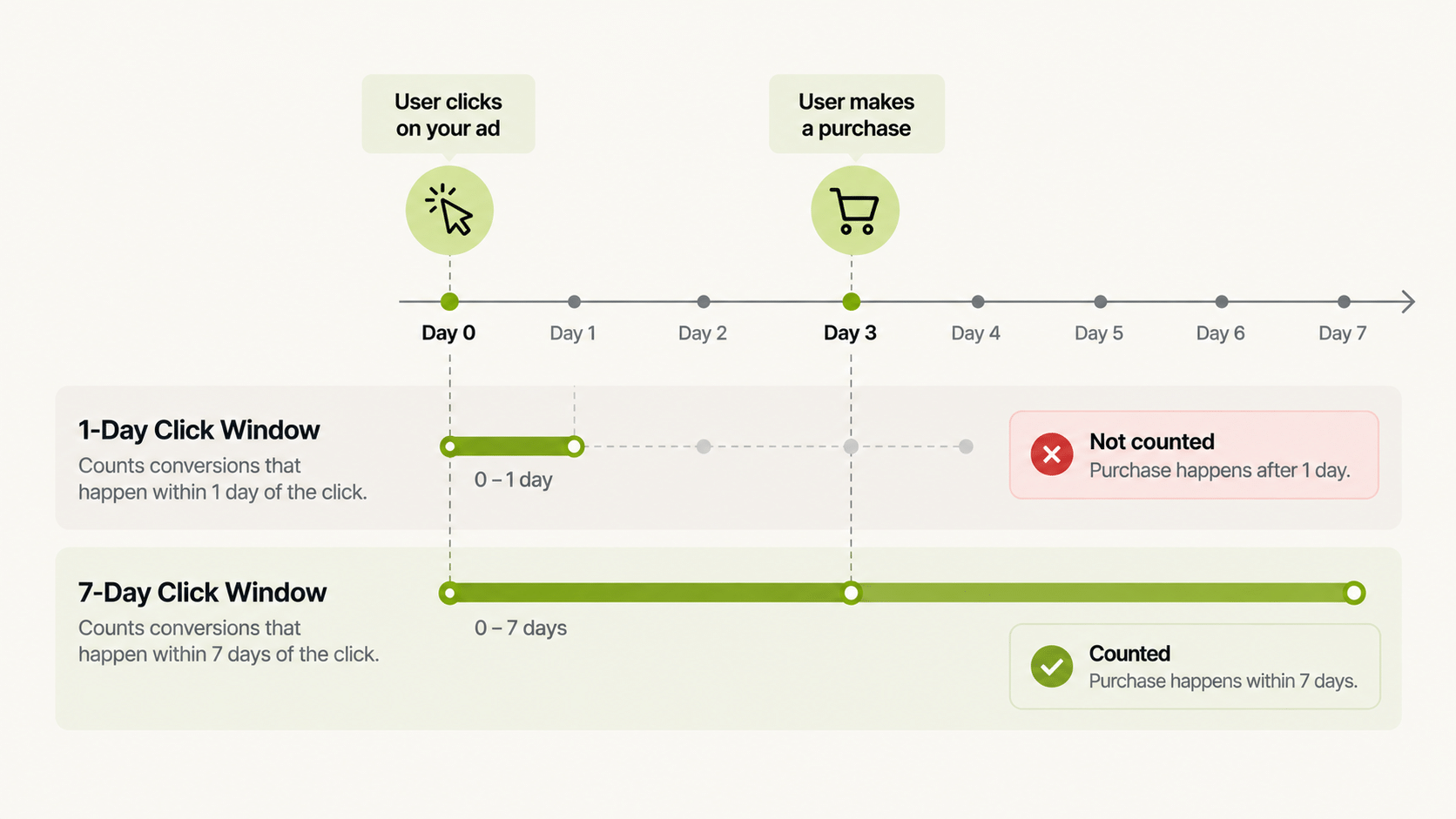
What Is a Facebook Attribution Window, and Why Does It Change Reported Results?
The attribution window sets how long after someone clicks or views an ad a resulting conversion still counts toward that ad. A 1-day click window counts fewer conversions than a 7-day click window, because it excludes anyone who converted more than a day after clicking. Neither window is “correct” — they measure different things, and the facebook attribution window you’re using directly shapes the CPA and ROAS numbers you see.
What Is a Facebook Attribution Tool Actually Measuring?
Any facebook attribution tool, whether Meta’s native reporting or a third-party layer on top of it, is applying a specific window and model to raw event data and presenting the result as “attributed conversions.” The tool isn’t determining ground truth about what caused a purchase — it’s applying a defined rule to available data, the same way an automation rule applies a defined condition to performance data.
Why Do Attribution Numbers Look Different When Comparing Facebook to Other Platforms?
Because different platforms often default to different attribution windows and models, and cross-platform comparisons that don’t account for this are comparing numbers measured differently, not just performance that differs. This is a common source of confusion when comparing Facebook ads attribution to another channel’s reported results without checking whether the underlying attribution settings match.
Attribution Windows Compared
| Window | What It Counts | Typical Effect on Reported Conversions |
|---|---|---|
| 1-day click | Conversions within 1 day of a click | Fewest conversions counted; most conservative |
| 7-day click | Conversions within 7 days of a click | More conversions counted than 1-day click |
| 1-day view | Conversions within 1 day of an impression, no click | Adds view-through conversions, often debated as overcounting |
| 7-day click, 1-day view (a common default) | Blend of the above | Middle-ground default many advertisers use |
How Does This Affect Decisions Made From Multi Ad Account Reporting?
Multi Ad Account Reporting keeps spend, ROAS, CPR, CPC, and CTR synced roughly every 15 minutes across Meta, TikTok, and NewsBreak. The reported ROAS and CPA numbers reflect whatever attribution settings are configured at the platform level — the reporting layer surfaces the data faster, but it doesn’t change what attribution model produced the underlying numbers. Confirming attribution settings stay consistent over time is what makes trend comparisons in that reporting meaningful.
Should You Change Your Attribution Window to Make Numbers Look Better?
No — changing the window to inflate reported conversions doesn’t change actual business results, and it makes future comparisons to past periods unreliable unless you track exactly when and why the setting changed. The window should reflect a genuine judgment about your typical purchase timeline, not a way to make a campaign look more efficient than it is.
How Do You Reconcile Facebook Attribution With Your Store or Tracker Data?
Expect a gap and plan for it. Platform-reported conversions and your own backend orders rarely match exactly, because they count different things over different windows. A repeatable reconciliation looks like this:
- Pick a reference source. Decide whether your store orders, your tracker, or the platform is the number you trust for money decisions.
- Match the date range and time zone. Mismatched dates are a common cause of apparent discrepancies.
- Compare totals weekly, not daily. Daily gaps are noisy because conversions land on different days in different systems.
- Track the ratio over time. If platform-reported conversions are consistently 1.2 times store orders, a sudden move to 1.5 is the thing to investigate.
- Log setting changes. Note the date you changed any window or model so a shift in the ratio has an explanation.
What Does FabFunnel Cover Here, and What Doesn’t It?
Be clear about scope. FabFunnel’s Multi Ad Account Reporting syncs spend, ROAS, CPR, CPC, and CTR as reported by the connected ad platforms. FabFunnel also lists integrations with Voluum and RedTrack, which are tracking tools. An attribution model or window selector of FabFunnel’s own is not described in its documentation, so treat attribution settings as something you configure and verify at the platform or tracker level.
What Are the Most Common Misreadings of Facebook Attribution Data?
- Comparing different windows as if they were the same. A 7-day click number and a 1-day click number are different measurements.
- Judging a campaign too early. If your customers typically convert days after clicking, yesterday’s numbers undercount.
- Treating view-through as proof. View-through conversions are part of attribution reporting, but they are the most debated, so look at them separately from click conversions.
- Ignoring other channels. Each platform counts its own touchpoints, and several can claim the same sale.
How Should You Document Your Facebook Attribution Settings?
Write them down once and keep them with your reporting. A one-page note should record the attribution window and model for each ad account, the date you last changed them, and who approved the change.
That note solves a surprisingly common problem. Someone changes a setting, results appear to jump, and nobody remembers why. With a record, you can line up the change date against the shift in your numbers and see whether performance moved or only the way it was measured.
Include two more items. First, list which reports use which settings, since a dashboard built on one window and a platform export built on another will never match. Second, record any known gaps, such as sales that happen offline or conversions the pixel is unlikely to see.
When you compare periods, compare like with like. If you changed your Facebook attribution settings in the middle of a quarter, split the quarter at the change date and report the two halves separately. That small discipline prevents false conclusions about what worked and keeps leadership conversations about Facebook attribution grounded in facts.
FAQs
What’s the difference between an attribution window and an attribution model?
The window is how long after an interaction a conversion still counts. The model is how credit gets split across multiple touchpoints if a person interacted with several ads before converting. They’re related but separate settings.
How do I know which facebook attribution window is right for my business?
Match it to your actual typical purchase timeline — a product with a long consideration cycle needs a longer window than an impulse purchase, though longer windows also make it harder to isolate a specific ad’s impact.
Does a facebook attribution tool tell me the “true” cause of a conversion?
No — it applies a defined rule to available data. It’s a consistent measurement approach, not a determination of actual causation, which is why comparing settings matters more than trusting the number at face value.
Why does attribution facebook ads reporting look different from Google Analytics for the same campaign?
Different platforms often use different default windows and models, and each platform can only see its own touchpoints clearly — cross-platform comparisons need matched settings to be meaningful.
Should I use view-through attribution or click-only?
This depends on what you’re trying to measure and how much weight you’re comfortable giving to ads someone saw but didn’t click. Click-only is more conservative; view-through captures more of the funnel but is more debated as a measurement choice.
How often should attribution settings be reviewed?
Whenever comparing performance across a long time span, or against another platform, confirm the settings haven’t changed and are comparable — this matters more than a fixed review schedule.
Where to Start
Understanding your Facebook attribution window and model is what makes the CPA and ROAS numbers in your reporting actually meaningful rather than just numbers. FabFunnel’s Multi Ad Account Reporting keeps that data synced roughly every 15 minutes across Meta, TikTok, and NewsBreak so you can track trends consistently once your attribution settings are set — start at FabFunnel or explore the full toolset at Fab AI.