Quick Answer
Facebook ads reporting means turning campaign data from Meta’s ad system into tables, charts, and scheduled files that people can act on. Meta provides Ads Manager for day-to-day views and Ads Reporting for custom reports with breakdowns, filters, sorting, visualisations, exports, and recurring email delivery. A separate Facebook ads reporting tool earns its place when you need to combine Meta with other platforms, share branded dashboards, or reconcile figures across accounts. Start with a short metric list, one report per audience, and a written rule for which number is the source of truth, because Meta’s counts will not match every other tool.
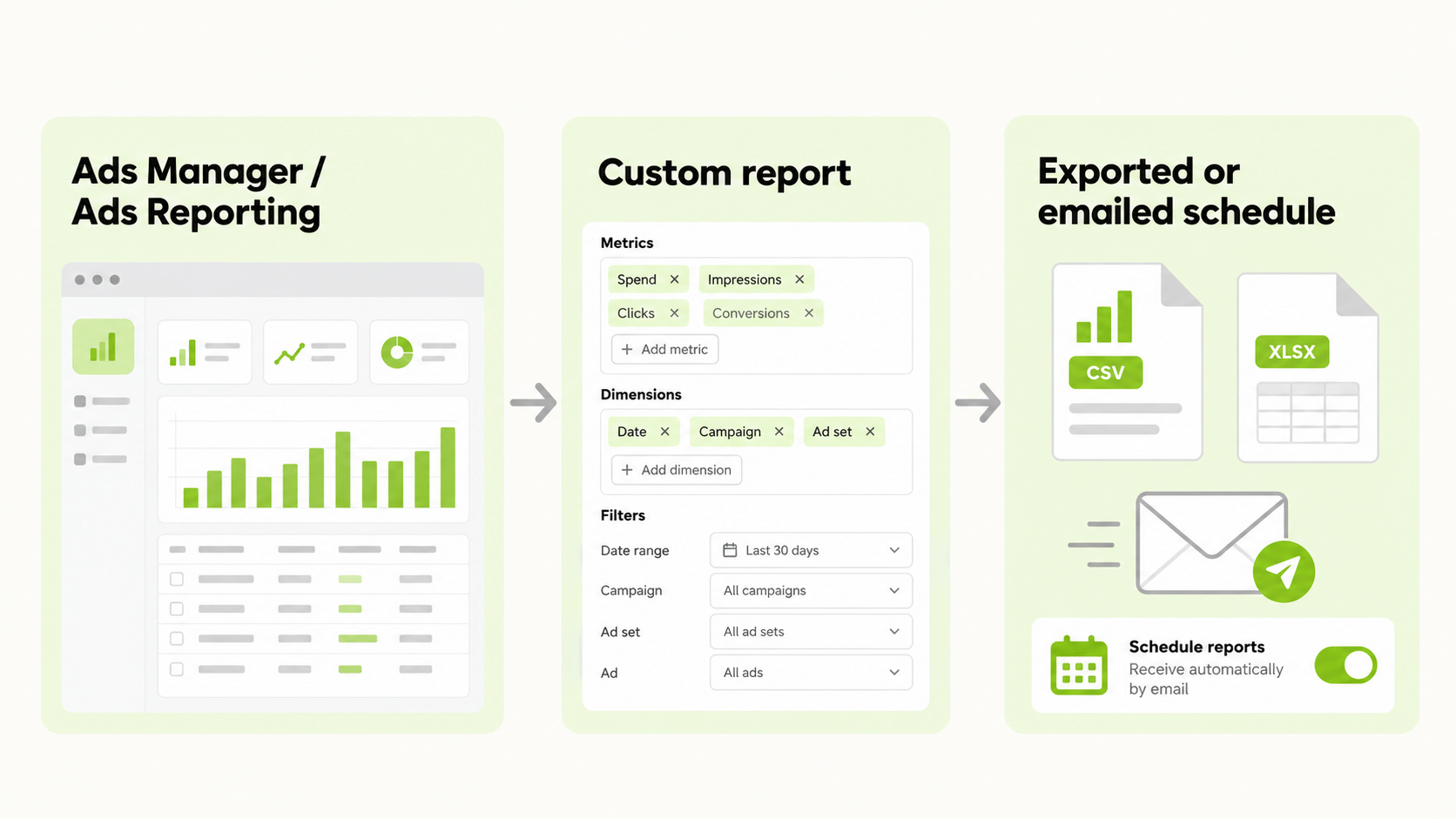
What Is Facebook Ads Reporting?
Facebook ads reporting is the process of extracting performance data from your Meta ad accounts and presenting it in a form that supports decisions. Despite the name, the same system covers Instagram and other Meta placements, so a report on a campaign usually includes all of them unless you filter by placement.
It serves three jobs. Monitoring is a quick daily check of spend and delivery. Analysis slices results by campaign, audience, placement, or creative to find what works. Communication packages the results for a client, manager, or finance team. Each job needs a different report, and trying to make one report do all three is why many reports go unread.
Where Do You Find Facebook Ads Reporting in Meta’s Tools?
There are two main places.
| Tool | Best for | Notes |
|---|---|---|
| Ads Manager | Daily monitoring and quick analysis | Columns, breakdowns, and filters on live campaigns |
| Ads Reporting | Custom reports and recurring delivery | Build from scratch or from templates, add visualisations, export or email |
According to Meta’s help pages, Ads Reporting lets you create a report from scratch or from a template, apply breakdowns, filters, and sorting, add visualisations, and share it with people on the ad account. Reports can be exported as XLSX, CSV, or PNG.
Which Metrics Should Facebook Ads Reporting Cover?
Choose metrics that connect spend to outcomes, and keep the front page short.
| Goal | Core metrics |
|---|---|
| Awareness | Reach, impressions, frequency, CPM |
| Traffic | Link clicks, CTR, cost per link click, landing page views |
| Leads | Leads, cost per lead |
| Sales | Purchases, purchase conversion value, cost per purchase, ROAS |
Add detail only when a question demands it. A metric that does not change a decision does not belong on the first page. Define each metric once, for example whether “clicks” means all clicks or link clicks, and use the same definition in every report.
How Do Breakdowns and Filters Work?
Breakdowns split a metric by a dimension. Meta groups them into categories such as level (campaign, ad set, ad), time, demographics (such as age and gender), and delivery (such as placement and device). Filters narrow the data to what you care about, and sorting puts the most important rows first.
Meta also allows custom breakdowns, which group accounts, campaigns, ad sets, and ads with custom filters, and you can keep them private or share them with your business. This helps when naming conventions let you group campaigns by product line or client.
A caution: some breakdowns cannot be combined, and splitting data too finely produces small numbers that swing from day to day. Wait for enough results before you act on a segment.
How Do You Schedule Facebook Ads Reporting?
Meta supports recurring reports sent by email. You open the report, turn on the scheduled email option from the link under the report title or from the report settings, choose recipients and frequency, and save. You need administrator, advertiser, or analyst access on the ad account.
Two limits matter. Scheduled email works for single-account reports only, because cross-account reports cannot be scheduled this way. And only people with permissions on the ad account can open a scheduled report, so for others you export the file and send it. If you manage several accounts, plan for either one scheduled report per account or a tool that combines them.
Why Do Facebook Ads Reporting Numbers Differ From Other Tools?
Meta explains that Ads Reporting counts events attributed to a Meta user who saw or clicked your ad, and deduplicates them. Actions that cannot be attributed to a person on Meta who saw your ad do not appear. That is one reason Meta’s numbers differ from your analytics tool, your store, or another platform.
Other causes include different attribution windows, different time zones, delayed conversion data, and differences between event counts in Ads Manager, Ads Reporting, and Events Manager, which Meta documents in a dedicated help article. The fix is a written reconciliation rule: name the source of truth, state the attribution window, and note the expected lag. Then use Meta’s figures as directional checks against your backend sales.
What Does a Good Facebook Ad Report Look Like?
An ad report on Facebook that people actually read follows a few rules.
- One audience per report. Executives want outcomes and cost per result. Operators want pacing, frequency, and creative detail.
- Five or six headline metrics at the top, with a comparison to the previous period.
- One chart per question, such as spend against results over time.
- A short note explaining what changed and what happens next.
- A consistent layout every week, so readers know where to look.
If the report needs a paragraph to explain each number, the metric list is too long.
When Do You Need a Facebook Ads Reporting Tool?
Meta’s native reporting is enough for a single account with one reader. A Facebook ads reporting tool becomes useful when at least one of these is true:
- You manage several ad accounts and want them in one view.
- You advertise on more than one platform and want one set of numbers.
- Stakeholders need a branded or simplified dashboard instead of account access.
- You need delivery that native scheduling cannot provide, such as cross-account reports.
The best Facebook ads reporting tool for you is the one that fits those needs without adding a manual step. Ask any vendor to show your own account data, check which metrics it reads and how fresh the data is, and confirm what it costs as accounts grow. Also confirm who owns the connection, because losing access to a connector can break reports.
How Does a Facebook Advertising Reporting Tool Fit a Multi-Platform Workflow?
Most advertisers use more than one platform, so a Facebook advertising reporting tool usually has to read other platforms too. FabFunnel’s Multi Ad Account Reporting shows Meta alongside TikTok and NewsBreak, with Google and Snapchat also connected for reporting, so you can compare spend and performance in one dashboard. FabFunnel also launches campaigns on Meta, TikTok, and NewsBreak. The columns shown follow each platform’s own metrics, so check them before you use the dashboard for client reporting.
For quick questions without building a view, FabFunnel’s Copilot answers questions about account performance in natural language. It recommends and explains; it does not change your account.
What Mistakes Should You Avoid?
Frequent errors include reporting every metric available, mixing definitions between reports, comparing Meta’s figures with backend sales without a rule, judging recent days before conversion data has settled, and sending operator-level detail to executives. Another is relying on a scheduled email nobody opens. Check that someone reads each report and acts on it.
FAQs
What is Facebook ads reporting?
It is the process and set of tools used to pull Meta ad performance data into tables, charts, and scheduled files for monitoring, analysis, and communication.
Where do I find Facebook ads reporting?
In Ads Manager for day-to-day views and in Ads Reporting for custom reports, exports, and scheduled emails.
Can I schedule an ad report on Facebook?
Yes, for single-account reports, by turning on scheduled email in the report. You need administrator, advertiser, or analyst access.
What is the best Facebook ads reporting tool?
It depends on your needs. Native reporting suits one account and one reader, while a tool helps with multiple accounts, platforms, or branded dashboards.
Why do Meta’s numbers differ from my analytics tool?
Attribution rules, windows, time zones, and deduplication differ between tools.
Can FabFunnel launch Meta campaigns?
Yes. FabFunnel launches campaigns on Meta, TikTok, and NewsBreak, and reports on Google and Snapchat.
Where to Start
Pick one audience, write down five metrics, and build one saved report in Ads Reporting. Run it for a month before you add a tool. If you also run TikTok or NewsBreak, or want Google and Snapchat alongside Meta, try the reporting at FabFunnel or explore the full toolset at Fab AI. Search phrases such as “fb ads reporting” and “ad report facebook” usually refer to the same Ads Manager reporting workflow described above.