Quick Answer
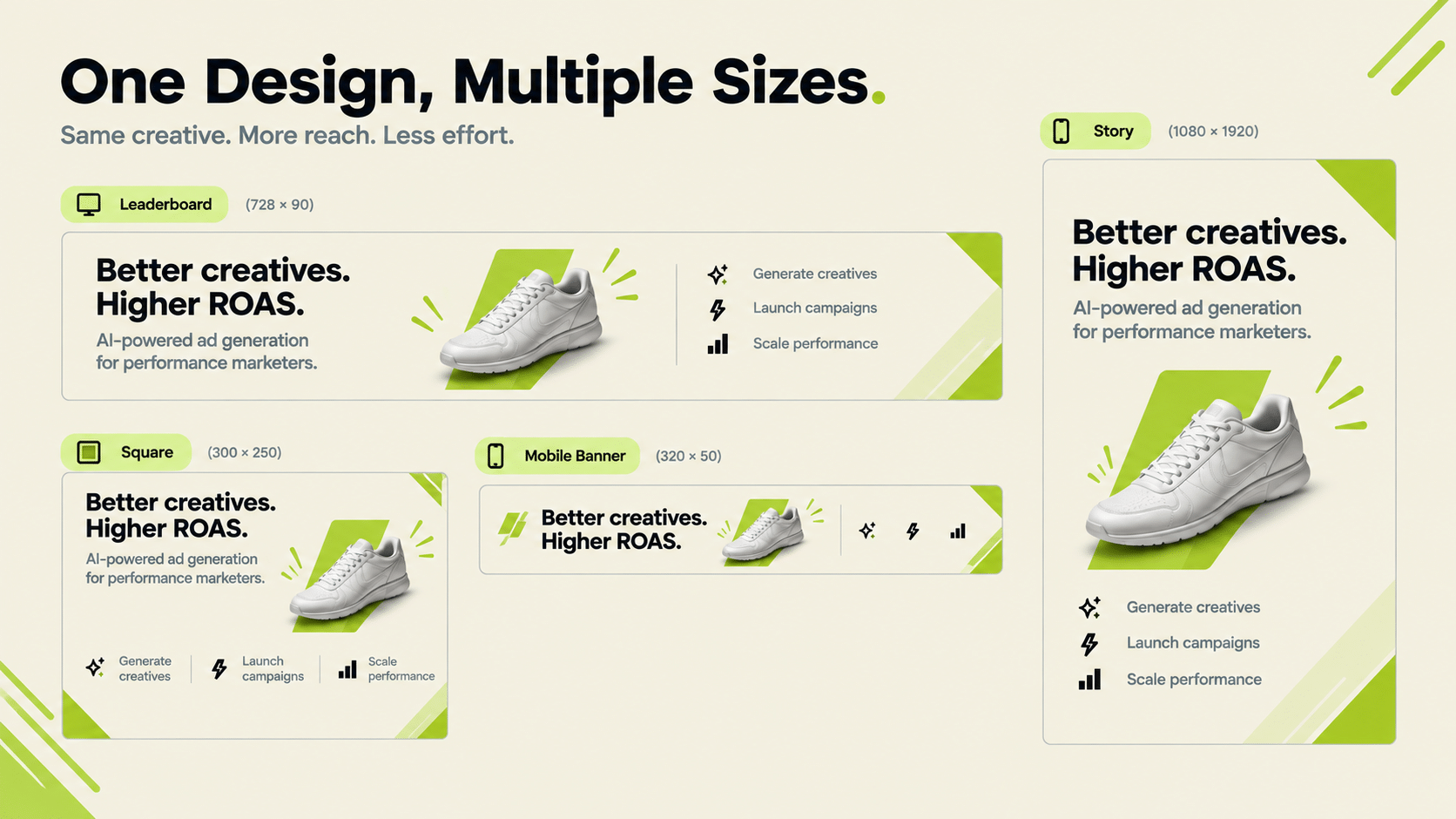
A banner ad generator needs to handle two things well: producing multiple standard display ad sizes from one design (rather than manually resizing each), and keeping brand elements (logo, colors, fonts) consistent across every size. A banner ad creator that only outputs one fixed size, or that requires manual resizing for each placement, adds rework rather than removing it. The multi-size requirement is what separates display advertising from single-format social ad creative.
Banner ad generator tools are built for one particular constraint: display advertising runs across many standard sizes (leaderboard, skyscraper, square, and others), and a design that works in one doesn’t automatically work in the rest without a tool built for that specific problem.
What Does Create Ad Banner Online Actually Require, Technically?
Producing the same core design (logo, product image, headline, CTA) correctly proportioned across several fixed display ad dimensions, without the layout breaking or key elements getting cropped at each size.
This is a more constrained problem than general ad creative, because display placements have fixed size requirements set by the ad networks running them. A square product shot has plenty of room for a headline, a logo, and a CTA. A thin leaderboard strip has room for maybe one line of text and a small image. A good banner ad generator reflows the layout for each shape rather than shrinking the square version until it is unreadable.
Three things tend to break first when a tool is not built for this:
- Text legibility. Headlines that fit at one size overflow or become tiny at another.
- Image cropping. The product ends up cut off or off-centre in narrow formats.
- CTA visibility. The button gets pushed out of frame or lost against the background.
What Should a Banner Ad Maker Online Get Right for Brand Consistency?
The same logo placement, color palette, and typography across every size variant. A banner ad maker online that lets each size drift stylistically undermines the point of having one generator handle all of them. Consistency across sizes is what makes a set of banners recognizable as one campaign rather than several unrelated ads.
In practice, this means brand rules should be set once and applied automatically, not rechecked by hand per size. If a tool has no concept of stored brand guidelines, someone has to review every output, and at ten sizes across twenty products that review becomes the real cost.
Best Software to Create Banner Ads: What to Evaluate
| Requirement | Why It Matters |
|---|---|
| Multiple standard display sizes from one design | Manual resizing per placement doesn’t scale |
| Consistent branding across sizes | A fragmented look across sizes weakens campaign recognition |
| Facebook ad banner design support specifically | Meta’s ad specs differ from generic display network specs |
| Export in formats the target ad network accepts | Avoids a manual conversion step before upload |
| Product data connection | Lets you generate banners per product without re-entering details |
When you shortlist the best software to create banner ads, ask each vendor for the exact list of sizes supported, not a general claim of “all standard sizes.” Compare that list against the placements your campaigns actually use.
Is Facebook Ad Banner Design the Same as Generic Display Banner Design?
Not quite. Facebook ad banner design follows Meta’s specific placement specs (feed, story, reels), which differ from the standard display network sizes (leaderboard, skyscraper, and similar) used across the broader web. A tool built for one doesn’t automatically produce correctly-sized output for the other.
The practical split: if your traffic comes from Meta placements, you need formats built for feed and vertical story viewing. If you are buying display inventory across the open web, you need the fixed IAB-style sizes. Many teams need both, which is why checking coverage up front matters.
Does FabFunnel Generate Banner Ads Specifically?
Partly, and the boundary matters.
Genie, FabFunnel’s creative studio, generates ad creative across four modes (Product Ad, Brand Ad, Product Shoot, and Performance Ad) for Meta, TikTok, and NewsBreak placements, working from your product catalogue. It produces both image and video ads, and you can select aspect ratio and resolution when configuring a creative. Brand guidelines are pulled automatically from the Catalogue, and Create Variations applies one approved concept across multiple products.
What is not confirmed: whether Genie outputs the fixed multi-size display network set (leaderboard, skyscraper, and similar standard display sizes) in one pass. Genie’s selectable aspect ratios cover social and feed placements. Google Ads is also not a supported platform in FabFunnel. If display network banners are your specific requirement, confirm coverage directly with FabFunnel before assuming it applies.
How Should You Test a Banner Ad Creator Before Committing?
Run one real campaign brief through it, not a demo asset. Use a product with a long name and a busy image, since that is where weak tools fail.
Then check the output against a short list: Is every size legible at actual display dimensions? Is the logo placed consistently? Does the CTA survive in the narrowest format? Can you export in the file type your ad network accepts? A banner ad creator that passes this on the first run is worth a longer trial; one that needs manual fixes in three sizes will cost more time than it saves. The same test applies to any ads banner maker: if the fixes take longer than resizing by hand, the tool isn’t helping.
What Sizes Should You Plan For Before You Start?
Don’t design in the abstract. List the placements you will actually run, then note the dimensions each one needs. For social feeds the common ratios are square and vertical. For display networks the standard sizes include leaderboard, medium rectangle, skyscraper, and mobile banner formats.
Write the list down and keep it next to your design tool. When you test a banner ad generator, request exactly that set and check each file. A generator that handles six of your eight sizes may still be useful, but you should know which two you will have to produce another way.
Also decide in advance who owns resizing exceptions. If a placement needs a one-off layout, assign it to a person rather than expecting the tool to improvise.
How Do You Choose a Banner Ad Generator for a Small Team?
Small teams need speed and fewer moving parts, and that is the real test of any banner ad generator. Before you compare features, list the placements you will actually buy and the number of products you will advertise. A banner ad generator that handles twelve sizes is no help if you only run three.
Check the learning curve honestly. Can someone with no design background produce a usable banner on day one? Can the same person apply brand colours and fonts without help? A banner ad generator that needs a designer to operate it has just moved the bottleneck.
Test the edges. Upload a product with a long name, a cluttered image, or an awkward aspect ratio, and see how the banner ad generator copes. Weak tools crop badly or shrink text until it is unreadable.
Finally, look at reuse. Can you save a layout and apply it to the next product? The best banner ad generator for a small team is the one that turns a good banner into a repeatable template, which also makes a banner ad generator easier to hand over to a new colleague, so the second hundred banners take a fraction of the effort of the first.
FAQs
What’s the difference between a banner ad generator and general ad creative tools?
A banner ad generator specifically handles the multi-size requirement of display network placements. The same design needs to work correctly across several fixed dimensions, which general social ad creative tools aren’t necessarily built to do.
Does ads banner maker software need to support every standard display size?
Ideally yes, or at minimum the sizes your specific ad network placements require. Check the exact size list before assuming broad coverage.
Is facebook ad banner design different from display network banner design?
Yes. Meta’s placements (feed, story, reels) have different specs than the standard display network sizes used across the broader web.
How do I create ad banner online content without a design background?
Tools built specifically for banner generation typically start from a template and auto-adjust proportions across sizes, reducing the design skill required, though brand consistency still needs a review step.
Does FabFunnel’s Genie generate multi-size display banners?
Genie generates creative for Meta, TikTok, and NewsBreak across four modes, in image and video. Coverage of the fixed multi-size display network banner format isn’t confirmed. Worth checking directly if that’s your specific need.
What’s the biggest mistake in choosing a banner ad maker online?
Assuming one tool covers both social feed ad specs and generic display network banner specs without confirming. These are related but distinct technical requirements.
Where to Start
List the exact placements and sizes your campaigns need, then check each banner ad generator against that list. For Meta, TikTok, and NewsBreak ad creative generated from your product catalogue, FabFunnel’s Genie covers four creative modes. Start at FabFunnel or explore the full toolset at Fab AI. For fixed multi-size display network banners specifically, confirm coverage directly before assuming it’s included.