Quick Answer
Automation takes the repetitive parts of ad management off a person’s daily checklist. That might mean building campaigns from a saved structure, swapping tired creative, pausing an ad after it crosses a spend limit, or preparing a recurring report. Some of this happens inside the ad platform, while other actions follow rules chosen by the advertiser. A useful test is simple: can the task be described clearly, checked afterwards, and reversed if necessary? If not, it probably still needs a person. Begin with one low-risk workflow, watch how it behaves, and adjust it before expanding the scope.
What Is Campaign Automation?
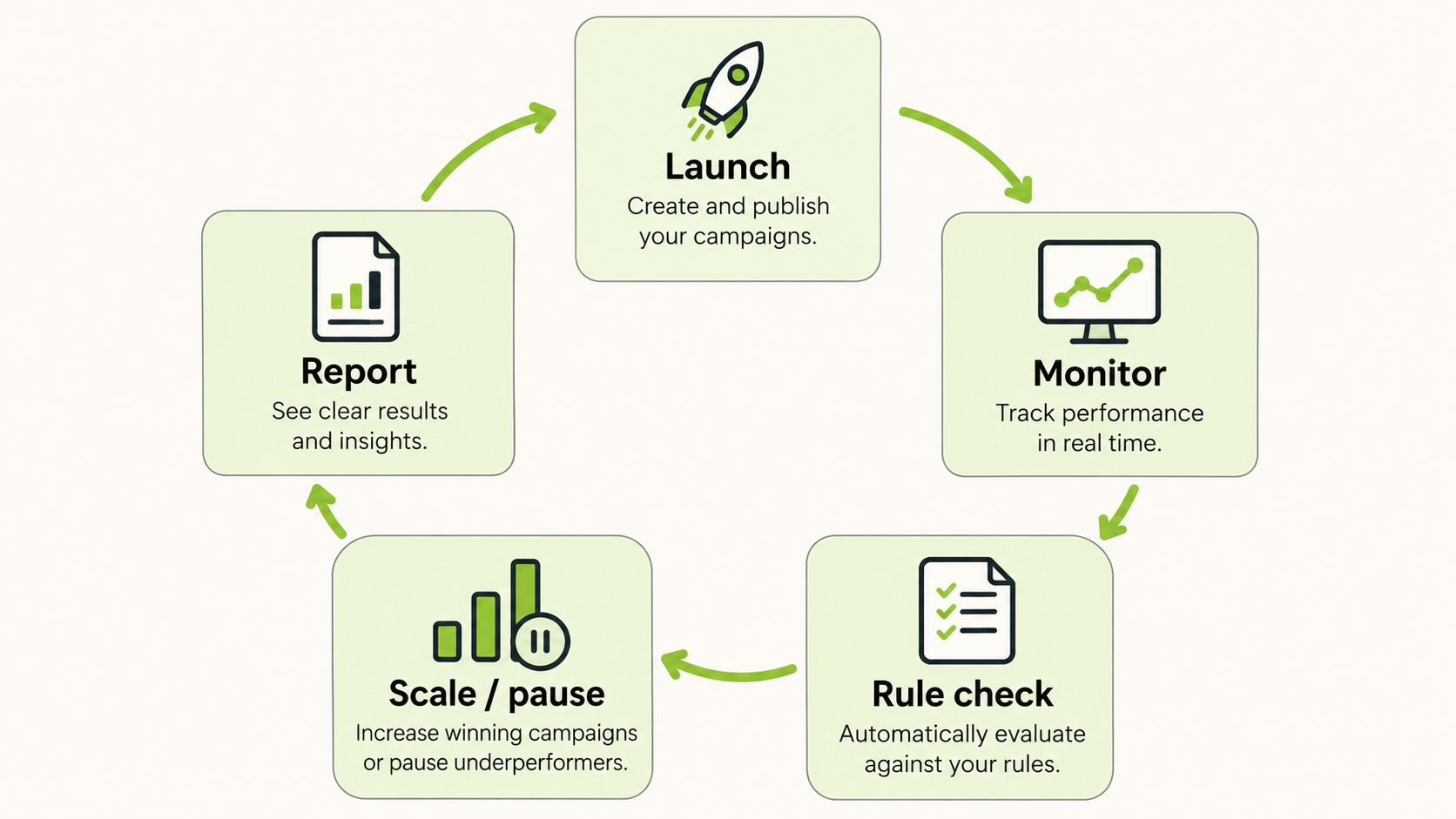
Campaign automation is the use of software to run parts of the advertising workflow on a schedule or in response to conditions. Instead of a person opening each account every morning to check spend and pause weak ads, a rule does it. Instead of building twenty similar campaigns by hand, a template builds them.
A marketing campaign workflow has stages: planning, creative production, setup, launch, monitoring, optimisation, and reporting. Automation can touch every stage, but it pays off most where work is repeated many times, where rules are clear, and where mistakes are visible quickly.
Which Parts of an Advertising Workflow Can You Automate?
| Stage | Manual version | Automated version |
|---|---|---|
| Setup and launch | Building each campaign and ad set by hand | Templates and bulk launch flows |
| Creative rotation | Swapping ads when they tire | Rules or scheduled relaunches |
| Monitoring | Checking accounts at set times | Rules that run all day |
| Optimisation | Pausing losers and raising budgets by hand | Rules that pause or scale on thresholds |
| Reporting | Copying numbers into decks | Scheduled and cross-platform reports |
Each row has the same trade-off: you gain speed and consistency, and you take on the risk that a badly designed rule repeats a mistake at scale.
What Is the Difference Between Platform and Rule-Based Automation?
Platform automation lives inside the ad network itself. Automated bidding is a familiar example: the advertiser provides the objective, budget, and conversion signals, then the platform decides how to bid from one auction to the next. Placement and audience decisions may also be handled this way. The trade-off is visibility. Advertisers give up some direct control, so clean tracking and a meaningful volume of data matter.
Rule-based automation starts with an instruction written by the team. For example, an ad could be paused after it spends beyond a chosen limit without producing a result. The logic is visible, which makes the action easier to audit. That does not make it foolproof. A vague threshold, a short data window, or a rule left running after the strategy changes can all create problems.
Most mature accounts use both: platform automation for bidding and delivery, and rules for housekeeping and guardrails.
What Are Practical Campaign Automation Use Cases?
Four use cases recur across advertisers.
- Bulk launch. Agencies and ecommerce brands often need many campaigns with the same structure across audiences, creatives, or accounts. A template or bulk launcher turns hours of setup into minutes.
- Winner and loser rules. Scale ads that meet your target and pause ads that waste spend, on a schedule that never sleeps.
- Creative refresh. Relaunch or clone proven structures with new creative when frequency rises.
- Reporting on a schedule. Deliver the same view to the same readers at the same time.
Pick the campaign automation use case with the clearest rule and the largest repeated workload.
How Does FabFunnel Fit Into Campaign Automation?
FabFunnel positions itself as campaign execution infrastructure. Its Bulk Launcher launches campaigns on Meta, TikTok, and NewsBreak, with a stated speed claim of 200+ campaigns in under two minutes once setup is done, and it offers five launch flows: New Launch, Relaunch, Clone, Creative Library Folder Launch, and launching from Genie. Automation is rule-based and works at campaign, ad set, and ad level, with the aim of scaling winners and pausing losers around the clock. Copilot answers questions about account performance and recommends actions; it does not make changes.
These boundaries matter. Launch and automation apply to Meta, TikTok, and NewsBreak. Google and Snapchat are connected for reporting only. This article does not describe specific rule conditions, so check the product for which triggers are available before you plan around any particular rule. Speed claims depend on your setup, so measure them on your own accounts.
How Do You Design Safe Automation Rules?
Rules act on money, so design them with care.
- Start with one rule and a small scope. Apply it to a single campaign before you roll it out.
- Use enough data. Rules that fire on tiny samples pause good ads and scale lucky ones.
- Add floors and ceilings. Cap how far a budget can rise and how many ads a rule can pause at once.
- Log every action. You should be able to see what the rule did and when.
- Name an owner. Someone reviews the rules each week.
- Test in a low-risk account first. Confirm that the rule behaves as you expect.
If a rule would be expensive to get wrong, keep a human approval step.
How Do You Measure Campaign Automation?
Do not judge the change by time saved alone. Record the work required before the change, then include the time spent checking logs and maintaining rules afterwards. Look at commercial results separately. Compare cost per result and spend efficiency with a sensible earlier period, while noting shifts in budget, promotions, and seasonality. A faster workflow is useful, but it is not a win if performance deteriorates.
Attribution needs restraint here. Better results after a new rule goes live do not prove that the rule caused them. Creative, pricing, demand, or budget may have changed at the same time. Review the actual ads affected by the rule. If it repeatedly stops campaigns that would have recovered with more data, the apparent efficiency may be misleading.
How Do You Choose Campaign Automation Tools?
Compare tools on the same questions.
| Question | Why it matters |
|---|---|
| Which platforms does it act on, and which does it only read? | Acting is different from reporting |
| What conditions and actions can rules use? | Defines what you can really automate |
| What safeguards and logs exist? | Protects against runaway rules |
| How does it handle approvals? | Controls risk |
| Who owns the platform connection? | Losing access can stop automation |
| What does it cost as accounts grow? | Pricing can climb with scale |
Ask for a trial on your own accounts, and read the platform’s documentation on what is supported today.
How Do You Roll Out Campaign Automation Across a Team?
Rollouts fail more often from process gaps than from software. Begin by writing the workflow as it is today, step by step, including who does each step and how long it takes. Mark the steps that are repeated, rule-shaped, and checkable. Those are your candidates.
Automate one step at a time. After each change, run the new process alongside the old for a short period, compare the outputs, and fix differences before you retire the manual version. Keep a simple change log so that anyone investigating a strange result can see what changed and when.
Train the people who will own the rules. They need to know what a rule does, how to pause it, and how to read its log. Agree a weekly review slot, and make it a habit to retire rules that no longer match your goals. Old rules written for last season’s targets are a common source of surprise.
Finally, tell stakeholders what automation will and will not do. It saves time and enforces consistency. It does not choose your offer, write your strategy, or guarantee better results.
What Campaign Automation Mistakes Should You Avoid?
Common mistakes include automating a broken process, writing rules without enough data, skipping logs, forgetting to review rules, and expecting automation to replace strategy. Another is treating a speed claim as a guarantee. Fix the process first, then automate it.
FAQs
What is campaign automation?
Campaign automation lets software handle repeatable advertising work. Typical examples include setting up launches, watching spend, applying pause or scale rules, and preparing routine reports.
What is the difference between automated campaigns and rule-based automation?
With an automated campaign, the ad platform makes delivery decisions within the settings you provide. A rule-based workflow instead carries out an action only when a condition chosen by your team is met.
What can advertising campaign automation do?
Advertising campaign automation can reduce repeated setup work, monitor agreed thresholds, update or pause campaigns under defined conditions, and prepare reports on a schedule.
Can FabFunnel automate Google or Snapchat campaigns?
No. In FabFunnel, campaign launch and automation are available for Meta, TikTok, and NewsBreak. The Google and Snapchat connections support reporting, not campaign changes.
Is campaign automation safe for budgets?
It can be, with small scope, enough data, caps, logs, an owner, and regular review.
How do I know automation is working?
Compare hours spent and cost per result against a period without it.