Quick Answer
Ad design tools that handle multiple creative sizes and formats well share three traits: catalogue connection (pulling actual product data rather than manual entry), platform-specific spec handling (feed, story, reels, or display each have different requirements), and consistent branding across every size variant. Ad design software that only outputs one format forces manual resizing for every other placement, which doesn’t scale as campaigns expand across platforms.
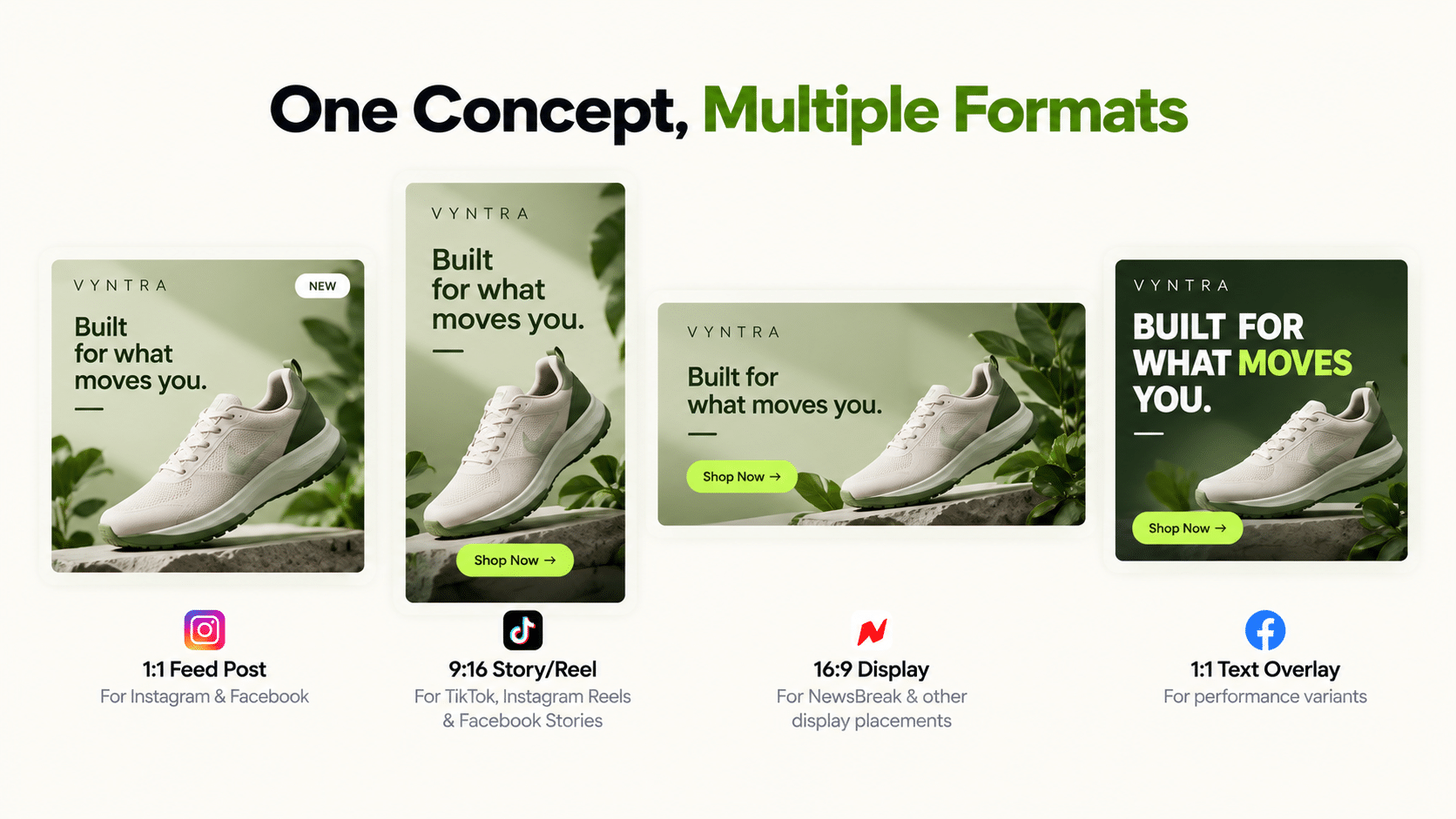
Online ad design increasingly means producing the same core creative across many sizes and platforms simultaneously, not designing one ad in isolation. This piece covers what separates tools built for that multi-format reality from single-format design tools.
Why Does Format Variety Matter More Than Single-Ad Polish?
Because a campaign running across Meta, TikTok, and other placements needs creative correctly sized and styled for each specific placement, not one polished ad resized generically. Ad design tools that generate format variety from one source concept save the repetitive manual resizing and re-cropping work that otherwise happens per placement.
The cost compounds quickly. Ten products, three placements, and two creative angles is already 60 assets. If each needs manual resizing and a brand check, the design queue becomes the campaign’s bottleneck, and testing slows to whatever the design team can produce that week.
What Should Best Facebook Ads Design Tools Get Right Specifically?
Meta’s specific placement specs (feed, story, reels) plus typical viewing behavior: often sound-off, and captions or text overlays matter even for static creative. Best facebook ads design tools that ignore placement-specific dimensions require manual adjustment after generation, undermining the point of using a design tool built for the platform.
Three checks when you test one:
- Safe zones. Story and reels placements overlay interface elements. Key text and logos should sit clear of them.
- Aspect ratios. Confirm the tool outputs the ratios you actually run, not just one.
- Text density. Overlay text should stay readable at phone size, not just on a desktop preview.
Ad Design Tools: What to Check Before Choosing One
| Requirement | Why It Matters |
|---|---|
| Catalogue/product data connection | Avoids manual re-entry of product details per design |
| Multiple format/size output from one concept | Reduces manual resizing across placements |
| Platform-specific spec handling | Meta, TikTok, and display each have different requirements |
| Brand consistency across formats | Prevents a fragmented look across a multi-format campaign |
| Variation at catalogue scale | One approved concept should apply across many products |
| Path to campaign launch | Avoids a manual export-and-upload step after design |
Is Best Google Ads Design the Same Category as Facebook Ads Design?
Not quite. “Best google ads design” most often refers to Google’s display network specs and formats, which differ from Meta’s feed, story, and reels placements. A tool built for one platform’s design specs doesn’t automatically produce correctly formatted output for the other without confirming coverage.
When you compare ad design software across both, ask for each platform’s exact supported sizes in writing. Vague claims such as “all major formats” tend to hide gaps in the less common sizes.
How Does Genie Handle Multiple Creative Formats?
Genie, FabFunnel’s creative studio, works in four steps: pick an ad mode (Product Ad, Brand Ad, Product Shoot, or Performance Ad), pick a format, pick an approach, then configure and generate. It produces both image and video ads. Aspect ratio and resolution are selectable, so you can set the output for the placement you are running.
It works from a Catalogue structured as Brand → Categories → Products, with Shopify auto-sync (manual upload for other setups) and brand guidelines pulled automatically. Create Variations applies one approved concept across multiple products. Generated creative can be stored in the Creative Library or launched straight into a campaign, and the Bulk Campaign Launcher handles launches at volume.
The boundary: Genie is built for Meta, TikTok, and NewsBreak. Whether it outputs the fixed multi-size display network set (leaderboard, skyscraper, and similar) in one pass isn’t confirmed, and Google Ads is not a supported FabFunnel platform. If Google display design coverage is a specific requirement, verify it directly.
How Do You Keep Brand Consistency Across Many Sizes?
Set brand rules once and let the tool apply them, rather than reviewing every file by hand. In FabFunnel, brand guidelines come from the Catalogue’s Brand setup and are applied automatically in Genie, and an account can hold multiple brands, which helps agencies and multi-brand advertisers keep each one separate.
Even with automation, spot-check. Pull a random sample of ten outputs across sizes each week and compare logo placement, colour, and tone. Drift tends to show up in the least-used formats first.
What Is a Practical Test for Multi-Format Ad Design Tools?
Take one product and one concept, then request every size and format you run. Open each output on a phone, not a monitor. Check that text is readable, the logo is in the same place, the product isn’t cropped, and the file type is accepted by the platform you’re uploading to.
Then repeat with a second, awkward product, such as one with a long name or a busy image. Most ad design tools look fine on the first test and fall apart on the second. Record how many outputs you’d ship without edits. That ratio, more than a feature list, shows whether online ad design at this scale will save your team time or just move the work.
How Should You Name and Store Multi-Size Creative?
When one concept becomes a dozen files, naming matters. Use a consistent pattern that includes product, concept, size, and version, for example the product name, concept label, and dimensions. Store files in folders by campaign or product line, and keep an approved subfolder separate from drafts.
This small discipline prevents the most common mistake in multi-format work: uploading the wrong size to a placement, which can lead to cropped, stretched, or unreadable ads. It also helps when you review results, because you can tell at a glance which variant produced which numbers.
How Often Should You Refresh Creative Across Formats?
Audiences tire of the same ad. A reasonable rhythm for most accounts is to review creative weekly and refresh the weakest performers every few weeks. Keep your best-performing concept running while you test new ones beside it, rather than replacing everything at once. If performance drops across all sizes together, the concept is probably tired. If one size lags, the issue is likely layout or placement.
What Should a Good Ad Design Tools Workflow Look Like End to End?
Think in stages: brief, generate, review, launch, learn. The best ad design tools support every stage without a manual handoff.
At the brief stage, the tool should know your products and brand rules already, so you are not retyping details. At the generate stage, it should produce the formats you actually run, from one concept. At review, someone checks product accuracy, text legibility, and brand fit against a short list. At launch, approved creative should reach campaigns without downloading and re-uploading. At learn, you should be able to see which variants performed and feed that back into the next brief.
Most teams using ad design tools discover that their weakest stage is review, not generation. Ad design tools can produce many options quickly, but a person still has to choose. Build a simple approval routine with clear owners and a deadline, or the queue of unreviewed creative grows faster than anyone can clear it.
Finally, measure the workflow, not only the output of your ad design tools. Track the time from brief to live ad, and the share of generated creative approved without edits. If both numbers improve after adopting new ad design tools, the switch is working.
FAQs
What’s the difference between ad design tools and ad design software?
No functional difference. Both describe the same category. What matters is whether a specific tool connects to your catalogue and handles multiple formats from one source concept.
Does online ad design always require designing for multiple platforms simultaneously?
Not always, but most active paid campaigns run across more than one placement, making multi-format output a practical requirement rather than a nice-to-have.
What’s the biggest risk in choosing ad design software without checking format coverage?
Ending up with a tool that only outputs one size or platform’s spec, requiring manual resizing and re-cropping for every other placement you actually run.
Do best facebook ads design tools also cover Google’s display network specs?
Not necessarily. These are distinct spec sets, and a tool strong on one doesn’t automatically cover the other. Confirm platform coverage directly.
What is the biggest time saver in ad design tools?
Generating several formats from one approved concept. Resizing and re-cropping by hand is the repetitive work that good ad design tools remove.
Does Genie generate creative for Google’s display network specifically?
This isn’t confirmed. Genie is built for Meta, TikTok, and NewsBreak, and Google Ads is not a supported platform. Verify directly if Google display network design coverage is a specific need.
How does Create Variations help with multi-format ad design at scale?
It applies one approved concept across multiple catalogue products automatically, which is the workflow needed when a campaign spans many SKUs across multiple formats.
Where to Start
Count your real assets: products times placements times angles, then check which ad design tools can produce that volume. If the number is above what your team can design manually each week, a catalogue-connected tool is worth testing. For catalogue-connected creative on Meta, TikTok, and NewsBreak, FabFunnel’s Genie generates from your product catalogue with Create Variations for scaling. Start at FabFunnel or explore the full toolset at Fab AI. For Google’s display network design specs specifically, confirm coverage directly before assuming it’s included.