Quick Answer
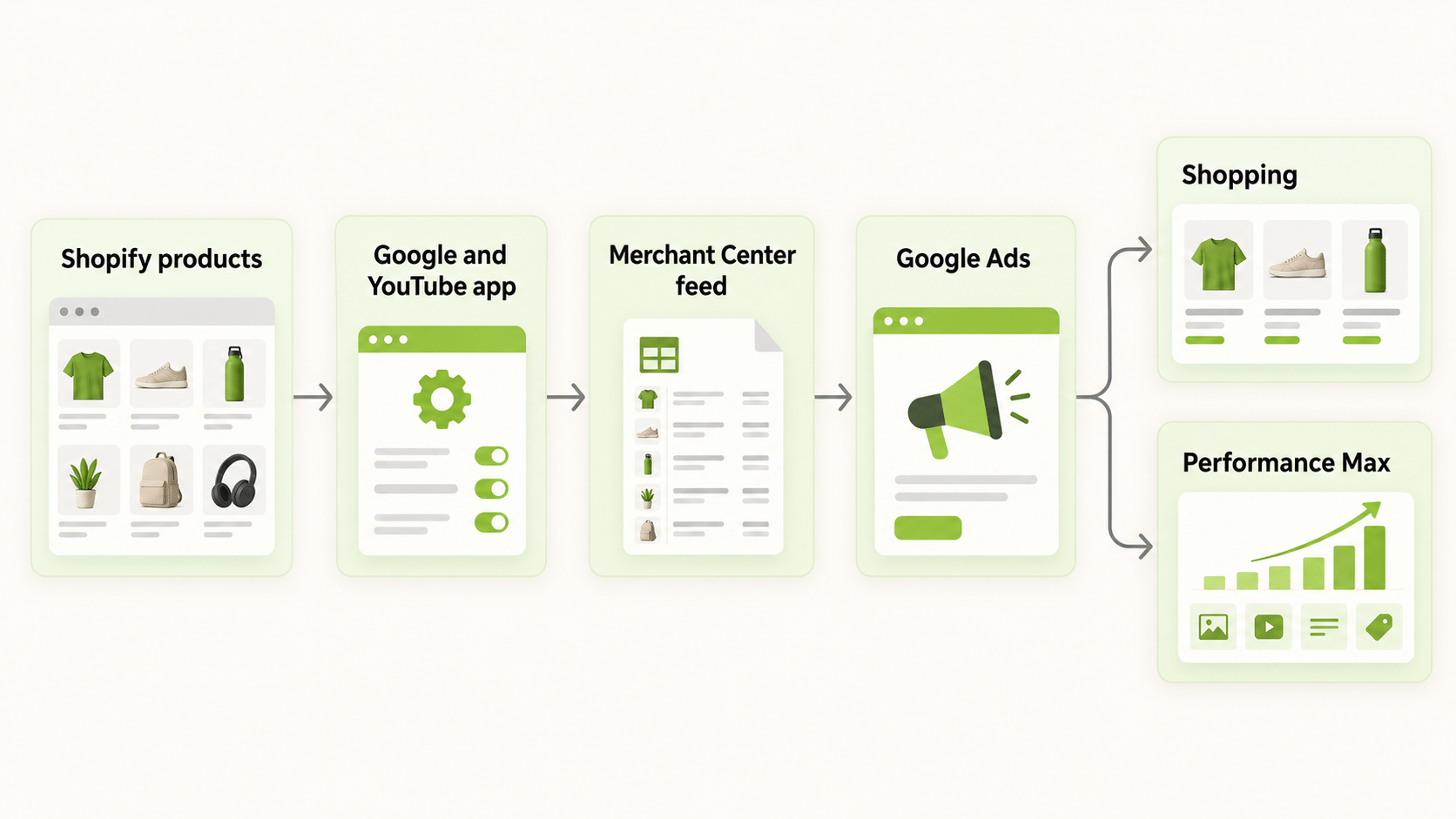
Google Ads for ecommerce runs on your product feed. Shopping ads and Performance Max both need an active feed in Google Merchant Center, and Google Ads reads that feed to build product listings. For a Shopify store, the usual route is to install the Google & YouTube app, link a Merchant Center account, connect Google Ads, and then create campaigns. Expect a review period after the first product sync, and fix product identifiers and policy issues before you spend. Costs are auction-based and vary by category, so size your test budget from your own margin and target cost per sale, not from a blog average.
How Does Google Ads for Ecommerce Work?
Google Ads for ecommerce differs from lead-generation accounts in one key way: the ads are built from product data, not only from text you write. Each product in your feed carries a title, image, price, availability, and identifiers. Google uses that data to show your products to people searching for them, and, for some campaign types, across other Google surfaces.
The result is that the quality of your feed is the quality of your account. A product with a weak title, a wrong price, or missing identifiers will struggle to show, however much budget you add. Many ecommerce accounts improve results more by fixing the feed than by changing bids.
What Are Google Shopping Ads for Ecommerce?
Google shopping ads for ecommerce show product listings with an image, title, price, and store name. They are driven by your Merchant Center feed, so you do not write individual ads. Shoppers see the product directly and click through to your product page.
Two campaign types matter most in Google Ads for ecommerce.
| Campaign type | How it works | Best for |
|---|---|---|
| Shopping campaigns | Product listings built from your feed, with your bids by product group | Control over product-level bidding |
| Performance Max | Uses your feed, assets, and budget to serve across Google channels, including Search, YouTube, Display, Discover, Gmail, and Maps | Broad reach with automated optimisation |
According to Google’s help pages, Performance Max uses your budget, product feed, and available countries to decide where and how your ads run, and feeds are optional: without one, the campaign builds ads from the assets you upload. Using a feed requires a linked Merchant Center account and an eligible goal such as Sales.
How Do You Connect Shopify to Google Ads for Ecommerce?
Google and Shopify document a setup order that works for most stores.
- Install the Google & YouTube app on your Shopify store.
- Link a Google Merchant Center account. Domain verification and account type rules apply, and multi-client accounts cannot connect directly to Shopify.
- Connect Google Ads. The Google account you use needs admin rights on the Ads account, and valid billing information must be entered for campaigns to run.
- Sync your products, and wait for Google’s review. Google states that new products are reviewed within three to five business days after the first sync.
- Create a campaign from the Performance Max module in the app or from Merchant Center.
This is the route to connect Shopify to Google Ads without a manual feed upload. Two cautions apply. Shopify is treated as the source of truth, so edits belong in Shopify, and changing settings directly in Merchant Center can break the sync. And if you disconnect Google Ads later, active Performance Max campaigns keep running, but new product and conversion data stop flowing to them.
What Does Google Ads for a Shopify Store Require?
For Google Ads for a Shopify store to work, a few product requirements must be met.
- Product identifiers. Most products need a Google product category and unique identifiers. Products without a GTIN need an MPN and a brand. Apparel, media, and books have extra requirements.
- English product options. Product options and variants need to be in English to sync.
- Fresh data. Google applies a 30-day expiry to synced product data, so the app refreshes products within that window.
- Policy compliance. Products must follow Google’s Shopping policies. Violations and account warnings can stop products from showing.
Check the Diagnostics area in Merchant Center before launch. A feed with errors can leave you paying for a campaign that shows few or none of your products.
How Do You Structure a Google Ads for Ecommerce Account?
Keep the first structure of a Google Ads for ecommerce account simple. One Shopping or Performance Max campaign for your best-selling products, with a budget that can produce enough conversions to learn from, is better than five campaigns each getting a trickle.
Group products by margin or category so that you can set different targets. A product with a thin margin cannot support the same cost per sale as one with a fat margin. Use your feed’s custom labels, where available, to segment products by margin, season, or best-seller status, then review performance by group rather than only at account level.
Add conversion tracking before you scale Google Ads for ecommerce spend. Without purchase tracking, automated bidding has nothing to optimise towards.
How Much Should You Budget for Google Ads for Ecommerce?
There is no standard budget. Costs depend on your category, your prices, your competition, and your feed quality. Work backwards: decide your target cost per sale from your margin, estimate how many sales you need to learn from, and multiply.
For example, if you can afford a certain cost per sale and want a number of sales in a test, your minimum test budget is the product of the two. If that figure is out of reach, narrow the scope to your best products or a single country rather than spreading a small budget thin. Third-party benchmark averages vary by source and year, so use them only as a sense check.
How Do You Measure Google Ads for Ecommerce?
Track revenue, cost, and the ratio between them. For ecommerce, the usual measures are conversion value, cost per sale, and return on ad spend. Compare them against your margin, not only against a target ratio, because a high ratio on a low-margin product can still lose money.
Remember that Google Ads and your store platform will not agree exactly. Google reports conversions on the click date by default, conversion data can lag, and your store counts refunds and cancellations differently. Pick a source of truth and note the expected differences.
How Do You Compare Google Ads for Ecommerce With Other Channels?
Most ecommerce brands advertise on more than Google. FabFunnel’s Multi Ad Account Reporting shows Google alongside Meta, TikTok, and NewsBreak, with Snapchat also connected for reporting, so you can read spend and results in one dashboard. Be clear about the boundary: Google is connected for reporting only. FabFunnel launches campaigns on Meta, TikTok, and NewsBreak, so you set up Shopping and Performance Max campaigns in Google Ads itself. The columns follow each platform’s own metrics, so check them before you use the dashboard for client reporting.
What Mistakes Hurt Google Ads for Ecommerce Accounts?
Common errors include launching with feed errors, editing the feed in two places, spending before purchase tracking works, judging results in the first days while Google is still reviewing products, and putting every product into one campaign regardless of margin. Another is expecting automated campaigns to rescue weak product pages: the page still has to convince the shopper.
FAQs
How do I set up Google Ads for ecommerce?
Build a product feed in Google Merchant Center, link it to Google Ads, set up conversion tracking, and create a Shopping or Performance Max campaign.
How do I connect Shopify to Google Ads?
Install the Google & YouTube app, link a Merchant Center account, connect Google Ads, sync your products, and then create a campaign.
Do I need a product feed for Performance Max?
Feeds are optional, but ecommerce accounts usually use one. Without a feed, the campaign builds ads from uploaded assets.
How long does Google take to review Shopify products?
Google states new products are reviewed within three to five business days after the first sync.
Can FabFunnel launch Google Shopping campaigns?
No. FabFunnel launches on Meta, TikTok, and NewsBreak. Google is connected for reporting only.
What should I fix first in Google Ads for ecommerce if products do not show?
Check Merchant Center diagnostics for missing identifiers, policy issues, and feed errors.
Where to Start
Fix your feed errors, set up purchase tracking, and launch one campaign for your best products with a budget sized from your margin. To read Google results next to your other channels, try FabFunnel or explore the full toolset at Fab AI. If you are evaluating Google Ads for Shopify store promotion, confirm the product feed and purchase tracking first. Google Shopping for ecommerce works only as well as the catalogue data behind it.