Quick Answer
Google Ads reporting means pulling performance data (cost, clicks, CTR, CPC, conversions) out of your account into tables, charts, and scheduled files that people can act on. Google gives you predefined reports, a Report editor for custom views, scheduling, and downloads. A separate reporting tool only earns its place when you need to combine Google data with other platforms, share branded dashboards, or automate delivery at scale. Most teams get further by fixing the basics first: a short list of metrics, one report per audience, and a clear rule for which number is the source of truth.
What Is Google Ads Reporting and What Does It Cover?
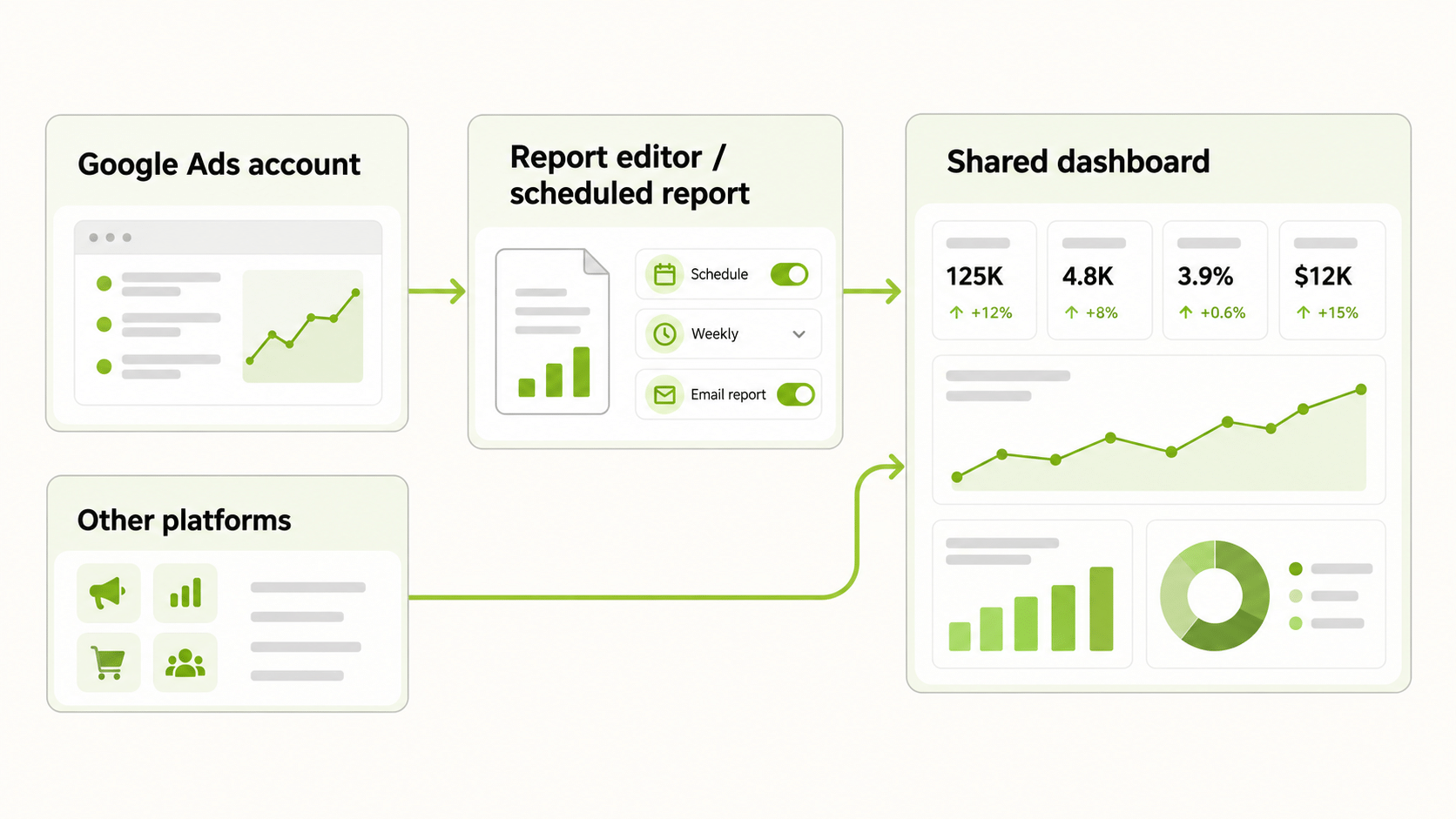
Google Ads reporting is the set of features that turn raw account data into something you can review. According to Google Ads Help, you can open predefined reports as a starting point, build your own in the Report editor, schedule them to be emailed, and download them in formats such as CSV and XML. Statistics tables on the Campaigns screen can also be saved and scheduled.
In practice, it covers three jobs. The first is monitoring: a daily or weekly look at spend and results to catch problems early. The second is analysis: slicing data by campaign, ad group, keyword, device, or audience to find what is working. The third is communication: producing a clean summary for a client, a manager, or a finance team that does not live inside the account.
Each job needs a different report. A monitoring view is small and fast. An analysis view is wide and filterable. A communication view is short, readable, and tied to business goals. Trying to make one report do all three is the most common reason reporting turns into a pile of unread exports.
Which Metrics Should Google Ads Reporting Track?
Start with the metrics that connect spend to outcomes, then add detail only when a question demands it. A commonly used core set includes cost, impressions, clicks, click-through rate, cost per click, conversions, conversion value, cost per conversion, and conversion rate.
| Metric | What it tells you | Watch out for |
|---|---|---|
| Cost | What you spent in the period | Compare against budget pacing, not only totals |
| Clicks and CTR | Whether the ad earns attention | High CTR with low conversions points to a landing page or intent problem |
| CPC | What each visit costs | Averages hide expensive keywords |
| Conversions | Actions you defined as valuable | Depends on conversion tracking being correct |
| Conversion value | Revenue or value attached to conversions | Needs consistent value settings |
| Cost per conversion | Efficiency of the account | Recent days can look worse because of reporting lag |
| Conversion rate | Share of clicks that convert | Compare like for like across campaigns |
Keep the first page of any report view to five or six of these. If a metric does not change a decision, it does not belong on the front page.
How Do You Build a Custom Report in the Google Ads Report Editor?
Google’s documented path is straightforward. In your account, go to Campaigns, then Insights and reports, then Report editor. Choose Custom and pick a table or chart type. Drag the dimensions and metrics you want onto the canvas, then select Save or Save as to keep the report.
A few habits make custom Google Ads reporting more useful:
- Name reports by audience and purpose, for example “Weekly spend and conversions, client A”, so nobody has to guess what a report is for.
- Save from a predefined report when you can. Google notes that predefined reports are meant as a starting point you can edit, schedule, and share, and your column changes are kept only if you save.
- Schedule from the Report editor. Pick recipients, frequency such as daily or weekly, and a file format. People with access to the account receive it by email.
- Freeze the date logic. Decide whether the report uses a rolling window or fixed calendar periods, and stick to it so week-on-week comparisons stay honest.
The Google Ads add-on for Google Sheets is another native route. It can refresh a scheduled report in a sheet automatically, which suits teams that already work in spreadsheets.
What Is a Google Ads Reporting Tool and When Do You Need One?
A Google Ads reporting tool is any product that reads your account data through a connector and presents it outside the Google Ads interface. Examples range from Looker Studio templates and spreadsheet connectors to dedicated dashboard products and agency reporting software.
You usually need one when at least one of these is true:
- You manage several Google Ads accounts and want them in one view.
- You run campaigns on more than one platform and want a single set of numbers.
- Stakeholders need a branded or simplified dashboard instead of account access.
- You want reports delivered automatically in a format the native schedule does not offer.
You usually do not need one if you run a single account, report to one person, and are comfortable in the Report editor. Many third-party templates also require authorising a connector, so factor in setup and who owns the connection.
Google Ads Reporting Platform: What to Compare Before You Choose
When you compare platforms, judge each on how it will behave in month six, not in a demo. Use this checklist.
| Question | Why it matters |
|---|---|
| Which platforms does it read, and in which direction? | Reading data is different from managing campaigns |
| How fresh is the data? | Daily pacing needs current numbers; monthly reviews do not |
| Can you control metric definitions? | Avoids arguments about which conversions count |
| Who can see what? | Client and team permissions prevent accidental sharing |
| What does it cost as accounts grow? | Per-account pricing can climb quickly |
| Can you export the underlying data? | Protects you if you switch tools |
Ask each vendor to show your own account data in the tool, not a sample. A platform that looks clean on demo data can struggle with real accounts that have many campaigns, mixed conversion actions, and years of history.
Why Do Google Ads Reporting Issues Happen?
Most Google Ads reporting issues are not bugs. They are differences in how data is counted. Google’s documentation points to several repeat causes.
- Date basis. By default, Google Ads reports a conversion on the date of the click, while analytics tools often report it on the date the conversion happened. Adding the “by conv. time” columns lets you line the two views up.
- Processing lag. Google states that conversion data is generally available within about three hours under last-click attribution and within about fifteen hours under other attribution models. Recent days can look temporarily low, so avoid judging yesterday too harshly.
- Conversion windows and attribution models. A conversion that happens after the conversion window closes is not recorded. Different attribution models also assign credit differently, so the same sale can appear in different places in different tools.
- Invalid traffic and view-through conversions. Counts can change after the fact when invalid traffic is removed, and view-through conversions are not part of the default conversions column.
- Offline conversion imports. Attribution reports and standard columns can treat uploaded offline conversions differently, which can make two views disagree even inside Google Ads.
The fix for these issues is a written reconciliation rule: name the source of truth, name the date basis, and note the expected lag. Then when two numbers differ, you can explain why in one sentence.
How Often Should You Review Google Ads Reporting?
Match the rhythm to the decision. Daily checks suit spend pacing and obvious breakages such as a campaign that stopped delivering. Weekly reviews suit optimisation: search terms, bids, creative, and landing pages. Monthly reviews suit planning and stakeholder communication.
Two audience rules help. Executive reports should lead with business outcomes such as revenue, return on ad spend, and cost per acquisition. Operator reports should carry the granular numbers, such as budget pacing, impression share, and cost per conversion by campaign. Sending the operator version to executives is why good accounts get ignored.
How Does Google Ads Reporting Fit a Multi-Platform Workflow?
Few advertisers run Google alone. If you also advertise on Meta, TikTok, or NewsBreak, Google becomes one slice of a bigger picture, and the real problem is comparing numbers across platforms that name and count things differently.
FabFunnel handles part of that. Its Multi Ad Account Reporting brings Google data into the same dashboard as your Meta, TikTok, and NewsBreak accounts, so you can review them side by side. Be precise about the boundary: Google is connected for reporting only. FabFunnel launches campaigns on Meta, TikTok, and NewsBreak, and reports on Google and Snapchat, so campaign creation and bulk launch are not available for Google. The columns you see for each platform follow that platform’s own metrics, so check them against your needs before relying on the dashboard for client work.
For teams that want a quick answer without building a view, Copilot, FabFunnel’s account assistant, answers questions about account performance in natural language and can produce simple charts. It recommends and explains; it does not change your Google account.
FAQs
What is Google Ads reporting?
It is the process and set of features used to extract Google Ads performance data into tables, charts, and scheduled files for monitoring, analysis, and communication.
How do I create a custom Google Ads report?
Go to Campaigns, then Insights and reports, then Report editor. Choose Custom, drag the dimensions and metrics you need onto the canvas, and save the report.
Can reports be scheduled?
Yes. From the Report editor you can schedule a report to be emailed on a recurring basis in a chosen file format.
Do I need a Google Ads reporting tool?
Not always. If you run a single account and report to one person, native reports are usually enough. A tool becomes useful for multiple accounts, multiple platforms, or branded client dashboards.
What should a Google Ads reporting platform include?
Clear data freshness, control over metric definitions, access permissions, export options, and pricing that does not jump as accounts grow.
Why do my Google Ads numbers differ from my analytics tool?
Common causes are click-date versus conversion-date reporting, conversion windows, attribution models, processing lag, and removed invalid traffic. These Google Ads reporting issues are explained in Google’s help documentation on data discrepancies.
Can FabFunnel launch Google Ads campaigns?
No. FabFunnel launches on Meta, TikTok, and NewsBreak. Google is connected for reporting only.
Where to Start
Pick one audience, write down five metrics, and build a single saved report for them in the Report editor. Run it for a month before you add a Google Ads reporting tool. If you also run Meta, TikTok, or NewsBreak and want those accounts and Google in one dashboard, try FabFunnel’s reporting at FabFunnel or explore the full toolset at Fab AI.