Quick Answer
Google Ads reporting covers the predefined reports, Report editor, scheduled emails, and downloads inside Google Ads, plus outside options such as Looker Studio templates and third-party reporting software. For a performance report, start from a predefined report or a template, keep five or six metrics on the first page, and schedule it to the people who need it. Use outside tools when you need to combine several accounts or platforms, add branding, or automate delivery at scale. Whatever you choose, write down which number is the source of truth, because Google Ads reports conversions by click date by default and your analytics tool may not.
What Are Your Options for Google Ads Reporting?
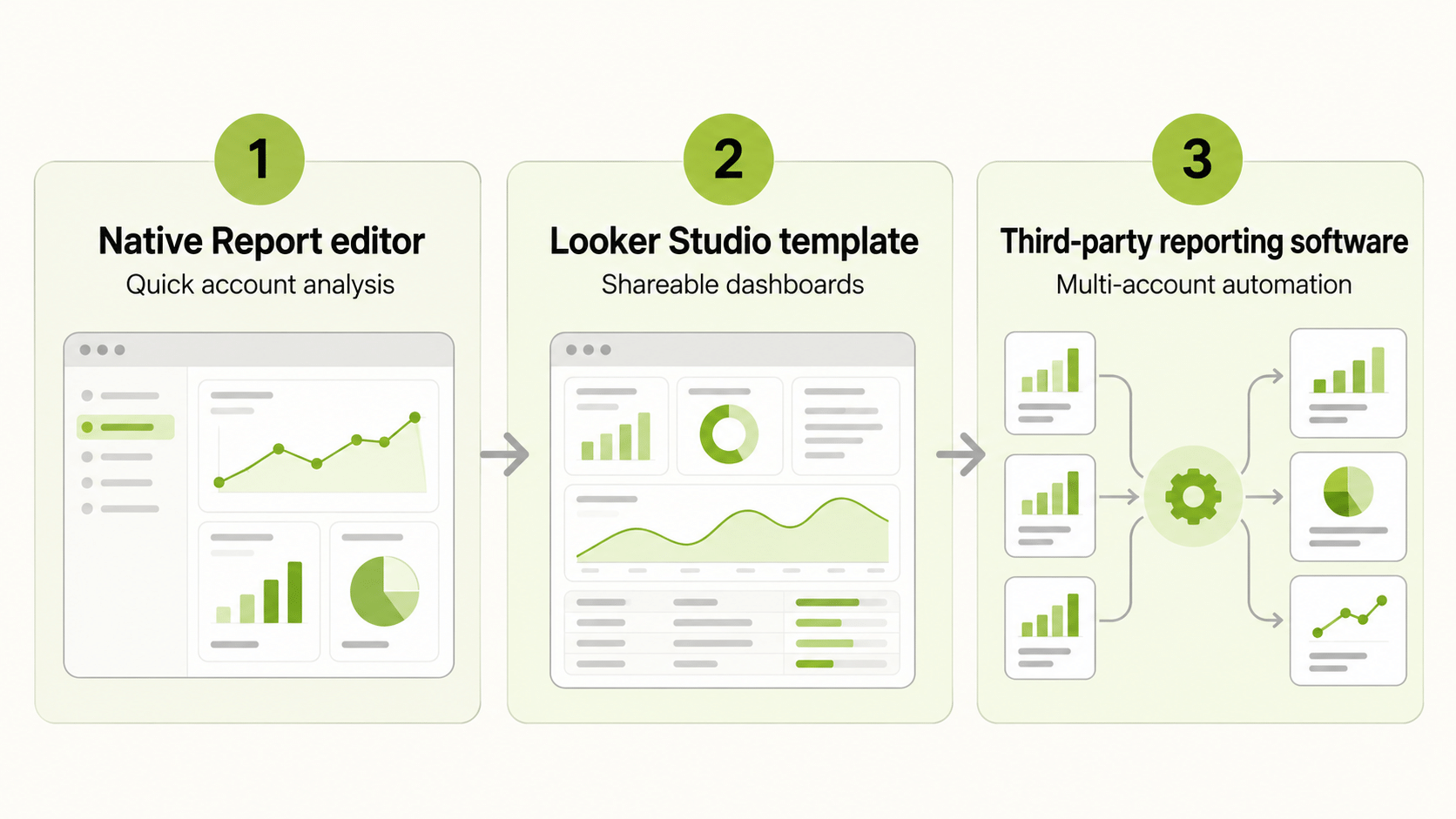
You have three routes, and most teams use more than one.
| Route | What it is | Best for |
|---|---|---|
| Native reports | Predefined reports, Report editor, statistics tables, scheduled emails | Single accounts, quick views |
| Looker Studio templates | Dashboards that read Google Ads data | Shared visual dashboards |
| Reporting software | Third-party products that connect to your account | Many accounts, many platforms, branded reports |
Native Google Ads reporting costs nothing extra and covers most single-account needs. Templates add layout and sharing. Software adds scale and cross-platform views, with a price and a setup cost.
How Do Google Ads Reporting Templates Work?
Google Ads comes with predefined reports, which are ready-made reports for common questions. Google’s help pages say you can use a predefined report as the starting point for a saved report that you can edit, schedule, and share. Changes to columns are kept only if you save.
Looker Studio offers a gallery of templates, including ones for Google Ads. To change a template, you copy it into your own report through Edit and share, then replace the data source with your own account. Templates are quick to adopt, but check what each page measures before you share it. A template built for another business may track metrics you do not use and omit ones you need.
When you build your own Google Ads report template, build it around an audience, not around the data. One page for the executive summary, one for campaign detail, and one for search terms or placements is easier to maintain than a single page that tries to do everything.
Which Performance Metrics Belong in a Google Ads Performance Report?
A Google Ads performance report should connect spend to outcomes.
| Question | Metrics |
|---|---|
| What did we spend and get? | Cost, impressions, clicks, conversions, conversion value |
| How efficient is it? | CTR, average CPC, cost per conversion, conversion rate |
| Are we losing reach? | Impression share, lost impression share |
| Is spend on pace? | Budget and cost against plan |
Keep the front page to five or six numbers. If a metric does not change a decision, move it to a detail page. Match the report to the reader: executives look for outcomes such as revenue and cost per acquisition, while operators look for pacing, impression share, and cost per conversion by campaign.
How Do You Schedule and Share Google Ads Reporting?
Google documents two routes. In the Report editor, open the report, choose the email and schedule icon, pick recipients, set a frequency such as daily or weekly, and choose a format such as CSV or XML. You can also customise a statistics table on the Campaigns screen, schedule it, and save a copy to edit later in the Report editor.
Two housekeeping points. Saved reports that have not been accessed in over 18 months are removed automatically, so keep a copy of anything you need long term. And scheduled reports go to people who have access to the account, so use a different route, such as an export or a shared dashboard, for people who do not.
Why Does Google Ads Reporting Show Different Numbers?
Most differences are counting rules, not bugs.
- Date basis. By default, Google Ads reports a conversion on the date of the click, while analytics tools often use the date of the conversion. The “by conv. time” columns line the two up.
- Processing lag. Google states that conversion data is generally available within about three hours under last-click attribution and about fifteen hours under other models, so recent days can look low.
- Attribution and windows. Different models and conversion windows assign credit differently.
- Invalid traffic. Counts can change after the fact when invalid traffic is removed.
Write a reconciliation rule that names the source of truth, the date basis, and the expected lag.
How Do You Set Up a Reporting Routine?
A routine matters more than a perfect template. Decide who needs which report and how often. A daily glance at spend and delivery catches broken campaigns early. A weekly review covers search terms, bids, creative, and landing pages. A monthly report goes to stakeholders with outcomes, trends, and the plan for next month.
Assign an owner for each report, store the definitions in one shared document, and review the report list every quarter. Reports nobody reads should be retired, because every extra report is a maintenance cost. When people change roles, check that scheduled emails still reach the right inboxes.
For agencies and in-house teams alike, build in a short commentary field. Numbers without explanation invite questions, while a two-sentence note on what changed and why saves a meeting. Keep the commentary factual, and flag anything that depends on data that has not yet settled.
Which Google Ads Reporting Software Should You Consider?
Google Ads reporting software ranges from spreadsheet connectors to full dashboard products and agency platforms. Judge each on the same questions.
| Question | Why it matters |
|---|---|
| Which platforms does it read, and in which direction? | Reading data is different from managing campaigns |
| How fresh is the data? | Pacing needs current numbers |
| Can you control metric definitions? | Avoids disputes about which conversions count |
| Who can see what? | Prevents accidental sharing |
| What does it cost as accounts grow? | Per-account pricing can climb |
| Can you export the data? | Protects you if you switch |
Ask to see your own account data in the tool rather than a demo. A good Google Ads report generator should produce the same totals as the native interface for the same date range and basis, so test that before you trust it.
How Do Best Google Ads Reports Differ by Audience?
The best Google Ads reports are short and specific. An executive report gives outcomes, a trend, and one recommendation. A client report adds context, wins and misses, and the plan. An operator report carries the granular numbers: campaign pacing, search terms, impression share, and cost per conversion. Sending the operator report to executives is the main reason good accounts get ignored.
How Does Google Ads Reporting Fit a Multi-Platform Workflow?
If you also advertise on Meta, TikTok, or NewsBreak, Google is one slice of a larger picture. FabFunnel’s Multi Ad Account Reporting brings Google into the same dashboard as Meta, TikTok, and NewsBreak, with Snapchat also connected for reporting, so you can compare spend and performance side by side. Google is connected for reporting only: FabFunnel launches campaigns on Meta, TikTok, and NewsBreak. The columns follow each platform’s own metrics, so check them before you use the dashboard for client reporting.
What Google Ads Reporting Mistakes Should You Avoid?
Frequent errors include adopting a template without checking its metrics, reporting too many numbers, mixing date bases between reports, judging recent days before data settles, and trusting a tool without checking its totals against Google Ads. Another is forgetting that scheduled emails only reach people with account access.
FAQs
What is Google Ads reporting?
It is the set of reports, schedules, and exports used to turn Google Ads data into views for monitoring, analysis, and communication.
Does Google Ads have report templates?
Yes. Predefined reports act as starting points you can edit, schedule, and share, and Looker Studio offers Google Ads templates.
How do I schedule a Google Ads report?
In the Report editor, choose the email and schedule icon, pick recipients, frequency, and a format such as CSV.
What should a Google Ads performance report include?
Cost, clicks, conversions, conversion value, cost per conversion, and conversion rate, plus impression share where relevant.
Do I need Google Ads reporting software?
Not for a single account and one reader. It helps with multiple accounts, multiple platforms, or branded dashboards.
Can FabFunnel launch Google Ads campaigns?
No. FabFunnel launches on Meta, TikTok, and NewsBreak. Google is connected for reporting only.
Where to Start
Choose one reader, pick five metrics, and start from a predefined report or a template. Schedule it, run it for a month, and only then consider software. To read Google next to Meta, TikTok, and NewsBreak, try FabFunnel or explore the full toolset at Fab AI. A Google Ads reporting tool is most useful when native reports cannot handle the number of accounts, platforms, or stakeholders involved.