Quick Answer
For an ecommerce brand, a display ad maker should be evaluated on catalogue integration (does it pull product data automatically, or require manual entry per ad), size coverage (does it output the actual display dimensions your placements need), and platform scope (does it cover the display network you’re running — Google Display, a specific ad platform’s feed placements, or both). This piece doesn’t make a ranked recommendation: the right display ad creator depends on which display network and catalogue platform your brand uses.
“Best display ad maker” lists are common, but ecommerce brands have a requirement most generic lists don’t address: the ad creative needs to reflect an actual, frequently changing product catalogue, not a fixed design template.
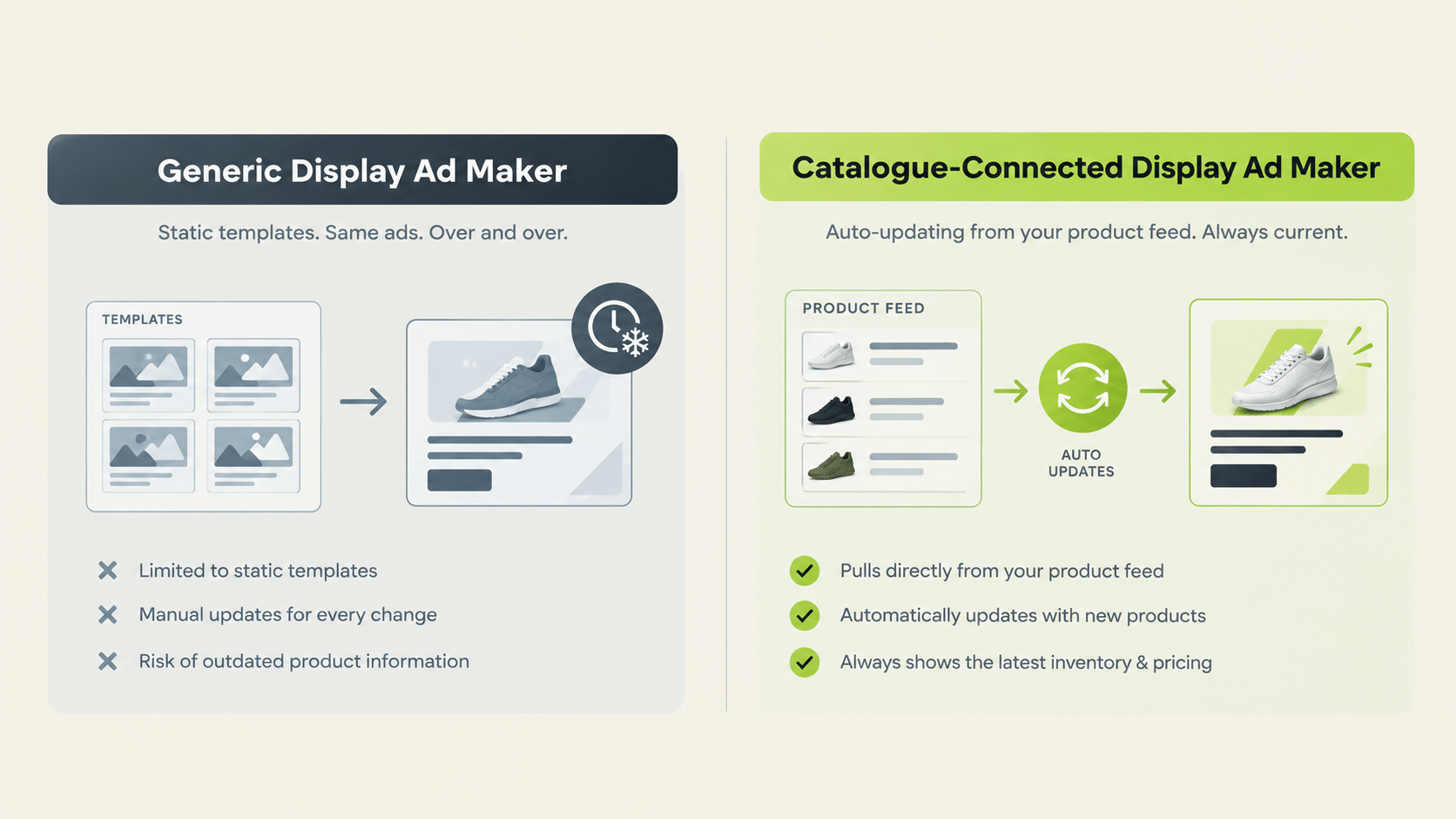
Why Does Catalogue Integration Matter More for Ecommerce Than for Other Advertisers?
Because ecommerce catalogues change constantly: prices update, products go out of stock, new items launch. A display ad creator without catalogue integration means someone manually updates ad creative every time the underlying product data changes, which doesn’t scale past a small handful of SKUs.
Compare that with a SaaS advertiser running one product page. They can build five display ads, run them for a quarter, and refresh when the offer changes. An ecommerce brand with 300 SKUs, seasonal collections, and rotating promotions cannot work that way. The creative workflow has to be tied to the product data, or the team ends up as a permanent production line.
When you assess an AI display ad maker on this point, ask how product data gets in (automatic sync or manual upload), how often it updates, and what happens to existing creative when a product changes.
What Is a Google Display Ad Creator, Specifically?
A tool built to generate display ads sized and formatted for Google’s Display Network, which has its own set of standard sizes and technical requirements distinct from social feed ad formats. A google display ad maker is a narrower category than “display ad maker” broadly. Confirming whether a tool is built for Google Display Network, or for social platform feed placements, matters before assuming coverage.
This is also where “AI” labels can mislead. An AI display ad maker might generate strong imagery and copy but still output only a handful of aspect ratios. Size coverage and AI quality are separate questions, and you need to test both.
AI Display Ad Maker Evaluation Framework for Ecommerce
| Criteria | Why It Matters | What to Ask |
|---|---|---|
| Catalogue integration | Ads should reflect live product data, not stale templates | Does it auto-sync with your ecommerce platform? |
| Size/format coverage | Different networks require different dimensions | Which specific display sizes or platforms does it output for? |
| Platform scope | Google Display Network and social feed placements are distinct | Does it cover the specific network your campaigns run on? |
| Variation generation | Ecommerce catalogues need creative across many SKUs, not one | Can one approved concept apply across multiple products automatically? |
| Launch connection | Creative that can’t reach campaigns without manual upload slows testing | Can you move from generated creative to a live campaign inside the tool? |
Does FabFunnel Function as a Display Ad Maker for Ecommerce?
For social and feed placements, yes, with a clear boundary on the display network side.
Genie, FabFunnel’s creative studio, generates creative across four modes (Product Ad, Brand Ad, Product Shoot, Performance Ad) directly from your Catalogue (Brand → Categories → Products), with Shopify auto-sync. It produces image and video ads, applies brand guidelines from the Catalogue automatically, and Create Variations lets one approved concept apply across your catalogue. Creative can be launched into a campaign without leaving the platform, and FabFunnel’s Bulk Campaign Launcher handles volume launches.
This creative generation is built for Meta, TikTok, and NewsBreak placements. Google Ads is not a supported platform in FabFunnel, and Genie’s coverage of Google Display Network’s size and format requirements isn’t confirmed. If your display ad strategy runs through Google Display Network, verify that directly rather than assuming it from general creative-generation capability.
Should an Ecommerce Brand Use One Tool Across Social Feed and Google Display Ads?
It depends on whether a single vendor covers both formats well, or specializes in one. A catalogue-connected creative tool built for social feed placements (like Genie for Meta, TikTok, NewsBreak) paired with a separate tool built for Google Display Network sizing can be a more reliable combination than assuming one tool covers both equally well.
The trade-off is operational. Two tools mean two workflows and two places for brand guidelines to drift. If display is a small share of your spend, a single tool with partial coverage plus occasional manual work may cost less than a second subscription. If display is a major channel, a dedicated tool is usually worth it.
How Should an Ecommerce Team Run a Trial?
Pick ten SKUs: five bestsellers, three slow movers, and two with awkward product images. Generate display creative for all ten, then record how many outputs are usable without manual edits, how long the whole batch took, and whether the sizes match your live placements. Change one product’s price or image in your catalogue and check how the creative responds. A tool that handles that update cleanly is solving the ecommerce problem; one that needs a fresh manual build is not.
What Does a Realistic Setup Look Like for a Small Ecommerce Team?
A three-person team does not need an elaborate workflow. A workable routine looks like this: sync the catalogue, choose the ten products that drive most revenue, generate creative for those first, and launch a small test before widening to the full range.
Review results after one to two weeks. Keep what works, drop what doesn’t, and extend the winning approach to the next group of products. This staged approach controls cost and gives you a clear before-and-after comparison.
If display is part of the plan, run it as a separate test with its own budget and its own reporting. That way you can judge it on its own results instead of blending it with social performance, and you can decide with real numbers whether a dedicated display tool earns its place.
What Should You Do When Product Data Changes Mid-Campaign?
Prices, stock, and promotions change constantly. Agree a rule for what happens when they do. For example: if a product goes out of stock, its ads are paused; if a price changes, the creative is refreshed within a set number of days.
Assign an owner for each rule. Without one, outdated ads keep running and quietly waste budget. Treat this as part of normal operations, not an exception, and review the list of live ads against your catalogue once a week.
FAQs
What’s the difference between a display ad maker and a display ad creator?
No meaningful difference. Both describe the same category. The features that matter (catalogue integration, size coverage, platform scope) are what to evaluate regardless of naming.
Is a google display ads maker the same as a general display ad maker?
Not necessarily. “Google display ads maker” specifically implies coverage of Google’s Display Network sizing and specs, which is narrower than the broader display ad maker category.
Why does catalogue integration matter more for ecommerce brands specifically?
Because ecommerce catalogues change constantly (price, stock, new products), and ad creative disconnected from that live data quickly goes stale without manual updates.
Does FabFunnel’s Genie cover Google Display Network ad sizes?
This isn’t confirmed. Genie’s four creative modes are built for Meta, TikTok, and NewsBreak, and Google Ads is not a supported platform. Confirm directly if Google Display Network coverage is required.
Can one approved ad concept be applied across an entire ecommerce catalogue automatically?
With FabFunnel’s Create Variations feature, yes. One approved concept can be applied across multiple catalogue products rather than manually recreating it per SKU.
What’s the biggest risk in choosing a display ad maker for ecommerce without checking catalogue integration first?
Ending up with a tool that requires manual re-entry of product data for every ad, which doesn’t scale as the catalogue grows or changes.
Where to Start
Write down which networks you actually run display on, then check each tool’s size list and catalogue sync against that. For catalogue-connected creative across Meta, TikTok, and NewsBreak placements, FabFunnel’s Genie works directly from your product Catalogue with Shopify auto-sync. Start at FabFunnel or explore the full toolset at Fab AI. For Google Display Network specifically, confirm size and format coverage directly before assuming it’s included.