Quick Answer
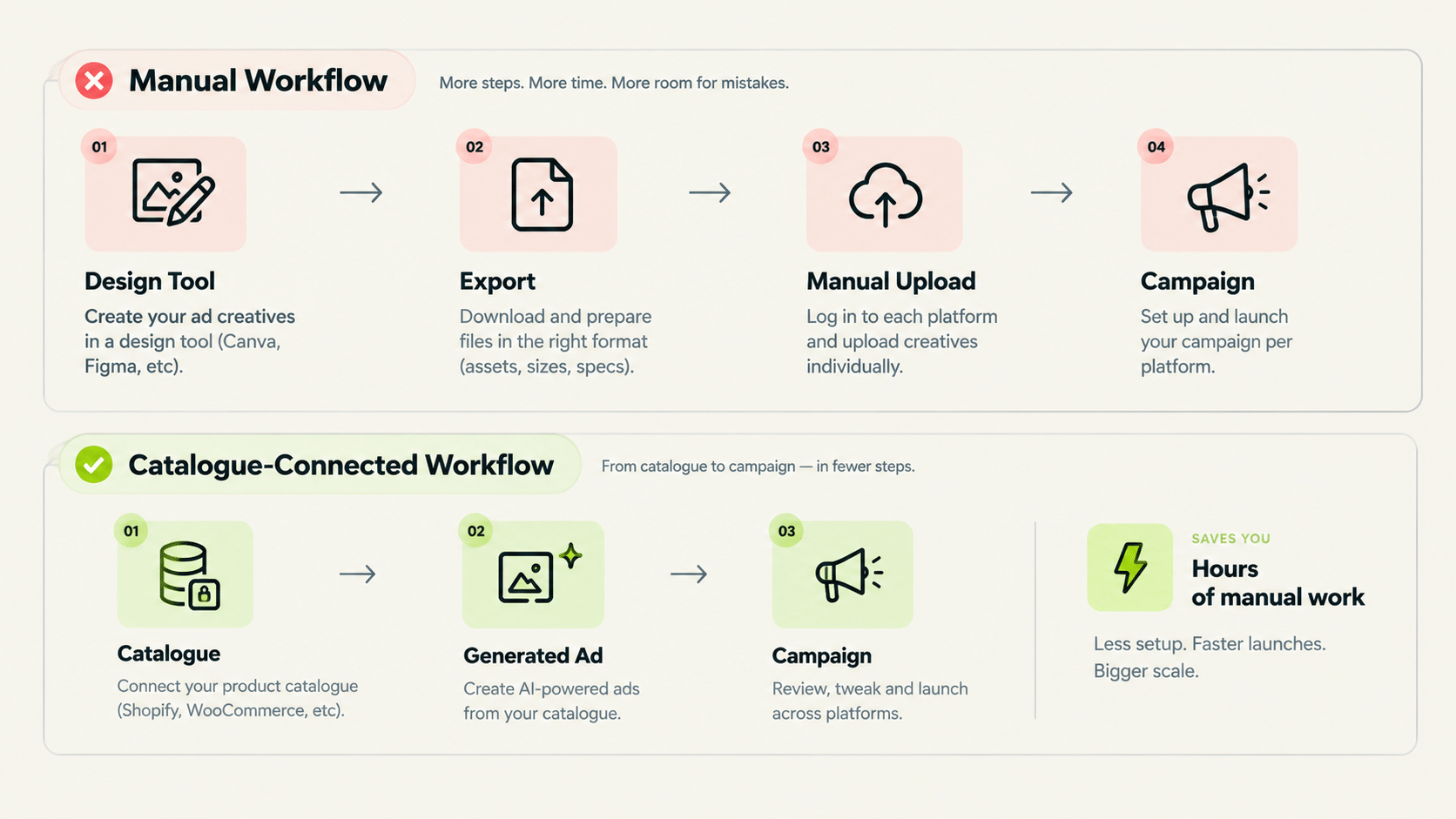
An ad creator online should do more than generate a single image — it should pull directly from your product catalogue, generate multiple ad types (not just one format), and connect to campaign launch without a manual export-and-upload step. An online ad maker that only produces static images disconnected from your product data and campaign workflow adds a step rather than removing one.
Ad creator online tools range from basic template editors to catalogue-connected generation systems. This piece covers what separates a useful tool from one that just adds a design step to an already manual workflow.
What Makes an Ad Creator Online More Than a Template Editor?
Catalogue connection. A social media ad creator that pulls directly from your product data (name, price, image, category) generates ads that are already accurate and on-brand, rather than requiring you to re-enter product details into a template for every ad.
Genie, FabFunnel’s creative generation tool, works from a Catalogue structured as Brand → Categories → Products. Shopify stores auto-sync; other setups use manual upload. Brand guidelines are pulled automatically from the Catalogue, so the brand context is set once rather than re-briefed per ad.
Template editors still have a place. For a handful of one-off ads, a template is faster than setting up a catalogue. The catalogue approach pays off when you have an ongoing product range and need creative to keep up with it.
What Ad Formats Should an Advertisement Creator Online Actually Support?
At minimum, more than one type of ad: a static product shot, a lifestyle-style brand ad, and a performance-focused variation. Different campaign goals call for different creative approaches, and a tool locked to one output type forces you to fill the gaps elsewhere.
Genie generates across four modes: Product Ad, Brand Ad, Product Shoot, and Performance Ad. Beyond static images, it also produces video ads, using Seedance 2 Fast, Seedance 2, Veo 3.1 Fast, or Veo 3.1 Quality depending on whether you prioritise speed or output quality. You can select aspect ratio and resolution when configuring.
The workflow is four steps: pick an ad mode, pick a format, pick an approach, then configure and generate. The Concepts tab offers 200 fixed, pre-built frameworks to start from. These are not customisable, so if your team relies on its own bespoke creative frameworks, expect to brief those through the configuration step instead.
Ad Creator Online: What to Check Before Choosing One
| Question | Why It Matters |
|---|---|
| Does it connect to your product catalogue? | Avoids manually re-entering product details for every ad |
| Does it generate multiple ad types/modes? | Different campaign goals need different creative approaches |
| Does it sync with your ecommerce platform? | Removes manual upload for catalogue updates |
| Does it cover video as well as static? | Many paid campaigns need both, and separate tools split the workflow |
| Does it connect directly to campaign launch? | Avoids a manual export-and-upload step between creative and campaign |
Is an Online Ad Maker the Same as a Social Media Ad Creator?
Largely yes. The terms are used interchangeably, though “social media ad creator” sometimes implies formats specific to social platforms (Meta, TikTok) rather than display or search ad formats. Confirming which platforms and formats a tool supports matters more than the label it uses.
For FabFunnel specifically, the supported ad platforms are Meta, TikTok, and NewsBreak. Google Ads is not supported, so a team whose main need is search or Google display creative should check that before choosing.
How Does an Ad Creator Online Connect to Campaign Launch?
This is where most tools stop. They output a file and leave export, upload, naming, and ad-set setup to a person.
In FabFunnel, a creative generated in Genie can be launched straight into a campaign without leaving the platform. The Bulk Campaign Launcher builds full Meta structures (Account → Campaign → Ad Set → Ads) and can launch 200+ campaigns in under 2 minutes, which matters once you are producing creative for dozens of products at a time. Creatives can also be stored in the Creative Library, organised in folders you define, and launched in bulk from there.
Does Catalogue-Connected Creative Generation Save Meaningful Time?
For a catalogue with more than a handful of products, yes. Generating ad variations manually per product doesn’t scale. Create Variations lets a single approved concept be applied across multiple products in the catalogue rather than starting from scratch for each one.
A practical test: take ten products from your real catalogue, run the same concept across all of them, and count how many outputs you would ship without edits. That ratio tells you more than any feature list.
What Are the Common Mistakes When Choosing an Online Ad Maker?
Three come up repeatedly:
- Judging on one polished demo. Any online ad maker looks good on a curated sample. Test it on your own products, including the awkward ones with long names or cluttered images.
- Ignoring what happens after generation. If every ad has to be downloaded, renamed, and uploaded by hand, the time saved in design is lost in operations.
- Skipping brand controls. Without brand guidelines applied automatically, someone has to check every output for colour, tone, and logo use. At volume, that review becomes the bottleneck.
How Do You Brief an Ad Creator Online for Better Results?
Tools produce better output when they receive a clear brief. Before generating anything, decide five things: the product, the single main benefit, the audience, the placement, and the tone. A vague brief produces generic creative that needs heavy editing.
Keep each ad to one message. An image that tries to show price, social proof, a discount, and a feature will say none of them well. If you need to test several messages, generate separate variations rather than packing them into one.
When you review output, check against a short list: is the product shown accurately, is any text legible at phone size, does the layout match the placement, and does it look like your brand? Anything that fails goes back for another pass rather than being fixed by hand.
How Many Ad Variations Should You Test at Once?
For most accounts, three to five variations per product is enough to learn something without spreading budget too thin. Change one element at a time, such as the headline, the image style, or the offer, so you know what caused any difference.
Retire losing variations quickly and replace them with new ones built from what won. A steady loop of generate, launch, review, and refresh keeps creative from going stale, which matters because audiences tire of the same ad after repeated exposure.
How Do You Know an Ad Creator Online Is Worth Paying For?
Treat the trial like a small experiment. Pick five products from your real catalogue, generate ads for each, and count how many you would launch without edits. Record how long the whole batch took from brief to approved file.
Next, compare against your current process. If a designer takes an hour per ad and the ad creator online produces approved versions in minutes, the saving is easy to see. If your current process is a template editor you already know well, the gap may be smaller, so measure honestly.
Then check what happens after generation. A good ad creator online lets you move straight into launch, store approved work in folders, and reuse a concept across products. If every ad still needs downloading, renaming, and uploading by hand, the tool has only moved the work.
Finally, think about volume six months from now. An ad creator online that suits ten products may struggle at two hundred. Ask how it handles catalogue growth, brand guidelines, and team access before you commit to it.
FAQs
What’s the difference between an ad creator online and an advertisement creator online?
No functional difference. An online advertisement maker and an ad creator online describe the same category of tool. The features that matter (catalogue connection, format variety, campaign integration) are what to evaluate regardless of naming.
Does an online ad maker need catalogue integration to be useful?
It depends on scale. For a handful of one-off ads, a template editor is fine. For an ongoing catalogue of products, catalogue connection removes significant manual re-entry work.
How many ad formats does Genie generate?
Four modes (Product Ad, Brand Ad, Product Shoot, and Performance Ad), in image and video, plus a Concepts tab with 200 fixed frameworks and a Create Variations feature for applying one concept across products.
Does Genie sync automatically with an ecommerce catalogue?
Yes, for Shopify, where auto-sync keeps the catalogue current. Other platforms currently require manual upload.
Is a social media ad creator only for Meta and Instagram?
Not necessarily. The term is used broadly. Confirm the specific platforms a tool supports rather than assuming based on the label. FabFunnel supports Meta, TikTok, and NewsBreak.
What should I check before trusting an ad creator online with recurring campaign creative?
Whether it connects to your actual product catalogue (not just a generic template), generates more than one ad type, and integrates with campaign launch rather than requiring manual export.
Where to Start
Take one product, one concept, and run it through Genie before committing to any ad creator online at larger scale. Genie generates ad creative across four modes directly from your product catalogue, with Shopify auto-sync and a Concepts tab to start from. Start at FabFunnel or explore the full toolset at Fab AI.