Quick Answer
The features that matter most in facebook ads management are per-account automation thresholds, creative generation tied to a product catalogue, consolidated reporting across accounts, and — for agencies specifically — clear information about whether white label options and role-based team permissions are available. A facebook ads management tool that only handles one of these (say, reporting but not creative, or automation but not bulk launch) leaves the rest of the workflow to manual work or a second tool.
Facebook ads management covers a lot of ground: campaign creation, creative production, budget and bid automation, and performance reporting. This piece breaks down which features reduce manual work and which are secondary, so you can score any tool against the same checklist.
What Does a Facebook Ads Management Tool Actually Need to Cover?
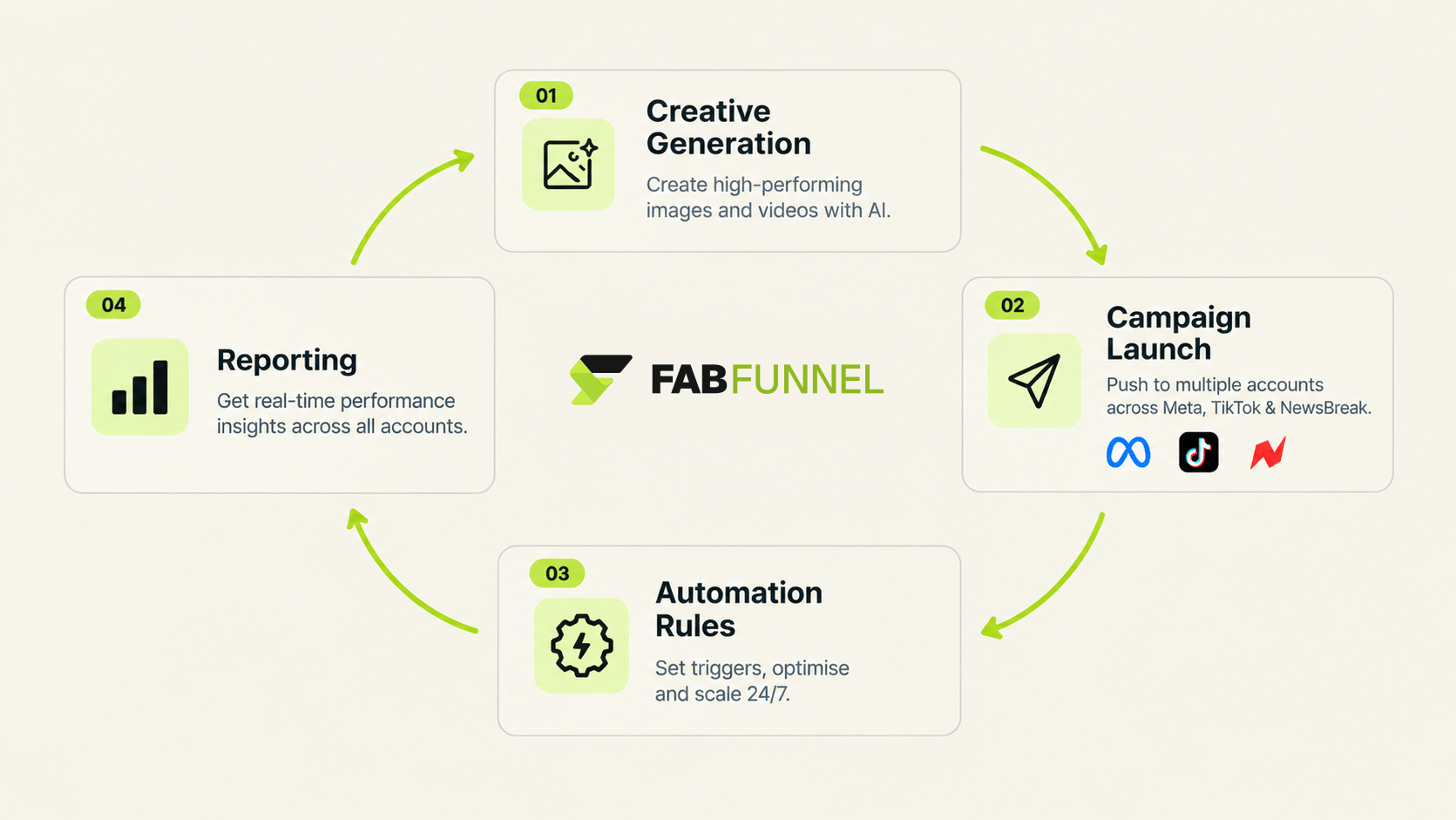
Four jobs, in the order they happen: producing creative, launching campaigns, controlling spend and performance while ads run, and reporting back. Most tools in this category are strong at one or two of those and thin on the rest.
That gap is where time goes. A team using a reporting-only tool still builds creative elsewhere and launches by hand. A team using a launcher with no automation still checks accounts manually every morning. When you evaluate a tool, the useful question is not “how many features does it have” but “which of these four jobs still lands on a person’s desk afterwards.”
What Should Automation Actually Do in Facebook Ads Management?
Apply pre-set thresholds (CPA floors, ROAS thresholds, frequency caps) at the level where the problem sits, with every triggered action logged against its specific condition and timestamp.
FabFunnel’s Automation Rules Engine works this way. Rules run at Campaign, Ad Set, and Ad level, run 24/7, and apply going forward from the point they are saved, not retroactively. Multiple rules can be active at once.
Two things to check in any tool:
- Granularity. A rule that can only pause a whole campaign is blunt. Ad-level rules let you cut one weak ad without touching the winners beside it.
- Auditability. If the tool pauses or scales something, you should be able to see which condition fired. Unlogged automation is hard to trust and impossible to debug.
How Does Creative Generation Fit Into Facebook Ads Management?
Creative is usually the slowest step. A tool that generates it from your product data and lets you launch directly removes a hand-off between design and media buying.
Genie, FabFunnel’s creative studio, works in four steps: pick an ad mode (Product Ad, Brand Ad, Product Shoot, or Performance Ad), pick a format, pick an approach, then configure and generate. It produces image and video ads, pulls from a Catalogue structured as Brand → Categories → Products (Shopify auto-sync, manual upload for other setups), and applies brand guidelines from that Catalogue automatically. A creative generated in Genie can be launched into a campaign without leaving the platform.
For an AI-assisted tool, this is the part worth testing hardest. Generate three ads for a real product and check whether the output is usable without a designer touching it.
What Is White Label Facebook Ads Management, and Who Needs It?
White label facebook ads management lets an agency present the tool under its own branding to clients, rather than the client seeing the vendor’s name. It matters for agencies that own the client relationship and want reporting or dashboards to look like theirs. A brand running its own single account has no practical use for it.
One flag for anyone evaluating this: white label support is a specific, separate feature, not a default part of the category. FabFunnel white label support is not confirmed in the documentation this piece draws from. If it is a requirement, verify it directly before you commit. A facebook ads management ai tool should state these boundaries clearly rather than implying every agency feature is included.
How Do Reporting and Permissions Change at Agency Scale?
With one account, reporting is a screen. With ten, it becomes a weekly export-and-paste job.
FabFunnel’s Multi Ad Account Reporting consolidates spend, ROAS, cost per result, CPC, and CTR across connected accounts, with data syncing roughly every 15 minutes. It covers Meta, TikTok, and NewsBreak. Google Ads is not supported, so a team that needs Google data in the same view will need to keep that reporting elsewhere.
On the team side, the question is access control: who can touch which account. Look for workspace-level and account-level permissions so a junior buyer can work in one client’s account without seeing another’s.
Facebook Ads Management Tools: Feature Comparison
| Feature | What It Solves | FabFunnel Coverage |
|---|---|---|
| Per-account automation | Prevents shared thresholds from misfiring | Automation Rules Engine (CPA, ROAS, frequency caps; Campaign, Ad Set, Ad level) |
| Creative generation | Removes manual design/upload step | Genie (4 modes, image and video, catalogue-based) |
| Bulk campaign launch | Launches many campaigns without repetitive manual setup | Bulk Campaign Launcher (200+ campaigns in under 2 minutes) |
| Cross-account reporting | Consolidates spend/ROAS without manual login-and-export | Multi Ad Account Reporting (~15-minute sync; Meta, TikTok, NewsBreak) |
| Role-based permissions | Controls team access across accounts | Workspace-level vs. account-level permissions |
| White label | Lets agencies present the tool under their own brand | Not confirmed — verify directly |
Does a Tool Like This Replace a Media Buyer?
No. Copilot, FabFunnel’s AI account assistant, answers performance questions in natural language, generates visual reports, and surfaces insights without manual data pulling. It is a recommendation layer, not an executor: a person still reviews and decides.
What changes is how much monitoring happens before something reaches a person’s attention. Automation rules handle the predictable cases (pause above a CPA ceiling, cap frequency), and Copilot helps surface the rest. Judgement calls on strategy, budget shifts, and creative direction stay with the buyer.
How Should You Test a Tool Before Moving Live Accounts Onto It?
A trial is only useful if it mirrors real work. Before you connect a client account or a large budget, run a short checklist on one low-risk account.
First, set up one automation rule with a clear cost ceiling and a minimum-spend condition, then confirm it logs the action when it fires. Second, generate creative for three real products and count how many outputs you would approve without edits. Third, check that reporting matches what the ad platform itself shows, allowing for the short sync delay. Fourth, test permissions by giving a colleague limited access and confirming they see only what they should.
Write down the time each step took and what surprised you. Teams often discover that the feature they assumed was minor, such as how easily a campaign can be cloned, saves more time than the headline feature.
Finish the trial by asking two plain questions. Which manual task did this remove from my week? And what would break if I stopped using it tomorrow? Honest answers to both tell you whether the tool belongs in your stack or is simply one more login.
If you manage several accounts, repeat the test on a second account with a different baseline. A tool that behaves well on one account but forces a shared setup across both is not ready for agency use.
FAQs
What’s the difference between a facebook ads management tool and a management platform?
The terms are used interchangeably. The more useful question is scope — whether creative, automation, and reporting are covered together or separately.
Is an AI-assisted tool the same as full automation?
Not necessarily. “AI tool” can describe anything from a creative generator to a recommendation engine to an automation rules system. Confirm which specific function the “AI” label refers to.
Do all facebook ads management tools support white label branding?
No. White label facebook ads management is a specific feature, typically relevant to agencies, and isn’t universal across every tool in the category.
How does FabFunnel’s automation avoid misfiring across multiple accounts?
Thresholds (CPA floors, ROAS thresholds, frequency caps) are set per rule rather than applied from one shared template, and rules can be set at campaign, ad set, or ad level.
Does Genie’s creative generation work per client account for agencies?
Creative pulls from the Catalogue’s Brand → Categories → Products structure, and an account can hold multiple brands, which keeps brand context separated.
What should I check before choosing a tool?
Whether automation, creative, and reporting are covered in one product, whether rules are configurable at the level you need, which platforms are supported, and — for agencies — whether white label and permission options exist.
Where to Start
Run the checklist above against your current stack and note which of the four jobs still depends on manual work. FabFunnel combines per-account automation, catalogue-based creative generation, bulk launch, and consolidated reporting for Meta, TikTok, and NewsBreak in one platform. Start at FabFunnel or explore the full toolset at Fab AI.