Quick Answer
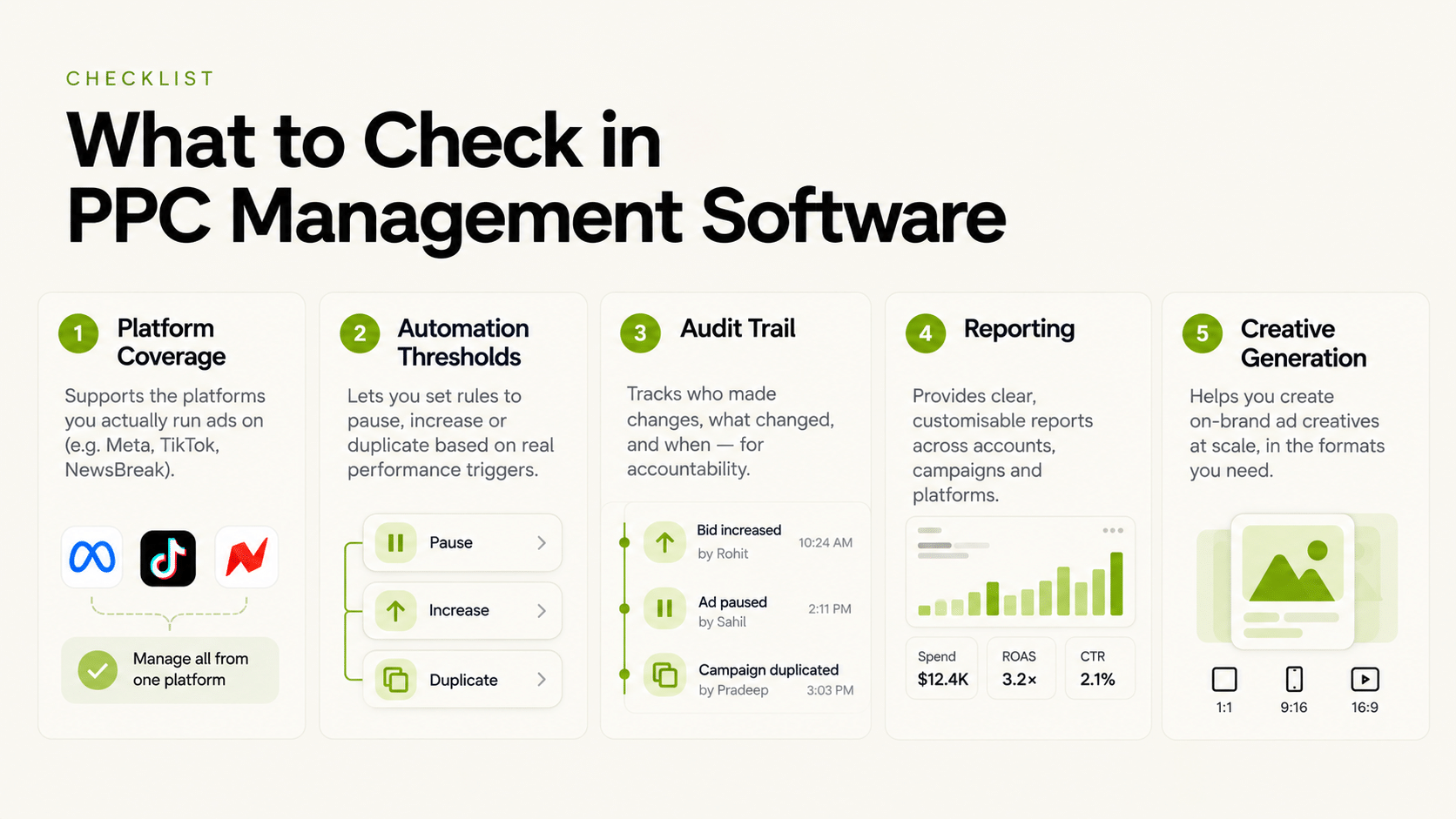
PPC management software should be evaluated on five things: which platforms it actually covers (paid search vs. paid social, or both), whether automation thresholds are configurable per account, whether every automated action is logged, how reporting consolidates across accounts, and whether creative generation is part of the product or a separate tool entirely. Best ppc management software isn’t a single universal answer — the right choice depends on which platforms your team actually runs and how much of the workflow you want automated versus manually reviewed.
“PPC management” spans a wide range of actual functionality, from basic bid adjustment to full campaign launch and creative generation. This piece breaks down what to check before assuming a tool covers what you need.
What Does PPC Management Software Actually Automate?
At minimum, budget and bid rules triggered by performance thresholds — pausing an ad below a CPA ceiling, scaling one above a ROAS floor. Ppc management tools vary widely in how much further they go: some add creative generation, bulk campaign launch, or cross-account reporting on top of the base automation layer.
Why Does Platform Coverage Matter More Than Feature Count?
Because a long feature list doesn’t help if the platforms you actually run aren’t covered. Paid search (Google Ads, Bing) and paid social (Meta, TikTok, NewsBreak) have different bidding mechanics and are often handled by different vendors specializing in one side. A ppc ad management software with impressive automation on paid social won’t help a team whose spend is mostly on Google Ads, and vice versa.
PPC Management Software Evaluation Framework
| Feature Area | What to Ask | Why It Matters |
|---|---|---|
| Platform coverage | Which specific platforms are supported? | “PPC” claims often hide a narrower actual scope |
| Automation thresholds | Configurable per account or shared template? | Shared thresholds misfire across accounts with different baselines |
| Audit trail | Is every action logged with its trigger and timestamp? | Needed to explain automated decisions after the fact |
| Reporting | Does it consolidate spend/ROAS/CPA across accounts? | Avoids manual login-and-export across every account |
| Creative generation | Is it built in, or a separate tool? | Determines whether the workflow is end-to-end or requires stitching tools together |
Is Bulk Campaign Launch a Standard Feature in PPC Management Tools?
No — bulk launch (spinning up large numbers of campaigns from a single template or variable set) is a more advanced feature that not every ppc management tool includes. FabFunnel’s Bulk Campaign Launcher can launch 200+ campaigns in under two minutes across connected accounts, using Folder Launch and dynamic variables to generate 1,000+ campaign variations in one run — but this is specific to FabFunnel’s Meta, TikTok, and NewsBreak coverage, not paid search.
What Does FabFunnel Cover, and What Doesn’t It Cover?
FabFunnel’s platform combines Genie (creative generation across four modes), the Automation Rules Engine (CPA floors, ROAS thresholds, frequency caps with a full action log), Bulk Campaign Launcher, and Multi Ad Account Reporting — all built for Meta, TikTok, and NewsBreak. It does not cover Google Ads or Bing paid search. A team running PPC across both paid search and paid social would need a separate tool for the search side.
Which Use Cases Fit Which Kind of PPC Management Software?
The right tool depends on who is using it and how many accounts they manage:
For the affiliate and performance case, FabFunnel integrates with Voluum, RedTrack, and JVZoo, along with Slack for team workflows. Confirm that your specific tracker setup is supported before relying on it.
What Does the Pricing and Trial Picture Look Like?
Check pricing on the vendor’s own plans page, since packaging changes. FabFunnel’s current pricing page states that every plan includes a 7-day free trial. Compare the live plan table before purchase to confirm which tier includes Genie, Industry Insights, Video Sage, Bulk Campaign Launcher, Creative Library, Reporting, Automation, Catalogue, Co-Pilot, and Account Health Management. Treat prices quoted in older documentation or articles as outdated unless they match the current checkout page.
How Should You Run a Demo or Trial of PPC Management Tools?
Don’t let the vendor drive the whole session. Bring your own scenario:
- Use your own account structure. Ask the vendor to show how your real campaigns, naming, and budgets would work.
- Ask for the action log. Have them trigger a rule and show you the log entry.
- Test the unglamorous parts. Permissions, account switching, and reporting exports are where daily friction lives.
- Check the boundaries. Ask directly which platforms are not supported. FabFunnel is explicit that Google Ads and Bing are not covered.
- Plan the exit. Know how you would move your data and rules if you leave.
If a vendor answers every question with “yes, we do that,” ask for a live demonstration of the least obvious one.
What Hidden Costs Should You Check When Choosing PPC Management Software?
The subscription price is rarely the whole story. Check these before you compare quotes:
- Seats and permissions. Does each additional team member cost extra, and can you limit access by role?
- Account or spend limits. Some tools price by number of ad accounts or by spend managed.
- Onboarding time. Setup that takes weeks has a real cost in delayed results.
- Creative production. If creative isn’t included, add the cost of a separate design tool or freelancer.
- Switching cost. Rules, templates, and history are hard to move, so estimate the effort of leaving.
Put the numbers side by side for the setups you are considering. A product that combines creative, launch, automation, and reporting can cost more per month than a single-purpose tool and still be cheaper than three tools stitched together.
Which Platform Mix Changes the Answer?
Your channel mix should drive the shortlist more than any feature list. A team spending mainly on paid social needs strong coverage of those platforms. A team spending mainly on search needs search coverage. A team split across both should expect to use more than one tool.
Write down your current monthly spend by platform and your likely spend in six months. If a platform you plan to grow into isn’t supported, the tool will become a constraint just when you need it to scale.
FAQs
What’s the difference between ppc management software and ppc management tools?
The terms are used interchangeably in most contexts. The more useful distinction is scope — whether a given product covers automation, creative, and reporting together or just one piece.
Is there a single best ppc management tool for every team?
No — the right choice depends on which platforms you run and how much of the workflow (creative, automation, reporting) you want in one product versus separate tools.
Does ppc management software always include creative generation?
No — many tools focus purely on bid and budget automation. Creative generation as part of the same product is a differentiator worth checking for specifically.
What should I check before trusting a “best ppc management software” ranked list?
Whether the ranking specifies platform coverage for each entry — a tool ranked highly for paid social automation may not support paid search at all, and rankings that don’t distinguish this can be misleading.
Does FabFunnel’s ppc management software cover Google Ads?
No — FabFunnel covers Meta, TikTok, and NewsBreak. Google Ads and Bing paid search automation would need a separate tool.
How do I know if a ppc management tool’s automation is safe to trust with budget?
Confirm thresholds can be set per account (not shared) and that every triggered action is logged with its condition and timestamp — that combination is what lets you audit what happened and why.
Where to Start
If your PPC workflow spans Meta, TikTok, and NewsBreak, FabFunnel combines creative generation, automation, bulk launch, and reporting in one platform built specifically for those channels — start at FabFunnel or explore the full toolset at Fab AI. For Google Ads or Bing, apply the same evaluation framework above to whichever tool covers that side.