Quick Answer
Safe to automate in PPC: repetitive, rule-based decisions with clear thresholds — pausing underperforming ad sets, applying frequency caps, and scaling budget within a defined range. Better left to manual review: creative direction, audience strategy, and anything requiring judgment about why a number moved, not just that it moved. The mistake most PPC automation checklists skip is treating every decision as equally safe to hand off, when some genuinely need a human reading the account’s context.
PPC automation gets pitched as an all-or-nothing decision, but the useful version of it is a checklist: which specific tasks are mechanical enough to automate safely, and which ones still need a person’s judgment. Getting this split wrong in either direction causes problems — automating too much loses the context a person would have caught, automating too little wastes hours on work a rule could handle reliably.
What Belongs on the “Safe to Automate” Side of a PPC Checklist?
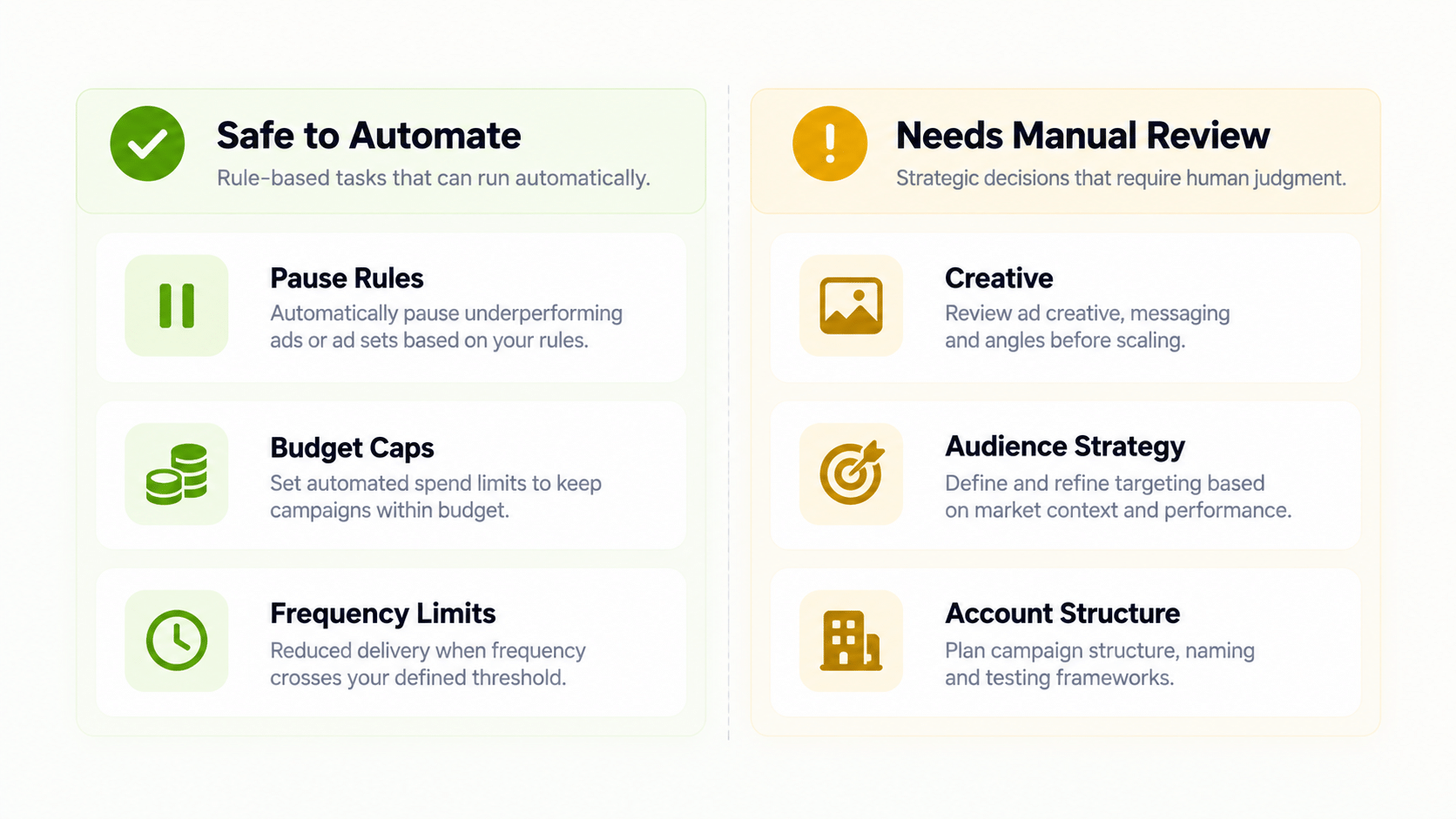
Tasks with a clear, measurable condition and a single correct action fit here: pausing an ad set once cost per result crosses a defined ceiling, applying a frequency cap once impressions per user pass a threshold, and scaling budget incrementally when ROAS clears a floor with enough conversion volume behind it. These are pay per click automation tasks precisely because the decision doesn’t require interpretation — the rule either fires or it doesn’t.
FabFunnel’s Automation Rules Engine handles exactly this category: CPA floors, ROAS thresholds, and frequency caps applied automatically, with every triggered action logged against the specific condition and timestamp that caused it.
What Belongs on the “Needs Manual Review” Side?
Creative direction, audience segmentation strategy, and interpreting why a metric moved all require context a rule doesn’t have. A CPA spike could mean the campaign is genuinely underperforming, or it could mean a competitor launched a sale, a tracking pixel misfired, or seasonality shifted demand. Ppc automation tools can flag that a threshold was crossed; they can’t reliably diagnose which of those explanations is correct.
This is the specific gap Co-Pilot is built for — a recommendation layer trained on live reporting data that surfaces what’s underperforming and why it might be worth a closer look, without executing changes automatically. The decision still sits with a person.
Where Do Most PPC Automation Tools Misfire?
Two common failure patterns: automating scaling rules without a matching downside rule, so budget keeps increasing after performance turns; and applying one automation template across accounts with different baselines, so a threshold that’s correct for one account misfires on another. Best ppc automation software accounts for both — thresholds set per account, and every scaling rule paired with a corresponding pause or reduction condition.
PPC Automation Checklist
| Task | Automate | Review Manually | Why |
|---|---|---|---|
| Pausing at a CPA ceiling | Yes | — | Clear threshold, single correct action |
| Applying frequency caps | Yes | — | Mechanical, no interpretation needed |
| Scaling budget within a set range | Yes, with a conversion floor | — | Safe if paired with downside protection |
| Diagnosing a performance dip | — | Yes | Requires context automation doesn’t have |
| Creative direction and messaging | — | Yes | Judgment call, not a rule-based decision |
| Setting initial account thresholds | — | Yes | Needs the account’s real baseline, set by a person |
| Auditing whether rules still make sense | — | Yes, on a schedule | Account economics change over time |
Do Automated PPC Management Tools Replace the Need for Regular Account Review?
No. Automation rules execute continuously, but the thresholds themselves need periodic review — a rule that made sense at one pricing point or audience size stops making sense after the account changes. Treating automation as “set once and never touch again” is one of the more common ways automated ppc management tools get misused.
How Does Reporting Fit Into a PPC Automation Checklist?
Multi Ad Account Reporting keeps spend, ROAS, CPR, CPC, and CTR synced roughly every 15 minutes across Meta, TikTok, and NewsBreak. For anyone running this checklist across multiple accounts, this reporting layer is what makes the manual-review side of the checklist practical — you’re scanning a consolidated dashboard for outliers instead of digging through each platform separately before deciding what needs a closer look.
Does This PPC Automation Checklist Apply to Google Ads?
The logic does, the tooling may not. Pausing at a cost ceiling, capping frequency, and scaling within a range are platform-agnostic ideas. But any ppc automation software you evaluate has to support the platform you actually run.
FabFunnel’s Automation Rules Engine works across Meta, TikTok, and NewsBreak. Google Ads is not supported. If your PPC spend sits mainly in search, use this checklist to design your rules, then confirm that your chosen tool can execute them on Google before you commit.
What Does a Weekly Review of Automated Rules Look Like?
Fifteen minutes is usually enough if the log is clear:
- Scan the action log. Which rules fired, on which campaigns, and why?
- Spot-check two or three actions. Would you have made the same call?
- Compare against reporting. Did spend, CPA, and ROAS move the way you expected?
- Note anything the rules missed. Gaps usually point to a missing condition, not a broken rule.
Rules apply going forward from the moment they are saved, so edits only change future behaviour. That makes small, frequent adjustments safer than large, infrequent rewrites.
What Data Does a PPC Rule Need Before You Trust It?
A rule is only as reliable as the data behind it. Before you switch one on, check three things:
- Enough volume. A cost ceiling applied after ten clicks is mostly noise. Set a minimum spend or conversion count so the rule only judges ad sets with real data.
- Working conversion tracking. If purchases are under-reported, every cost rule will fire too early. Compare platform conversions against your store orders first.
- A sensible lookback window. Short windows react quickly but overreact to daily swings. Longer windows are calmer but slower to protect your budget.
None of this is specific to one tool. It applies to any ppc automation you run, whether through a platform’s native rules or a separate product.
What Should You Document About Your Automation?
Keep a short log outside the tool: what each rule does, why you set that threshold, and the date you last reviewed it. When a result surprises you six weeks from now, this note will save an hour of guessing. It also makes handover to a new team member much easier.
Who Should Own the Checklist Once It Is Live?
Name one person. A shared checklist that nobody owns is reviewed in theory and ignored in practice. The owner reviews the action log weekly, calls a threshold review when pricing or seasonality changes, and keeps a short note of every rule edit. When that person is on leave, a named backup covers the same duties.
FAQs
What’s the safest starting point for someone new to ppc automation?
A single CPA pause rule, applied to one account, with a delivery minimum so it isn’t judging an ad set on too little data. Confirm it behaves as expected for a week before adding scaling or budget rules.
Are ppc automation tools reliable for budget scaling decisions?
They’re reliable for executing a scaling rule exactly as configured. The reliability question is really about the rule’s design — whether it includes a conversion floor and a matching downside rule — not whether automation itself is trustworthy.
What causes ppc automation software to make bad decisions?
Usually the rule configuration, not the software: a lookback window too short to filter noise, no conversion floor before scaling, or a threshold copied from a different account’s baseline.
Is there a good pay per click automation checklist for agencies managing multiple client accounts?
The same categories apply, but thresholds need to be set per client account rather than shared across the roster, since baseline metrics like CPA and audience size differ from client to client.
How often should the checklist be reviewed?
A monthly or quarterly cadence is a reasonable baseline, with an earlier review triggered by a pricing change, seasonal shift, or audience change that would move the account’s real baseline.
Does automated ppc management tools include creative decisions?
No — creative direction and messaging strategy stay on the manual side of the checklist. Automation in this context covers budget, pacing, and performance thresholds, not creative judgment.
Where to Start
If you’re deciding what to automate in a PPC account, start with the mechanical, threshold-based decisions and leave judgment calls with a person reviewing flagged recommendations. FabFunnel’s Automation Rules Engine and Co-Pilot are built around that split — start at FabFunnel or explore the full toolset at Fab AI.