Quick Answer: Ad automation wastes budget when rules react to noisy short-term data, scale spend without a conversion floor, or run unaudited for weeks. The fix, and the approach FabFunnel’s rules engine follows, is not less automation, it is tighter guardrails: longer lookback windows, downside protection, and scheduled rule reviews. Most losses trace back to configuration, not the concept of automating.
Ad automation, often called advertising automation, is supposed to remove the manual grind of watching dashboards and adjusting bids by hand. Most teams running it on Meta, TikTok, or NewsBreak already know the pitch and already have rules live. The problem is not whether to automate, it is that the rules themselves are often built on assumptions that quietly cost money every day they run. This piece walks through where that happens and what a tighter setup looks like.
Rules Firing on Noisy, Single-Day Data
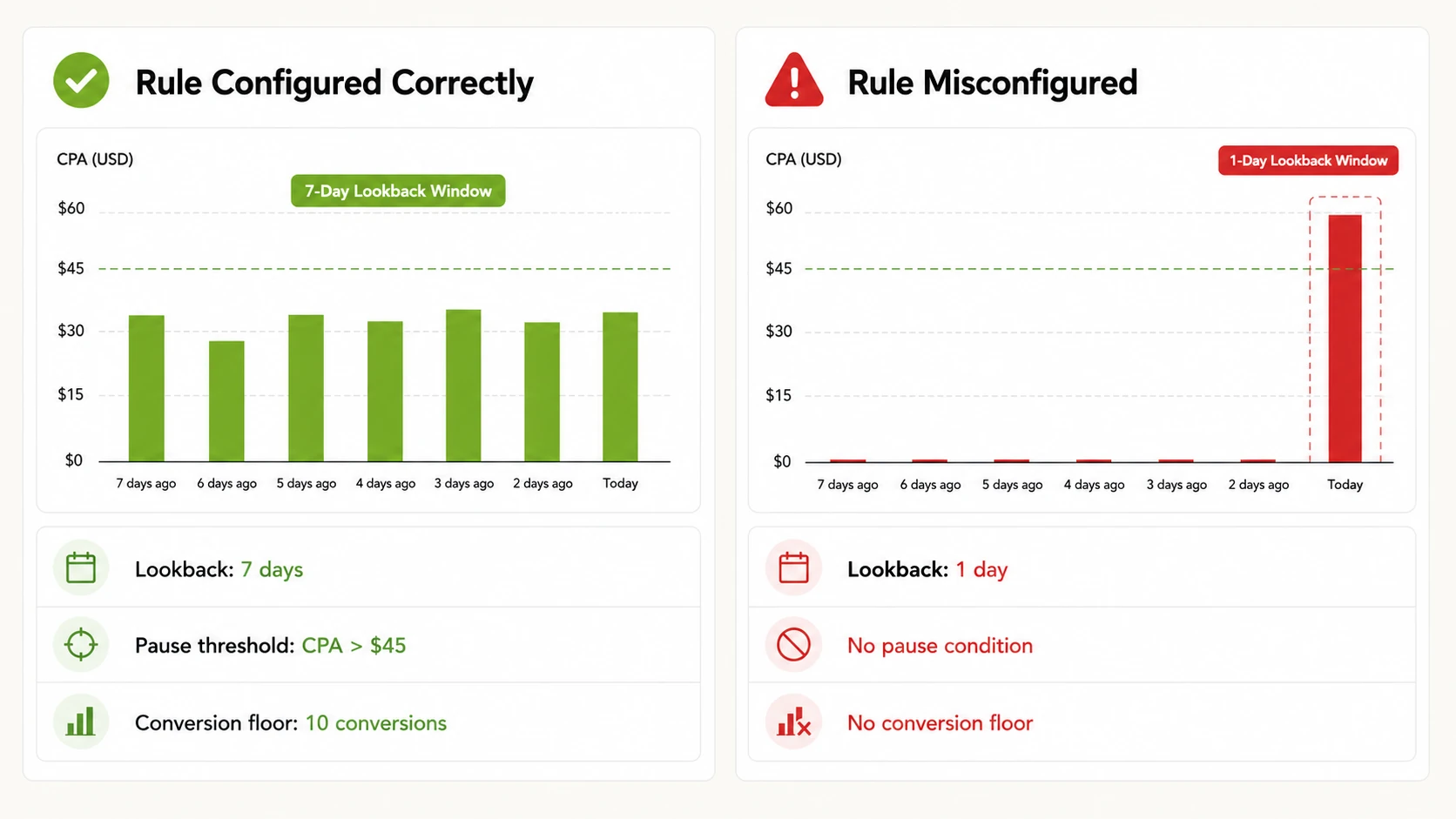
The most common way ad automation drains budget is also the easiest to miss: a rule with no lookback window, or a lookback window of a single day, reacting to a spend spike or a conversion drought that has nothing to do with real performance. A campaign that converts well over a week can still have one bad Tuesday, a pattern just as common with automated ads in Facebook as with TikTok or NewsBreak campaigns. If the rule only looks at yesterday’s numbers, it pauses a winning ad set or cuts a budget that was about to recover.
This is a statistics problem dressed up as a technology problem. Daily conversion counts on small to mid-size ad sets are volatile by nature, especially on platforms like TikTok and NewsBreak where audience pools and delivery pacing shift day to day. A rule that treats one noisy day as signal will misfire regularly, killing a working ad set or reallocating spend toward something that only looked good by chance. FabFunnel’s automation rules engine, an example of ai automation ads built for auditability, runs continuously at the campaign, ad set, and ad level and logs every action with the triggering condition and timestamp, which makes these misfires visible after the fact. The fix upstream is a lookback window wide enough, typically 3 to 7 days minimum and longer for lower-volume accounts, that a single bad day cannot trigger an action on its own.
No Downside Protection Before Scaling Rules Go Live
Teams are quick to build rules that scale budget when performance is good. Fewer build the matching rule that pulls budget back or pauses spend when performance turns. That asymmetry is where a lot of the damage happens. A scaling rule with no corresponding downside rule will keep pushing budget into an ad set that has already turned unprofitable, because nothing in the automation logic is watching for that condition.
Downside protection is not complicated in concept: a pause or budget-reduction condition on the same metrics the scaling rule watches, set to fire before losses compound. The mistake is treating scaling and protection as separate projects instead of two halves of the same rule set. Without a downside counterpart, ad automation stops being a safety mechanism and becomes an accelerant.
Automating Budget Increases Without a Conversion Floor
A close cousin of the above: budget-scaling rules that key off ROAS or CPA alone, with no minimum conversion volume required before the rule is allowed to act. Three conversions at a strong ROAS is not the same signal as three hundred conversions at that ROAS, but a rule with no conversion floor treats them identically. It will happily double the budget on an ad set that got lucky with a handful of conversions, then keep scaling as the metric regresses toward its real average.
A conversion floor is a simple safeguard: require a minimum sample size (the right number depends on the account, but even a low floor like 15 to 20 conversions in the lookback window filters out most false positives) before a scaling condition is allowed to fire. Without it, ad automation optimizes for statistical noise instead of performance.
Letting Ad Automation Run Unaudited
Automation is supposed to reduce the time spent watching campaigns, but that only works if someone is still watching the automation itself. A rule that starts misfiring, whether from a platform-side tracking change, an audience that has saturated, or a conflict with another rule touching the same ad set, can run for weeks before anyone notices, because the entire point of the setup was to stop checking manually.
This is where an audit trail matters. Every action a rule takes should be traceable to the specific condition and timestamp that triggered it, so a review can spot a pattern, such as a rule that has paused the same ad set eleven times in a month, instead of relying on someone remembering to look. FabFunnel logs every rule action this way across every connected account, turning an audit from a manual dig through Ads Manager history into a five-minute scan.
Treating Automation as Set and Forget
Rules that were correct when they were built stop being correct as the account changes. A CPA threshold that made sense at a $30 average order value stops making sense after a pricing change. A frequency cap tuned for a cold-audience campaign is wrong once that campaign shifts to retargeting. Ad automation does not know the business context changed, it just keeps executing the last logic it was given.
The practical fix is a recurring review, not a one-time setup. A monthly or quarterly pass through active rules, checking whether the thresholds still match current account economics, catches this before it compounds. Teams that treat rule-building as a single project rather than a maintained system are the ones most likely to find, months later, that a rule has been quietly working against the account’s actual goals the whole time.
Applying the Same Rule Logic Across Accounts With Different Baselines
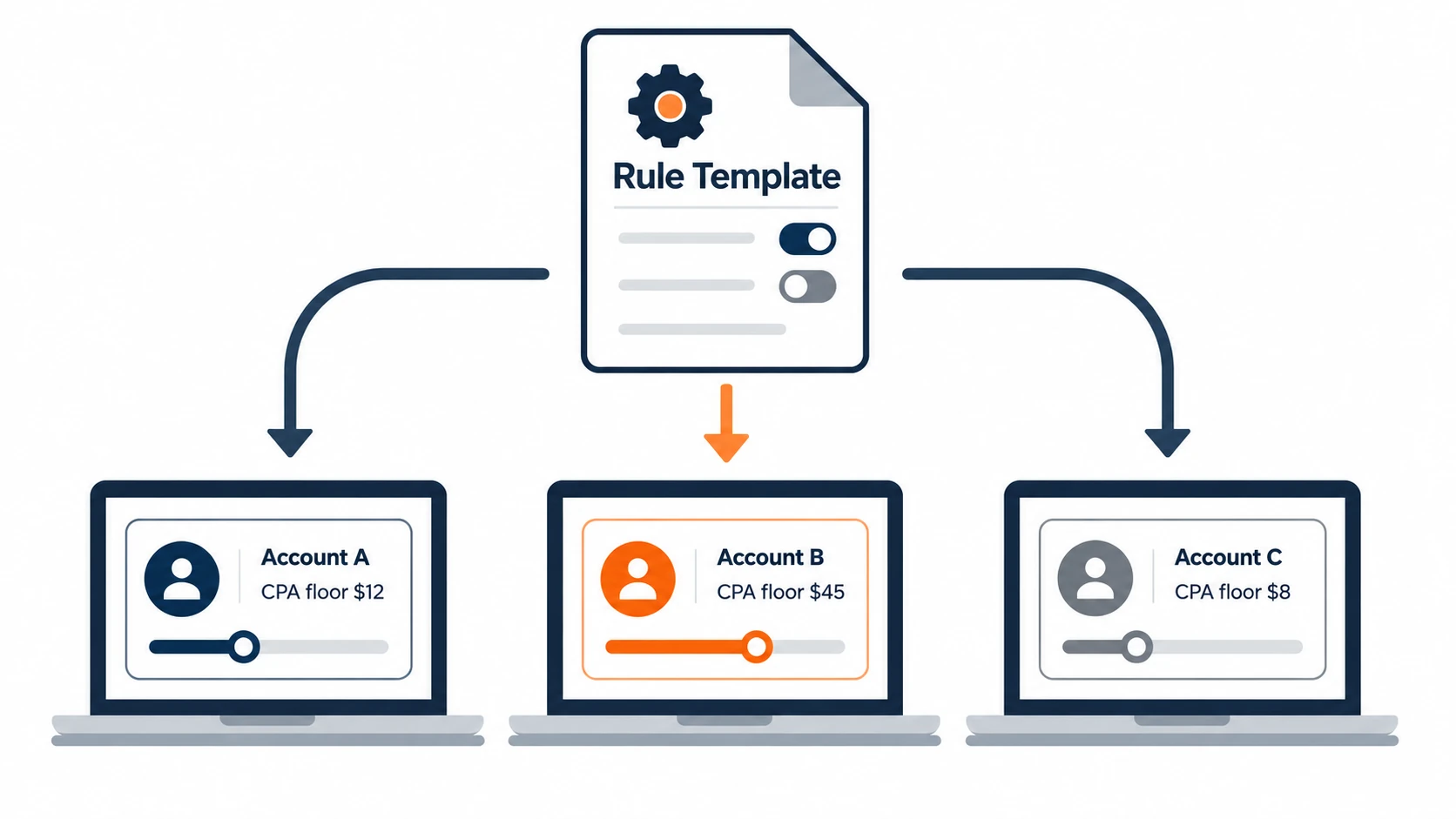
Agencies and multi-account operators often build one rule template and apply it everywhere, which fails the moment two accounts have different baseline metrics. A CPA threshold that is conservative for a client with a $200 average order value is far too loose for a client with a $20 one. A frequency cap tuned for a broad-reach awareness account will choke a small retargeting audience.
The underlying capability, applying rules across every connected account simultaneously, is a real efficiency gain for agencies and media buyers managing multiple clients. The mistake is skipping account-specific thresholds before turning that capability on. A rule template is a starting point, not a finished configuration, and each account needs its own numbers based on its own baseline before the rule goes live.
Common Misconfigurations and Fixes
The mistakes above tend to repeat in the same handful of forms. The table below maps the pattern to the fix.
| Misconfiguration | What It Causes | Fix |
|---|---|---|
| No lookback window, or a 1-day window | Rule reacts to a single noisy day and pauses or scales incorrectly | Set lookback to 3-7 days minimum, longer for low-volume accounts |
| Scaling rule with no downside counterpart | Budget keeps increasing after performance turns | Build pause or reduction rules alongside every scaling rule |
| No conversion floor on scaling conditions | Small sample sizes trigger large budget moves | Require a minimum conversion count before a rule can act |
| No audit review cadence | Misfiring rules run unnoticed for weeks | Review the action log on a fixed schedule, not ad hoc |
| Same rule template across all accounts | Thresholds mismatched to each account’s real baseline | Set account-specific thresholds before activating shared rules |
What a Tighter Setup Looks Like in Practice
None of this argues against running ad automation, it argues for building it with defined inputs, defined failure conditions, and a review cycle. A rule with a proper lookback window, a downside condition, a conversion floor, and account-specific thresholds is not meaningfully harder to set up than a rule without those things. It takes a few extra minutes at creation time and removes most of the ways automation quietly turns against the budget it was meant to protect.
Teams that get the most out of ad automation treat the rule set as a living part of the account, not a one-time configuration. Checking the action log, adjusting thresholds after a pricing or audience change, and keeping downside protection current with scaling logic is the maintenance work behind campaigns that look automated from the outside. This kind of ongoing rule maintenance is part of what FabFunnel’s ad management platform covers.
FAQs
1. What causes ad automation to waste ad spend?
The most common causes are rules built on too short a lookback window, budget-scaling logic with no conversion floor, missing downside protection, and rules that go unreviewed for weeks or months after account conditions change. Each of these lets a rule act on noise or outdated assumptions instead of real, current performance.
2. How long should a lookback window be for automation rules?
There is no universal number, but 3 to 7 days is a reasonable starting range for most accounts, with longer windows for lower-volume ad sets where daily conversion counts are naturally more volatile. The right window depends on how much daily variance the specific account normally sees.
3. What is a conversion floor in ad automation?
A conversion floor is a minimum number of conversions required within the lookback window before a rule is allowed to act, such as scaling a budget. It prevents a rule from treating a small, statistically unreliable sample as a strong signal.
4. How often should automation rules be reviewed?
A monthly or quarterly review is a reasonable baseline for most accounts, though accounts going through pricing changes, seasonal shifts, or audience changes warrant a check sooner. The goal is to confirm thresholds still match current account economics, not to rebuild rules from scratch each time.
5. Can the same automation rule template work across multiple ad accounts?
A shared template can be a useful starting point, but the specific thresholds inside it, such as CPA floors or frequency caps, need to be set per account based on that account’s own baseline metrics. Applying identical thresholds across accounts with different average order values or audience sizes is a common source of misfires.
6. Why does automation need downside protection if the goal is to scale spend?
Scaling rules without a matching pause or reduction rule will keep increasing budget even after performance turns, because nothing in the rule set is watching for that condition. Downside protection is what keeps a scaling rule from compounding losses once conditions change.
7. How do you audit whether an automation rule is misfiring?
Reviewing the action log for a rule, specifically which conditions triggered which actions and when, makes it possible to spot a pattern like a rule pausing the same ad set repeatedly or scaling budget on thin data. FabFunnel logs every rule action with its triggering condition and timestamp across every connected account, which supports this kind of review.
8. Does ad automation work the same way across Meta, TikTok, and NewsBreak?
The underlying logic (conditions, thresholds, lookback windows) can follow the same structure, but baseline metrics like CPA and conversion volume typically differ across platforms and even across campaigns on the same platform. Rules should be tuned to each platform’s real baseline rather than copied over unchanged.
If you want to see how a properly guarded rules engine looks in practice, including the audit trail behind every automated action, you can start a free trial or explore FabFunnel’s Meta Ads Automation and AI tooling, including automated ad creation.