Quick Answer
AI ad automation helps a media buyer managing multiple ad accounts by handling two specific jobs: applying budget and performance rules continuously across every connected account, and consolidating reporting so checking ten accounts doesn’t mean ten separate logins. The automation doesn’t replace campaign strategy — it removes the repetitive monitoring that otherwise caps how many accounts one person can realistically manage well.
A media buyer handling multiple ad accounts hits a ceiling that has nothing to do with skill: there are only so many dashboards a person can check in a day before something gets missed. Ad automation exists specifically to raise that ceiling, but it only works if the automation applies per-account logic rather than one shared rule set across every account.
Why Does Managing Multiple Ad Accounts Manually Break Down?
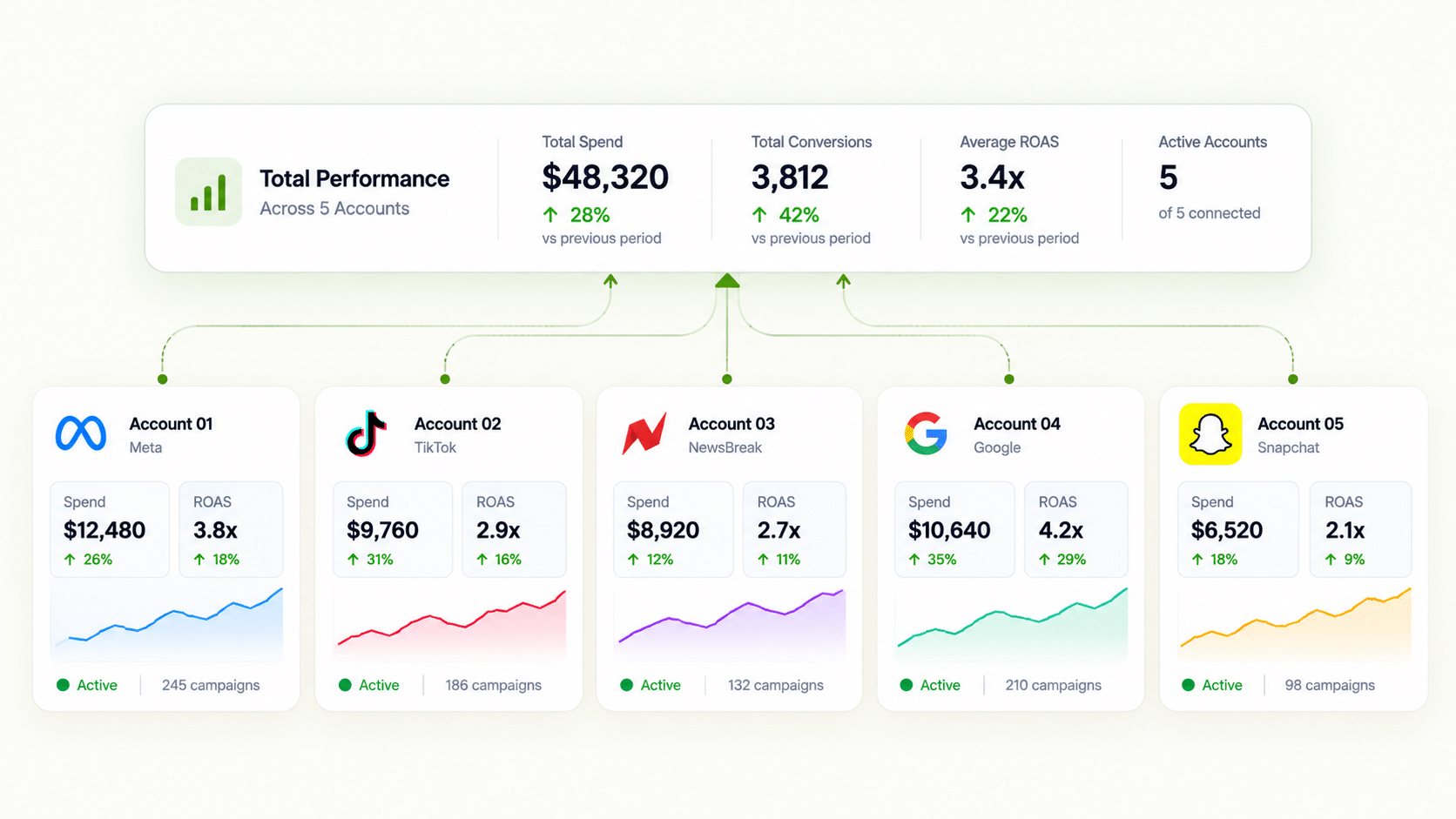
Each account has its own baseline — different average order values, different audience sizes, different typical CPA. A media buyer checking accounts manually has to hold all of that context simultaneously, and the more accounts added, the more likely something gets checked late or missed entirely. This is the specific failure mode ai ad automation is built to prevent: not bad judgment, but not enough hours to apply good judgment to every account every day.
How Does Automation Apply Different Rules to Different Accounts?
FabFunnel’s Automation Rules Engine applies CPA floors, ROAS thresholds, and frequency caps automatically, configured per account rather than as one shared template. This matters specifically for multi-account media buying: a CPA floor calibrated for one account’s economics would misfire applied unchanged to an account with a different average order value or audience size. Every triggered action is logged with the condition and timestamp that caused it, so a buyer reviewing what happened across accounts has a concrete record rather than a memory of what they think they saw.
What Does “Automated Advertising” Actually Take Off a Media Buyer’s Plate?
The continuous checking, specifically. A rule set to pause an ad set when CPA crosses a threshold runs 24/7 without a person watching it happen in real time. What stays with the buyer is reviewing the log periodically, adjusting thresholds as account economics change, and deciding whether a flagged pattern reflects a real problem. Automated advertising handles the “is anything currently out of bounds” question continuously; the buyer still answers “does this threshold still make sense.”
How Does Reporting Work Across Every Connected Account at Once?
Multi Ad Account Reporting keeps spend, ROAS, CPR, CPC, and CTR synced roughly every 15 minutes across Meta, TikTok, and NewsBreak, with per-account timezone settings. For a media buyer managing several accounts, especially across regions with different working hours, this is what turns “log into each platform separately every morning” into “scan one dashboard for anything that needs attention.”
Manual Multi-Account Management vs. AI Ad Automation
| Task | Manual Approach | AI Ad Automation Approach |
|---|---|---|
| Checking each account’s performance | Log into each ad platform separately | Multi Ad Account Reporting syncs data every ~15 minutes in one view |
| Applying budget/performance rules | Check thresholds per account by hand | Automation Rules Engine applies per-account CPA/ROAS/frequency rules continuously |
| Reviewing what automation did | No consistent record | Every action logged with triggering condition + timestamp |
| Deciding what needs attention | Scan every account’s full report | Co-Pilot surfaces flagged underperformance from live data |
| Adjusting for account-specific baselines | Manually recalibrate per account | Thresholds set per account, not shared across the roster |
Does AI Campaign Management Mean the Buyer Stops Watching the Accounts?
No — it changes what “watching” means. Co-Pilot, a recommendation layer trained on live reporting data, surfaces what’s underperforming across accounts without executing changes automatically, which keeps a person in the loop for the judgment call rather than letting automation act unsupervised on ambiguous signals. Ai campaign management, done this way, shifts a buyer’s time from continuous checking to periodic review and decision-making.
How Many Accounts Can One Media Buyer Realistically Manage With Automation in Place?
There’s no fixed number, and it depends on account complexity, but the ceiling moves meaningfully once continuous monitoring is handled by rules rather than manual checks. The remaining constraint becomes review and strategy time, not the mechanical work of checking whether each account is within bounds.
What Should a Media Buyer Set Up First When Adding Automation?
Start with the failure that costs the most money and is easiest to define. For most accounts that means a ceiling on CPA at ad level and a frequency cap on prospecting audiences.
A simple order of operations:
- Pick one rule per account. A single clear condition is easier to audit than five overlapping ones.
- Use each account’s own numbers. Pull the last 30 days of CPA and ROAS and set thresholds with headroom, not at the exact average.
- Check the log after a week. Look for actions you wouldn’t have taken, then adjust.
- Add rules gradually. Rules apply from the moment they are saved, not retroactively, and several can run at once at campaign, ad set, and ad level.
- Keep the first rules conservative. A rule that is too tight pauses good ads during normal variance, and that costs as much as the waste you were trying to stop.
What Does a Week With Multiple Accounts Look Like Once AI Ad Automation Is Running?
A realistic week is quieter than most media buyers expect. On Monday, you scan consolidated reporting for outliers and read the action log for anything the rules paused or scaled over the weekend. Midweek, you review recommendations and decide which are worth acting on. On Friday, you adjust thresholds for any account whose economics changed and plan next week’s creative tests.
The difference from a manual routine is where your attention goes. Instead of opening every account to look for problems, you open the ones the log or reporting points to. Good AI ad automation reduces the number of places you have to look, not the quality of the judgement you apply when you get there.
Keep a short running note for each account: current thresholds, the last change, and the reason. When a teammate covers for you, that note makes the setup understandable in minutes. It also keeps AI ad automation from turning into a black box that only one person understands.
Finally, schedule a monthly check on the rules themselves. Prices change, offers end, and audiences shift, so a threshold that was right in June may be wrong now. A short review prevents slow drift in results, and it keeps your AI ad automation aligned with how the business actually runs today.
FAQs
What’s the difference between ai ad automation and simply setting alerts on an ad account?
Alerts notify; automation acts. An alert still requires a person to log in and make a change. Automation rules execute the pause, budget adjustment, or other action directly based on the condition, with the action logged for review afterward.
Can the same automation rule template be used across every ad account a media buyer manages?
A template can be a starting point, but the actual thresholds — CPA floors, ROAS targets, frequency caps — need to be set per account, since baseline metrics like average order value and audience size differ across accounts.
How do I explain AI ad automation to a client who is nervous about it?
Show them the action log. AI ad automation executes rules you set and records every action with its condition and timestamp, so each decision can be explained in plain terms.
Does automated advertising work the same way across Meta, TikTok, and NewsBreak?
The rule structure (conditions, thresholds, lookback logic) works the same way conceptually, but the actual threshold values should reflect each platform’s and account’s own baseline rather than being copied across unchanged.
How does a media buyer know if an automation rule misfired across a multi-account setup?
The action log ties every automated action to its triggering condition and timestamp, which makes it possible to spot a pattern — like a rule pausing the same type of ad set across several accounts — that would be hard to catch by memory alone.
Does ai campaign management remove the need for a media buyer to check accounts at all?
No. It removes the need for continuous manual checking. Periodic review of the automation log, and judgment calls on flagged recommendations, still require the buyer’s attention.
Is consolidated reporting across accounts accurate in real time?
Multi Ad Account Reporting syncs spend, ROAS, CPR, CPC, and CTR roughly every 15 minutes, which is near-real-time rather than instantaneous — close enough for most monitoring and decision-making needs without requiring a live data feed.
Is ai ad automation the same thing as advertising automation software in general?
They’re the same category — advertising automation software is the broader term, and ai ad automation is how that category gets described when the rule logic and recommendation layer are described as AI-driven, which is increasingly the default rather than the exception.
Where to Start
If checking multiple ad accounts manually is the specific bottleneck limiting how many campaigns you can actually manage well, that’s what AI ad automation is built to remove. Begin with a small pilot on one account. FabFunnel’s per-account Automation Rules Engine, Co-Pilot recommendations, and Multi Ad Account Reporting work together as one system — start at FabFunnel or explore the full toolset at Fab AI.