Quick Answer
There’s no single “best” ai powered marketing tools list that applies universally, because paid advertising has at least three distinct layers — creative generation, campaign execution, and performance monitoring — and most tools cover one layer well rather than all three. The useful evaluation isn’t “which tool is best,” it’s “which layer is my actual bottleneck, and which tool covers that layer specifically.”
“Best ai marketing tools” roundups tend to blend tools built for completely different jobs into one ranked list, which makes the comparison less useful than it looks. A tool that generates ad creative and a tool that executes bulk campaign launches solve different problems, even if both get labeled ai marketing automation tools.
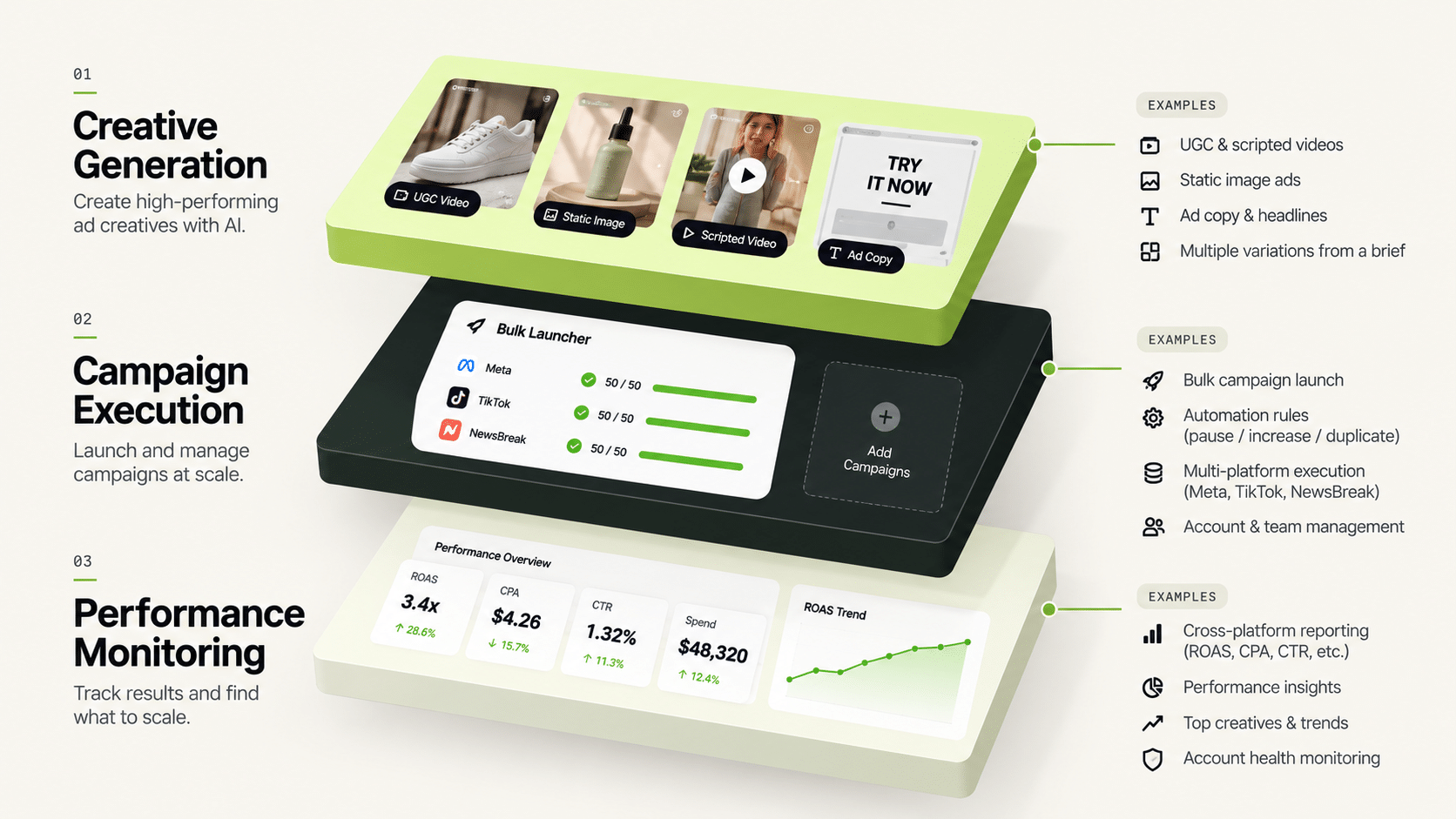
What Three Layers Do AI Powered Marketing Tools for Paid Advertising Split Into?
Creative generation (producing ad variants from product or brand inputs), campaign execution (launching and structuring campaigns, applying budget rules), and performance monitoring (tracking spend and results, surfacing what needs attention). Best marketing ai tools lists rarely separate these clearly, which is why two tools that don’t compete with each other end up ranked against one another.
What Does “AI Use in Marketing” Actually Cover at the Creative Layer?
Genie generates creative across four modes — Product Ad, Brand Ad, Product Shoot, and Performance Ad — drawing on a Catalogue structure (Brand → Categories → Products) and a Concepts tab with 200 fixed, pre-built frameworks. It produces image and video ads (video via Seedance 2 Fast, Seedance 2, Veo 3.1 Fast, or Veo 3.1 Quality), and brand guidelines are pulled automatically from the Catalogue. This is the layer most “ai marketing tools” content focuses on, since generation is the most visually demonstrable part of ai use in marketing.
What Does the Execution Layer Look Like for Paid Ads Specifically?
Bulk Campaign Launcher pushes 200+ campaigns live in under two minutes, with Folder Launch and dynamic variables (generating over 1,000 campaign variations from a single run) handling the mechanical work of getting creative into live campaigns. The Automation Rules Engine applies CPA floors, ROAS thresholds, and frequency caps automatically, with every action logged against the triggering condition and timestamp.
What Does the Monitoring Layer Add on Top of Execution?
Multi Ad Account Reporting syncs spend, ROAS, CPR, CPC, and CTR roughly every 15 minutes across Meta, TikTok, and NewsBreak. Co-Pilot, a recommendation layer trained on that reporting data, surfaces what’s underperforming and why — without executing changes automatically, keeping the decision with a person.
Comparing Tools Across the Three Layers
| Layer | What It Solves | Example Capability |
|---|---|---|
| Creative generation | Producing ad variants without a designer per SKU | Genie’s four generation modes + Concepts framework library |
| Campaign execution | Launching and structuring campaigns at volume | Bulk Campaign Launcher + Automation Rules Engine |
| Performance monitoring | Tracking and flagging results across accounts | Multi Ad Account Reporting + Co-Pilot recommendations |
Does the Best of the AI Powered Marketing Tools Cover All Three Layers, or Just One?
Some tools cover all three as a connected system; many cover just one and are marketed more broadly than their actual scope. Before comparing tools on marketing claims, identify which layer is your actual constraint — creative supply, execution speed, or decision quality — since that determines which comparison is even relevant.
Is There a Fourth Layer Before Creative: Research?
Many teams add one. Before generating anything, you need to know what is already working in your market. Industry Insights covers competitor ad discovery and tracking, and it connects forward: from a static ad, “Generate Variations” sends it into Genie; from a video ad, “Analyse Video” sends it to Video Sage, which evaluates hook, CTA, and retention patterns.
This research layer is optional, and it is an input rather than a verdict. Seeing a competitor’s ad tells you what they run, not whether it pays back. Treat it as a source of angles to test in your own account.
How Do You Decide Which Layer to Fix First?
Use the symptom, not the sales pitch:
- Your creative queue is the delay. Ads wait days for design, and you test few variations. Start with the creative layer.
- Launch is the delay. Approved creative sits while someone builds campaigns by hand. Start with execution.
- Surprises are the problem. You discover overspend or fatigue a day late. Start with automation rules and monitoring.
- You can’t see the whole picture. Numbers live in several accounts and platforms. Start with consolidated reporting.
Fix one layer, measure the hours saved, then move to the next. A single connected system is convenient, but you don’t need to adopt every part on day one.
What Should You Ask Vendors of AI Powered Marketing Tools?
Five questions cut through most marketing language:
- Which layer does the product actually cover, and which does it only mention?
- Which ad platforms does it support today? (FabFunnel: Meta, TikTok, NewsBreak; not Google Ads.)
- What does it do automatically, and what does it only recommend?
- Can I see an action log or audit trail for anything it changes?
- Can I trial it on my own account data rather than a demo?
Good answers are specific. Vague answers about “AI-driven optimization” usually mean the product does less than the label suggests. When you compare ai powered marketing tools, the vendor that is precise about its limits is usually the safer choice.
How Do You Roll Out AI Powered Marketing Tools Without Disrupting the Team?
Introduce one layer at a time. A team that adopts creative generation, bulk launch, and automation in the same month cannot tell which change helped or which one caused a problem.
Start with a four-week pilot. Pick the layer that is your biggest bottleneck, write down how long the task takes today, and run the new tool alongside your existing process. Compare time spent, errors, and results at the end. Most ai powered marketing tools look good in a demo and fall short on messy real accounts, so insist on testing with your own products and your own campaign structure.
Assign one owner per tool. That person learns the settings, writes a short how-to for the team, and reviews the output weekly. Without an owner, ai powered marketing tools tend to drift into half-use, where one person relies on them and everyone else works around them.
After the pilot, decide with evidence. Keep the tool if it saved real hours or protected real budget. Drop it if it only added another dashboard to check. Good ai powered marketing tools earn their place by removing work, not by adding reports.
FAQs
What’s the difference between ai powered marketing tools and ai marketing automation tools?
The terms overlap heavily. The more useful distinction is which layer (creative, execution, monitoring) a specific tool actually covers, regardless of which label it uses.
Is there a single best marketing ai tools list that works for every paid advertising team?
No — the right tool depends on which layer is your bottleneck. A team drowning in manual campaign builds needs execution-layer tools; a team without enough creative volume needs generation-layer tools.
How is ai use in marketing different for paid advertising versus other marketing functions?
For paid advertising specifically, the relevant “ai use” clusters around creative generation, campaign execution, and performance monitoring — a narrower and more mechanical set of tasks than broader marketing AI use cases like content writing or lead scoring.
How do I stop ai powered marketing tools from overlapping in my stack?
List every tool, the layer it covers, and the task it replaced. If two ai powered marketing tools do the same job, keep the one your team actually uses and cancel the other.
Do I need separate tools for each of the three layers, or one connected platform?
Either can work, but a connected platform removes the manual handoff between layers — creative doesn’t need to be exported and re-uploaded into a separate execution tool, for example.
What should I check before trusting a “best AI marketing tools for paid advertising” ranking?
Whether the list separates tools by layer (creative, execution, monitoring) or blends them together. A ranking that doesn’t distinguish the layers is comparing tools that don’t actually compete with each other.
Does automation at the execution layer replace strategic decisions about creative or audience?
No. Automation handles the mechanical execution — launching, budget rules — while creative direction and audience strategy remain judgment calls a person makes, informed by the monitoring layer’s recommendations.
Where to Start
If you’re evaluating ai powered marketing tools for paid advertising, start by naming which layer — creative, execution, or monitoring — is your actual bottleneck before comparing options. FabFunnel connects all three layers as one system: Genie for creative, Bulk Campaign Launcher and Automation Rules Engine for execution, and Multi Ad Account Reporting with Co-Pilot for monitoring — start at FabFunnel or explore Fab AI.