Quick Answer
Meta ads reporting is the practice of turning Facebook and Instagram campaign data into reports and dashboards that drive decisions. Inside Meta’s tools, Ads Reporting lets you start from a template or from scratch, add breakdowns and filters, build visualisations, export to XLSX, CSV, or PNG, and email single-account reports on a schedule. To set up a useful dashboard, pick one audience, choose five or six metrics tied to a goal, decide your attribution view, and fix the layout so it is the same every week. Reach for an outside Meta ads reporting tool when you need several accounts or other platforms in one view.
What Is Meta Ads Reporting?
Meta ads reporting covers the views, reports, and exports that show how your campaigns on Facebook, Instagram, and other Meta placements are performing. The data lives in Meta’s ad account, and you read it through Ads Manager for quick checks and Ads Reporting for custom and recurring reports.
Good reporting does three jobs. It monitors spend and delivery so that problems are caught early. It supports analysis, so you can see which audiences, placements, and creatives work. And it communicates results to people outside the account, such as clients, managers, and finance. A report built for one job rarely serves the others well.
Which Metrics Should Meta Ads Reporting Track?
Start from the goal and work back to the metrics.
| Goal | Core metrics |
|---|---|
| Awareness | Reach, impressions, frequency, CPM |
| Traffic | Link clicks, CTR, cost per link click, landing page views |
| Leads | Leads, cost per lead |
| Sales | Purchases, purchase conversion value, cost per purchase, ROAS |
| Creative health | Frequency, CTR trend, video view rates where available |
Keep the first view to five or six numbers. Define each one in writing, especially clicks (all clicks or link clicks) and conversions (which events count), and use the same definitions everywhere. Add detail only when a specific question needs it.
How Do Meta Ads Reporting Templates Work?
Per Meta’s help pages, you can create a report in Ads Reporting from a template. Templates give you a pre-built set of columns and breakdowns, which you then adjust. They are a fast way to start and a good way to learn what is available.
Treat a template as a draft. Check which metrics it includes, change the date range and attribution view to match your rules, remove columns you do not use, and save it under a name that says who it is for and what it answers, for example “Weekly spend and purchases, client A”. A clear name saves guessing six months later.
How Do You Build a Meta Ads Reporting Dashboard?
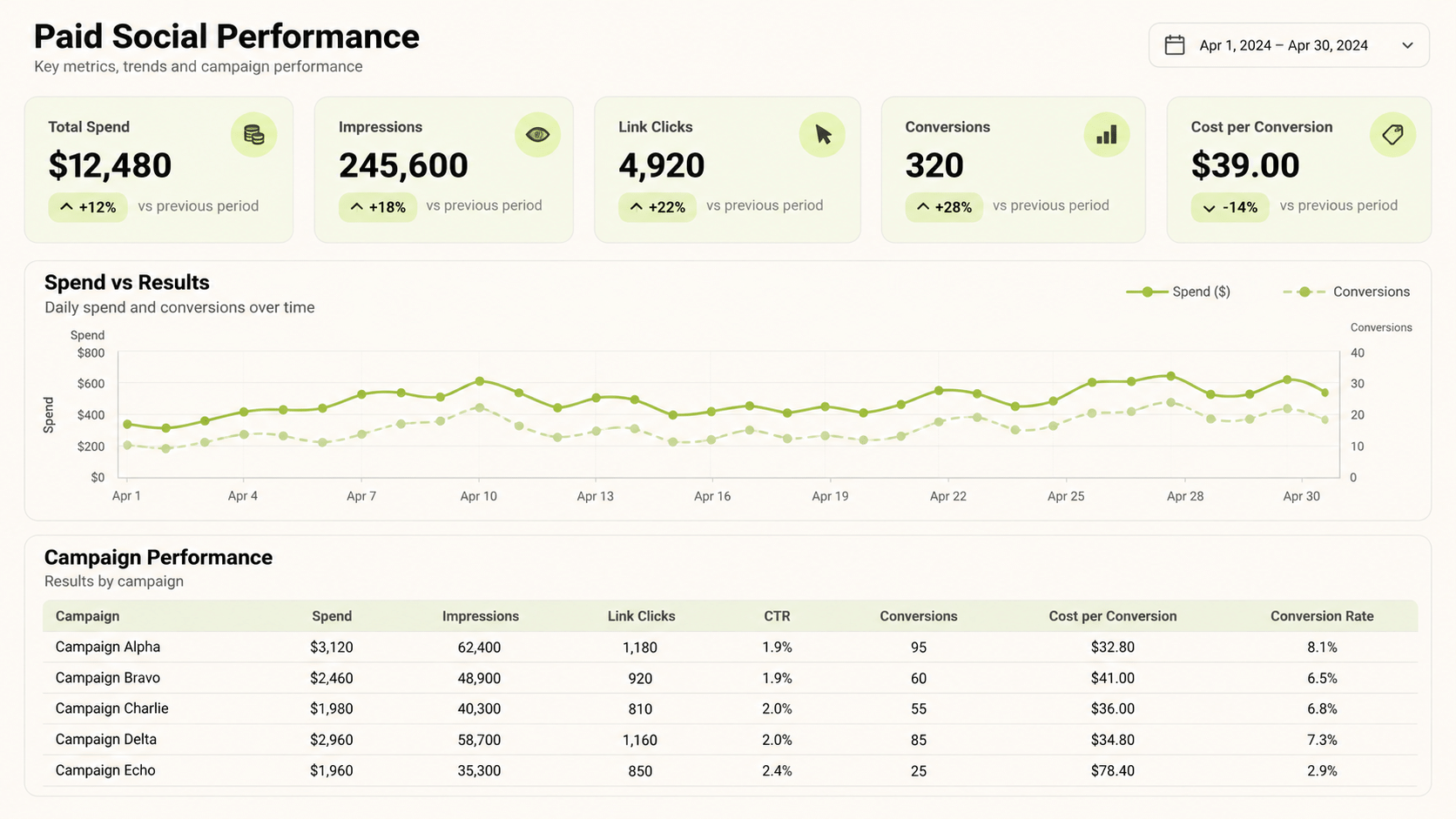
A dashboard is a report arranged for quick reading. Meta’s Ads Reporting supports visualisations alongside tables, so you can show trends and comparisons. A simple build looks like this.
- Pick the audience. Executives need outcomes and cost per result. Operators need pacing, frequency, and creative detail.
- Choose the headline tiles. Five or six metrics, each with a comparison to the previous period.
- Add one chart per question. For example, spend against results over time, or cost per result by campaign.
- Add a table for detail. Campaign, ad set, or ad level, sorted by spend.
- Apply breakdowns and filters. Breakdowns by age, gender, placement, or device, and filters for the campaigns that matter.
- Save, name, and share with people who have access to the ad account.
Use custom breakdowns if your campaign names follow a convention. Meta lets you group accounts, campaigns, ad sets, and ads with custom filters, and share those groupings across your business.
How Does Attribution Affect Meta Ads Reporting?
Attribution decides which conversions are counted and when. Meta states that Ads Reporting counts events attributed to a Meta user who saw or clicked your ad, and deduplicates them. Actions that cannot be attributed to a person on Meta who saw your ad do not appear in Ads Manager or Ads Reporting.
That is why Meta’s totals will not always match your store, your analytics tool, or other platforms. Choose an attribution view, note it on the dashboard, and keep it constant when you compare periods. For automated pulls, Meta’s Ads Insights API lets you set attribution windows as parameters, so a developer can fix the window in code.
How Do You Schedule and Export Reports?
You can email a report on a recurring schedule from Ads Reporting. Open the report, turn on the scheduled email option, choose recipients and frequency, and save. You need administrator, advertiser, or analyst access to the ad account.
Two limits matter. Scheduled email works for single-account reports only, and only people with permissions on the ad account can open a scheduled report. For everyone else, export the file as XLSX, CSV, or PNG and send it. If you manage many accounts, plan on one scheduled report per account or a tool that combines them.
Why Do Meta Ads Reporting Numbers Differ Between Views?
Even inside Meta, counts can differ between Ads Manager, Ads Reporting, and Events Manager, and Meta documents this in a help article on event count differences. Causes include attribution, deduplication, delayed data, and what each view counts as an event.
The practical answer is a reconciliation rule. Name the source of truth, such as backend sales for revenue, state the attribution view, and note the expected lag, then explain any gap in one sentence.
When Do You Need a Meta Ads Reporting Tool?
Native reporting is enough for one account and one reader. A Meta ads reporting tool earns its place when you manage several accounts, need Meta next to other platforms, want a branded dashboard for clients, or need delivery that native scheduling does not support. When you compare tools, check which metrics they read, how fresh the data is, who owns the connection, whether they let you control metric definitions, and what they cost as accounts grow. Ask to see your own account data, not a demo.
How Does Meta Ads Reporting Fit a Multi-Platform Workflow?
Few advertisers use Meta alone. FabFunnel’s Multi Ad Account Reporting shows Meta alongside TikTok and NewsBreak, with Google and Snapchat also connected for reporting, so you can compare spend and performance in one dashboard. FabFunnel also launches campaigns on Meta, TikTok, and NewsBreak. The columns shown follow each platform’s own metrics, so check them before you use the dashboard for client reporting.
For quick questions without building a view, FabFunnel’s Copilot answers questions about account performance in natural language. It recommends and explains; it does not change your account.
How Often Should You Review the Dashboard?
Match the rhythm to the decision. A daily look at spend, delivery, and any sudden change in cost per result catches broken ads and budget problems. A weekly review covers creative performance, frequency, and which audiences or placements deserve more budget. A monthly review compares cost per result with margin, summarises what was learned, and sets the plan for the next period.
Avoid reacting to a single day. Conversion data can arrive late, and small samples swing widely. When you do change something, change one thing, record the date, and check the result after enough time has passed to judge it.
What Mistakes Should You Avoid?
Common errors include too many metrics on one page, mixed definitions between reports, changing the attribution view mid-comparison, judging recent days before data settles, and sending operator detail to executives. Another is leaving a scheduled email running after the reader has left the company. Review the report list each quarter and retire what no one uses.
FAQs
What is Meta ads reporting?
It is the set of views, reports, and exports used to analyse and communicate the performance of campaigns on Facebook, Instagram, and other Meta placements.
Does Meta have report templates?
Yes. Ads Reporting lets you create a report from a template, then adjust columns, breakdowns, and filters.
Can I schedule a Meta report?
Yes, for single-account reports, by turning on scheduled email. You need administrator, advertiser, or analyst access.
What file formats can I export?
Meta supports XLSX, CSV, and PNG exports from Ads Reporting.
Why do Meta’s numbers differ from my analytics tool?
Attribution rules, deduplication, time zones, and delayed data differ between tools.
Can FabFunnel launch Meta campaigns?
Yes. FabFunnel launches campaigns on Meta, TikTok, and NewsBreak, and reports on Google and Snapchat.
Where to Start
Pick one audience, choose five metrics, and build one dashboard from a template in Ads Reporting. Fix the attribution view and run it for a month. To read Meta next to TikTok, NewsBreak, Google, and Snapchat, try FabFunnel or explore the full toolset at Fab AI. Define the Meta ads reporting metrics before building the dashboard so every viewer reads the same numbers the same way.