Quick Answer
Meta ads management for an agency needs to work across every client account simultaneously, not one at a time — per-client automation thresholds, role-based team permissions, and reporting that breaks out by client rather than blending the roster together. A meta ads management tool built for a single in-house account often falls short here, because it assumes shared context (one baseline, one team, one budget) that doesn’t exist across an agency’s client list.
Running Meta ads for one brand and running Meta ads for a dozen clients are different operational problems, even though the platform and ad formats are identical. The difference is entirely in how much has to be account-specific: thresholds, permissions, and reporting all need to flex per client rather than being configured once and applied everywhere.
Why Doesn’t a Single-Account Approach to Meta Ads Management Scale for Agencies?
Because client accounts differ in average order value, audience size, and typical CPA — the same automation threshold correct for one client will misfire on another. A meta ads management tool that assumes one shared configuration across accounts creates exactly the kind of misfire an agency can’t afford to explain to a client after the fact.
How Should Budget and Performance Rules Work Across a Client Roster?
Per account, not per template. FabFunnel’s Automation Rules Engine applies CPA floors, ROAS thresholds, and frequency caps configured independently for each connected account, with every triggered action logged against the specific condition and timestamp that caused it — the record an agency needs if a client asks why a campaign was paused or scaled.
What Does Creative Generation Look Like When Managing Multiple Client Brands?
Genie generates creative across four modes — Product Ad, Brand Ad, Product Shoot, and Performance Ad — working from each client’s own Catalogue (Brand → Categories → Products), keeping brand context separated by account rather than pooling creative into one shared library that needs manual sorting.
How Do Agencies Control Who on the Team Can Access Which Client Accounts?
Workspace-level versus account-level permissions let an agency assign role-based access — campaign execution, reporting and oversight, or billing and admin — rather than giving every team member full access to every client account by default. This matters specifically as a client roster grows past what one or two people can reasonably access without a permission structure.
Single-Account vs. Agency Meta Ads Management
| Requirement | Single-Account Approach | Multi-Client Agency Workflow |
|---|---|---|
| Automation thresholds | One shared configuration | Per-client CPA/ROAS/frequency thresholds |
| Creative | One brand context | Per-client catalogue (Brand → Categories → Products) |
| Team access | Often all-or-nothing | Role-based, workspace vs. account-level |
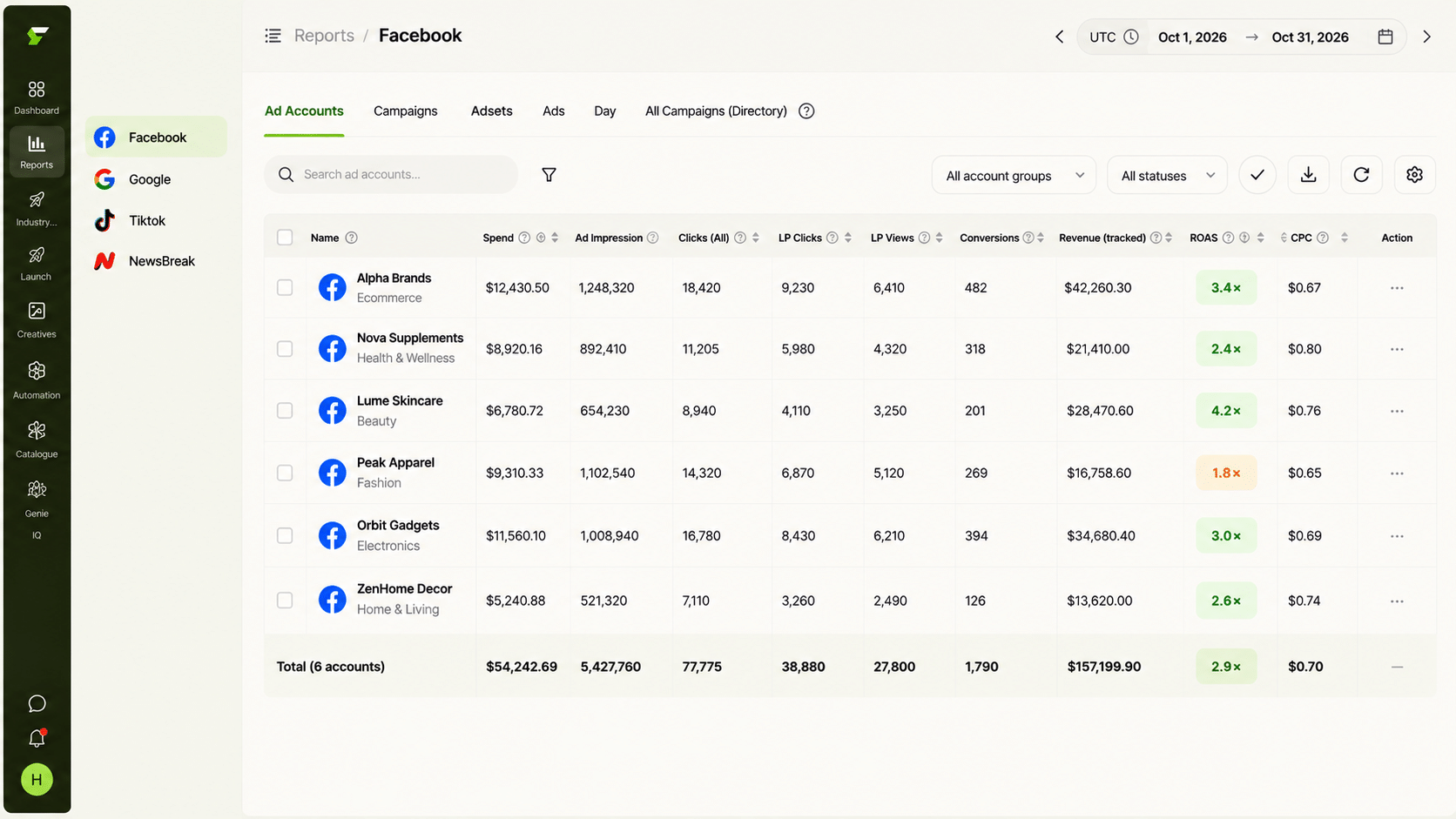
| Reporting | Single account view | Broken out per client, consolidated in one place |
| Audit trail | Varies | Every action logged with condition + timestamp |
How Does Reporting Work Across Every Client Account at Once?
Multi Ad Account Reporting keeps spend, ROAS, CPR, CPC, and CTR synced roughly every 15 minutes across Meta, TikTok, and NewsBreak, with per-account timezone settings — relevant for agencies with clients in different regions. This consolidates what would otherwise be logging into each client’s ad account separately every morning.
Does This Kind of Meta Ads Management Software Reduce the Need for a Dedicated Buyer Per Client?
It reduces the monitoring hours per client, not the strategic ones. Co-Pilot, a recommendation layer trained on live reporting data, surfaces what’s underperforming per account without executing changes automatically — a person still reviews recommendations and decides what to act on. What changes is that one person can reasonably manage more client accounts, since continuous checking is handled by automation rather than manual review.
What Does a Multi-Client Meta Ads Management Workflow Look Like Week to Week?
A repeatable cadence keeps quality consistent as the roster grows:
How Does Bulk Launch Help When You Run the Same Structure for Many Clients?
Agencies tend to rebuild similar campaign structures for every client. FabFunnel’s Bulk Campaign Launcher builds full Meta structures (Account → Campaign → Ad Set → Ads) and can launch 200+ campaigns in under two minutes. Launch Templates help for campaigns you run repeatedly with the same targeting structure, and Folder Launch from the Creative Library moves a folder of approved creative into live campaigns in one action.
The saving is real, but so is the risk: a template applied to the wrong client’s account is a costly mistake. Check the selected account and structure before every bulk launch.
What Should an Agency Show Clients From This Workflow?
Clients rarely want dashboards. They want to know what happened and what you’re doing about it. A short monthly summary works: spend and results against the agreed target, what was tested, what the action log shows about automated pauses or scaling and why, and the next two tests. The action log is useful here because it turns “we paused that campaign” into a specific, dated reason.
What Should an Agency Do When a Client Asks for Faster Results?
Clients often push for speed, especially in the first month. A structured workflow gives you a better answer than a promise.
Start by separating what can be accelerated from what can’t. Launch speed, creative volume, and reporting turnaround can all be improved with the right setup. Learning phases, audience testing, and statistical confidence cannot be rushed without risking wasted spend.
Then show the plan. Explain how many creative variations you will test, how automation rules protect budget while tests run, and when you will report. Clients respond well to a clear timeline and an honest note that early results can be noisy.
How Do You Handle Different Reporting Needs Across Clients?
Some clients want a weekly email, some want a shared dashboard, and some only want a monthly call. Standardise the underlying data, then adapt the presentation.
Keep one internal template that pulls the same core metrics for every client: spend, ROAS, cost per result, CPC, and CTR. Build each client’s report from that template, adding only what they specifically ask for. This keeps your work repeatable while letting each client feel the report is theirs.
Review each client’s baseline every quarter. Average order value, margin, and seasonality change, and the thresholds you set at onboarding may no longer fit. A short quarterly check prevents quiet drift in results.
What Should an Agency Check Before Onboarding the Next Client?
Before adding a client to an existing setup, confirm three things: their average order value and target cost per result, which team members need access, and how they want to receive reports. Set thresholds from the client’s own history, not from another client’s. Then run the first two weeks with tighter review so any misfire is caught early, while the account is still small enough to correct quickly.
FAQs
What’s the difference between meta ads management for a single brand and for an agency?
Scale of the same requirements: per-account thresholds, role-based access, and client-broken-out reporting matter for a single brand too, but they become essential rather than optional once managing multiple client accounts.
Is a meta ads management platform the same as a standalone tool?
The terms are used interchangeably. The more useful distinction is scope — whether the product covers automation, creative, and reporting together, or just one piece.
Can automation thresholds be set differently for each client in meta ads management software?
Yes, with a properly built system — CPA floors, ROAS thresholds, and frequency caps should be configurable per account, not shared across every client by default.
How does an agency show a client why a campaign was paused automatically?
The action log ties every automated decision to its specific triggering condition and timestamp, giving a concrete answer rather than requiring the account manager to reconstruct what happened from memory.
Does meta ads management software handle creative for multiple client brands without mixing them up?
Creative generation works from each client’s own catalogue structure, which keeps brand context separated by account rather than pooling everything into one shared library.
How many client accounts can one person manage with this kind of setup?
There’s no fixed number — it depends on account complexity — but the ceiling moves meaningfully once continuous monitoring is automated and only flagged items and periodic threshold reviews require manual attention.
Where to Start
If your agency’s Meta ads management is still using one shared configuration across every client, that’s the specific gap that causes misfires as the roster grows. FabFunnel’s per-account Automation Rules Engine, catalogue-based creative generation, and role-based permissions are built for exactly this structure — start at FabFunnel or explore the full toolset at Fab AI.