Quick Answer
BIGO Ads is the advertising platform from BIGO Technology, the company behind live-streaming and short-video apps. Advertisers use it to run campaigns across BIGO’s own apps and, according to some third-party guides, its wider network of partner inventory. A typical first campaign follows the usual pattern: pick an objective such as traffic or app installs, set a name and budget, define the audience, upload image or video creative, and add tracking. Details such as who can open an account, minimum budgets, and available formats have changed over time and differ between sources, so confirm them in BIGO’s own advertiser help center before you plan.
What Is the BIGO Ads Platform?
The BIGO Ads platform is the system BIGO provides for advertisers to buy placements and manage campaigns. BIGO’s advertiser help center is organised around getting started, campaign management, tracking and API integration, and optimisation, which gives a sense of how the platform is structured.
For most advertisers, it sits in the same family as other self-managed ad platforms: you create campaigns, assign budgets, choose audiences, upload creative, and read results in a dashboard. What is different is the audience. BIGO’s products centre on live-streaming and short video, so the context is entertainment and creator content, and the people you reach may differ from those on search or professional networks. Whether they match your customers is something to test.
Can You Open a BIGO Ads Account?
Third-party guides disagree on access. Some older guides say the platform was in semi-private mode, with self-registered accounts sometimes declined and access running through agents. Other sources describe a simpler sign-up. This article cannot confirm which applies today, so check BIGO’s advertiser site for current account requirements and, if needed, contact BIGO or an authorised partner.
Plan for lead time. If account approval takes days, build that into your launch schedule, and prepare creative and tracking while you wait.
How Do You Set Up BIGO Ads Step by Step?
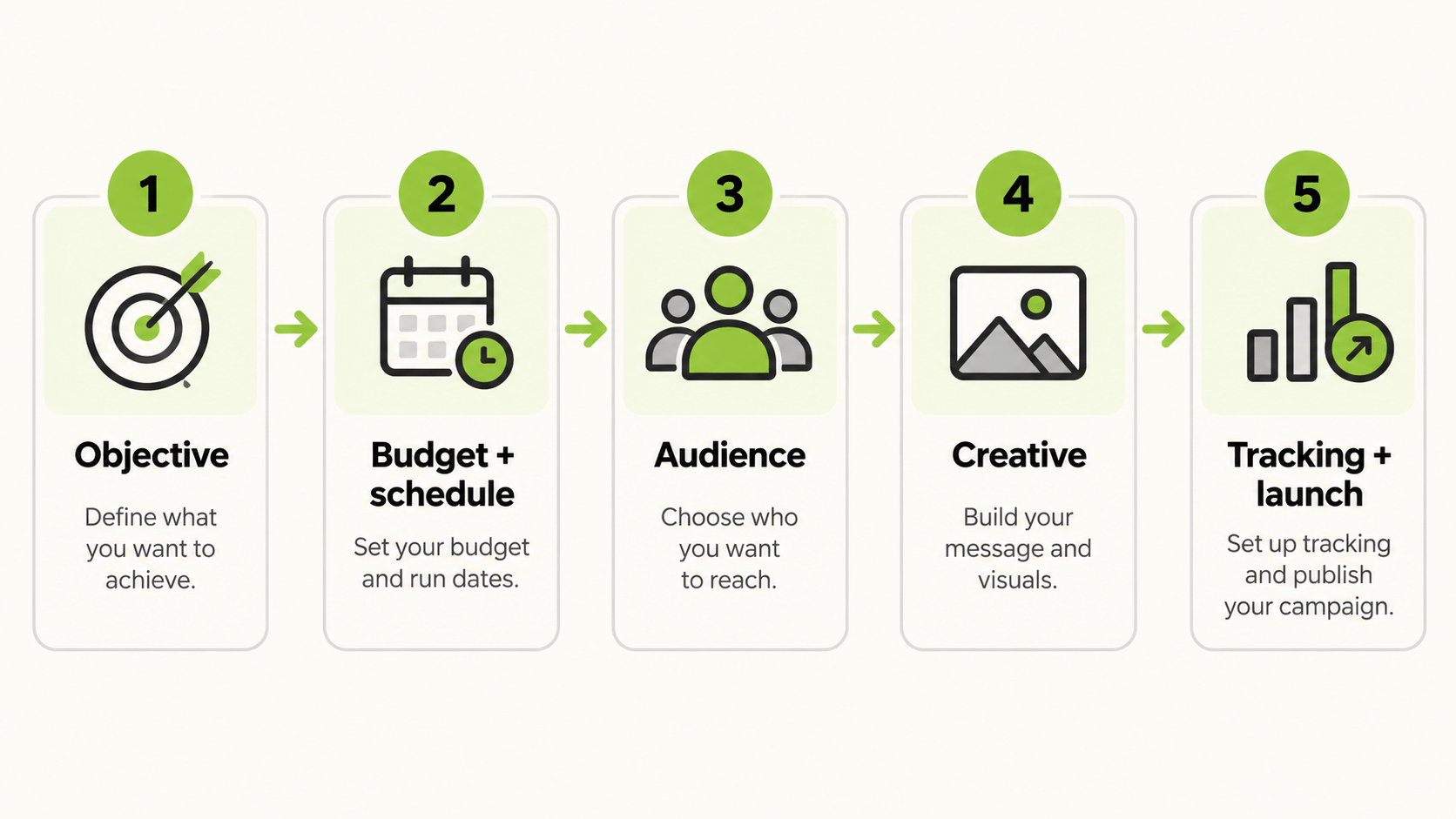
The flow below follows the structure described in third-party guides and the headings in BIGO’s help center. Screens and options can change, so treat it as a checklist, not a manual.
- Prepare your assets. Have the app store link or landing page URL, your tracking links, and your creative ready. For app campaigns, guides describe adding the app first, with its download URL and tracking links.
- Create a campaign and pick an objective. Commonly listed objectives include traffic and app installs.
- Set a name, budget, and schedule. One older guide cites a minimum daily or total budget of $20, but confirm the current minimum in the platform.
- Define the audience. Choose location, language, device, and any interest options available.
- Add creative. The platform is described as supporting image and video, with limits on headline and body text and a set of call-to-action options.
- Review and submit. Ads typically go through review before they run.
Some guides suggest a structure of one campaign, one ad group, and several creatives, so that you can compare creative within a single audience. That is a sensible testing habit on any platform.
What Should You Check Before You Launch BIGO Ads?
Run through a pre-launch list.
| Check | Why it matters |
|---|---|
| Account approved and billing set | Campaigns cannot run without it |
| Budget above the platform minimum | Below-minimum budgets are rejected |
| Tracking links tested | Without tracking, you cannot judge results |
| Creative meets specifications | Rejected ads delay the launch |
| Landing page or store listing ready | The ad is only as good as the destination |
| Compliance reviewed | Policies on content and claims apply |
If your campaign is for an app, confirm how installs and in-app events will be measured, and whether you use a mobile measurement partner.
What Creative Works Where People Watch Short Video?
BIGO’s context is video-first, so creative should follow video habits. Open with movement and a clear reason to keep watching. Use short text for viewers who watch without sound. Show the product in use, with real people where possible. Keep a single call to action, and make sure the destination repeats the promise.
Plan variations. Two hooks, two lengths, and two calls to action give you enough combinations to learn from. Refresh creative on a schedule, because frequency builds quickly on smaller audiences.
How Do You Measure BIGO Ads Results?
Decide the scorecard before launch. For traffic, watch click-through rate, cost per click, and landing page views. For app campaigns, watch installs and cost per install, and, if available, in-app events such as registrations or purchases. For sales, compare cost per purchase with your margin.
Third-party tracking tools document integrations with the platform, and BIGO’s help center lists tracking and API integration as a section. Choose one source of truth, such as your tracker or your backend, and use platform figures as directional checks. Because each platform counts conversions with its own window, totals will rarely match exactly.
Who Should Consider the Platform?
The platform suits advertisers whose customers spend time on live-streaming and short-video apps: mobile games, entertainment and social apps, consumer apps, and brands that want reach among viewers of creator content. It is less obvious for products with long research cycles or strict professional targeting needs, where other platforms may reach buyers more directly.
Before you commit, ask three questions. Do your customers use these apps in the countries you plan to target? Can your team produce video that fits the environment? And can you measure results well enough to judge a test? If any answer is no, start with a platform where you already have tracking and creative in place, and revisit BIGO Ads later.
How Should You Structure a BIGO Ads Test?
Keep the first test small and readable. Pick one objective and one country. Run a single campaign with one audience and three or four creatives that differ in the first second only, so that you learn which hook works. Use the same landing page or store listing for all of them.
Set a budget that is above the minimum and large enough to produce results you can read, then give the campaign several days before you judge it. Record spend, impressions, clicks, installs or leads, and cost per result in a simple log. When the test ends, keep the best creative, retire the rest, and change one variable at a time in the next round.
If results are weak, check the basics before you blame the platform: is tracking firing, does the creative meet the specification, and does the landing page load quickly on a mobile connection? Many weak tests come from setup problems.
How Do You Compare BIGO Ads With Your Other Channels?
If BIGO is one channel among several, the practical problem is reading the numbers together. FabFunnel’s Multi Ad Account Reporting shows BIGO alongside Meta, TikTok, NewsBreak, Google, and Snapchat, so you can compare spend and performance in one dashboard. BIGO is connected for reporting only: FabFunnel launches campaigns on Meta, TikTok, and NewsBreak, so you would build and launch BIGO campaigns inside BIGO’s own platform. The columns follow each platform’s own metrics, so check them before you use the dashboard for client reporting.
What Mistakes Should You Avoid?
Common mistakes include launching before tracking works, budgets below the minimum, creative that ignores sound-off viewing, copying benchmarks from old guides, and judging results on day one. Another is assuming that a platform’s audience matches yours without checking. Test with a small, capped budget and let your own numbers decide.
FAQs
What is BIGO Ads?
It is the advertising platform from BIGO Technology, used to run campaigns across BIGO’s apps and, per some guides, partner inventory.
How do I set up BIGO Ads?
Create an account, add your app or landing page and tracking, create a campaign with an objective, set budget and audience, upload creative, and submit for review.
What is the BIGO ads platform minimum budget?
One older guide cites $20, but check the platform for the current figure.
What formats does BIGO advert creative use?
Guides describe image and video formats. Confirm current specifications in BIGO’s help center.
Can I launch BIGO campaigns from FabFunnel?
No. FabFunnel reports on BIGO but launches only on Meta, TikTok, and NewsBreak.
Where can I find official instructions?
BIGO’s advertiser help center covers getting started, campaign management, tracking and API integration, and optimisation.
Where to Start
Confirm account access and the current budget minimum in BIGO’s help center, prepare tracking and two or three video creatives, and launch one capped test. To follow BIGO results next to your other channels, try the reporting at FabFunnel or explore the full toolset at Fab AI.