Quick Answer
Automated ad management for an ecommerce brand covers three practical jobs: keeping campaign structure aligned with a changing product catalogue, applying budget and performance rules without watching dashboards all day, and pulling reporting into one place instead of checking each ad account separately. The “AI” part is doing the repetitive checking and executing; a person still decides strategy and reviews what the automation flags. Brands evaluating ai ad management tools should check which of these three jobs a given tool actually covers, since most only handle one.
Ecommerce ad accounts grow messier as a catalogue grows. New products need campaigns, seasonal SKUs need pausing and reactivating, and budget decisions that made sense at 20 active campaigns stop scaling cleanly at 200. “AI ad management” gets used to describe a wide range of tools that address pieces of this, and it’s worth being clear about which piece actually solves the problem an ecommerce brand has.
What Does “AI Ad Management” Mean in Practice for Ecommerce?
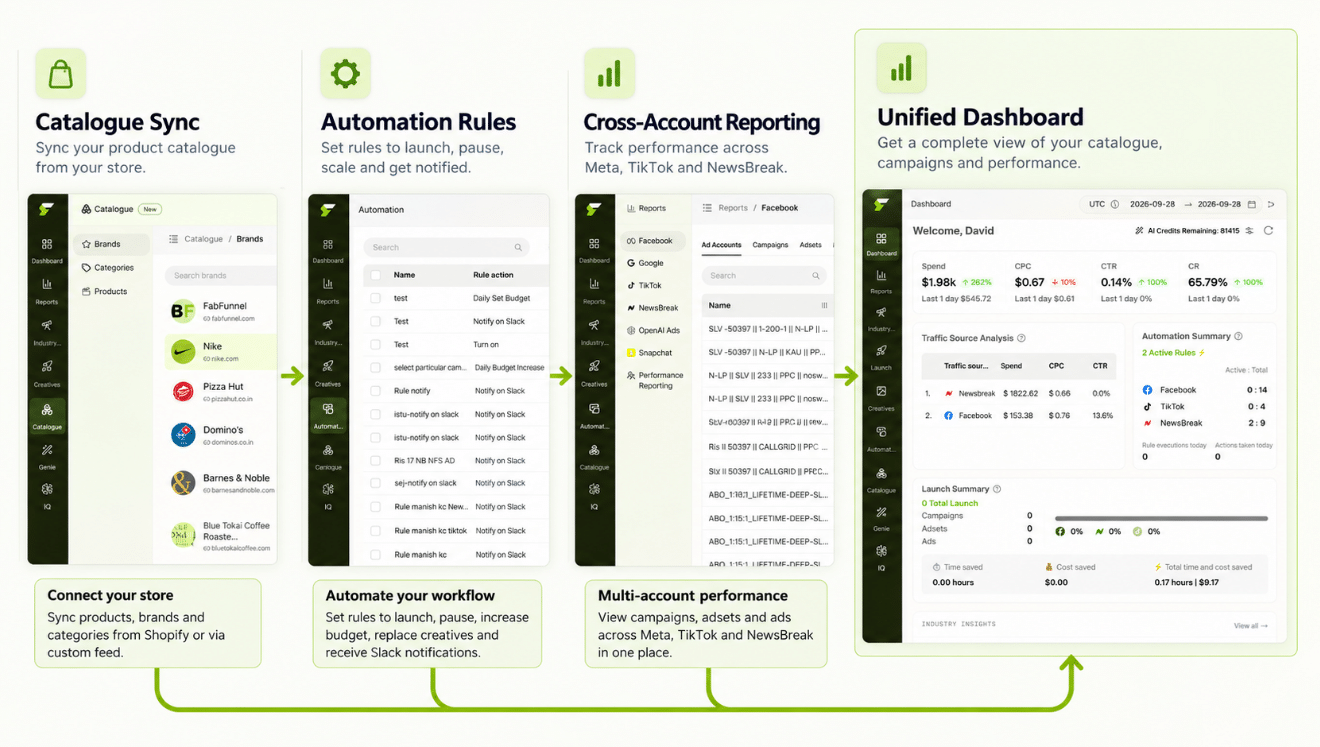
Stripped of the marketing language, it means software that watches account data continuously and takes or recommends action based on rules, instead of a person checking each account manually. For an ecommerce brand specifically, this shows up in three places: keeping campaign structure current as the catalogue changes, applying spend and performance rules automatically, and consolidating reporting so a growing number of campaigns doesn’t mean a growing number of dashboards to check.
Automated ad management tools that only cover one of these — a bidding tool with no reporting layer, a reporting dashboard with no automation — leave the other gaps for someone to fill manually.
How Does Catalogue Structure Stay Current Without Manual Campaign Rebuilds?
For ecommerce brands, campaign structure and product catalogue are tightly linked — a new SKU often needs a new ad, and a discontinued one needs its campaigns paused. FabFunnel’s Catalogue, structured as Brand → Categories → Products, syncs automatically for connected Shopify stores, so campaign-relevant product data doesn’t go stale between manual updates. This matters specifically for ad management because campaigns built against an outdated catalogue waste spend on discontinued products or miss new ones entirely.
How Do Automation Rules Handle the Day-to-Day Budget Decisions?
The automated adwords management and Meta-side equivalent of this is FabFunnel’s Automation Rules Engine, which applies CPA floors, ROAS thresholds, and frequency caps automatically across connected accounts. Every triggered action is logged with the condition and timestamp that caused it, so an ecommerce brand running dozens of product-level campaigns can review what the automation did without reconstructing it from memory.
This is the part that removes the most manual hours: instead of checking each campaign’s CPA daily, the rule checks continuously and only surfaces what actually crossed a threshold.
What Role Does Co-Pilot Play in AI Ad Management Decisions?
Co-Pilot is a recommendation layer trained on live reporting data — it surfaces what’s underperforming and why, without executing changes automatically. For ecommerce ad management specifically, this matters because not every automated advertising management decision should be fully automatic. A product going out of stock, a seasonal shift, or a pricing change can all explain a performance dip that a rigid rule might misread. Co-Pilot flags the pattern; a person still decides whether it’s a real problem.
Manual Ad Management vs. AI Ad Management for Ecommerce
| Task | Manual Approach | Automated Approach |
|---|---|---|
| Keeping campaigns aligned with catalogue changes | Manually check for new/discontinued SKUs | Catalogue synced automatically (Shopify), structure stays current |
| Applying budget/performance rules | Check CPA/ROAS per campaign manually | Automation Rules Engine applies thresholds continuously, logs every action |
| Spotting underperformance | Review each campaign’s numbers by hand | Co-Pilot surfaces flagged issues from live reporting data |
| Checking performance across accounts | Log into each ad account separately | Multi Ad Account Reporting syncs data every ~15 minutes in one view |
How Does Reporting Work Across Multiple Ad Accounts?
Multi Ad Account Reporting keeps spend, ROAS, CPR, CPC, and CTR synced roughly every 15 minutes across Meta, TikTok, and NewsBreak, with per-account timezone settings. For an ecommerce brand running ads across multiple platforms or multiple accounts (common for brands with regional storefronts), this is the difference between one consolidated check-in and logging into three separate ad managers every morning.
Does AI Ad Management Replace a Media Buyer?
No. Automation handles the repetitive checking and rule execution; it does not decide strategy, judge creative quality, or interpret why a metric moved without more context than the rule itself has access to. What changes with AI ad management software is how much of a media buyer’s day goes to manual monitoring versus actual decision-making.
How Should an Ecommerce Brand Roll Out AI Ad Management?
Start with the part that is easiest to check. Connect your store and confirm the Catalogue matches what you actually sell: products, categories, and prices. A catalogue with errors will produce errors downstream, so fix it first.
Next, add a small number of automation rules on your highest-spend campaigns. Use your own CPA and ROAS history to set the thresholds, and leave generous headroom for the first two weeks. Rules apply going forward from the moment they are saved, so there is no retroactive change to review.
Then set a recurring review. Ten minutes a day on the action log and flagged items is usually enough at the start. Once the rules behave as expected, widen them to more campaigns. Treat the first month as calibration, not as a verdict on the tool.
What Mistakes Should Ecommerce Brands Avoid?
- Copying thresholds from a blog post. Every account has its own economics, so a CPA ceiling that works for another brand can pause your best ads.
- Automating before the data is trustworthy. If conversion tracking is broken, rules will act on bad numbers.
- Skipping the log. The action log is how you learn what the rules are really doing. Read it weekly.
- Expecting strategy from automation. Which products to push, which offers to run, and what creative to test remain human decisions.
FAQs
What’s the difference between AI ad management and ad automation software generally?
They overlap heavily — ad automation software is often the mechanism behind AI ad management. The distinction that matters more in practice is scope: whether a tool covers just rule-based automation, or automation plus catalogue sync plus consolidated reporting as a connected system.
Does AI ad management work if I sell on multiple platforms, not just Shopify?
Catalogue sync is automatic for connected Shopify stores; other platforms require a manual catalogue upload, after which the same automation and reporting tools apply. Multi Ad Account Reporting itself works across Meta, TikTok, and NewsBreak regardless of where the product catalogue lives.
Is AI advertising management the same as fully automated ad buying?
Not in the sense used here. The approach covered by FabFunnel’s tools executes rule-based actions (pausing, budget thresholds) and surfaces recommendations, but strategic decisions — what to test, what to prioritize — stay with a person.
How much manual monitoring does automated ad management actually remove?
It removes the continuous checking, not the periodic review. A rules engine watches thresholds around the clock and logs every action; a person still reviews the log periodically and decides whether thresholds need adjusting as the account or catalogue changes.
Can automated ad management software make budget decisions I disagree with?
Automation rules execute exactly the conditions you set — if a threshold is set too aggressively, the rule will act on it as configured. This is why every action is logged with its triggering condition, so misconfigured rules are visible and correctable rather than invisible.
Does this help more with a large catalogue or a small one?
The time savings scale with catalogue size and campaign count — a brand with 10 campaigns can often manage manually without much strain, while a brand with hundreds of SKU-level campaigns hits a point where manual monitoring alone isn’t sustainable.
Where to Start
If checking campaign performance, applying budget rules, and keeping campaigns aligned with your catalogue is eating hours every week, that’s the specific gap AI ad management is built to close. FabFunnel connects catalogue sync, the Automation Rules Engine, Co-Pilot recommendations, and Multi Ad Account Reporting as one system — start at FabFunnel or see the full toolset at Fab AI.