Quick Answer
AI media buying for an ecommerce brand works best as a connected workflow: catalogue data drives creative generation, approved creative launches in bulk across campaigns, and automation rules handle budget decisions between manual reviews. Treating “ai media buying” as a single feature — just a bidding algorithm, or just a creative generator — misses that the actual time savings come from these pieces working off the same catalogue and account data rather than as separate tools stitched together.
Ecommerce media buying has a specific volume problem: more SKUs means more creative variants, more campaigns, and more accounts to check, and a media buyer’s calendar doesn’t scale the same way a catalogue does. AI media buying tools exist to close that gap, but the term covers everything from a single bid-optimization plugin to a full creative-to-reporting pipeline. It’s worth knowing which one you’re actually evaluating.
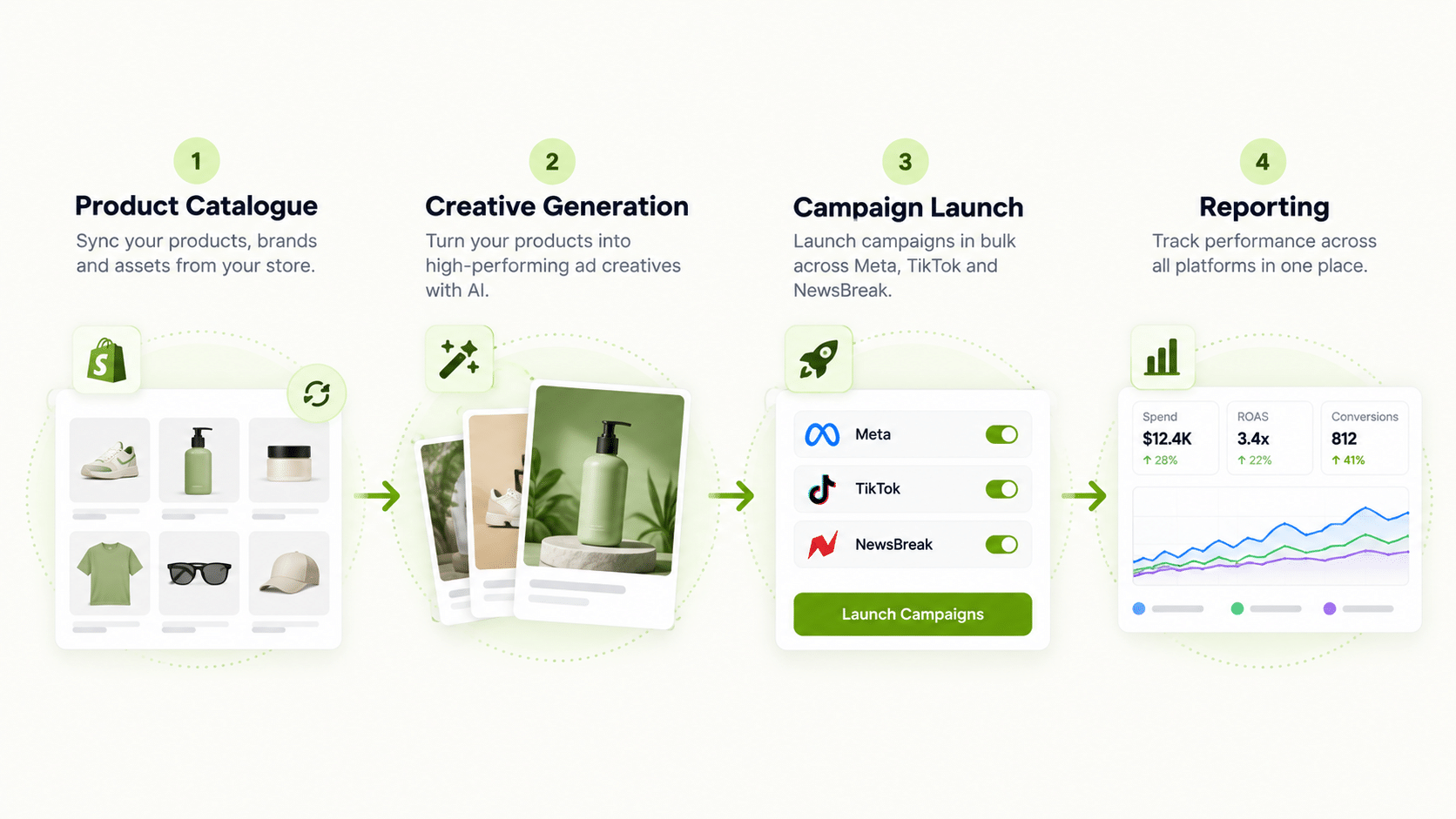
What Does “AI Media Buying” Cover for an Ecommerce Workflow?
At minimum, three stages: turning catalogue data into ad creative without a designer touching every SKU, launching that creative into live campaigns without building each one by hand, and applying budget rules so a media buyer isn’t checking every campaign’s numbers daily. A tool that handles only the bidding piece is still useful, but it’s a narrower slice of ai media buying than the term often implies.
How Does Catalogue Data Feed Into Creative for Media Buying?
FabFunnel’s Catalogue is structured as Brand → Categories → Products, syncing automatically for connected Shopify stores. Genie then generates creative across four modes — Product Ad, Brand Ad, Product Shoot, and Performance Ad — directly from that catalogue structure, which is the mechanism that lets a media buyer work with creative for dozens of SKUs without briefing a designer for each one individually.
What Happens Between Creative Generation and a Live Campaign?
This is where a media buyer’s actual workload lives, and where automated media buying tools either help or fall short. FabFunnel’s Bulk Campaign Launcher pushes 200+ campaigns live in under two minutes, with Folder Launch taking an approved batch of creative straight into live campaigns in one action. Dynamic variables generate over 1,000 campaign variations from a single run, useful when creative needs to pair against multiple audiences or placements.
For a media buyer managing an ecommerce account, this is the difference between a launch taking a day of manual campaign builds and a launch taking the time it takes to review and approve creative.
How Do Budget Rules Reduce the Manual Checking a Media Buyer Does?
The Automation Rules Engine applies CPA floors, ROAS thresholds, and frequency caps automatically, with every triggered action logged against the specific condition and timestamp that caused it. This is the part of ai media buying software that removes the most repetitive hours — instead of a media buyer checking each campaign’s CPA daily, the rule checks continuously and only surfaces what crossed a threshold, with a clear log of exactly what happened and why.
Manual Media Buying vs. AI Media Buying Workflow
| Stage | Manual Workflow | Automated Workflow |
|---|---|---|
| Creative sourcing | Brief a designer per product/batch | Genie generates from catalogue data across four modes |
| Campaign launch | Build each campaign in Ads Manager | Bulk Campaign Launcher pushes 200+ live in under 2 minutes |
| Variant testing | Manually duplicate per audience/placement | Dynamic variables generate 1,000+ variations from one run |
| Budget monitoring | Check CPA/ROAS per campaign manually | Automation Rules Engine applies thresholds continuously |
| Performance review | Log into each ad account | Multi Ad Account Reporting syncs data every ~15 minutes |
Does AI Media Buying Software Make the Bidding Decisions Itself?
Not in the sense of fully autonomous strategy. Automation rules execute exactly the conditions a media buyer sets — pausing at a CPA ceiling, scaling past a ROAS floor — but deciding what those thresholds should be, and interpreting whether a dip in performance reflects a real problem or a temporary blip, stays with a person. Co-Pilot, a recommendation layer trained on live reporting data, surfaces what’s underperforming without executing changes automatically, keeping that judgment call with the buyer.
What Does Reporting Look Like Once Campaigns Are Running at Volume?
Multi Ad Account Reporting keeps spend, ROAS, CPR, CPC, and CTR synced roughly every 15 minutes across Meta, TikTok, and NewsBreak, with per-account timezone settings. For a media buyer working an ecommerce account with campaigns spread across platforms, this consolidates what would otherwise be several separate ad manager logins into one place to scan for outliers.
How Should an Ecommerce Brand Phase In AI Media Buying?
Don’t switch everything on at once. A staged rollout makes it easier to see what is working and to catch mistakes early.
- Start with creative. Generate ads for your top ten products and compare them against what your team would have produced. This is the lowest-risk stage because a person approves every asset.
- Add bulk launch. Move approved creative into campaigns using a template, and check the structure in Ads Manager after the first run.
- Add automation last. Start with conservative rules, such as pausing an ad above a clear CPA ceiling, and review the action log weekly before widening them.
- Review reporting weekly. Compare consolidated numbers against your native ad account to confirm they line up.
Rules apply going forward from the moment they are saved, so there is no retroactive surprise, but there is also no automatic cleanup of what ran before. Settle your thresholds against your real account history first.
What Should You Measure to Know the Workflow Is Paying Off?
Measure the work, not just the ad results. Before you change anything, note how many hours per week your team spends on creative production, campaign setup, and routine account checks. After a month on the new workflow, measure the same three numbers again.
Then look at throughput: how many new creative variants reached a live campaign per week, and how long a new product took to go from catalogue entry to running ad. Those two figures show whether the pipeline is actually faster or has just moved the bottleneck.
Finally, check quality control. Count how many generated creatives needed edits before approval, and how often a rule paused something that should have kept running. A rising edit rate points to a brief or brand-guideline problem. A rule that fires too often points to a threshold set without enough headroom.
Keep results and workflow metrics separate. Cost per result depends on offers, seasons, and competition, so it can move for reasons unrelated to the tool. Hours saved and variants launched are much cleaner signals.
FAQs
Is AI media buying the same as automated bidding?
Automated bidding is one piece of it. AI media buying, in the fuller sense used here, also covers catalogue-driven creative generation and bulk campaign launch — a tool that only optimizes bids is solving a narrower part of an ecommerce media buyer’s workload.
Does artificial intelligence in media buying replace the media buyer’s role?
No. It removes repetitive monitoring and manual campaign-building work. Deciding on audience strategy, creative direction, and which automation recommendations to act on remains a person’s job.
What’s the practical difference between an ai media buyer tool and ai media buying software more broadly?
The terms are often used interchangeably. The more useful distinction is scope: whether the tool covers creative generation, campaign launch, and budget automation together, or just one piece of that workflow.
How does catalogue-driven creative generation help media buying specifically for ecommerce?
It removes the design bottleneck that otherwise limits how many SKUs get dedicated creative, which directly affects how much of a catalogue a media buyer can actually put in front of an audience rather than leaving untested.
Can a media buyer working across Meta, TikTok, and NewsBreak use one set of automation rules?
Automation rules can be applied per account, and Multi Ad Account Reporting consolidates the resulting performance data across all three platforms roughly every 15 minutes, so a media buyer isn’t reconciling separate exports manually.
Is this kind of software worth it for a smaller ecommerce catalogue?
The time savings scale with catalogue size and campaign volume. A brand with a handful of SKUs may not need the full pipeline, but as SKU count and campaign count grow, manual creative and campaign-building work becomes the actual constraint on what gets tested.
Where to Start
If creative production, campaign launch speed, or budget monitoring is the actual bottleneck in your media buying workflow, that’s the specific gap these tools are built to close. FabFunnel connects catalogue-driven creative, bulk launch, automation rules, and cross-platform reporting as one pipeline — start at FabFunnel or explore Fab AI for the creative layer specifically.