Quick Answer
Before using any tool marketed as an “AI ads agent” to manage multiple campaigns, verify what it actually does: most tools under this label are rule-based automation (pre-configured conditions executing consistently) paired with a recommendation layer (flagging what’s worth reviewing), rather than a system making fully autonomous decisions. Used this way — rules handling the mechanical work, recommendations guiding the judgment calls — the approach genuinely helps manage more campaigns than manual monitoring allows, regardless of whether “agent” accurately describes the underlying system.
“AI agent advertisement” tools get pitched as a way to hand off campaign management entirely. In practice, the more reliable and verifiable version of this is a two-part system: automation that executes exactly what you configure, and a recommendation layer that surfaces what needs a decision. This piece walks through how to actually use that combination to manage multiple campaigns.
Step 1: Set Per-Campaign Rules, Not One Shared Template
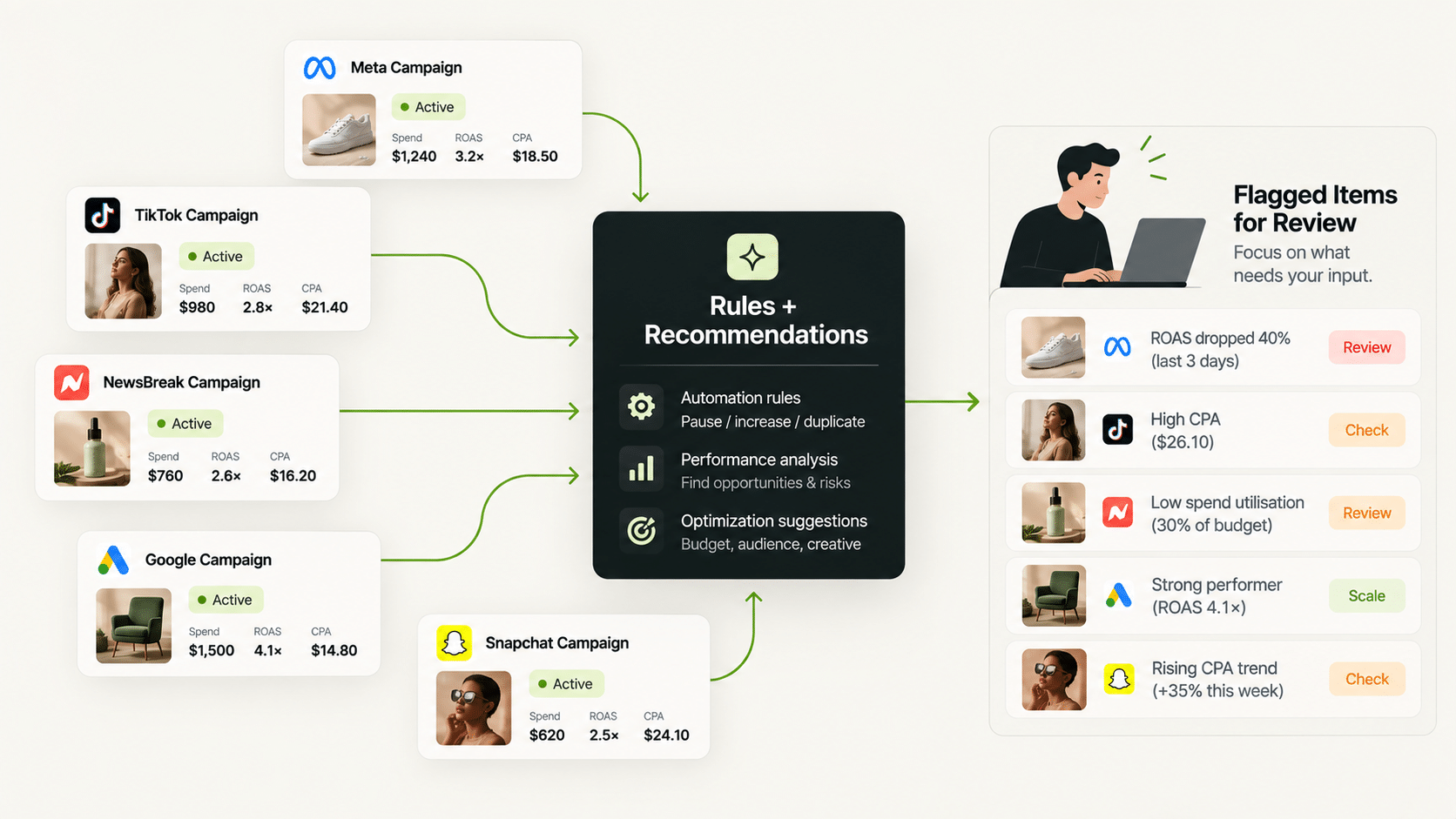
A facebook ads ai agent claim only holds up if it can apply different thresholds to different campaigns — a CPA floor correct for one campaign is often wrong for another with a different average order value or audience size. FabFunnel’s Automation Rules Engine applies CPA floors, ROAS thresholds, and frequency caps per campaign or account, not as one shared template, with every triggered action logged against its specific condition and timestamp.
Step 2: Let the Recommendation Layer Flag What Needs Attention
A meta ai ads agent claim, similarly, should specify whether it’s flagging issues or executing changes without review. Co-Pilot, a recommendation layer trained on live reporting data, surfaces what’s underperforming and why across every managed campaign — without executing changes automatically. This is the step that lets a person manage more campaigns than they could by manually checking each one, without giving up the judgment call.
Step 3: Review Flagged Items on a Schedule, Not Continuously
Once rules and recommendations are running, the manual work shifts from continuous checking to periodic review — a daily or every-other-day scan of what’s been flagged, rather than watching every campaign in real time. This is the actual mechanism behind “managing multiple campaigns with an AI ads agent”: automation removes the continuous monitoring, and scheduled review handles the judgment calls.
Step 4: Use Consolidated Reporting to See Across All Managed Campaigns
Multi Ad Account Reporting keeps spend, ROAS, CPR, CPC, and CTR synced roughly every 15 minutes across Meta, TikTok, and NewsBreak, giving one place to scan across every campaign under management rather than opening each platform’s native reporting separately.
Managing Multiple Campaigns: What Runs Automatically vs. What You Review
| Task | Runs Automatically | Reviewed on a Schedule |
|---|---|---|
| Pausing at a CPA ceiling | Yes | — |
| Applying frequency caps | Yes | — |
| Flagging underperforming campaigns | Yes (Co-Pilot surfaces it) | Yes, decide whether to act |
| Deciding on creative or audience changes | — | Yes, always a person’s call |
| Adjusting thresholds as campaigns change | — | Yes, periodic review |
Does an AI Ads Agent Approach Scale to Managing Dozens of Campaigns?
The rules-plus-recommendations structure is specifically what makes that possible — the continuous checking that would be unmanageable across dozens of campaigns is handled by automation, leaving a person to review flagged items and make judgment calls on a schedule rather than in real time.
How Should You Structure Campaigns So Automation Works Cleanly?
Rules are only as good as the structure they act on. A few habits make multi-campaign management much easier:
- Name consistently. Use a pattern that includes product, audience, and creative angle so the action log is readable at a glance.
- Group by purpose. Keep prospecting and retargeting in separate campaigns, since they need different frequency and CPA thresholds.
- Use templates for repeat setups. FabFunnel’s Bulk Campaign Launcher supports Launch Templates for campaigns you run repeatedly, and Clone is the fastest path when you are testing variations of a live ad set.
- Organise creative in folders. The Creative Library stores creatives in folders you define, and Folder Launch can push a folder’s contents into campaigns in bulk.
What Does a Weekly Rhythm Look Like for Managing Multiple Campaigns?
What Should You Do When a Rule Misfires?
Treat it as information, not failure. Open the action log and find the condition that triggered the action. Most misfires come from a threshold set without enough headroom, a lookback window that is too short, or a template copied from a campaign with different economics.
Fix the rule, not the symptom. Rules apply going forward from the point they are saved, so a corrected rule only affects future behaviour. Re-enable anything that was paused in error by hand, and note the change so the next review has context.
Which Accounts Should You Hand to an AI Ads Agent First?
Not every account is a good starting point. Begin where the signal is clearest and the cost of a mistake is smallest.
Good first candidates: accounts with steady daily spend, reliable conversion tracking, and a clear target CPA or ROAS. These give rules enough data to act sensibly, and you can judge the results quickly.
Poor first candidates: brand-new accounts with little history, accounts in a launch or sale period with unusual traffic, and anything where tracking is unreliable. Rules will either lack data or react to noise.
Roll out in waves. Put two or three stable accounts under rules, review for a week, then add the next group. This also gives you real examples of what the action log looks like before you depend on it everywhere.
How Do You Keep a Record of What the Automation Is Doing?
Treat the log as your management report. Once a week, scan it for patterns rather than single events: the same rule firing repeatedly on one campaign, a pause that always follows a weekend, or a scaling rule that never triggers. Patterns tell you whether a threshold is wrong.
Write down any change you make to a rule and the reason. A one-line note, such as “raised CPA ceiling after price increase,” is enough. Without notes, nobody can explain why results changed after a tweak.
Finally, share a short summary with whoever owns the budget. A single paragraph covering what ran automatically, what you changed, and what you plan to test next builds trust in the setup far faster than a dashboard screenshot.
How Do You Brief a Team on Working With an AI Ads Agent?
People worry about two things when an AI ads agent arrives: losing control and losing their role. Address both in a short briefing.
Explain what the AI ads agent does in concrete terms. It applies the rules you set, records each action, and flags what deserves a look. It does not pick strategy, approve creative, or decide budgets. Then explain what changes for each person: the buyer reviews flagged items instead of checking every campaign, the strategist spends more time on tests, and the account lead gets a clearer record of what happened.
Agree the escalation path. If someone sees an action they do not understand, who do they ask, and where do they look first? The answer should always be the action log, then the person who owns the rule.
Finally, set expectations about mistakes. An AI ads agent will occasionally pause something that deserved more time, because the threshold was a little tight. That is a prompt to adjust the rule, not a reason to abandon the setup. A well-run AI ads agent improves as its rules get refined.
FAQs
What should I check before trusting an “ai ads agent” with live campaign budget?
Whether it executes pre-configured rules with a full audit log, or claims to decide things beyond that — and if the latter, ask for a concrete example of what it decides without explicit configuration.
Can an ai agent advertisement tool manage campaigns across Meta, TikTok, and NewsBreak at once?
If it’s built on per-account automation rules and consolidated reporting, yes — the rules apply per account with their own thresholds, and reporting consolidates the results across platforms.
Can an AI ads agent run campaigns while the team is offline?
Rules keep running around the clock and every action is logged, so you can review what happened when you return. Judgement calls still wait for a person.
Does a facebook ads ai agent replace the need for someone to review campaigns?
No — even a well-built rules-plus-recommendations system still needs a person reviewing flagged items on a schedule. What changes is the frequency and nature of that review, not whether it’s needed.
How many campaigns can one person manage using this kind of automation?
There’s no fixed number — it depends on account complexity — but the ceiling moves meaningfully once continuous monitoring is automated and only flagged items need review.
Is a meta ai ads agent different from a general ai ads agent, or just platform-specific framing?
Usually just platform-specific framing of the same underlying capability — automation rules and recommendations applied to Meta specifically rather than a fundamentally different system.
What’s the first thing to set up when starting with this kind of tool?
One simple rule (a CPA pause threshold) on one campaign, confirmed to behave as expected for a few days, before expanding to more campaigns or adding scaling and budget rules.
Where to Start
Whatever a tool calls itself, including an AI ads agent, verify the split between what executes automatically and what still needs your review before trusting it with multiple campaigns. FabFunnel’s Automation Rules Engine and Co-Pilot are built around exactly that verifiable structure — start at FabFunnel or explore the full toolset at Fab AI.