Nobody becomes a media buyer because they love rebuilding campaign structures from scratch. Or manually compiling cross-platform reports every Monday morning. Or checking ad accounts at 11 PM because the scaling window is open and nobody else is watching.
Yet that’s what the job looks like at scale. AI for media buyers doesn’t change what you’re trying to accomplish – it changes how much of your week gets consumed doing it. The tools below are the ones worth actually using: each one cuts a specific, recurring time cost in the media buying workflow.
This isn’t a list of everything that exists. It’s the 10 that make a real difference.
What to Look for in AI Tools for Media Buyers
Before picking tools, figure out where your time is actually going. AI Tools for Media Buyers fall into three categories – and the best starting point is whichever one matches your biggest bottleneck right now.
| Category | What It Covers |
|---|---|
| Creative | Ad copy, image/video variants, inspiration research, brief generation |
| Campaign Management | Bid rules, budget automation, bulk campaign launch, scaling decisions |
| Analytics & Intelligence | Performance reporting, creative insights, competitor tracking, data aggregation |
Pick your bottleneck. Start there. Adding tools from all three categories at once just creates new overhead.
Quick Reference: All 10 AI Tools for Media Buyers at a Glance
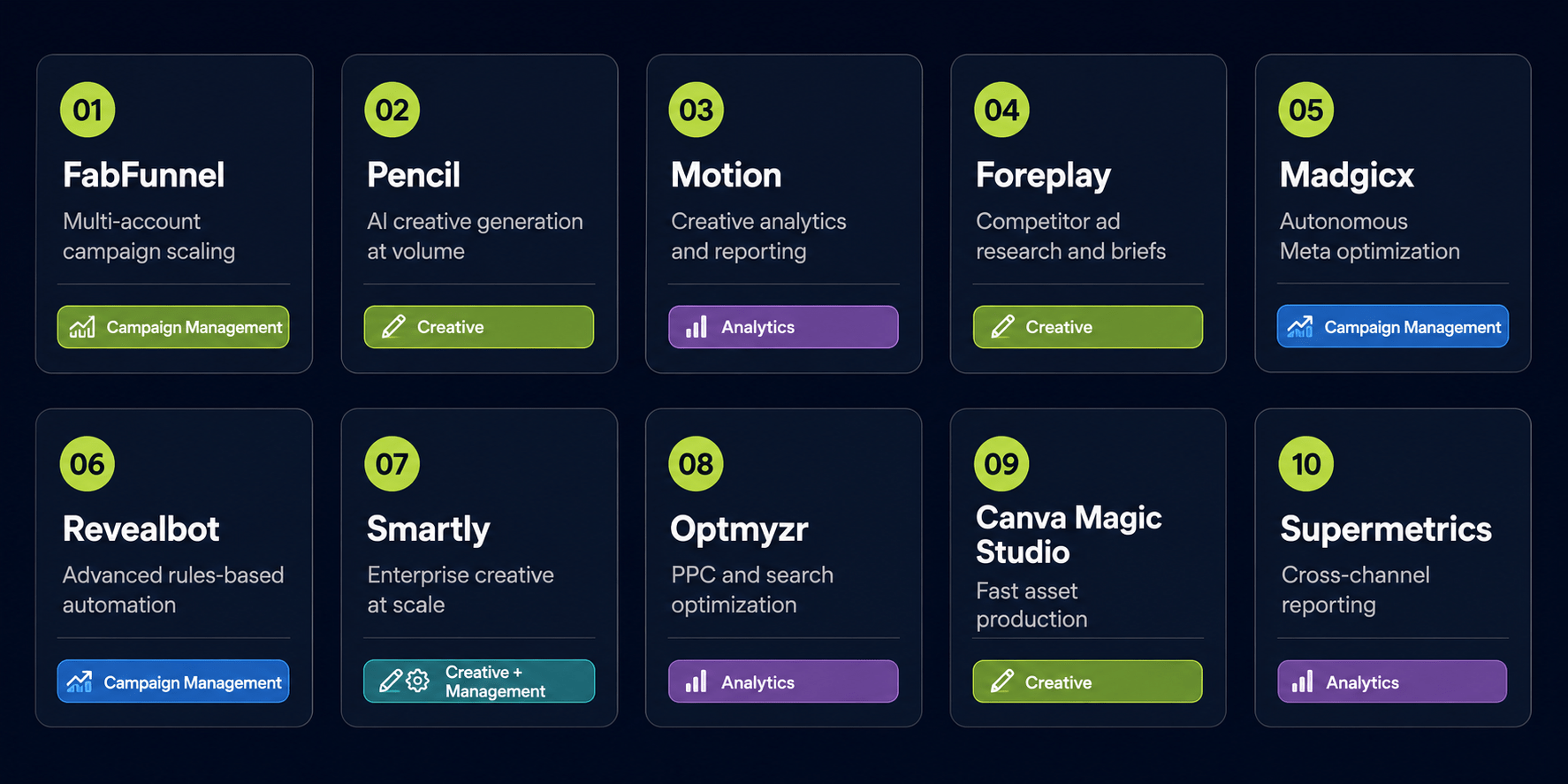
1. FabFunnel – All-in-One AI Advertising Platform
Best for: Agencies and media buying teams managing campaigns at volume across Meta, TikTok, and NewsBreak.
Most of the time lost in media buying isn’t in the strategy – it’s in the build. Setting up the same campaign structure across twelve client accounts, one by one, is pure operational drag. FabFunnel is purpose-built AI for media buyers who operate at volume. The Bulk Campaign Launcher cuts that down significantly. The Bulk Campaign Launcher pushes ad structures across multiple accounts simultaneously – what would take a team several hours manually runs in under two minutes.
The automation rules engine handles the ongoing management side: scaling ad sets when ROAS hits target, pausing underperformers when CPA floors are breached, running continuously so decisions don’t wait for the next account review. Creative analysis shows which elements drive performance – so you iterate with data, not gut feel.
For agencies with many clients, cross‑account workflow removes per‑account manual work.
2. Pencil – AI-Assisted Ad Creative Generation
Best for: Teams that need more creative variants without scaling a design team.
Pencil generates image and video ad variants using AI trained on real campaign performance data. It predicts performance scores before launch, integrates with Meta and TikTok, and replaces a large chunk of the brief-to-deliverable cycle. If your creative testing is limited by how fast you can produce variants, this compresses that timeline significantly.
3. Motion – Creative Analytics
Best for: Teams running constant creative tests who need faster answers on what’s working.
Motion connects directly to your ad accounts and surfaces creative performance in a format native dashboards simply don’t offer – metrics like Thumb-Stop Rate and hook-to-click conversion, visualized cleanly. It doesn’t replace analysis; it cuts the time between pulling data and understanding it. For teams running high creative volume, that gap is where hours disappear.
4. Foreplay – Ad Inspiration and Creative Research
Best for: Creative strategists who want to brief faster using proven formats.
Foreplay solves a specific problem: competitor ads disappear from the Meta Ad Library once they stop running. Foreplay saves them permanently, letting you build a searchable swipe library over time. The AI layer categorizes hooks, analyzes visual pacing, and extracts structural patterns – turning what used to be passive observation into structured briefs you can actually hand off to a team.
5. Madgicx – Autonomous Ad Management for Meta
Best for: It is best suited for Meta advertisers who want machine learning‑driven optimization without giving up manual controls.
The platform integrates three functional areas: bid optimization, audience targeting, and creative insights within a single tool. Its AI layer continuously evaluates live performance data and makes adjustments using pattern recognition (e.g., detecting statistical trends in CPA or ROAS) rather than deterministic fixed rules.
6. Revealbot – Advanced Rules-Based Automation
Best for: Media buyers who’ve hit the ceiling of what native Meta automation can handle.
If you’ve tried to build complex multi-condition rules in Meta Ads Manager and hit a wall, Revealbot is the tool. It extends native automation with a more flexible rules engine, cross-platform support, and actual visibility into rule performance. Particularly useful for eliminating the reactive manual work that happens after hours, when nobody is watching the accounts.
7. Smartly – Creative Production and Campaign Management at Scale
Best for: Large agencies and enterprise brands running high-volume, multi-market campaigns.
Smartly connects creative templates to product feeds and generates personalized ad variants at a volume that manual production can’t match – localized pricing, language variations, seasonal overlays, all populated automatically.
8. Optmyzr – PPC Optimization and Reporting
Best for: Media buyers managing search and PPC accounts alongside paid social.
Optmyzr handles the workflow overhead of PPC management – surfacing bid recommendations, automating reporting, streamlining optimization review cycles across Google and Microsoft Ads. If your work is purely social, look elsewhere. If PPC is part of your channel mix and reporting is eating your week, this addresses it directly.
9. Canva with Magic Studio – Fast Creative Production
Best for: Media buying teams without dedicated designers who produce their own ad creative.
Smart resizing, background removal, text-to-image, copy suggestions – Canva’s Magic Studio layer turns it into a legitimate production tool for buyers who handle their own creative. It’s not purpose-built for ad performance optimization, but it solves a real bottleneck at a price point that doesn’t require a budget conversation.
10. Supermetrics – Automated Reporting Across Channels
Best for: Media buyers spending hours each week manually pulling and compiling cross-platform data.
Supermetrics pulls performance data from all major ad platforms into Google Sheets, Looker Studio, or BI tools automatically. There’s no AI ad optimization here – it’s data aggregation. But if Monday mornings currently mean manually exporting CSVs and pasting numbers into client dashboards, this eliminates that task entirely. Sometimes the highest-leverage tool is the unglamorous one.
How to Prioritize Which AI Tools for Media Buyers to Adopt
Don’t try to implement all ten at once. The overhead of onboarding too many platforms simultaneously will erase the time savings they’re supposed to provide.
Map your biggest time drain first, then match it:
- Creative production bottleneck → Pencil, Canva Magic Studio
- Campaign management overhead → FabFunnel, Revealbot
- Reporting eating your week → Supermetrics, Motion
The compounding value of AI for media buyers comes from stacking the right tools in the right order – not from deploying everything and managing a new coordination problem on top of your existing ones.
Conclusion
AI for media buyers doesn’t replace the judgment that makes a good media buyer – it removes the operational weight that prevents them from using it. Strategy, creative direction, audience logic, account structure – those stay human. The campaign builds, the bid adjustments, the reporting pulls, the Monday morning data compilation – those don’t have to.
Pick one tool. Solve one bottleneck. The hours come back faster than most people expect.
Frequently Asked Questions
Q1: What is AI for media buyers?
AI for media buyers refers to tools that handle the grind – creative production, campaign management, bid optimization, reporting. It takes care of repetitive tasks so you can spend your time on the big decisions that actually need a human brain.
Q2: How much time can AI Tools for Media Buyers actually save?
Depends on the workflow. Automation rules tools cut hours of daily monitoring. Reporting tools like Supermetrics remove weekly manual compilation. Creative tools compress production from days to hours. Buyers managing multiple accounts often recover 8–15 hours per week, though results vary by account complexity and how well the tools are configured.
Q3: Do AI tools for media buyers work across all ad platforms?
Coverage varies by tool. FabFunnel covers Meta, TikTok, and NewsBreak. Revealbot focuses on Meta. Optmyzr covers search and PPC. Supermetrics and Smartly are broader. Always confirm platform support before committing.
Q4: Is FabFunnel suitable for small media buying teams?
As AI for media buyers goes, FabFunnel is built for volume: agencies with many client accounts or high‑spend teams on Meta, TikTok, and NewsBreak. Value grows with account count. More accounts = more benefit from bulk launch and automation.
Q5: What’s the difference between AI ad optimization and traditional automated rules?
Traditional rules: you set a fixed trigger (e.g., CPA > $50 → pause). No thinking. AI ad optimization: it spots patterns in your past data and either recommends changes or makes them. Bottom line? Use both. Rules give you hard limits. AI gives you continuous, data‑driven signals.
Q6: How to evaluate AI tools for media buying is actually saving time?
Track before and after. Log task time for two weeks pre‑tool, then post‑tool. If time saved doesn’t justify cost + onboarding, the tool or workflow is wrong.