Campaign management tools coordinate a campaign: they track schedules, approvals, and budget so a team knows what’s happening and when. Campaign execution infrastructure does the work underneath those tasks, generating the creative, launching it on the ad platform, and reporting back on performance inside one connected system. Management tools show what needs to happen; execution infrastructure is what makes it happen.
Most teams running paid social at scale already have a campaign management tool. A calendar that shows what’s launching this week. A dashboard that tracks spend against budget. A shared doc where someone logs which creative is live on which account. None of that is wrong. It’s just not the same job as running the campaign.
Campaign management tools solve a coordination problem: who’s doing what, by when, against what budget. That’s a real problem worth solving. But coordination isn’t production. Knowing a campaign needs a dozen new creative variations by Thursday doesn’t make the variations. Tracking spend across three ad accounts doesn’t lower CPR. The tools that manage the administrative layer of a campaign were never built to touch the parts that actually decide whether it performs: the creative itself, the speed it goes live, and what happens to the account after it does.
That gap is where “campaign execution infrastructure” earns its name as a distinct category, separate from campaign management tools. It’s not a better calendar. It’s the operational layer underneath the calendar that produces the assets, ships them, and reports back on what worked.
Campaign Management Tools vs. Campaign Execution Infrastructure
The distinction comes down to what each layer actually does:
| Dimension | Campaign Management Tools | Campaign Execution Infrastructure |
|---|---|---|
| Primary job | Coordination: scheduling, task assignment, approvals, budget tracking | Production: generating creative, launching it, and reporting on results |
| Creative production | Not included; someone still has to brief, design, and export the assets | Built in; the system generates the creative itself |
| Campaign launch | Marks a task as done | Pushes creative live directly to the ad platform |
| Multi-platform work | Same manual export-and-reupload cycle repeated per platform | One connected system across platforms |
| Reporting | Spend against budget, plan status | Structural performance data (hook, script, framework) that feeds the next creative cycle |
| What it sits on | Sits on top of execution, not inside it | Sits inside execution, alongside coordination tools |
What Campaign Management Tools Are Actually Built to Do
Look at how the category is described consistently across the space: scheduling, task assignment, approval workflows, budget tracking, and a dashboard that rolls up status. That’s the job. Marketing calendar platforms, project management tools repurposed for marketing, spreadsheet trackers, basic ad account dashboards – all of them sit on top of execution, not inside it. Most vendors selling into this space market themselves as campaign management tools first, project tools second, and that framing is accurate. It describes what they do well.
That’s a useful layer. A media buyer running six ad accounts across Meta, TikTok, and NewsBreak needs to know what’s scheduled, what’s approved, and what’s spent against plan. But none of that layer generates a single ad. None of it launches anything. If a creative is fatiguing and CPR is climbing, a campaign management tool will show the number going up. It won’t produce the next creative to replace it, and it won’t put that creative live.
That’s not a knock on the category, just a scope limit. Marketing campaign management software was built to organize campaigns, not run the machinery that produces and ships them. The confusion starts when teams expect a scheduling and tracking layer to also solve production and launch. It can’t, because it was never designed to.
Where the Category Runs Out of Road
Here’s where it shows up operationally. A performance team decides creative needs a refresh. In a campaign management tool, that’s a task card: “refresh creative, due Friday.” Someone still has to brief a designer or write a prompt, generate the actual static or video assets, get them approved, export them, re-upload to Meta or TikTok or NewsBreak, build the ad sets, and launch. The tool tracked the task. It didn’t do any of the work the task required.
Multiply that across accounts and the gap gets expensive. Teams handling multi channel campaign management across three platforms end up running the same manual export-and-reupload cycle three separate times for every creative refresh, once per platform. The task tracker shows three tasks marked complete. It doesn’t show the hours spent moving files between tools that don’t talk to each other.
This is the operational reality most campaign management tools don’t account for: production and launch are the expensive, time-consuming parts of running a campaign, and they sit entirely outside what these tools do. No amount of better scheduling fixes a bottleneck that lives downstream of the calendar.

What Execution Infrastructure Actually Adds
Campaign execution infrastructure closes that gap by owning production and launch directly, not by scheduling around them the way campaign management tools do. Concretely, that means one system that generates the creative, ships it to the ad platform, and reports on performance, inside a single operational layer instead of three disconnected tools stitched together with exports and spreadsheets.
FabFunnel is built as that layer for Meta, TikTok, and NewsBreak. Genie, its AI creative generation tool, pulls brand guidelines and product data automatically from a connected Catalogue, populated once from a brand URL or Shopify store, with Shopify stores getting ongoing automatic sync. From there, Genie generates across four ad modes, in static or video formats:
| Category | Options |
|---|---|
| Ad Modes | Product Ad, Brand Ad, Product Shoot, Performance Ad |
| Static Formats | Single image, carousel, story |
| Video Formats | UGC-style, reel, demo |
Teams can generate from scratch, create variations of an existing creative to fight fatigue fast, or start from one of 200 pre-built frameworks in the Concepts tab.
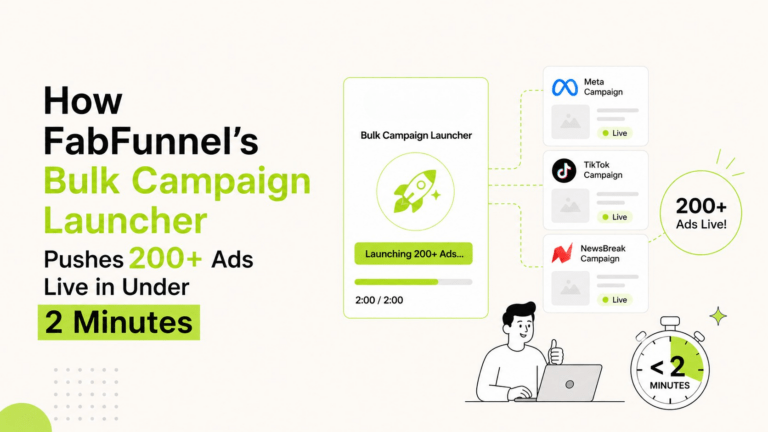
That’s the production half, and it’s the half campaign management tools never touch. The launch half is the Bulk Campaign Launcher, which pushes generated creative live directly from Genie through the “From Genie” flow, no export, no re-upload. Folder Launch goes further: once setup is done, a whole approved batch of creative can go live across 200+ campaigns in under two minutes. That’s the actual difference between a task marked “done” in a campaign management tool and a campaign that is live, spending, and producing data.
The Reporting Layer Has to Close the Loop
Execution infrastructure isn’t complete without reporting that feeds back into the next round of production, and this is another place generic campaign management tools fall short. A dashboard showing spend against budget tells you if you’re on plan. It doesn’t tell you why CTR dropped or which hook in a video ad is carrying the performance.
FabFunnel’s reporting consolidates spend, CPR, CPC, and CTR across every connected account into one dashboard with a timezone selector, so a team running accounts across regions isn’t reconciling numbers by hand. Video Sage breaks a video ad’s performance down structurally – hook, script, framework – so a team knows what to keep when it generates the next variation instead of guessing. Copilot, a natural-language assistant, generates specific reports and charts on request, and a recommendations panel on the dashboard surfaces suggested actions directly. That’s reporting built to inform the next creative cycle, not just to look at after the fact, which is where most campaign management tools stop.

Why This Distinction Matters for How Teams Are Structured
The practical effect of treating campaign management tools and execution infrastructure as the same thing is that teams overbuild process around a layer that can’t do the work. More task cards, more approval steps, more dashboards – none of it makes creative get produced or campaigns get launched faster. The bottleneck was never visibility. It was throughput. Adding another campaign management tool on top of the ones a team already has doesn’t change that math.
That’s also why category language matters here. A campaign orchestration platform and a campaign automation platform aren’t just nicer names for a calendar, and they aren’t a rebrand of campaign management tools either. They describe systems where production, launch, and reporting are connected steps in one pipeline instead of separate tools a person has to bridge by hand. FabFunnel’s team and agency plans reflect that structure too – credits, competitor tracking slots, and storage are pooled across a workspace rather than locked to rigid per-user limits, because the unit of work is the pipeline, not an individual seat.
None of this replaces a calendar or a budget tracker. Teams still need campaign management tools to know what’s scheduled and what’s been spent. But that layer was never going to produce the creative or launch the campaign, and expecting it to is where a lot of execution quietly slows down without anyone being able to point to why.
FAQs
Is campaign execution infrastructure meant to replace project management or scheduling tools entirely?
No. Scheduling, task assignment, and budget tracking still matter for coordinating a team. Execution infrastructure sits underneath that layer and handles what scheduling tools were never built to do: generating creative, launching it, and reporting on performance in a way that feeds the next cycle.
Does FabFunnel support Google Ads alongside Meta, TikTok, and NewsBreak?
No. FabFunnel supports Meta, TikTok, and NewsBreak. It does not support Google Ads.
What is the difference between a campaign orchestration platform and a campaign automation platform?
Both terms describe execution infrastructure rather than a scheduling layer, but the emphasis differs slightly. A campaign orchestration platform stresses coordinating production, launch, and reporting as one pipeline. A campaign automation platform stresses removing manual steps from that pipeline, like exporting creative and re-uploading it to each ad account by hand.
Can a campaign management tool generate ad creative on its own?
No. Campaign management tools track that a creative refresh is needed and assign the task to someone. They don’t produce the static or video assets themselves; a designer, a prompt-based tool, or an execution layer like Genie has to do that work separately.
How does FabFunnel generate creative without a designer starting from scratch each time?
Genie pulls brand guidelines and product data from a Catalogue connected once to a brand URL or Shopify store, then generates ads across four modes in static or video formats. Teams can also start from one of 200 pre-built frameworks in the Concepts tab instead of building a creative brief from zero.
How fast can FabFunnel launch a full batch of campaigns across accounts?
Once creative is approved, Folder Launch can take a whole batch live across 200+ campaigns in under two minutes. The Bulk Campaign Launcher also pushes creative straight from Genie to the ad platform through the “From Genie” flow, with no export or re-upload step in between.
Does FabFunnel work for agencies managing multiple client accounts?
Yes. FabFunnel’s team and agency plans pool credits, competitor tracking slots, and storage across a workspace instead of locking them to individual seats, which fits agencies running several client accounts under one plan rather than per-user licenses.
Try FabFunnel free for 14 days and see the execution layer in action: fabfunnel.com/fab-ai