Quick Answer
For an agency, an AI ads manager is only useful if it works across every client account at once rather than one account at a time — applying automation rules, generating creative, and reporting performance per client without requiring a media buyer to log into each account separately. The features that matter most are per-account thresholds (so one client’s baseline doesn’t get applied to another), workspace-level permissions (so different team members see only what they should), and consolidated reporting that still breaks out by client.
Agencies managing multiple client ad accounts run into a specific version of the scale problem: every tool decision has to work across N accounts, not one. A single-account ai ads manager that works well for an in-house team often breaks down for an agency, because thresholds, permissions, and reporting all need to be account-specific rather than shared. This is the distinction to check before adopting one.
Why Doesn’t a Single-Account AI Ads Manager Work for Agencies?
Because a rule, threshold, or permission set that’s correct for one client is often wrong for another. A CPA floor tuned to a $200 average order value client will misfire applied unchanged to a $20 AOV client. An AI advertising manager built around one account assumes shared context that doesn’t exist across an agency’s client roster.
How Should Automation Rules Work Across Multiple Client Accounts?
FabFunnel’s Automation Rules Engine applies CPA floors, ROAS thresholds, and frequency caps automatically, and critically for agencies, these can be applied per account rather than as one shared template. Every triggered action is logged with the condition and timestamp that caused it — for an agency, that log is also the audit trail a client might ask to see if they question why a campaign was paused or scaled.
Can One Ads Manager Handle Creative Across Different Client Brands?
Genie generates creative across four modes — Product Ad, Brand Ad, Product Shoot, and Performance Ad — working from each client’s own Catalogue (Brand → Categories → Products), so creative generated for one client’s brand doesn’t bleed into another’s. For an agency managing creative across several accounts, this per-client catalogue structure is what keeps generation organized rather than becoming a shared pool that needs manual sorting.
What Does Workspace-Level Permission Control Actually Solve for Agencies?
Agencies typically need different access levels for different roles: a media buyer executing campaigns needs different permissions than someone handling reporting or billing. Workspace-level versus account-level permissions let an agency assign role-based access — campaign execution, reporting/oversight, billing/admin — rather than giving every team member full access to every client account by default.
AI Ads Manager Requirements for Agencies vs. Single-Account Tools
| Requirement | Single-Account Tool | AI Ads Manager Built for Agencies |
|---|---|---|
| Automation thresholds | One shared configuration | Per-account CPA/ROAS/frequency thresholds |
| Creative generation | One shared catalogue/brand context | Per-client catalogue (Brand → Categories → Products) |
| Team access | Often all-or-nothing | Workspace vs. account-level, role-based permissions |
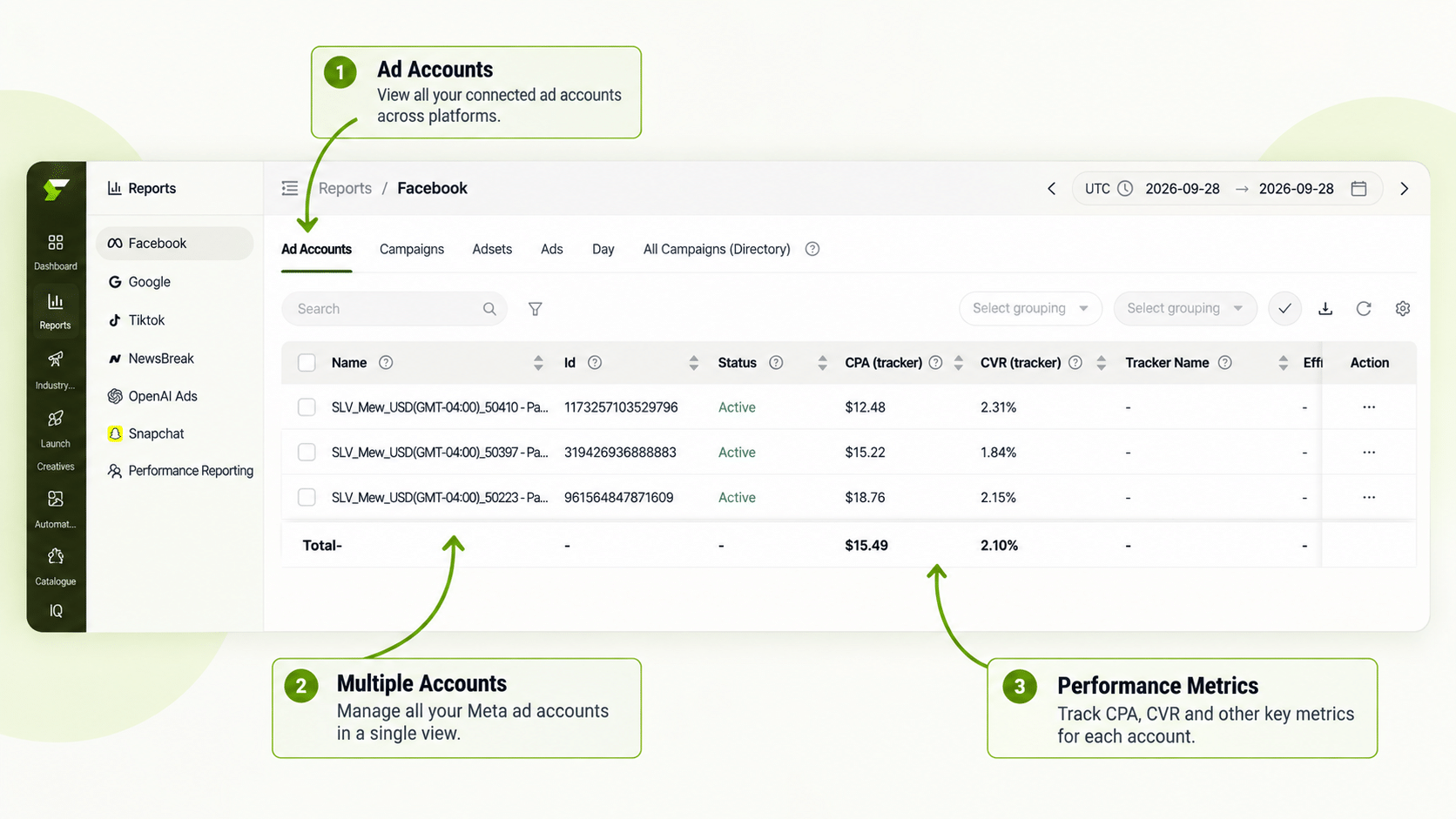
| Reporting | Single account view | Multi Ad Account Reporting broken out per client |
| Audit trail | Varies by tool | Every automated action logged with condition + timestamp |
How Does Reporting Work When You’re Managing Client Accounts Across Different Platforms?
Multi Ad Account Reporting keeps spend, ROAS, CPR, CPC, and CTR synced roughly every 15 minutes across Meta, TikTok, and NewsBreak, with per-account timezone settings — relevant for agencies with clients in different regions or running on different platform mixes. This gives an agency one place to scan for outliers across the full client roster instead of opening each client’s native ad manager individually.
Does Automation Reduce the Need for a Dedicated Buyer Per Client?
It reduces the monitoring hours per client, not the strategic ones. Co-Pilot, a recommendation layer trained on live reporting data, surfaces what’s underperforming per account without executing changes automatically — an agency still needs someone reviewing those recommendations and deciding what to act on. What changes is that one person can reasonably oversee more accounts, because the continuous checking is handled by the rules engine and the reporting sync.
How Should an Agency Onboard a New Client Into an AI Ads Manager?
Treat it as a short checklist, not a migration project:
- Connect the ad account. Link the client’s Meta (or TikTok, NewsBreak) account so reporting and automation have data to work from.
- Set up the client’s brand and catalogue. Add the brand, categories, and products so creative generation starts from the client’s own data.
- Set thresholds from the client’s baseline. Use their actual CPA and ROAS history, not a template from another client. Rules apply going forward from the moment they are saved, so settle the numbers before you save.
- Assign access. Give each team member only the permissions their role needs.
- Review the first week manually. Compare what the automation did against what you would have done, and adjust thresholds before trusting them fully.
The review step matters most. A rule that looks right on paper can still pause the wrong ad in a seasonal spike, and the action log lets you see exactly why.
How Do You Review an AI Ads Manager Before Renewing It?
Set a review date at the start, not after the first complaint. At the end of the first quarter, sit down with the account leads and ask what the AI ads manager actually changed.
Check four things. How many hours per client per week did monitoring take before and after? How many automated actions did the team have to reverse, and why? Did any client question an action, and could you answer from the log? And are the people who were meant to use it still using it?
If the answers are mostly positive, extend the setup to the next group of clients. If the log shows repeated reversals, the problem is usually threshold design, so fix the rules before blaming the product. If nobody opens it, the tool does not fit your workflow, however good the feature list looks.
A good AI ads manager makes this review easy by keeping a clear record of what it did and when. If you cannot reconstruct a month of activity from the log, treat that as a serious gap for agency work.
FAQs
What makes an AI ads manager suitable for agencies specifically, versus a single-brand tool?
Per-account thresholds instead of one shared rule set, role-based workspace permissions, and reporting that breaks out by client are the three requirements that distinguish an agency-ready tool from a single-account one.
Can automation rules be different for each client account?
Yes, with a properly built automation engine — CPA floors, ROAS thresholds, and frequency caps are set per account rather than applied as one template across every client, since baseline metrics differ across accounts. This is also what separates real ai ad management software from a tool that only supports one shared rule set, and it’s what keeps an automated ads manager from misfiring across a mixed client roster.
How does an agency control which team members can access which client accounts?
Workspace-level and account-level permissions let an agency assign different access tiers — campaign execution, reporting and oversight, or billing and admin — rather than giving every team member the same access to every account.
How many clients should an agency move onto an AI ads manager first?
Two or three with stable spend and reliable tracking. That gives you real examples to review before rolling out to the full roster.
Does an AI ads manager handle creative for multiple client brands without mixing them up?
Creative generation works from each client’s own catalogue structure (Brand → Categories → Products), keeping brand context separated by account rather than pooling all creative together.
How often does cross-account reporting update for agencies managing several clients?
Multi Ad Account Reporting syncs spend, ROAS, CPR, CPC, and CTR roughly every 15 minutes across connected platforms, with per-account timezone settings for agencies working across regions.
What’s the audit trail an agency can show a client if they question a campaign change?
Every action an automation rule takes is logged with the specific condition and timestamp that triggered it, giving an agency a concrete record rather than having to reconstruct what happened from memory.
Does using an AI ads manager reduce agency headcount needs?
It reduces the manual monitoring hours per account, which can let one person oversee more client accounts than would otherwise be practical — it doesn’t replace the strategic and creative judgment a media buyer or account manager provides.
Where to Start
If your agency is managing automation thresholds, creative, and reporting the same way across every client account, the AI ads manager you use needs to close that specific gap that causes misfires as your roster grows. FabFunnel’s per-account automation, catalogue-based creative generation, and role-based permissions are built for exactly this — start at FabFunnel or see the full toolset at Fab AI.