Quick Answer
An ad image generator built for paid campaigns needs to do more than produce a single AI image. It should connect to your actual product data, generate multiple creative variations from one product or concept, and keep brand elements consistent across every output. An ad image creator that generates a generic AI image disconnected from your catalogue and brand still requires manual review, cropping, and re-branding before it’s campaign-ready.
Ad image generator tools range from general-purpose AI image tools (not built for advertising specifically) to catalogue-connected systems designed for paid campaign creative. This piece covers what separates the two.
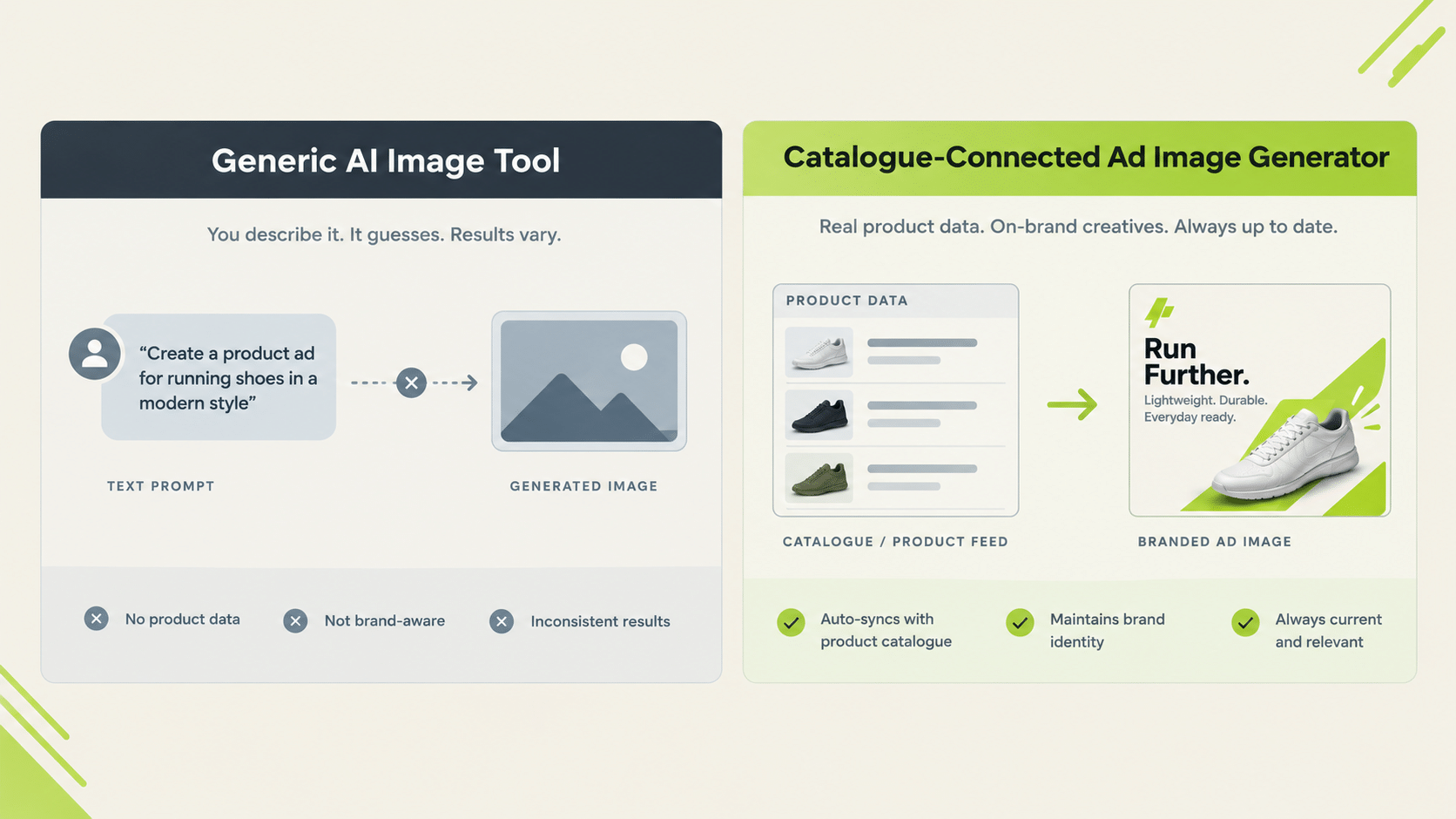
What’s the Difference Between a General AI Image Tool and an Ad Image Generator?
A general AI image tool generates an image from a text prompt with no awareness of your specific products, brand guidelines, or campaign structure. An ad image generator built for advertising works from your actual product catalogue and brand context, producing images already formatted and branded for a paid campaign rather than a raw image needing further editing.
The gap shows up in the second hour of use. Anyone can get one striking image from a general tool. The hard part is the fiftieth image: same product accuracy, same brand look, correct dimensions, and a file name someone can find later. Purpose-built tools treat that repeatability as the product; general tools leave it to you.
What Should a Facebook Ad Image Creator Get Right Specifically?
Sizing and layout that fit Meta’s placements (feed, story, reels) without manual cropping, and product accuracy: the image should reflect the actual product being advertised, not a generic stand-in. A facebook ad image creator disconnected from your product catalogue risks generating visually appealing but factually inaccurate product representations.
Product accuracy is the issue most teams underestimate. If a shoe ad shows the wrong sole, or a packaging render drops half the label text, the ad can mislead buyers or get flagged in review. When you test any facebook ads image creator, compare each output against the real product photo, not against your memory of it.
Ad Image Generator: What to Check Before Choosing One
| Question | Why It Matters |
|---|---|
| Does it connect to your product catalogue? | Avoids generic images disconnected from actual products |
| Does it generate multiple variations per product? | Enables creative testing without manual re-generation |
| Does it maintain brand consistency automatically? | Prevents each output needing manual brand review |
| Is it sized correctly for your target platform? | Avoids manual cropping/resizing after generation |
| Can output move straight into a campaign? | Removes the download-and-upload step between image and ad |
How Does Genie Approach Ad Image Generation?
Genie generates creative across four modes (Product Ad, Brand Ad, Product Shoot, and Performance Ad), working from a Catalogue structured as Brand → Categories → Products. Shopify auto-sync keeps it current; other platforms use manual upload. Brand guidelines are pulled automatically from the Catalogue, which is how brand consistency is handled without a manual check on every file.
The flow is four steps: pick an ad mode, pick a format, pick an approach, then configure and generate. Genie covers video ads as well as images, and you can select aspect ratio and resolution at the configure step.
Create Variations applies one approved concept across multiple catalogue products. That is the workflow an ad image generator needs to support at ecommerce scale, rather than one-off generation. Generated creative can also be launched into a campaign directly, or stored in the Creative Library and launched in bulk from there.
Does an Ad Image Creator Replace the Need for a Designer Entirely?
Not entirely. It removes the repetitive generation work (producing variations across a catalogue), but brand review and campaign strategy still benefit from human judgment, particularly for a brand’s flagship creative or a new visual direction.
The Concepts tab offers 200 fixed frameworks as a starting point. These can’t be customised, so a team with its own established creative system will brief that through the configure step. Either way, reviewing output against brand standards remains a manual step worth keeping.
A sensible division of labour: designers set direction, approve concepts, and handle hero assets; the ad image creator handles volume, such as the same approved concept across 40 products.
How Should You Test AI Ad Images Before Scaling Them?
Run a structured check on a small batch before committing a catalogue to any tool:
- Pick five products. Include one with fine detail, such as text on packaging or a complex texture.
- Generate three variations each. Look for consistency across variations, not just one good result.
- Compare against the real product. Check colour, shape, labels, and proportions.
- Check placement fit. Preview each image in the aspect ratios you actually run.
- Count the edits. Note how many images you would approve without touching them.
The final number is the useful one. If most outputs ship unedited, the tool saves real time. If most need fixes, the time goes into correction instead of generation, and the saving disappears.
Also check how revisions work. When one image is close but not right, can you adjust and regenerate, or do you start again? Tools that support targeted iteration save more time at volume than tools that only support fresh generation.
What Should You Look for in an AI-Generated Product Image?
Beyond whether it looks attractive, check the details that cause real problems in ads. Look at product shape and proportions, because small distortions can make a product look different from what a customer receives. Check any text or logos on the product, since generators often garble lettering. Confirm colours match your product photography, as colour mismatch drives returns and complaints.
Check the background and context too. A lifestyle scene should make sense for the product and not introduce elements that imply features you don’t offer. And check that the composition leaves space for any overlay text your placement needs.
A quick routine is to put the generated image beside your reference photo and ask: would a customer feel misled if they received the real product? If the answer might be yes, regenerate.
How Do You Keep a Library of Approved Images Organised?
Volume creates its own problem: after a month you may have hundreds of images. Use a simple folder structure by product line or campaign, and name files so a teammate can find them. Mark approved images clearly and archive rejected ones, so nobody launches the wrong version by mistake.
FabFunnel’s Creative Library stores creatives in folders that you define, such as by vertical, offer, format, or campaign type, which keeps approved work easy to reuse and launch.
What Prompts and Inputs Give an Ad Image Generator the Best Results?
Quality in, quality out. Whatever ad image generator you use, the inputs matter as much as the model.
Start with a clean product photo, ideally on a plain background with good lighting. If the source image is blurry or heavily edited, the output inherits the problem. Provide the product name, the single main benefit, and any text that must appear, so the ad image generator does not invent claims.
Be specific about the scene. “A running shoe on a wet city street at dawn” gives a better result than “a shoe ad.” Add constraints that matter for ads: leave space at the top for headline text, keep the product in the lower two thirds, avoid busy backgrounds behind the logo.
Finally, iterate in small steps. Change one element at a time, such as the setting, the lighting, or the angle, so you learn what each change does. Keep a note of prompts that worked, because a good brief reused across products is what makes an ad image generator fast at scale.
FAQs
What’s the difference between an ad image generator and an ad image creator?
No functional difference. Both terms describe the same category of tool. What matters is whether it connects to your product catalogue and maintains brand consistency automatically.
Does a facebook ad image creator need to match Meta’s specific placement sizes?
Yes. Feed, story, and reels placements have different dimensions, and a tool that doesn’t account for this requires manual resizing after generation.
Can Genie generate multiple ad image variations from one product?
Yes. Create Variations applies one approved concept across multiple catalogue products, and the Concepts tab offers 200 fixed frameworks to start from.
Is a facebook ads image creator the same as a general ad image generator?
Largely yes, though “facebook ads image creator” implies specific attention to Meta’s placement specs rather than generic image output.
Does Genie sync with an ecommerce catalogue automatically?
Yes, for Shopify. Auto-sync keeps generated creative aligned with current product data. Other platforms currently require manual upload.
What’s the biggest risk in using a generic AI image tool for ad creative instead of a purpose-built ad image generator?
Generic tools don’t reflect actual product data or brand guidelines, which means manual review, cropping, and correction before the image is campaign-ready.
Where to Start
Test any ad image generator with real products: pick five from your catalogue, generate variations, and compare each image against the actual product photo. Note which outputs you would ship unedited, which need small fixes, and which you would reject. That split is your real baseline for any tool you evaluate, including this one. Genie generates ad image creative across four modes directly from your product catalogue, with Create Variations for scaling across SKUs. Start at FabFunnel or explore the full toolset at Fab AI.