Quick Answer
AI for ecommerce retargeting works best when audience segmentation and creative generation are connected: different segments (cart abandoners, past purchasers, category browsers) get their own creative rather than one generic retargeting ad shown to everyone. In practice, ai for ecommerce here isn’t inventing new audience logic — it’s removing the manual bottleneck of building distinct creative for each segment, which is usually why retargeting campaigns default to one-size-fits-all in the first place.
Retargeting works on a simple premise: someone who already showed interest is more likely to convert than someone cold. Most teams adopting ai for ecommerce already get the audience segmentation part right — cart abandoners, product viewers, past purchasers are standard segments. Where retargeting underperforms is the creative side: building genuinely different creative for each segment takes time most teams don’t have, so segments end up seeing the same generic ad regardless of where they dropped off. This is as true for artificial intelligence in e commerce broadly as it is for retargeting specifically — the bottleneck is almost always creative production, not audience logic.
Why Do Retargeting Segments Usually End Up Seeing the Same Ad?
Because building distinct creative per segment multiplies the design workload — three segments means three times the briefs, three times the review cycles, three times the launch work. Most teams that haven’t adopted ai for ecommerce solve this by either under-segmenting (fewer audiences, less relevant creative) or reusing one ad across segments (more audiences, but the creative doesn’t actually match the segment’s context).
How Does AI Solutions for Ecommerce Remove the Creative Bottleneck?
Genie generates creative across four modes — Product Ad, Brand Ad, Product Shoot, and Performance Ad — working from the same Catalogue structure (Brand → Categories → Products) regardless of which segment it’s aimed at. The Create Variations feature is particularly relevant for retargeting: it produces new versions of an already-approved creative, which is exactly the workflow retargeting needs — the same core product message, adjusted per segment, rather than a fresh brief for each one.
What Does Segment-Specific Retargeting Actually Look Like in Practice?
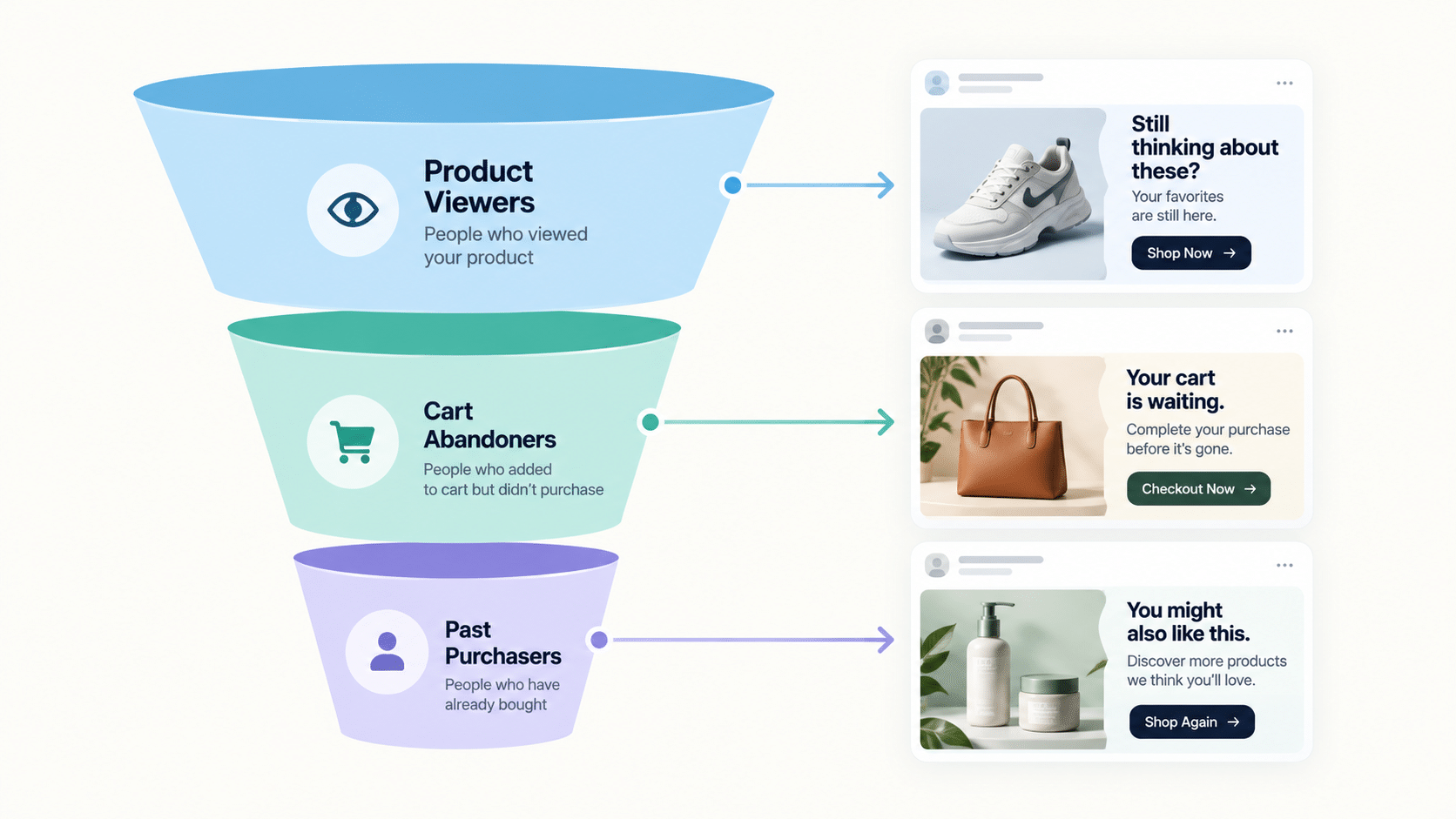
A cart abandoner has already decided the product is relevant — creative for that segment can skip broad awareness messaging and focus on removing a specific friction point (shipping cost, sizing uncertainty). A past purchaser retargeting campaign works better as a complementary or repeat-purchase message than a cold introduction to the product. A category browser who hasn’t picked a specific product benefits from creative that narrows the choice, not creative identical to what a cart abandoner sees.
Ecommerce Retargeting Segments and Creative Approach
| Segment | What They Already Know | Creative Focus |
|---|---|---|
| Product viewers (no add-to-cart) | Aware of the product, hasn’t committed | Narrow the choice, highlight a specific benefit |
| Cart abandoners | Decided the product is relevant | Remove a specific friction point (cost, sizing, shipping) |
| Past purchasers | Already trust the brand | Complementary products or repeat-purchase framing |
| Category browsers | Interested in the category, not a specific SKU | Comparison or best-seller framing to narrow choice |
Does This Work for Brands With Ecommerce Platforms Outside of Shopify?
Catalogue sync is automatic for connected Shopify stores; other platforms require a manual catalogue upload, but the same segment-specific generation and launch tools apply once the catalogue is in place — this covers ai in b2b ecommerce contexts as well, where segmentation often follows account or use-case lines rather than just cart behavior.
How Do You Launch Segment-Specific Campaigns Without Building Each One Manually?
Once creative exists for each segment, FabFunnel’s Bulk Campaign Launcher and Folder Launch push approved creative into live campaigns directly, and dynamic variables can generate variations across multiple segments and products from a single run. This is the mechanism that makes segment-specific retargeting practical at more than a handful of SKUs — the segmentation logic and the creative generation both scale off the same catalogue structure.
Where Does Audience Segmentation Actually Happen?
Be precise here, because it affects what you expect from any tool. The segments themselves (cart abandoners, product viewers, past purchasers) are built in your ad platform from your pixel or catalogue events. FabFunnel’s documentation covers creative generation, launch, automation, and reporting. Audience-building is not described as a FabFunnel function, so treat it as a step you complete in Meta, then connect to the creative and launch workflow.
That split is workable, and it is how ai for ecommerce tools typically fit alongside an ad platform. Define the segments once, name them clearly, and use the same naming in your campaign structure so the right creative reaches the right audience.
How Should You Test Segment-Specific Retargeting Creative?
Change one thing at a time and keep the comparison fair:
- Hold the audience constant. Test creative A against creative B within the same segment, not across segments.
- Vary the message, not just the image. A shipping-cost message and a social-proof message teach you more than two colour variants.
- Include a format test. Genie produces both image and video ads, so you can compare a static against a short video for the same segment.
- Set a decision rule before you launch. Agree the metric (cost per purchase, ROAS) and a minimum spend before calling a winner.
- Pair scaling with protection. Use automation rules such as CPA ceilings and frequency caps, since retargeting audiences are small and fatigue quickly.
Frequency matters most here. A retargeting pool might be a few thousand people, and the same ad shown ten times in a week tends to hurt rather than help.
What Can AI for Ecommerce Realistically Do for Retargeting, and What Can It Not?
Be specific about the job. AI for ecommerce is strong at production and repetition: turning catalogue data into creative variants, applying one approved concept across many products, and keeping branding consistent. It is weaker at judgement, such as deciding which segments deserve budget this month or which offer fits your margins.
That split should shape how you use it. Let the tool generate the five variants per segment, then have a person choose which to launch. Let automation rules pause an ad that overspends, then have a person decide whether the segment still deserves investment.
Teams also overestimate what AI for ecommerce can fix in weak foundations. If your product feed has missing images, your tracking is unreliable, or your segments overlap heavily, better creative will not solve those problems. Fix the data first, then use AI for ecommerce to scale what works.
A simple test helps: before adopting any AI for ecommerce tool, write down the one retargeting task it should remove and how long that task takes today. If you cannot name the task, you are buying novelty rather than time.
FAQs
What’s the best ai for ecommerce retargeting if I only have a few segments?
The value of catalogue-driven creative generation scales with segment and SKU count, but even a small setup benefits from Create Variations producing segment-specific versions of an approved creative instead of one generic ad for every segment.
Does using ai for ecommerce retargeting require rebuilding my existing audience segments?
No — segmentation logic (cart abandoners, past purchasers, etc.) stays the same. What changes is how quickly distinct creative can be produced for each existing segment.
How is ai solutions for ecommerce different from generic ai advertising tools?
The ecommerce-specific value is the catalogue connection — creative generation, organization, and launch all working off the same Brand → Categories → Products structure, rather than a generic tool with no catalogue awareness.
Can ai based ecommerce platform tools handle retargeting across multiple products at once?
Dynamic variables can generate over 1,000 campaign variations from a single run, which covers pairing multiple products against multiple retargeting segments without manual duplication.
Is using ai in ecommerce retargeting only relevant for large catalogues?
The creative bottleneck exists at any catalogue size — even a handful of products benefits from segment-specific creative rather than one generic ad, though the time savings become more noticeable as segment and SKU count grow.
Does segment-specific creative actually outperform generic retargeting ads?
This depends on execution and audience, and results vary by account — segment-specific creative addresses a more relevant context for each audience, but a brand should still test rather than assume a universal lift.
Where to Start
If your retargeting segments are well-defined but the creative behind them is generic, AI for ecommerce built around your catalogue is worth testing, because that is the specific gap catalogue-driven generation is built to close. FabFunnel’s Genie, Create Variations, and Bulk Campaign Launcher connect segmentation to creative to launch as one workflow — start at FabFunnel or explore Fab AI for the creative generation layer specifically.