Catalogue
Brand and product data for Genie.
Included in every plan
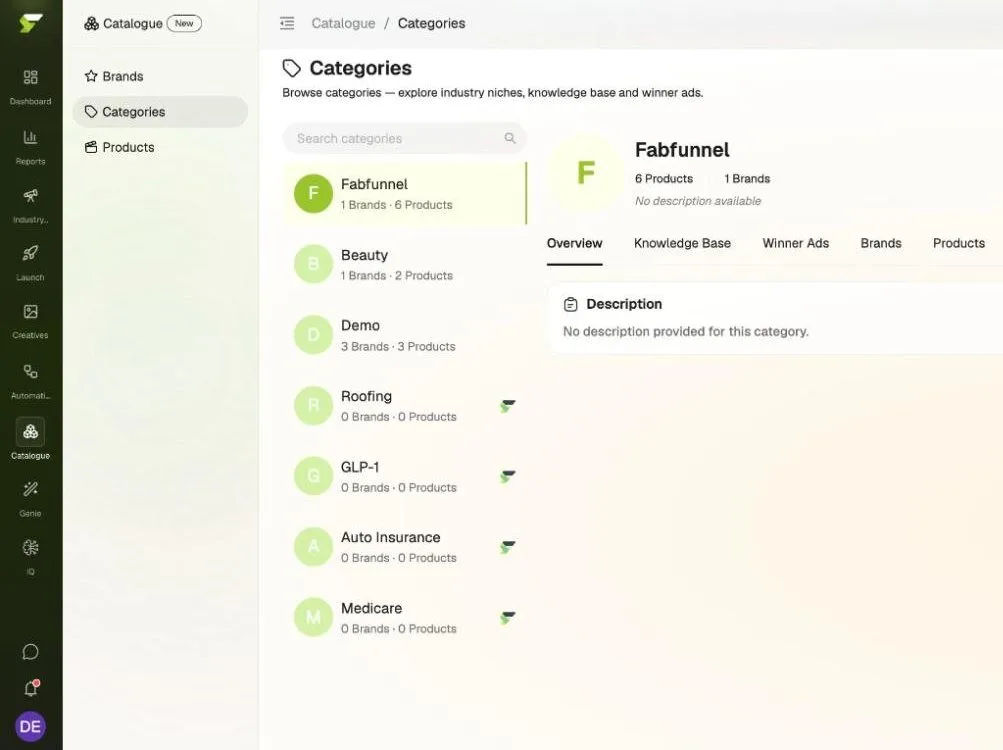
Catalogue holds your brands, categories, and products: brand guidelines, knowledge bases, reference winner ads, and audiences. It is what Genie reads when it generates creative, so a run starts from your own records, not a blank style.
What lives in it
Three tiers of brand data.
Category, brand, and product each carry their own knowledge base and reference winner ads.
Brands
Guidelines for voice, colors, typography, and audiences, plus a knowledge base, reference winner ads, and the brand's products. Run several brands from one account.
Categories
Industry niches with their own description, knowledge base, and winner ads, and the brands and products filed under them.
Products
One record per variant, so each shade or size has its own image, description, knowledge base, and winner ads.
Capabilities
The records Genie reads before it writes.
Genie's Brand Guidelines and Knowledge Base inputs come straight from Catalogue, so you set the rules once and Genie starts from them.
- Brand guidelines
Your voice, colors, and type, on file.
Brand Voice in your own words, five named color slots (Primary, Secondary, Accent, Background, and Text), Display and Body fonts, and an audiences table with segment, age range, geography, and interests.
Brand VoiceColorsTypographyAudiences
- Knowledge base
Writing rules Genie starts from.
Primary Instructions set the default writing rules. Additional Instructions hold rule sets for an angle, compliance, or a product line. References keep landing pages and brand assets to hand.
- Winner ads
Reference ads at every tier.
Register the ads that worked against a category, a brand, or a single product.
- Product detail
Real product facts in the creative.
Product records feed names, variants, and descriptions into Genie runs.
- Language from audiences
Copy in your market's language.
The geography on a brand's audiences sets the language Genie writes in.
- Three ways in
Website, Shopify, or by hand.
Add a brand from its website link, sync a Shopify store automatically, or add products manually for other stores.
Where it sits
See it. Build it. Launch it.
Catalogue is the groundwork for Build it: your data goes in once, Genie reads it when it generates, and Bulk Launcher puts the results live.
See it
Build it
- CatalogueYou are here
- Genie Image and video ads grounded in your Catalogue
Launch it
What it doesn't do: Catalogue grounds Genie's runs, but it can't guarantee every output follows every instruction, so review creative before you launch. Winner ads are added by hand, and Catalogue doesn't show ad performance.
Who it's for
For the teams that make creative for real products.
What is Catalogue?
Catalogue is where FabFunnel keeps your brand, category, and product records: brand guidelines, knowledge bases, reference winner ads, and audiences. Genie reads it when it generates image and video ads.
How do I add my products?
Add a brand from its website link, connect a Shopify store to sync products automatically, or add products manually if you sell elsewhere.
Can I manage more than one brand?
Yes. Catalogue holds several brands per account, each with its own guidelines, knowledge base, winner ads, and products.
Does Genie follow my instructions exactly?
Genie reads your Catalogue records through its Brand Guidelines and Knowledge Base inputs, both on by default, but generated creative can still miss an instruction. Review each result before you send it to launch.
Does Catalogue cost credits?
No. Catalogue itself uses no credits. Credits are used when Genie generates creative.