Choosing an AI image generator for ads specifically is a narrower decision than picking one for general creative work. Ad creative has requirements, brand consistency across a batch, format compliance for the platform it’s headed to, a direct path to launch, that general-purpose tools weren’t built around. Below are the ten tools worth knowing in 2026, split across free, paid general-purpose, and ad-specialized categories, followed by a practical framework for choosing between them.
The 10 Best Ai Image Generators for Ads in 2026
- Midjourney – The highest ceiling on visual quality and stylistic range among general-purpose tools used as an ai image generator for ads. No native brand reference, so every ad-ready output needs manual color and logo correction before it’s usable.
- Adobe Firefly – Built with commercial usage rights in mind and integrated directly into Photoshop and Adobe Express, which matters for teams already inside the Adobe ecosystem. Like Midjourney, it generates from the prompt alone rather than a connected brand source, though many design teams still reach for it as a default ai image generator for ads when licensing clarity matters most.
- Canva Magic Media – Sits inside Canva’s broader design platform, convenient for teams building social graphics and quick creative without leaving a familiar editor. Output leans toward general social content rather than ad-format-specific composition.
- Microsoft Designer (Bing Image Creator) – A free, DALL-E-powered ai image generator for ads exploration and one-off graphics. Works well for early concept testing; less suited to maintaining a consistent look across a batch of ad variants.
- OpenAI’s image tools (via ChatGPT) – Flexible for quick iteration and prompt refinement in a conversational interface. Like other general-purpose tools, brand consistency depends entirely on how precisely each prompt re-specifies visual details.
- Stable Diffusion (open-source and hosted UIs) – The most customizable option for teams with the technical setup to fine-tune a model on their own brand assets, though that customization requires meaningfully more setup time than a ready-to-use, hosted tool.
- Leonardo AI – Popular for game and product asset generation with strong control over style presets. Ad-specific formatting, platform aspect ratios, ad-mode composition, isn’t the primary design target for teams that need a dedicated ai image generator for ads rather than a general creative tool.
- Ideogram – Known for handling in-image text more reliably than most generators, useful when an ad concept needs legible on-image copy. Still a prompt-driven, general-purpose tool without a persistent brand reference.
- Recraft – Strong at vector-style and brand-asset-adjacent outputs (icons, patterns, logo-style graphics), a useful complement to a photorealistic ai image generator for ads rather than a full replacement for one.
- FabFunnel’s Genie – A purpose-built ai image generator for ads: it pulls brand guidelines and product data automatically from a connected Catalogue, generates across defined ad modes and platform formats (static, carousel, story), and launches the finished creative directly through Bulk Campaign Launcher without a separate export step.
Free and Freemium Options Worth Knowing
Several of the tools above offer free tiers useful for early testing before committing to a paid workflow: Canva’s Magic Media (inside its broader free design tier), Microsoft’s Bing Image Creator, and various Stable Diffusion-based community tools. These work reasonably well for exploring concepts or producing occasional social graphics, though ai image generator for ads online use at any real volume usually runs into the limits of a free tier fairly quickly, and brand consistency across outputs takes manual correction since most don’t hold a persistent brand reference. A free ai image generator for ads is worth using for exactly this exploration phase, and worth outgrowing once volume picks up.
Paid General-Purpose Generators
Midjourney and Adobe Firefly represent the higher end of general image quality and creative range, with subscription tiers suited to teams generating regularly. Best ai image generator for ads users in this category tend to be design-savvy teams comfortable writing detailed prompts and doing manual brand correction on output, since these tools generate from the prompt alone rather than a connected brand reference. Leonardo AI and Ideogram sit in a similar tier: strong for specific use cases, style presets, in-image text, but still built around prompt-only generation rather than a stored brand identity.
Ad-Specialized Generation
Ai image generator for marketing use specifically is a smaller category, built around ad-mode-aware composition and platform format requirements rather than general artistic generation. FabFunnel‘s Genie fits here: it generates ad creative, pulls brand guidelines automatically from a connected Catalogue, and supports ad-specific formats (static, carousel, story) with a direct launch path through Bulk Campaign Launcher.
Ai advertising image generator tools in this category trade some of the broader creative range general-purpose tools offer for consistency and a shorter path from generated asset to live ad, which matters more for ad performance than raw visual novelty usually does.
What to Actually Evaluate Before Choosing One
Picking the right ai image generator for ads comes down to a few practical criteria, not price alone. Whether the tool holds a persistent brand reference or requires re-specifying colors and tone in every prompt matters more at volume than at the first few generations. Whether output composition matches ad platform formats natively, or needs manual cropping and resizing afterward, determines how much work happens after generation and before launch. Commercial usage rights need to be clear for the ad spend involved, and the number of steps separating a finished generation from a live ad determines how much of the speed advantage of any ai image generator for ads actually reaches the account. A tool that’s slightly more expensive but removes an export-and-upload step often costs less in practice than a cheaper one that adds manual work at volume.
How to Actually Choose Between Them
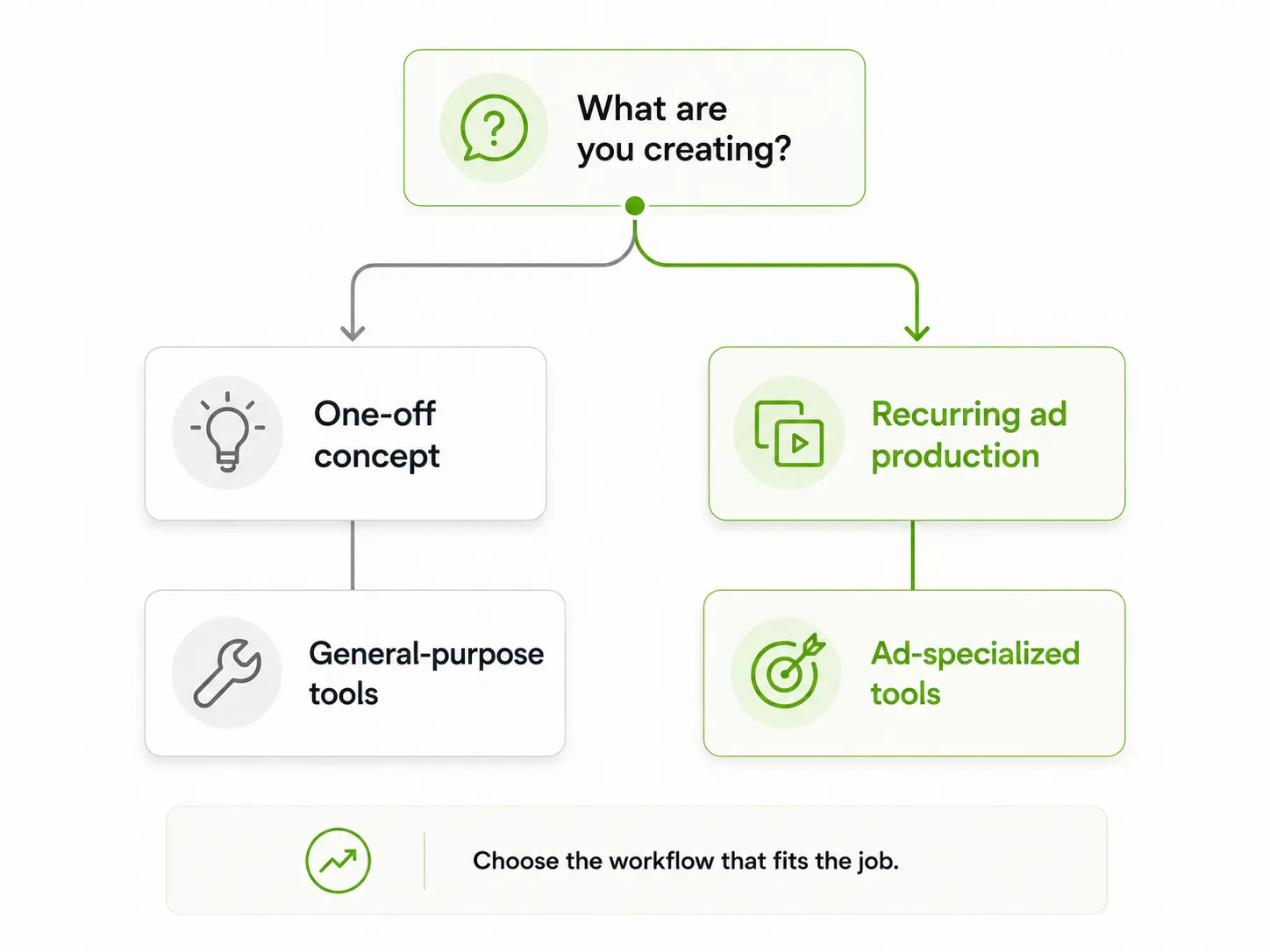
The right ai image generator for ads depends on where you are in the production cycle. Concept exploration and one-off creative benefit from a general-purpose tool’s range, Midjourney or Firefly for polish, Ideogram when on-image text needs to be legible. Recurring ad production at volume, where brand consistency and launch speed matter more than novelty, benefits from a tool built specifically for that use case. Most teams running real ad volume end up using a general-purpose tool for early concepting and an ad-specialized one for production and testing.
What Actually Determines Value Here, Price or Output Speed to Launch
A free tool that requires significant manual correction and a separate export-and-upload step before an ad goes live isn’t necessarily cheaper once that time is accounted for. Best ai image generators for ads, evaluated on total time from idea to live test rather than subscription cost alone, often favor a tool that connects generation directly to launch. Ten minutes saved per asset sounds small until it’s multiplied across the dozens of variants a real testing cadence requires each week.
FAQs
What’s the actual best AI image generator for ads if I’m just starting out?
Start with a free general-purpose tool like Canva Magic Media or Bing Image Creator to get comfortable with prompting, then move to an ad-specialized tool once volume and brand consistency start to matter more than exploration.
Are free AI image generators good enough for real ad campaigns?
For occasional or exploratory use, yes. At consistent volume, most teams outgrow the free tier limits and the manual brand-correction overhead fairly quickly.
What’s the main advantage of an ad-specialized generator over a general one?
A persistent brand reference and a direct path to launch, which reduces the manual steps between generating an image and having a live, on-brand ad.
Can one tool handle both concept exploration and final ad production?
Some teams try to standardize on one, but the tradeoffs are real: a general-purpose tool’s creative range comes at the cost of ad-specific formatting and brand consistency, while an ad-specialized ai image generator for ads trades some creative range for exactly those two things.
Does switching between multiple ai image generators for ads slow a team down?
It can, if each tool needs its own brand setup repeated from scratch. Standardizing on one ad-specialized generator for production, while keeping a general-purpose tool on hand for early concepting, avoids most of that friction.
Whichever ai image generator for ads you land on, the fastest way to know if it’s the right fit is running one real batch through it end to end, generation, brand check, and launch, rather than judging on sample images alone.
Want ad creative that goes from generated to live without leaving the workflow? Try Fab AI and generate your first ad in Genie.