The biggest reason media buyers lose money isn’t bad strategy. It’s slow execution.
Your best-performing ad set doesn’t wait for tomorrow’s review. Your worst-performing one doesn’t stop spending because you’re in a meeting. Meta ads automation exists to close that gap – handling scaling decisions, budget protection, frequency management, and creative fatigue logic continuously, across every campaign in your portfolio.
Facebook automated rules have been available in Ads Manager for years. Most media buyers use one or two and leave the rest untouched. If you’re working out how to automate Meta ads beyond the basics, this is where to start. These 7 rules cover what’s actually worth configuring – decisions that need to happen faster than manual review can catch them, or at a scale where account-by-account oversight breaks down.
Why Meta Automated Rules Matter More for Meta Ads Automation at Scale
Manual management works at low volume. Once you’re running dozens of accounts across multiple objectives, the model breaks. Budget leaks into underperformers. Scaling windows open and close between reviews. Creative fatigue compounds until CPMs spike.
Meta automated rules run on conditions you define, execute without you, and log every action. An ad set hitting peak performance at 2am Thursday isn’t waiting for Monday. A well-built meta ads automation setup captures that window. Manual review misses it.
One thing that gets overlooked when media buyers first start with meta campaign automation tips and best practices: set up the downside protection rules before the scaling rules. Most people build Rule 1 first. It should be the other way around – you want budget protection live before you start pushing harder on winners.
Rule 1: Scale Budget on High-ROAS Ad Sets
Condition: ROAS ≥ [target + 20%], over the last 7 days, minimum 10 conversions
Action: Increase daily budget by 20%
Frequency: Once per day
The core scaling rule in any meta ads automation stack. The 20% budget increment avoids learning phase resets. The 7-day lookback and conversion floor filter out single-day variance – two conversions at high ROAS is noise, ten-plus over a week is a real signal.
Rule 2: Pause Ad Sets Exceeding CPA Floor
Condition: CPA > [maximum acceptable CPA], over the last 3 days, minimum 5 conversions
Action: Pause ad set
Frequency: Twice per day
This stops budget from flowing into ad sets that have clearly missed target. The 3-day lookback catches deteriorating performance quickly without reacting to daily variance.
This is the rule that makes aggressive scaling viable. When you know losers are being cut automatically, you can push harder on winners without over-hedging your budgets.
For Example: A supplements client was averaging a $44 CPA. One ad set drifted to $71 over three days – gradual enough to miss on a weekly review. Pause rule stopped ~$400 wasted spend before manual catch.
Rule 3: Reduce Budget on High-Frequency Ad Sets
Condition: Frequency >2.5 over 7 days
Action: Cut budget 25%
Frequency: Once per week
Frequency >2.5 signals audience saturation: CTR falls, CPM rises. The fix is refreshing creative, but the immediate action is pulling back spend while that refresh gets built. This rule buys time, not performance.
Rule 4: Pause Low-CTR Ads After Sufficient Impressions
Condition: CTR <0.8% over 7 days with 2,000+ impressions
Action: Pause ad
Frequency: Once per day
First impressions lie. This rule waits for solid numbers, then kills ads that can’t hit the click rate your CPA targets require. And one more thing – adjust that 2,000 floor to match your CPMs and daily budgets. No excuses.
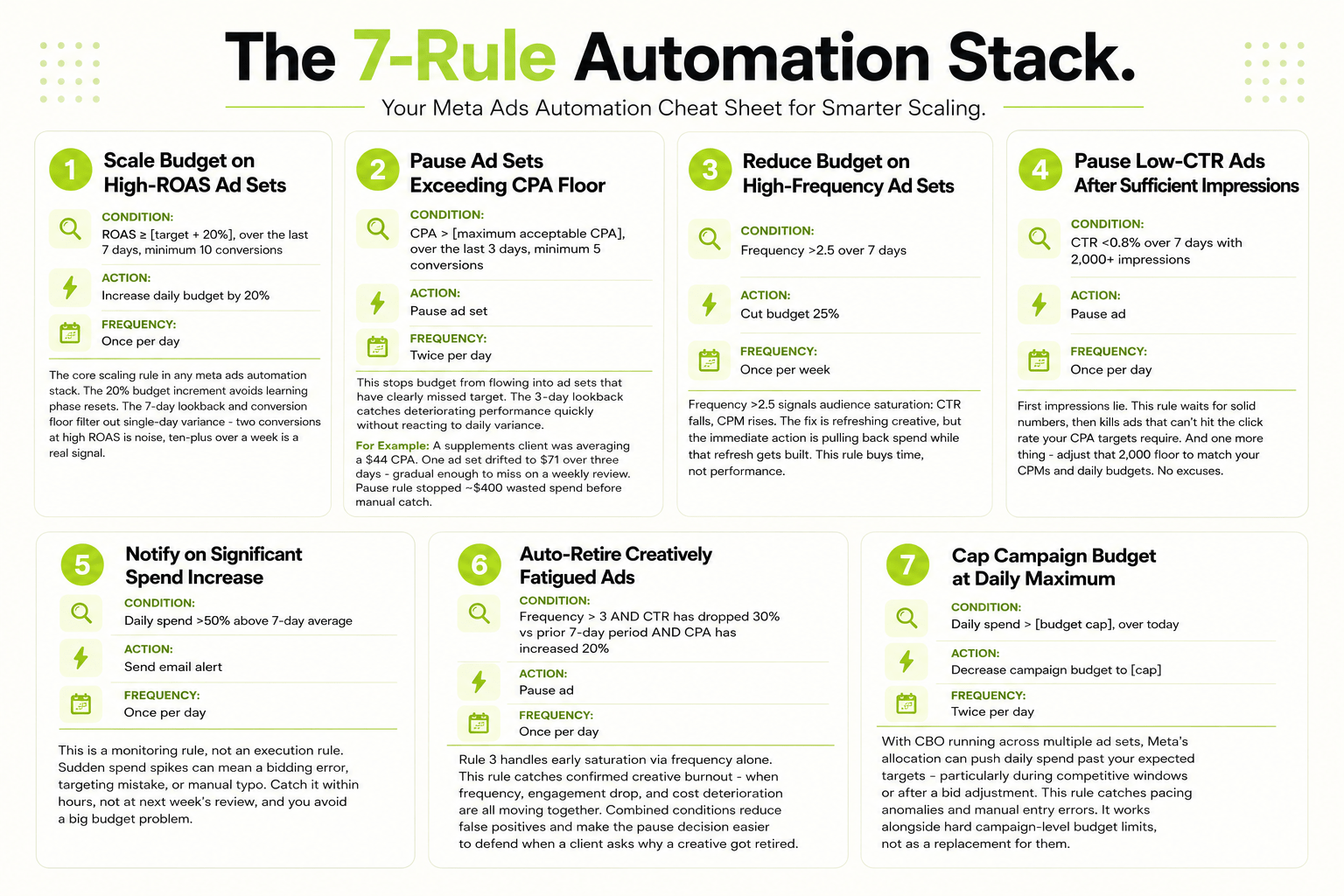
Rule 5: Notify on Significant Spend Increase
Condition: Daily spend >50% above 7‑day average
Action: Send email alert
Frequency: Once per day
This is a monitoring rule, not an execution rule. Sudden spend spikes can mean a bidding error, targeting mistake, or manual typo. Catch it within hours, not at next week’s review, and you avoid a big budget problem.
Rule 6: Auto-Retire Creatively Fatigued Ads
Condition: Frequency > 3 AND CTR has dropped 30% vs prior 7-day period AND CPA has increased 20%
Action: Pause ad
Frequency: Once per day
Rule 3 handles early saturation via frequency alone. This rule catches confirmed creative burnout – when frequency, engagement drop, and cost deterioration are all moving together. Combined conditions reduce false positives and make the pause decision easier to defend when a client asks why a creative got retired.
Rule 7: Cap Campaign Budget at Daily Maximum
Condition: Daily spend > [budget cap], over today
Action: Decrease campaign budget to [cap]
Frequency: Twice per day
With CBO running across multiple ad sets, Meta’s allocation can push daily spend past your expected targets – particularly during competitive windows or after a bid adjustment. This rule catches pacing anomalies and manual entry errors. It works alongside hard campaign-level budget limits, not as a replacement for them.
How FabFunnel Extends Meta Ads Automation
Native meta ads automation has a hard limit for agencies: every rule has to be built, maintained, and audited inside each individual client account.
Agencies don’t have an account problem. They have a portfolio problem.
Managing 30 clients means configuring the same Facebook ads automation logic 30 separate times – inconsistent thresholds, no unified audit trail, rules drifting out of sync across accounts. FabFunnel turns meta ads automation from an account-level feature into a portfolio-level system. Build your rules once, apply them across every connected account simultaneously. Every automated action is logged with its triggering condition and timestamp in one place.
That’s the distinction: automated rules for Meta Ads Manager solve execution inside a single account. FabFunnel solves it at scale.
Conclusion
Meta ads automation handles the decisions that need to happen faster than manual review can deliver. The 7 rules above cover the most common gaps: scaling winners, cutting losers, managing saturation, catching anomalies, retiring burned creative, and protecting budget limits.
Start with Rules 1 and 2. Layer in the rest once those are stable. Automate what needs speed and consistency. Leave judgment calls to your team.
Frequently Asked Questions
Q1: What are Meta automated rules?
Inside Meta Ads Manager, conditions-based automations take action (pause, scale, notify) when performance hits your targets. They run all the time, need no manual input, and replace constant account monitoring.
Q2: How do I set up automated rules in Meta Ads Manager?
Go to Automations → Create Rule. Choose entity (campaign, ad set, ad), set condition, action, and frequency. Rules fire continuously when conditions are met.
Q3: What’s the best Meta automated rule for scaling?
A ROAS-based rule with a conversion floor: ROAS ≥ target over 7 days with at least 10 conversions, increase budget by 20%. The conversion floor prevents scaling thin data; the 20% increment prevents learning phase resets – standard starting point for any Facebook ads automation scaling setup.
Q4: Can automated rules replace manual account management?
No. Rules handle execution – pausing underperformers, scaling winners in real time. They don’t replace analysis, creative strategy, or account structure decisions. Think of meta ads automation as the execution layer, not the management layer.
Q5: What is the risk of over-automating Meta ad accounts?
Over-automation creates two dangers. One: rules acting on thin data. Two: rules sabotaging each other. Mandatory safeguards: set conversion floors. Verify no rule conflicts. Audit logs religiously.
Q6: How does FabFunnel handle Meta ads automation for agencies?
FabFunnel automates all connected Meta accounts at once – no per-account setup. Rules run continuously. Every action is logged with its trigger and timestamp. Coverage extends to every client account automatically – no manual copying.