Co-Pilot (beta)
Ask your ad account, in plain English.
Included in every Growth plan
Beta on Meta, TikTok, and NewsBreak
AI ad optimization only means something when the AI can read your account. Most assistants give you advice from general knowledge. Co-Pilot answers from your spend, your CPA, your CTR and your conversions across Meta, TikTok, and NewsBreak. It surfaces recommendations on your dashboard with the figures behind each one, and answers questions in plain language with charts and tables. It reports and recommends only. It never launches, pauses or changes a campaign.
The film
See Co-Pilot in action.
Ask a question about your campaigns and get the answer as a chart, a table, or a recommendation with the reasoning shown.
The problem it solves
Why most AI ad optimization is generic advice
- Context is the product
Generic AI doesn't know your account
"Improve your CTR" is not AI ad optimization. Useful guidance requires knowing what your CTR is, what you are spending to get it, and what that combination means for the account in front of you.
You see the data but not the next move
The dashboard tells you ROAS dropped. It does not tell you whether that is a creative problem, an audience problem or a tracking problem. The diagnosis still costs you an afternoon.
Reporting answers the wrong question
You do not need another table. You need to know which campaign to scale and which one to fix, and you need the reasoning attached, ready to disagree with.
How it works
Two ways Co-Pilot runs AI ad optimization
- 01
Proactive recommendations on your dashboard
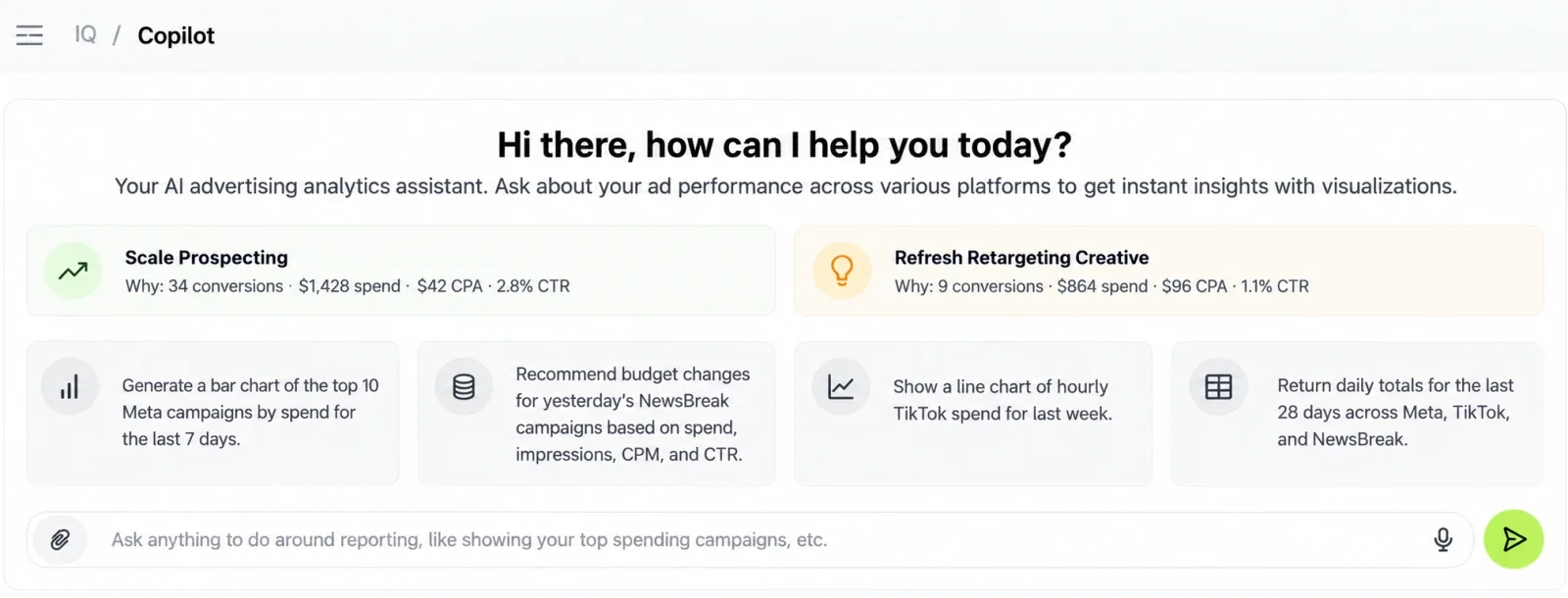
The recommendations panel sits on your dashboard permanently. Each recommendation carries a headline and a "Why" line citing the figures it came from: conversions, spend, CPA, CTR, impressions and clicks. You can read the reasoning and decide whether you agree.
- 02
Ask anything about your campaigns
Open the chat and ask in plain language. "Show me a bar chart of my top 10 Facebook campaigns by spend for the last 7 days." Co-Pilot reads the same connected ad accounts your reporting does and answers with a chart, a table or an analysis. Chat history is kept for picking up a thread later.
What you can ask
AI ad analytics, answered three ways.
Every answer comes from your own reporting data on Meta, TikTok, and NewsBreak.
Charts
Ask for a bar or line chart, such as the top 10 Meta campaigns by spend for the last 7 days, or hourly TikTok spend for last week.
Tables
Ask for a table of daily totals across Meta, TikTok, and NewsBreak: date, platform, spend, impressions, link clicks, CPM, and CTR.
Recommendations
Ask for budget recommendations, for example for yesterday's NewsBreak campaigns, based on spend, impressions, CPM, and CTR.
Conversational reporting
Ask anything. Get charts, tables, and analysis.
-
On-demand charts
"Generate a bar chart of my top 10 Facebook campaigns by total spend for the last 7 days." Ask for a bar chart, a line chart or a table on spend, impressions, link clicks, CPM, CTR, conversions or CPA. You get a formatted chart back instead of an export and an afternoon in Sheets.
-
Budget recommendations by platform
"Provide budget recommendations for yesterday's NewsBreak campaigns based on spend, impressions, CPM and CTR." Ask for budget guidance on any platform for a given window. You get campaign-level suggestions with the reasoning attached.
-
Cross-platform queries
"Return a table of daily totals for the last 28 days across Meta, TikTok, and NewsBreak: date, platform, spend, impressions, link clicks, CPM and CTR." Ask across all three platforms in one question. Hourly, yesterday, last 7 days, last week and last 28 days are all available windows. That is AI advertising analytics without building the view by hand.
-
Diagnostic questions
"Show me my click rate and tell me how I can improve it." Ask why something is happening, not just what happened. Co-Pilot references your actual figures and explains what is driving them.
Before / after
What changes when AI ad optimization reads your account
| Without FabFunnel | With FabFunnel |
|---|---|
| Generic "improve your CTR" advice with no account context | A recommendation citing your conversions, spend, CPA and CTR |
| ROAS drops and you spend an afternoon diagnosing why | The recommendation arrives with its reasoning already attached |
| Export data and build charts in Sheets | Ask for the chart and get it back formatted |
| Open three dashboards to compare platform performance | One question, one table covering all three |
| An AI that will happily tell you to scale an untracked account | Co-Pilot flags the measurement gap instead of recommending spend |
Recommendations
How Co-Pilot runs AI ad optimization recommendations
Each recommendation names an action and shows the account figures behind it. Recommendations it generates include:
Scale budget to winning ad sets while monitoring CPA
Co-Pilot identifies ad sets converting inside your CPA range and proposes a percentage budget increase, showing the conversion count, the spend behind it, the resulting CPA and the CTR, to judge whether the headroom is real.
Run landing page UX and speed tests to reduce CPA
When CPA sits high against conversion volume, Co-Pilot points at the post-click experience rather than the ad. It shows the conversions, the spend and the CTR that led it there, which separates an ad problem from a landing page problem.
Refresh creative and run multi-creative tests to improve conversion rate
A strong CTR next to a weak conversion rate is a creative-to-conversion gap: the ad earns the click and something after it does not close. Co-Pilot names that gap explicitly and shows both figures.
Implement conversion tracking before scaling
An account with high impressions and clicks but zero reported conversions is not ready to scale. Co-Pilot flags it rather than recommending a budget increase into a measurement blind spot.
Those categories are the shape. The specific recommendations and the figures inside them are generated from your own accounts, so no two accounts read the same. That is AI ad optimization grounded in one account rather than in general knowledge. Everything here is advice. Nothing is applied to a campaign by Co-Pilot.
Works best with
Where AI ad optimization fits in the workflow
Multi Ad Account Reporting
Co-Pilot reads the same connected accounts your reporting does.
Explore Multi Ad Account ReportingAutomation
Co-Pilot tells you which rule to build. Automation is what runs it.
Explore AutomationCreative Generations
Co-Pilot flags a creative-to-conversion gap. Genie produces the alternatives.
Explore Creative Generations
Where it sits
Build it. Launch it. Manage it.
Campaigns go live through Bulk Launcher. Reporting tracks them, Co-Pilot answers questions about the numbers, and Automation acts on the rules you set.
Build it
Launch it
Manage it
- Co-PilotYou are here
- Reporting Every connected ad account, per platform
What it doesn't do: Co-Pilot reports and recommends; it never changes a campaign. It covers Meta, TikTok, and NewsBreak. It reads performance data, not creative attributes such as hooks or angles. Co-Pilot is in beta.
FAQ
Common questions about AI ad optimization
How Co-Pilot recommends actions and answers questions across your campaigns. Can’t find what you need? Book a demo
Does Co-Pilot use my actual campaign data?
Yes. It reads your connected ad accounts across Meta, TikTok, and NewsBreak, not generic benchmarks. Every recommendation cites your own conversions, spend, CPA and CTR. That is the difference between AI ad optimization and a chatbot with opinions.
Does Co-Pilot launch or pause campaigns?
No. Co-Pilot reports and recommends only. It never launches, pauses or modifies anything. Automated actions are handled by the Automation feature, where you set the rules yourself.
What is the difference between the recommendations panel and the chat?
The panel is always on your dashboard and surfaces recommendations without being asked. The chat is conversational: you ask a question and get a chart, a table or an analysis back. Together they are the AI ad management layer over accounts you already run.
Which platforms does Co-Pilot cover?
Meta, TikTok, and NewsBreak.
What can I ask it?
Spend, impressions, link clicks, CPM, CTR, conversions and CPA, across hourly, yesterday, last 7 days, last week or last 28 days. You can request a bar chart, a line chart, a table or budget recommendations. As an AI ad optimization tool it answers from your own account rather than from benchmarks.
Is Co-Pilot part of FAB AI?
No. Co-Pilot is part of the full FabFunnel platform, alongside the Bulk Launcher, Automation and multi-account reporting. FAB AI is the creative and intelligence tier: Industry Insights, Genie and Video Sage.