Industry Insights
Competitor ads analysis across Meta, NewsBreak and SmartNews.
Part of FabFunnel
Meta, NewsBreak, SmartNews
Competitor ads analysis is the difference between a test you funded and a test the market already paid for. Industry Insights puts the ads running in your niche on Meta, NewsBreak, and SmartNews on one screen: what your competitors are live with, how long each ad has been running, which angles are repeating, and where the traffic goes after the click. Your next test starts from signal.
The film
Every ad, opened up.
Open an ad to see how long it has been running, its call to action, its reach, and similar ads.
The problem it solves
The cost of skipping competitor ads analysis
- Guesswork is expensive
Every test starts from a guess
Without competitor ads analysis you do not know which angle your competitors are running, which formats are getting traction, or which offers are scaling in your niche. So you guess, and you pay to find out what someone else already knows.
By the time you find a winner, it's saturated
The angle that took three weeks to find has been live in your vertical for a month. You are competing on a crowded hook instead of getting there first.
The Ads Library is not competitor ads analysis
The Meta Ads Library shows you that an ad exists. It does not show you how long it has been running, how often that advertiser rotates creative, or which of their landing pages is carrying the volume.
How it works
Competitor ads analysis before you spend on the test
- 01
Browse your niche
Filter the feed by status, ad type, running days, video length, language, country, placement, content style and target market. That includes a Tracking Tool filter for the tracking tool an advertiser uses.
- 02
Competitor ad tracking that builds itself
Add a competitor as a page or a domain, then follow it so new creative surfaces in your stream. Bind a competitor to a board and their ads populate it automatically. Your reference builds itself over time.
- 03
Go from insight to live campaign
Found an angle worth testing? Hit Generate Variations to send it into Genie, or Analyze Video to send a competitor's video into Video Sage. Brief to variations to Bulk Launcher, without leaving FabFunnel.
Coverage
Meta, NewsBreak and SmartNews, with every Meta placement.
Industry Insights covers ads on Meta, NewsBreak and SmartNews. On Meta you can filter by placement. It does not show ads from TikTok, Google, or other networks yet.
Placements you can filter by
- Audience Network
- Messenger
- Oculus
- Threads
Research, not measurement: Industry Insights shows observed activity history, not how a competitor's ads perform.
Competitor ad tracking
Competitor ad tracking you can filter twelve ways.
Tap a filter to narrow the feed. In the app, the same panel runs across My Feed, Discover, and Saved Ads, with twelve dimensions and Reset and Apply.
Filters
Status
Running days
Platforms
Content style
Tracking tool
- Aurora SkinActive · 34 days
Two for one, this weekend only
- Pulse DailyActive · 18 days
Why I switched after one week
- DaybreakInactive · 9 days
Three features your team will use
- NorthlineActive · 47 days
Day one versus day thirty
- Aurora SkinActive · 12 days
Built for the way you work
- Pulse DailyInactive · 26 days
Last call on the spring bundle
No ads match these filters.
All twelve filter dimensions in the app
- Status
- Ad Type
- Running Days
- Similar Ads
- Video Length
- Languages
- Countries
- Platforms
- Content Style
- Target Marketing
- Tracking Tool
- Followed Domains
Capability breakdown
What's inside Industry Insights
- Discover
Browse the full ad feed
Browse beyond your tracked set, filtered by industry, brand, keyword or date. Set feed preferences once and Discover narrows to the industries you sell into. Coverage spans 199 countries.
Live ads, filtered your way
- My Feed
Your personalized intelligence stream
Follow specific advertisers and brands and My Feed surfaces their newest creative first. Competitors and Followed Brands are separate lists: watch a direct rival and a category leader without mixing the two.
Your personalized stream of tracked advertisers
- Competitors and Domains
Track pages, domains and their whole funnel
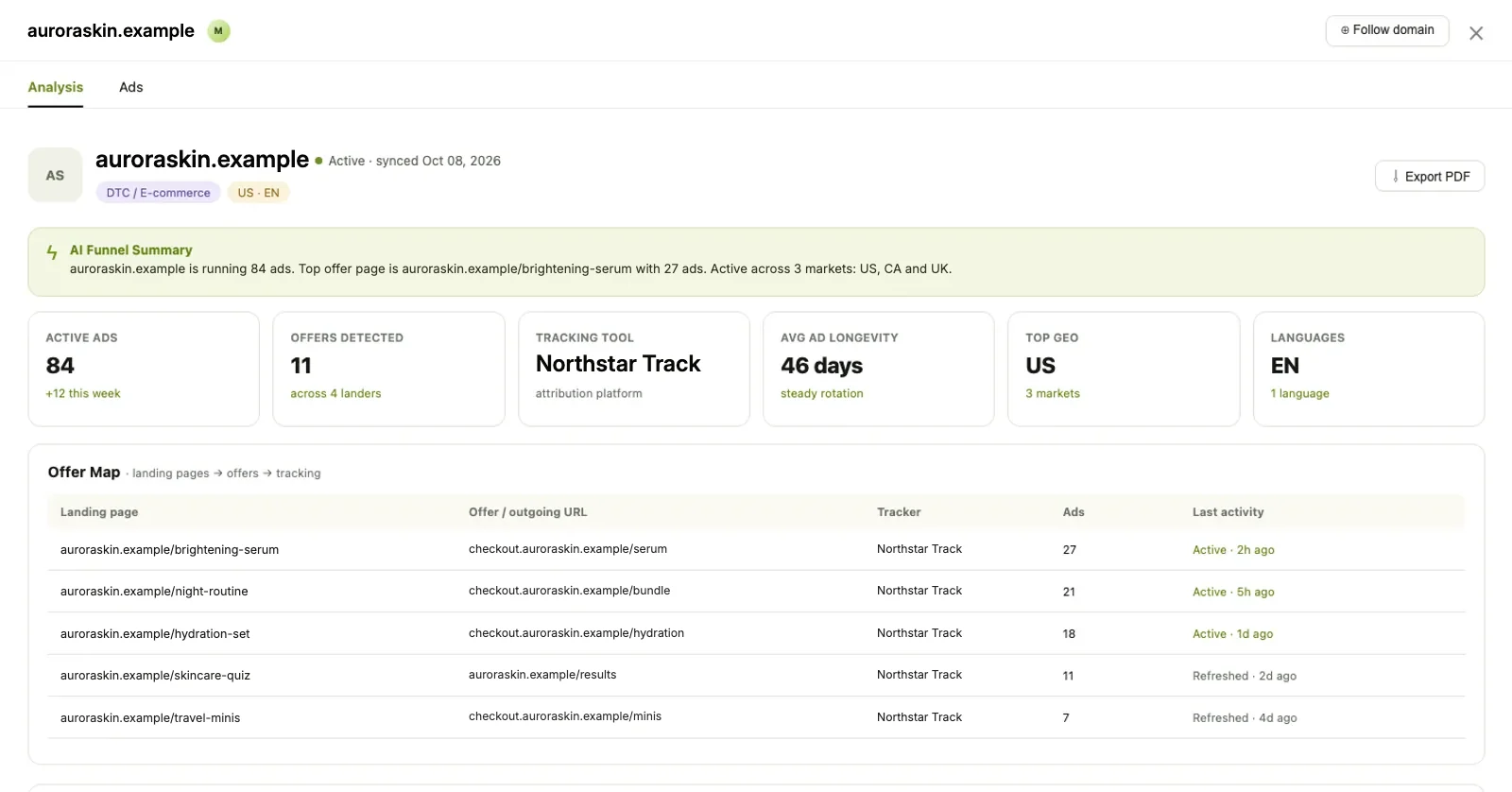
Add a competitor as a page or a domain and FabFunnel pulls their active Meta ads automatically. As an ad analysis tool it goes past the feed: an offer map linking each landing page to its offer and tracker, an angle mix showing the percentage split across promotion, features, facts and lifestyle, longest-running ads flagged, their CTA mix, their markets, and archived screenshots of every landing page captured on each sync.
Auto-pulled from Meta, flagged on launch
- Saved Ads and Boards
Build a living swipe file
Save any ad to a board. Organize by campaign, angle, client or anything else. Bind a competitor to a board and every ad they launch lands there automatically, which is the difference between a swipe file and a folder somebody stopped updating.
Organized, searchable, shareable with your team
- Generate Variations
From insight to your own creative
See a static ad worth testing? Hit Generate Variations and it opens Genie with that creative already attached. On a video ad, Analyze Video sends it to Video Sage for a shot-by-shot breakdown first.
Insight to your own creative in one step
- Chrome Extension
Capture ads while you browse
Clip ads from the Meta Ads Library straight into your boards while you are browsing normally. No copying links, no screenshots, no separate tab.
Capture ads while you browse
Before / after
What changes when competitor ads analysis comes first
| Without FabFunnel | With FabFunnel |
|---|---|
| Guess which creative angle to test next, pay to find out | Read what is running in your niche on Meta, NewsBreak, and SmartNews before spending a dollar |
| Check competitor Facebook pages manually for new ads | Competitors auto-pulls their active ads and flags new launches |
| See a competitor's ad and guess where it sends traffic | Offer map shows the landing page, the offer and the tracker behind it |
| Screenshot ads into a folder and lose track of them | Boards are organized, searchable, shareable, and fill themselves |
| Spot a good angle and rebuild it from scratch | Generate Variations opens Genie with the creative already attached |
What buyers use it for
Four things performance marketers do with competitor ads analysis
Find new hooks
See which opening angles competitors are testing right now: hooks, offers, pain points, social-proof formats. Page-level analysis pulls the recurring terms out of an advertiser's ad copy and shows you their CTA mix. Read their pattern rather than guess at it.
Validate ideas before spending
Check whether a concept already exists in market. An ad that keeps running is backed by someone else's budget. If nobody is running it, you are either early or wrong, and the longevity data tells you which.
Spot rotation and strategy shifts
Launch and rotation activity charts new versus paused ads across recent weeks, alongside average creative lifespan. An advertiser who suddenly triples their launch rate is telling you something before it shows up in your own numbers.
Build a strategic swipe file
Save ads to Boards organized by niche, offer type, format or client. Boards are searchable and shareable, and a competitor bound to a board fills it without anyone remembering to do it.
Works best with
Where competitor ads analysis fits in the workflow
Creative Generations
Take an angle from Insights and generate your own variations immediately.
Explore Creative GenerationsVideo Analysis
Send a competitor's video to Video Sage for a shot-by-shot breakdown.
Explore Video AnalysisBulk Launcher
Push your variations live in bulk across Meta, TikTok, and NewsBreak.
Explore Bulk Launcher
- 199countries covered
Where it sits
See it. Build it. Launch it.
Industry Insights is where a test starts: spot the angle, rebuild it as your own, then ship it.
See it
- Industry InsightsYou are here
- Video Sage Break down any video ad you find
Build it
Launch it
What it doesn't do: Industry Insights covers Meta, NewsBreak and SmartNews. It shows the ads competitors run and their observed activity, not how those ads perform, and it never touches your own campaigns.
FAQ
Common questions about competitor ads analysis
What media buyers ask about Industry Insights before using competitive signal to plan campaigns and creative. Can’t find what you need? Book a demo
Which platforms does Industry Insights cover?
Meta, NewsBreak, and SmartNews. On Meta, that covers Facebook, Instagram, Audience Network, Messenger, WhatsApp, and Threads placements.
How current is the ad data?
The feed shows ads actively running on Meta, NewsBreak, and SmartNews, not a historical archive. Each domain carries a sync timestamp showing when it was last refreshed.
Can I track specific competitors automatically?
Yes. Add a competitor as a page or a domain in the Competitors tab and FabFunnel pulls their active Meta ads and flags new launches. Bind them to a board and their ads collect there on their own.
What can I see about a competitor beyond their ads?
Their offer map, which links each landing page to its offer and tracker. Their angle mix as a percentage split. Their longest-running ads. Their CTA mix, top hooks and keywords, markets and languages. Plus archived screenshots of their landing pages captured on every sync. That is Facebook ads analysis at the account level rather than the ad level, and it updates on every sync. This is competitor research, not performance analytics for your own account.
What is the Chrome Extension for?
It clips ads from the Meta Ads Library directly into your boards while you browse, so you do not have to copy links or take screenshots.
Can I go from a saved ad to my own creative?
Yes. Generate Variations opens Genie with that creative attached. On video ads, Analyze Video sends it to Video Sage first.