Creative Library
Ad creative library and folder launch.
Included in every Growth plan
Your best creative should compound rather than disappear. The asset that carried last quarter is in a Drive folder somewhere, and the next time you need it you rebuild it from memory or you never use it again. Your ad creative library keeps media and ad copy as reusable assets, bundles them into ad units you can launch, and connects them straight to the Bulk Launcher. As an ad creative management platform, it keeps ad creative management and launching together.
The film
See Creative Library in action.
Keep images, videos, and copy in folders, then send a whole folder or just the files you pick straight into a launch.
The problem it solves
Why creative assets get lost and forgotten
- The Drive graveyard
Finding assets wastes time before every launch
Which folder was it in? Is this the approved version? Did anyone upload the final file? Every launch starts with a search instead of a launch.
Top performers get buried in the volume
A creative that carried a quarter sits next to dozens of variations that went nowhere. The signal is in there, but nothing about the folder tells you which one it is.
Creative lives separately from campaigns
Assets in Drive, campaigns in the ad platform, copy in a doc somewhere. Every launch means moving files between systems and retyping the headline that already worked.
How it works
One ad creative library for everything
- 01
Organize into folders
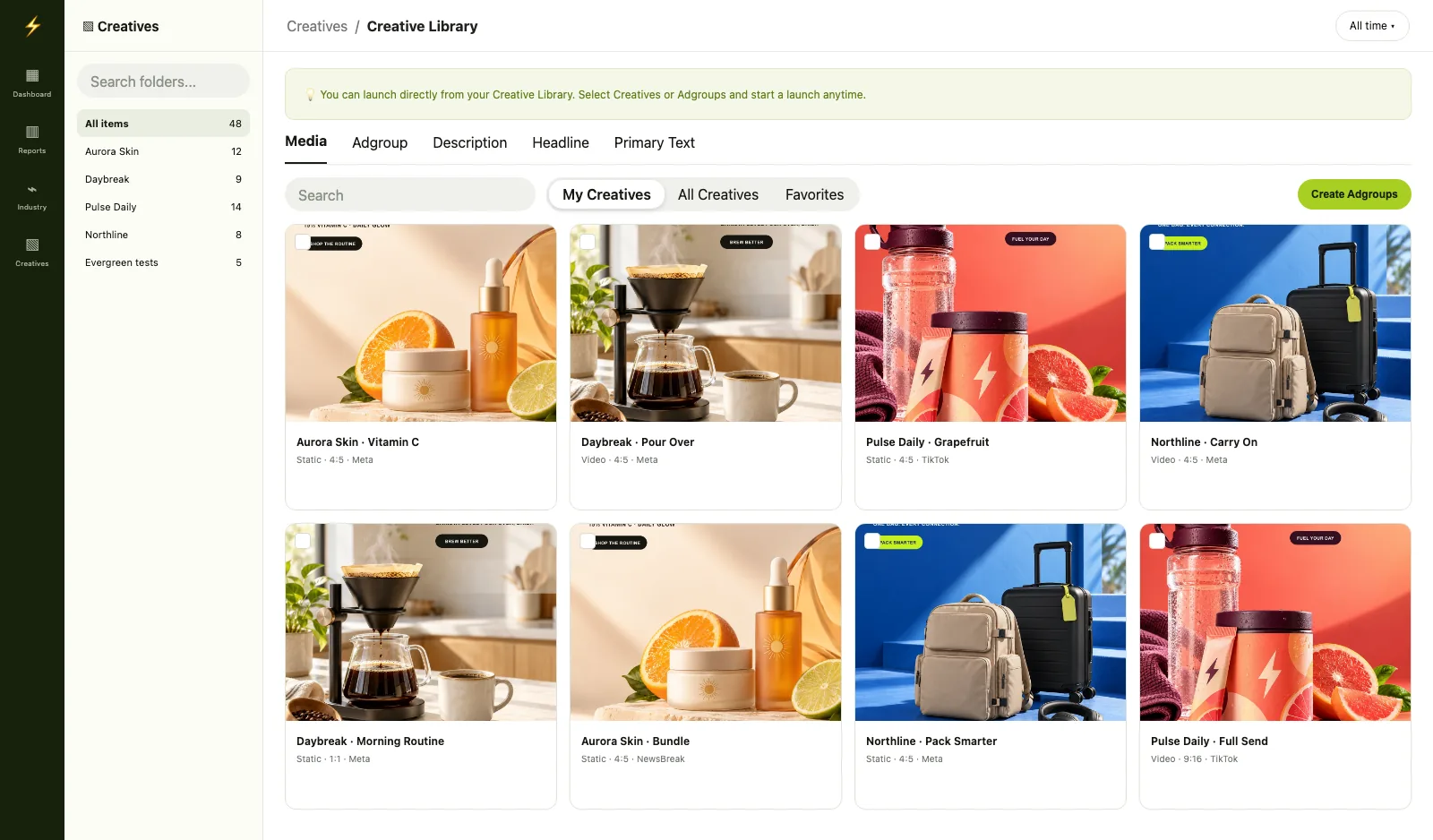
Create folders by campaign, client, product or angle. Each folder shows counts for images, videos and adgroups, and carries a Media tab and an Adgroup tab. Upload directly, or let Genie save generated assets straight in.
- 02
Bundle creative and copy into adgroups
An adgroup is an ad unit you can launch: creative, plus copy, plus platform. Pick your ad format, choose media, then fill the headline, primary text and description fields, with up to five variants each. Pull stored copy in with Import from library rather than retyping it.
- 03
Launch directly from the library
Launch a single adgroup or an entire folder. Fast Launch has a review step before you launch.
What lives in it
Ad creative management for media, copy, and adgroups.
Three kinds of asset, kept together, so the creative you made last week is one search away from your next launch.
Media
Images and videos in folders, each card showing its aspect ratio and platform. Sort by time, name, or size, open any asset full size, download it, or save it to Favorites.
Copy
Separate libraries for headline, primary text, and description. Reuse what worked, or write a new line by prompt while you build an ad.
Adgroups
Creative plus copy, bundled into a launch-ready ad unit, Static or Flexible. The thing you launch is a finished ad, not a loose file.
Capability breakdown
What the ad creative library does
- Folders
Your ad creative library, by folder
Structure assets by client, campaign, product line or angle. Each folder shows image, video and adgroup counts at a glance, and every card carries its aspect ratio and platform badge that shows what an asset is built for without opening it.
Folders that match your workflow
- Copy libraries
Headlines, primary text and descriptions, stored
This is the part creative tools often skip. The three Meta copy fields each get their own library. A headline that converted is stored once and pulled into any future ad with Import from library, rather than retyped from a screenshot. Each field takes up to five variants per ad, matching Meta's multi-text structure.
Copy is an asset, not a retype
- Adgroups
Ad units, not loose files
Bundle creative and copy into an adgroup and that is what launches, rather than a bare image you still have to write around. Choose Static or Flexible at creation. Flexible hands Meta the assets and lets it recompose them.
The launch target is an assembled ad
- Launch
Launch folders directly
Select a folder and launch every asset inside it as a batch. Fast Launch has a review step before you launch, with the totals in front of you: ad accounts, campaigns, ad sets, ads, media, copy counts and budget, all computed before you commit.
See the blast radius before you launch
- Find it again
Search, scope and favorites
Search by name across the ad creative library. Filter to images or videos. Scope the view to My Creatives, All Creatives or Favorites, and bookmark the assets you keep coming back to so they surface without hunting.
The right asset without scrolling
- Connected
Generate variations without leaving
Assets generated in Genie save straight here, and it works both ways: select any stored creative, hit Generate Variations, and Genie opens with that asset already attached. No exports, no re-uploads.
Generation and storage, one loop
Before / after
What changes with a real ad creative library
| Without FabFunnel | With FabFunnel |
|---|---|
| Search Drive and Slack for the right asset before every launch | One library, scoped and searchable, with favorites for the ones you reuse |
| Retype the headline that worked from an old screenshot | Import it from the copy library into the new ad |
| Upload creatives one at a time into the campaign builder | Launch a whole folder in one action, with a review step before you launch |
| Launch a bare image and write the copy somewhere else | Adgroups bundle creative, copy and platform into one ad unit you can launch |
| Rebuild a proven creative from memory to make a variation | Generate Variations opens Genie with the original attached |
Works best with
Where the ad creative library fits in the workflow
Creative Generations
Generated assets save straight here, and any stored asset can go back for variations.
Explore Creative GenerationsBulk Launcher
Pull folders into a bulk launch. Your creative is always a step from live.
Explore Bulk LauncherAutomation
Rules you set take over once the creative is live.
Explore Automation
- 3copy libraries: headline, primary text, description
- 5variants per copy field, per ad
Where it sits
Build it. Launch it. Manage it.
Creative arrives from Genie and your uploads. Creative Library assembles it into ads. Bulk Launcher puts them live.
Build it
Launch it
- Creative LibraryYou are here
- Bulk Launcher Launch campaigns in bulk across accounts
Manage it
What it doesn't do: folder launches use Fast Launch; the full Advanced Launch wizard isn't available from folders. Adgroups are Static or Flexible, with no carousel. Filtering is by traffic source; there are no custom tags or performance filters in the library.
FAQ
Common questions about the ad creative library
Everything you need to know about storing, organizing and reusing your creative. Can’t find what you need? Book a demo
What is an adgroup?
A bundled ad unit you can launch, made of creative, copy and a platform. It is the unit that launches, so you are not pushing a bare image and writing copy somewhere else.
Can I launch an entire folder in bulk?
Yes. Select a folder and use Launch folder. Fast Launch has a review step with the computed campaign, ad set and ad counts before you launch.
Does it store ad copy as well as media?
Yes. Headline, primary text and description each have their own library. Store a line once and import it into any future ad, up to five variants per field.
How do I organize and find assets?
Folders that you structure yourself, plus search by name, an images or videos filter, and a scope control for My Creatives, All Creatives or Favorites. Bookmark anything you reuse often.
Does it work with assets generated in Creative Generations?
Both directions. Generated assets save here automatically, and any stored creative can be sent back to Genie with Generate Variations.
What is the difference between Static and Flexible?
Static is a fixed ad. Flexible is Meta’s flexible format, where the platform recomposes your assets across placements. You choose when you create the adgroup, not at launch.